Most engineering orgs do not have an AI budget. They have an AI invoice, which arrives after the decisions that produced it.
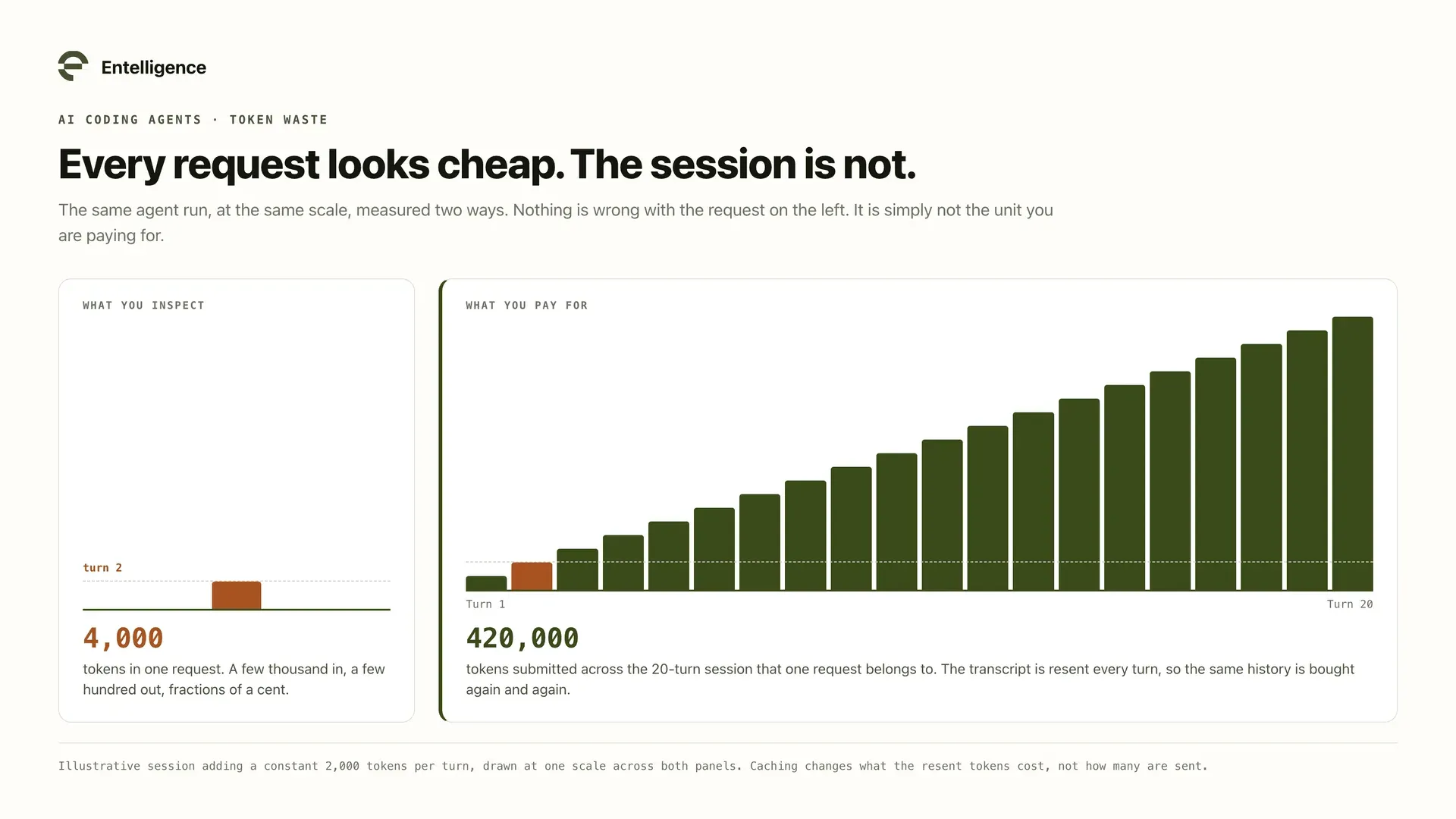
The reason is not negligence. The budgeting tools most teams own were built for seats, and AI spend does not behave like seats. A seat is a decision you make once a year. A token is a decision your agents make a thousand times a day.
Short answer: Budget AI usage at three levels. The individual view is for enablement, never ranking. The project is where the budget actually lives, because it is the smallest unit with an owner and an outcome. The team roll-up tracks run rate against variance. Then connect the budget to routing, so a project approaching its cap changes how work is served rather than waiting for someone to notice.
Why AI spend resists the budgets you already have
Software budgeting assumes a per-seat license and a predictable renewal. AI spend has neither.
Property | Seat-based tool | AI usage |
|---|---|---|
Unit of cost | One license per person | One session, of unbounded length |
Who commits the spend | Procurement, once a year | Every agent, on every turn |
Variance within a month | Effectively zero | Routinely multiples of the mean |
Cost of a heavy user | The same as a light user | Can exceed a whole team |
What the invoice tells you | Headcount | Almost nothing about cause |
The last row is the expensive one. A seat invoice reconciles against a headcount you already know. A token invoice reconciles against nothing.
Entelligence research across more than 1 million pull requests and 2,444 organizations estimates that about $0.18 of each dollar spent on AI coding tools becomes shipped product. That is vendor produced research rather than a universal benchmark, but the direction is the point: most of the spend is not the part you were trying to buy, and you cannot manage that gap without first being able to see it.
The three levels, and which one owns the number
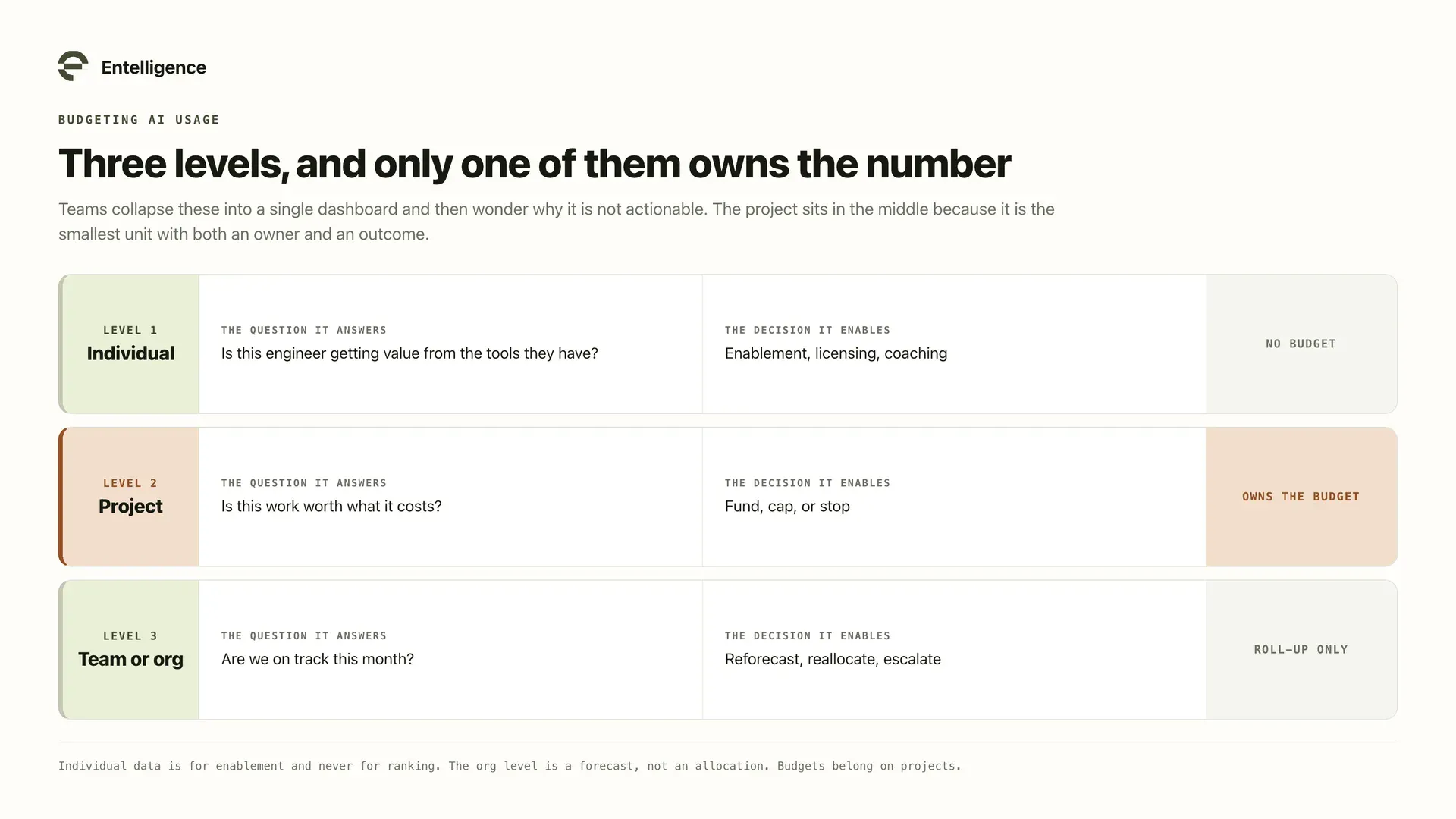
Every useful AI budgeting setup separates three questions that teams tend to collapse into one.
Level | The question it answers | The decision it enables | Owns a budget? |
|---|---|---|---|
Individual | Is this engineer getting value from the tools they have? | Enablement, licensing, coaching | No |
Project | Is this work worth what it costs? | Fund, cap, or stop | Yes |
Team or org | Are we on track this month? | Reforecast, reallocate, escalate | Roll-up only |
The middle row holds most of the value and is the one teams most often skip. Individual dashboards feel actionable and mostly are not. Org totals feel authoritative and are far too coarse to act on.
Level 1: The individual view, for enablement and not ranking
Per-engineer data is useful, and it is also the fastest way to damage trust if you point it at the wrong question. Use it for: finding engineers who have a paid seat they barely use, spotting capability gaps where a team never adopted plan mode or sub-agents, and identifying practices worth spreading because one person's sessions finish in half the tokens.
Do not use it for: ranking or performance review. Token spend measures the shape of a workload, not the quality of the person doing it. An engineer on a gnarly legacy migration will spend more than one shipping CRUD endpoints, and that is the correct outcome.
One guardrail: engineers should see their own numbers. A metric visible to management but not to the person it describes reads as surveillance, and changes behavior in ways that cost more than they save.
Individual signal | What it is good for | What it must not do |
|---|---|---|
Spend per engineer | Spotting unused or underused seats | Ranking output |
Capability adoption | Targeting enablement | Implying non-adopters are worse |
Sessions per week | Understanding working style | Setting a quota |
Cost per merged pull request | Comparing a person against their own past | Comparing people against each other |
Level 2: The project budget is the real unit
A project is the smallest thing with both an owner and an outcome, which makes it the only level where "is this worth it" is answerable. A budget line item anyone can act on needs five fields, not one.
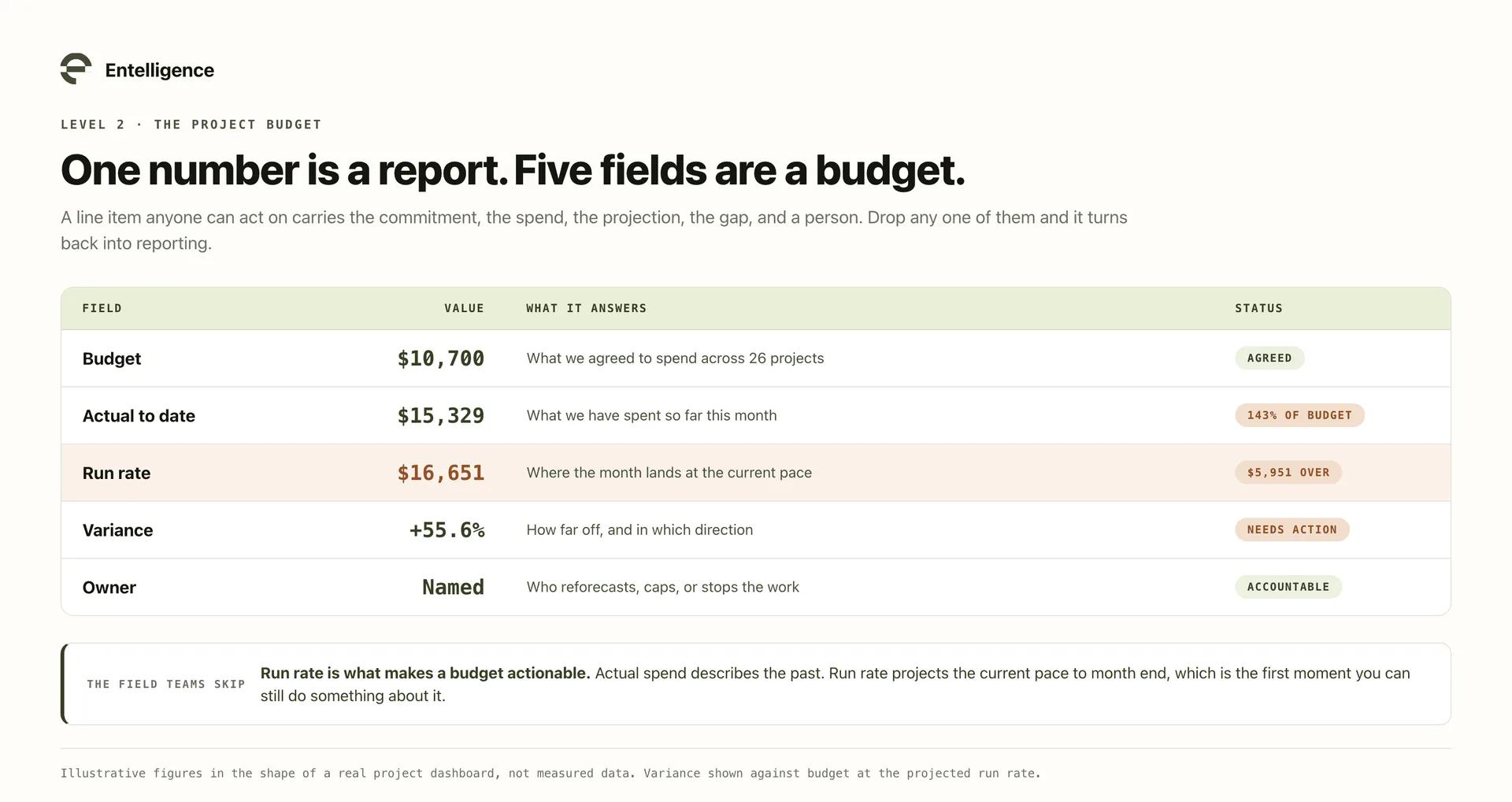
Field | What it answers | Why one number alone fails |
|---|---|---|
Budget | What we agreed to spend | Without it, every actual is just a fact |
Actual to date | What we have spent | Says nothing about where the month ends |
Run rate | Where the month lands at this pace | The number that makes it actionable |
Variance | How far off, and in which direction | Turns a total into a decision |
Owner | Who reforecasts or stops the work | An unowned budget is a report |
Run rate is the field teams skip and the one that does the work. Actual spend describes the past; run rate projects the current pace to month end, which is the first moment a budget becomes something you act on rather than explain.
A worked example:
Illustrative month, 26 projects | Amount | Status |
|---|---|---|
Total monthly budget | $10,700 | Agreed across projects |
Actual this month | $15,329 | 143% of budget |
Monthly run rate | $16,651 | $5,951 over |
Projects over budget | 5 | Needs attention |
Notice that the actual and the run rate tell different stories. At $15,329 spent you are over budget. At a $16,651 run rate you are going to be considerably further over, and you have the rest of the month to do something about it.
Level 3: The team roll-up, for run rate and variance
The org number is not for allocation. It is for reforecasting and catching drift early. Three things belong here:
- Run rate against budget, so the month is a forecast and not a surprise.
- Count of projects over budget, which is more useful than the total, because it tells you whether you have one runaway or a systemic underestimate.
- A weekly pulse with a top mover, so a step change gets attributed to the project that caused it while anyone still remembers what changed.
The distinction between one runaway project and a systemic underestimate matters, because the responses are opposite. One project over by 300% is an investigation. Twenty projects over by 15% means your baseline was wrong and the budget needs reforecasting, not enforcement.
Find the untracked spend before you allocate anything
Here is the failure that quietly invalidates most first attempts: you allocate carefully across the projects you know about, and a large share of the spend belongs to projects that were never on the list.
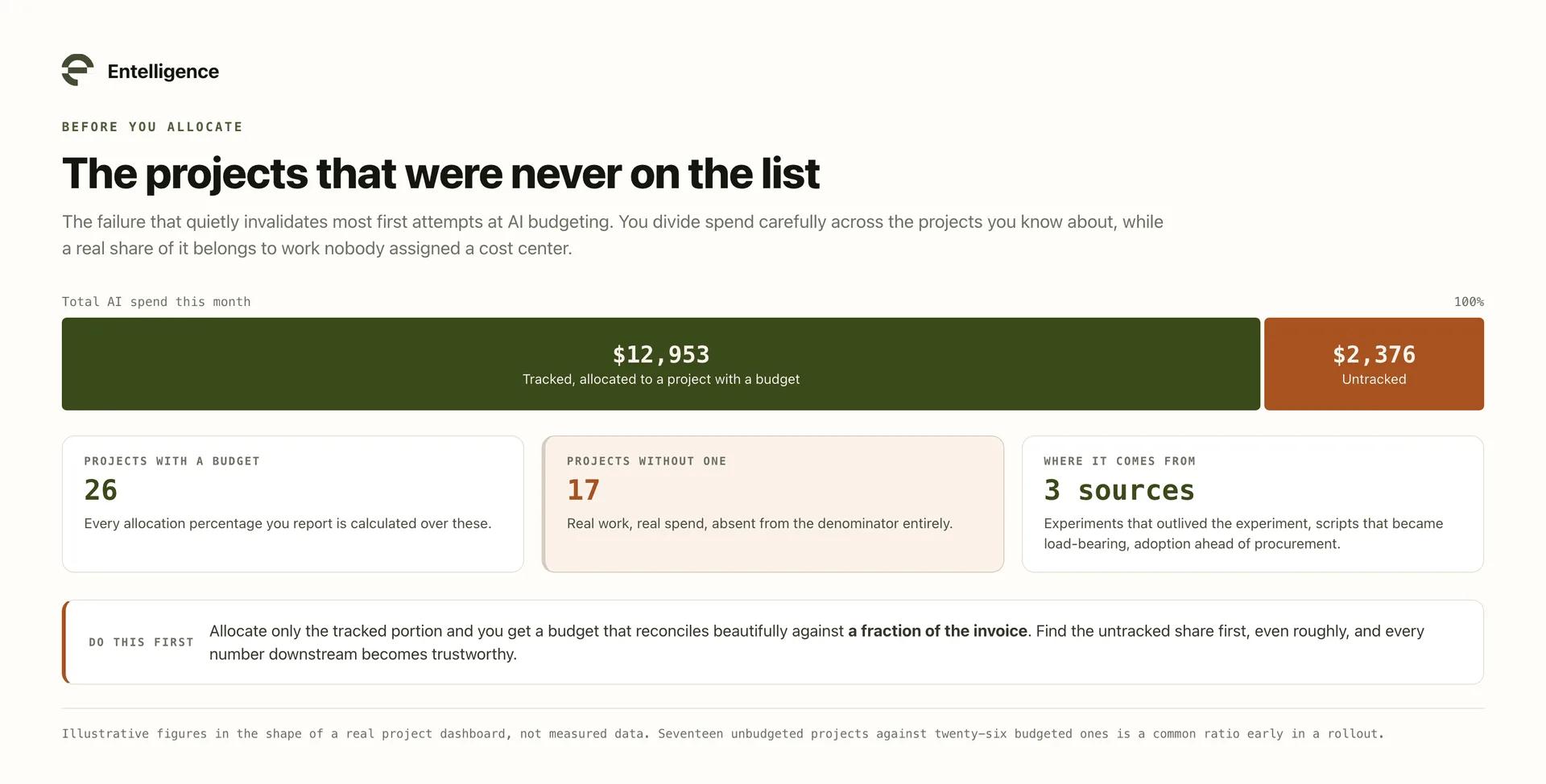
Untracked spend is not a rounding error. It comes from experiments that outlived their experiment phase, one-off scripts that became load-bearing, and teams that adopted a tool before anyone assigned it a cost center.
Symptom | What it usually is | What it costs you |
|---|---|---|
Projects with no budget line | Work that started as an experiment | Every allocation percentage is wrong |
Spend on a tool nobody owns | Adoption ahead of procurement | Invisible until renewal |
A cost center that only grows | Shared infrastructure with no attribution | Blocks per-project accountability |
Allocate only the tracked portion and you produce a budget that reconciles beautifully against a fraction of the invoice. Find the untracked portion first, even roughly, and every number downstream becomes trustworthy.
Most of your spend sits in a very few workloads
AI spend is not distributed evenly, and budgets built on averages will be wrong in both directions.
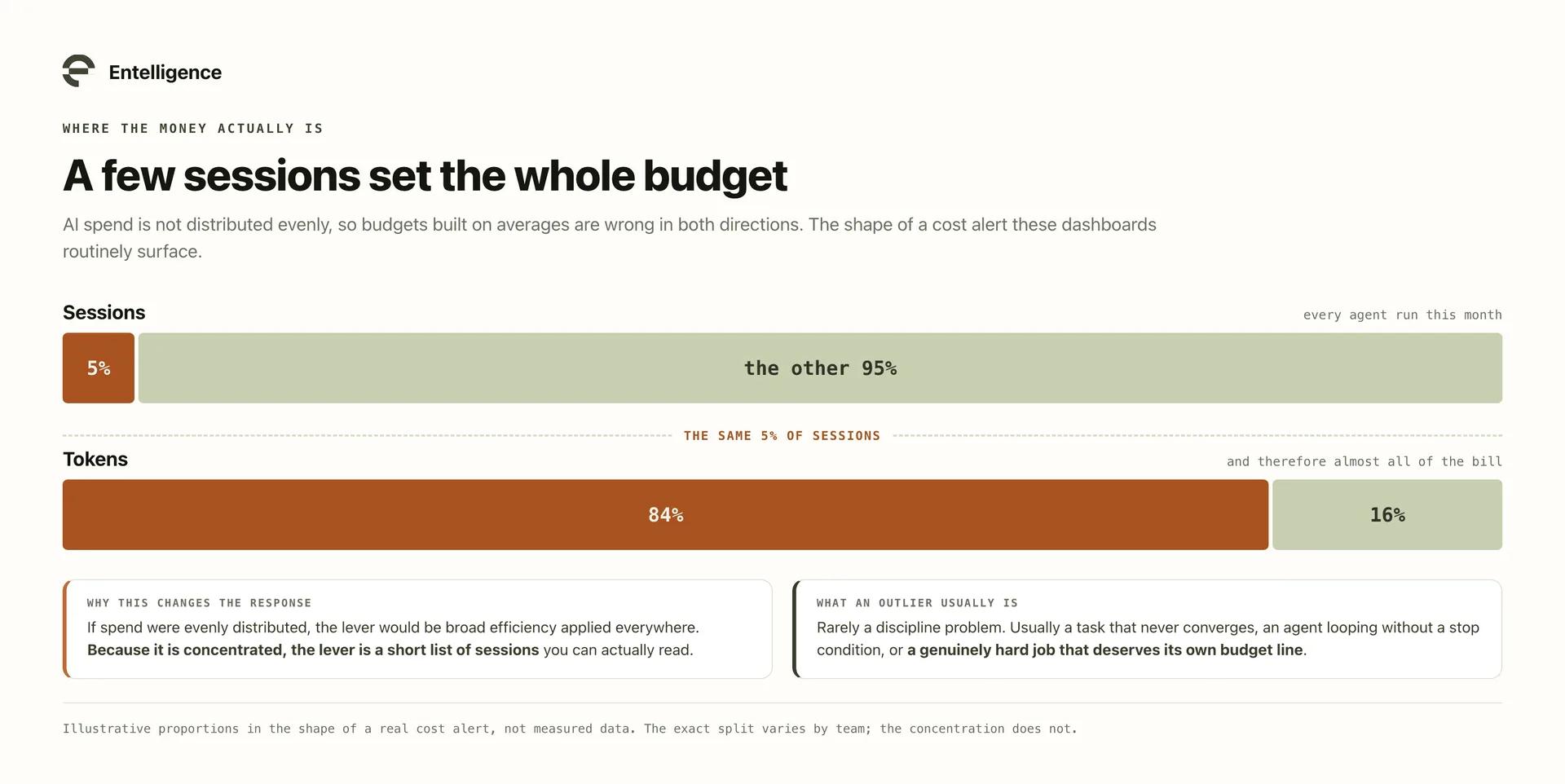
The pattern is consistent enough to plan around: a small minority of sessions accounts for most of the tokens. A cost alert of the shape top 5% of sessions burn 84% of tokens is the kind of concentration these dashboards routinely surface, and it changes the response. If spend were evenly distributed the lever would be broad efficiency, applied everywhere. Because it is concentrated, the lever is targeted:
If spend is | Then the useful move is | Because |
|---|---|---|
Evenly spread | Broad defaults: effort levels, conciseness rules | Every session contributes similarly |
Concentrated in a few sessions | Investigate the outliers directly | A handful of sessions moves the whole number |
Concentrated in one workload | Look at that workload's design, not the org's habits | One team's pattern is setting the budget |
A workload averaging several times the team median tokens per session is rarely a discipline problem. It is usually a design problem: a task that never converges, an agent looping without a stop condition, or a genuinely hard job that deserves its own budget line rather than quietly consuming everyone else's. Sessions that repeat without progress are the most expensive category of all, because they produce nothing, which where AI coding agents waste tokens covers in detail.
Model mix is the other half of the equation
Everything above budgets volume. The other half of the bill is price per token, and it moves independently.
Frontier models are priced several times higher than efficient ones, and output costs several times more than input. Claude Opus 4.8 runs $5 per million tokens in against $25 per million out, and most frontier models are shaped similarly.
This produces a specific reporting trap. Model usage share and model cost share are different numbers, and only one of them is on the invoice:
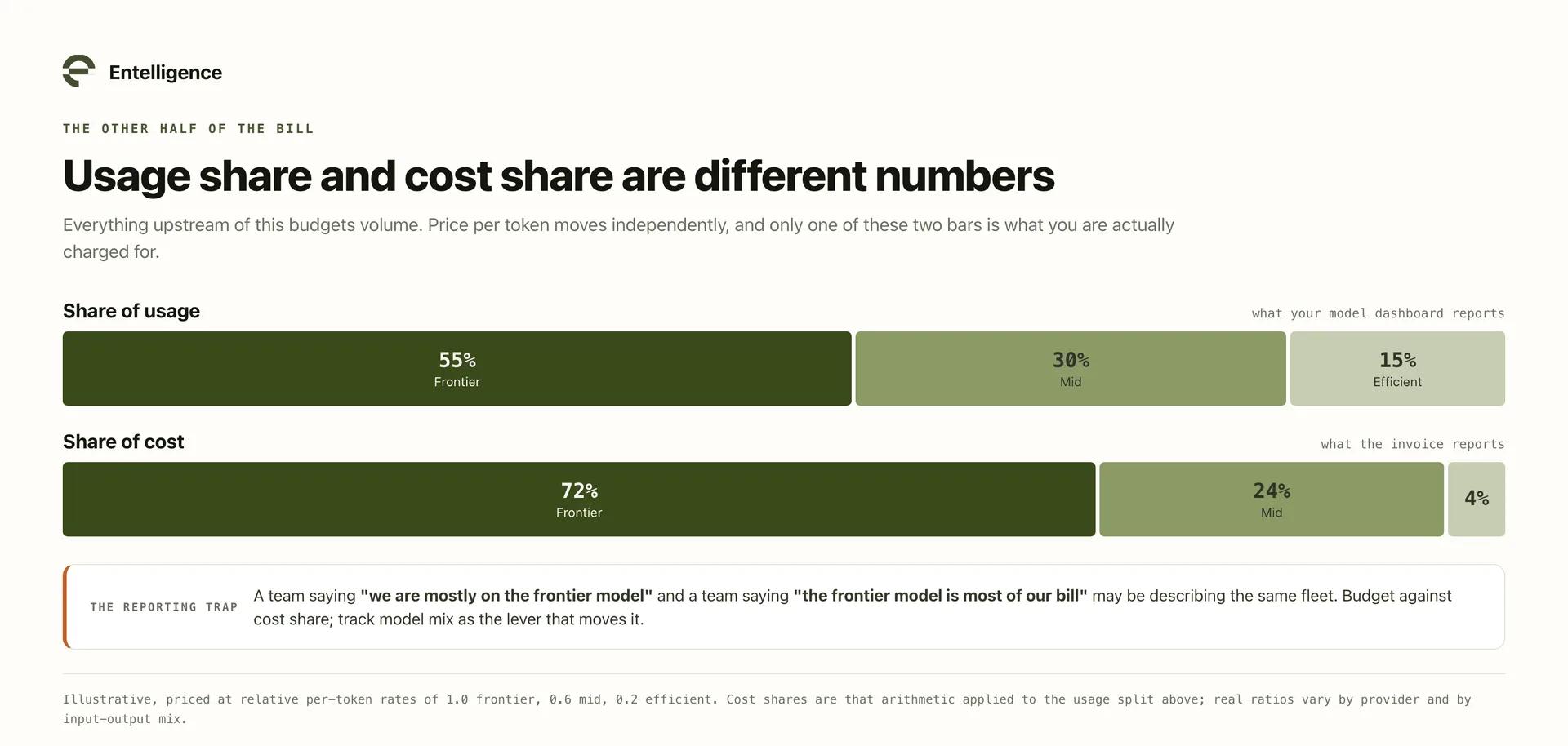
Illustrative mix, priced at 1.0 / 0.6 / 0.2 per token | Share of usage | Share of cost |
|---|---|---|
Frontier tier | 55% | 72% |
Mid tier | 30% | 24% |
Efficient tier | 15% | 4% |
A team reporting "we are mostly on the frontier model" and a team reporting "the frontier model is most of our bill" may be describing the same fleet. Budget against cost share, and track model mix as the lever that moves it.
Connect the budget to how work is routed
This is the part that turns budgeting from reporting into control.
A budget that only reports is a smoke alarm with no sprinkler: it tells you the project went over after it went over. The useful version connects the number to the mechanism that produces it, which for AI spend is model placement.
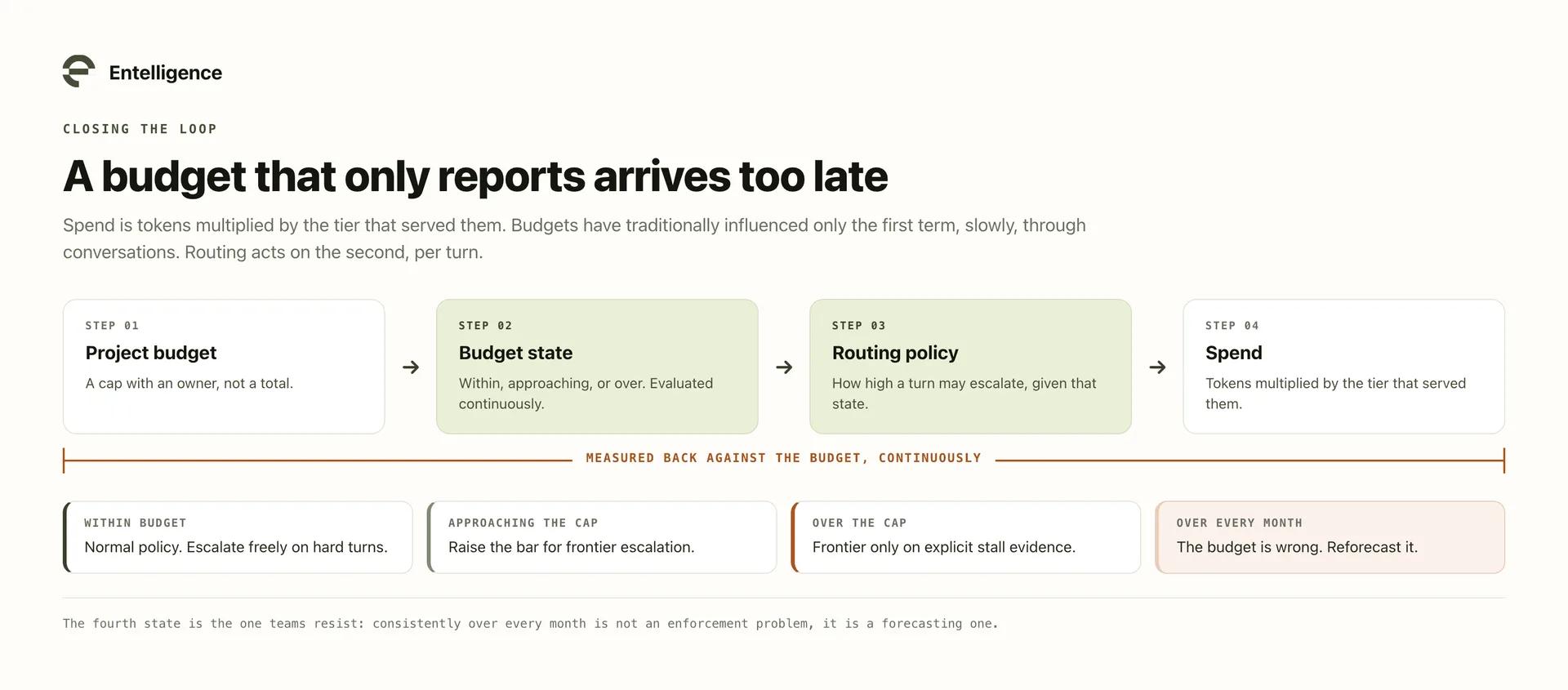
Every dollar of AI spend is the product of two decisions: how many tokens a workload consumes, and what tier served them. Budgeting has traditionally only had a lever on the first, and a slow one, since the usual response to an overspending project is a conversation. Routing gives you a lever on the second, and it operates per turn:
Budget state | What routing can do | What that preserves |
|---|---|---|
Comfortably within budget | Normal policy, escalate freely on hard turns | Full capability |
Approaching the cap | Raise the bar for frontier escalation | Hard turns still escalate, routine ones stop trying |
Over the cap | Restrict frontier to explicit stall evidence only | The work continues rather than stopping |
Structurally over every month | Reforecast, because the budget is wrong | Honesty about what the work costs |
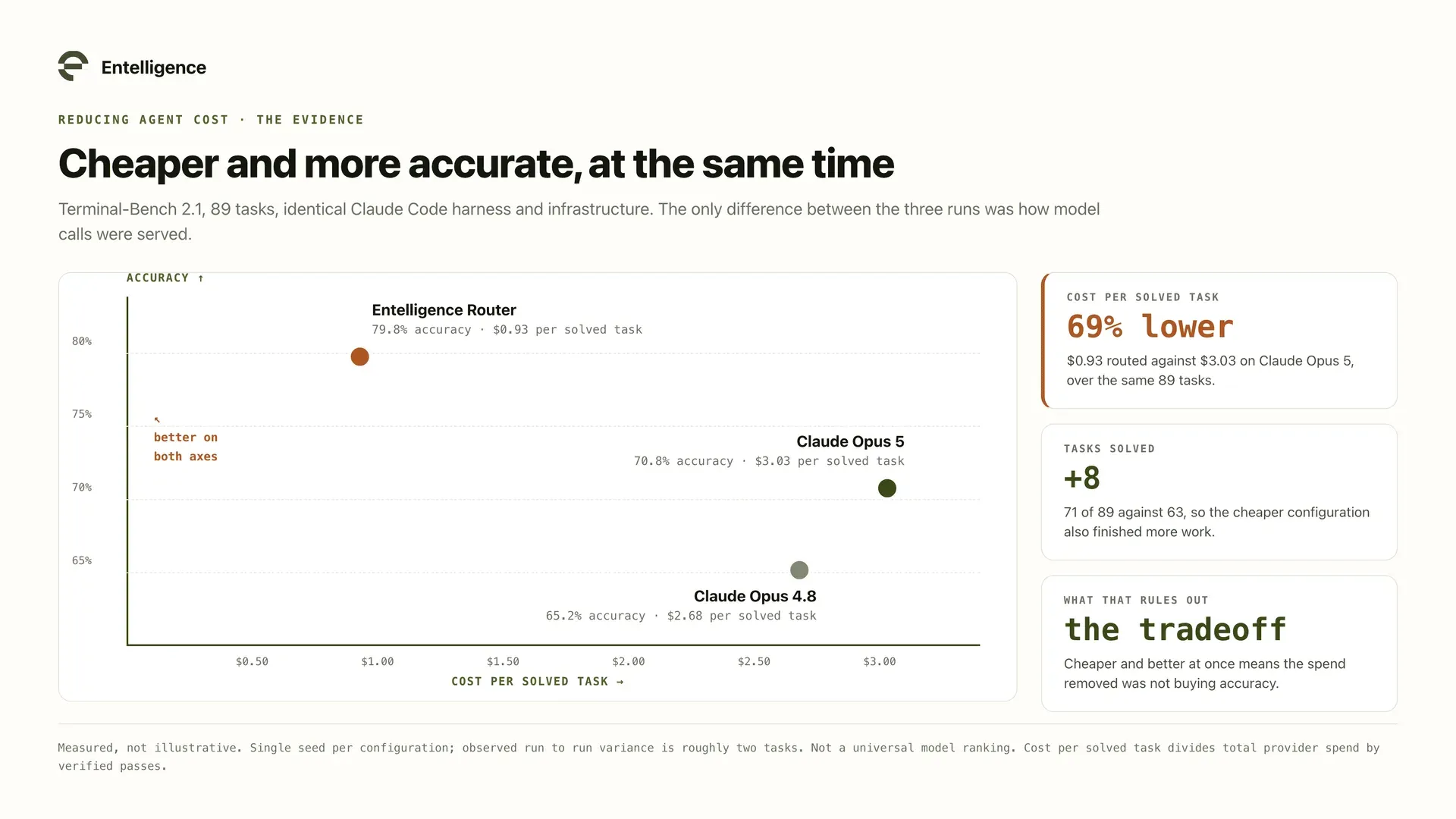
This is not simply a quality cut, because most turns do not need frontier capability. Reading a file, rerunning a test, and summarizing a diff complete identically on an efficient model. On 89 Terminal-Bench 2.1 tasks, per-turn routing solved eight more tasks than Claude Opus 5 while spending 65% less, a benchmark with stated limitations rather than a universal ranking, but enough to show the tradeoff is not automatic.
Entelligence Model Router makes that choice per turn, and Agent Insights is where the budgets live: spend by outcome, project, and model, per-project run rate and variance, budget cap alerts before an overage rather than after, and the untracked spend sitting in projects with no budget attached.
If you would rather evaluate the routing category than adopt a product, our comparison of nine LLM routers covers the options including self-hosted ones.
What to set up first
You do not need the whole system before it pays.
Week | Do this | What it unlocks |
|---|---|---|
1 | Aggregate spend across every tool into one place | Nothing below works without it |
2 | Attribute spend to projects; list what stays untracked | Honest denominators |
3 | Set budgets on the top ten projects by spend, with an owner each | The first real accountability |
4 | Add run rate and cap alerts | Overages become forecasts |
Ongoing | Review outlier sessions weekly; connect caps to routing | Control rather than reporting |
Start at week 1 even if you never get to week 4. An org that can see spend by project is already making better decisions than one arguing about a total.
For the metrics that sit alongside these budgets, see the five AI metrics worth tracking. For cutting the spend once you can see it, see how to reduce AI agent costs without sacrificing quality.
Frequently asked questions
How do you budget for AI usage when spend is so variable?
Budget at the project level and manage with run rate rather than actuals. Actual spend describes the past; run rate projects the current pace to month end, which is the first number you can act on. Variance against that forecast, not against a fixed monthly total, is what makes a variable cost manageable.
Should individual engineers have AI budgets?
No. Track individual usage for enablement, licensing, and coaching, but put the budget on the project, which is the smallest unit with both an owner and an outcome. Per-person budgets turn a shared resource into a quota and push work toward whoever has headroom left.
What is a reasonable AI budget per engineer?
There is no credible universal benchmark, and any figure quoted as one should be treated with suspicion. The number depends on workload type, model mix, and how much of your work is agentic. Your own trend is the benchmark: baseline for 60 to 90 days, then budget against your observed run rate.
Why does our AI spend exceed the budget every month?
Usually one of three things. A few outlier sessions are consuming most of the tokens, a large share of spend belongs to projects that were never given a budget line, or the original budget was set from a pre-agentic baseline. The count of projects over budget tells you which: one runaway is an investigation, twenty small overages mean the baseline was wrong.
How do you attribute AI spend to a specific project?
Through the identity and repository the session runs under, aggregated across tools rather than read per vendor. The hard part is not the mapping but the coverage: any tool left out of the aggregation shows up later as untracked spend and invalidates every allocation percentage you calculated.
What does routing have to do with budgeting?
It is the only fast lever. Spend is tokens multiplied by price per token, and budgets have traditionally only influenced volume, slowly, through conversations. Routing changes the price side per turn, so a project near its cap can automatically raise the bar for frontier escalation while still escalating on genuinely hard work.
Budget the workload, not the invoice
AI spend becomes manageable when it stops being one number and becomes a set of owned ones. Put the budget on the project, because that is where the owner and the outcome are. Use individual data for enablement, never ranking. Keep the org level for run rate and variance.
Find the untracked spend before you trust any allocation, look for the few workloads setting most of the total, then close the loop. A budget that only reports arrives too late to change anything, and the fastest lever on AI spend is not a conversation about usage. It is how each turn gets routed.
See how Agent Insights tracks AI spend by project.