Inside OpenClaw: How a Persistent AI Agent Actually Works
Aamitesh Anand
Feb 19, 2026
Insights
Aamitesh Anand
Feb 19, 2026
Insights
Introduction
OpenClaw, originally called ClawdBot, is trending everywhere. People are building insane things with it: an AI agent that rebuilds an entire website via Telegram, an AI agent platform where humans are only guests, and giving one AI full access to your system that can accidentally delete 6,000 emails because of a prompt injection attack.
Unlike ChatGPT or Claude sitting behind a web interface, OpenClaw runs as a persistent process on your hardware. You message it through WhatsApp, Telegram, or Slack. It messages you back. It can check things while you sleep. It has access to your filesystem, your terminal, and whatever APIs you give it.
The possibilities are wild. The security risks are real. And the technical architecture behind it explains both, and it's simpler than you'd think. Let's see how it actually works.
Gateway Architecture: The Central Nervous System
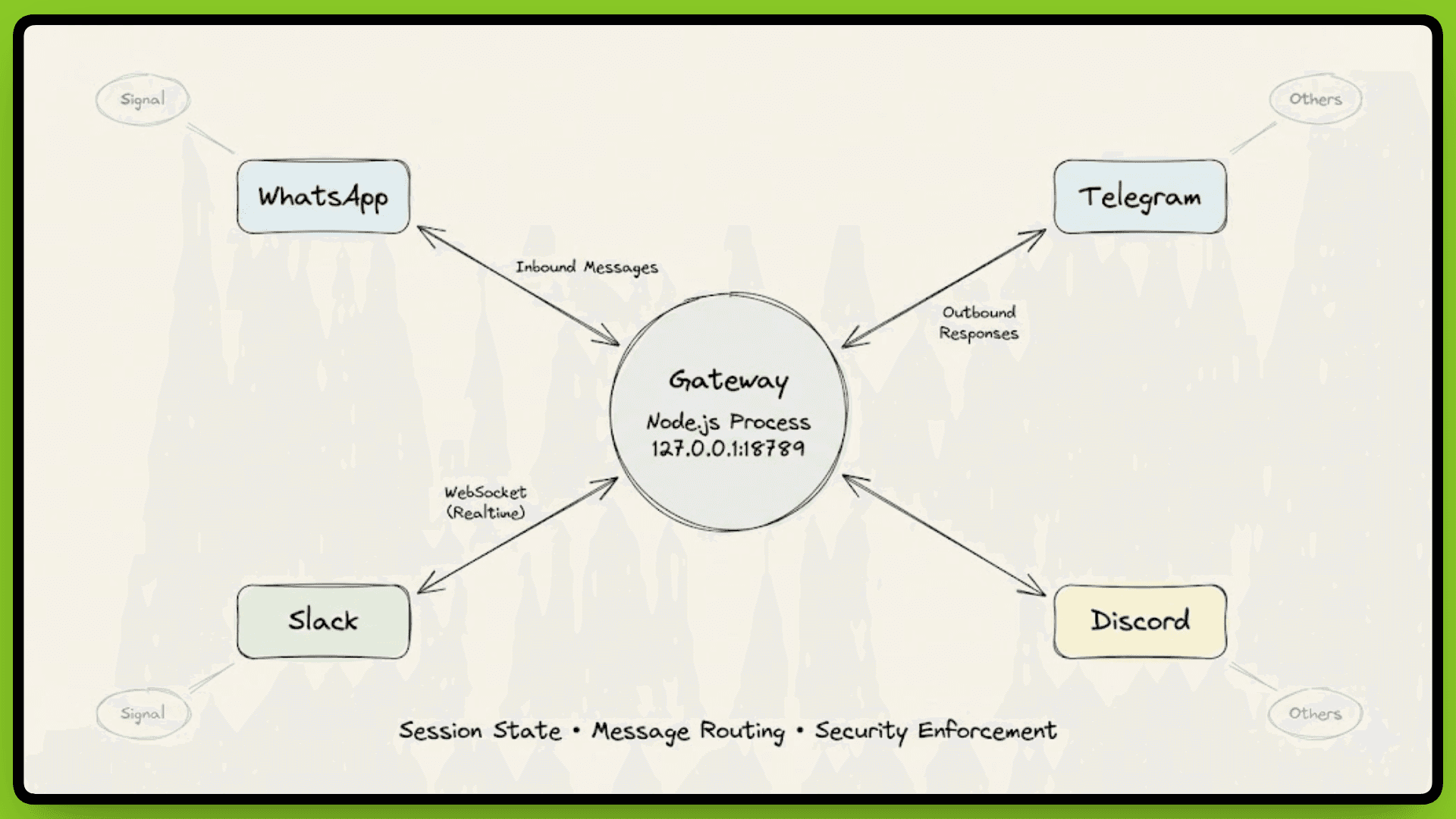
OpenClaw runs as a single Node.js process on your machine, listening on 127.0.0.1:18789 by default. This process is called the Gateway, which manages every messaging platform connection simultaneously: WhatsApp, Telegram, Discord, Slack, Signal, and others.
Think of it as the central nervous system. Every message coming in from any platform passes through the Gateway. Every response your agent generates goes back out through it. All communication happens via WebSocket protocol, which keeps connections open and allows real-time bidirectional messaging.
Session State, Routing, and Security
The Gateway handles three critical functions:
session state management,
message routing, and
security enforcement.
When a message arrives from WhatsApp, the Gateway determines which agent session should handle it based on the user, conversation context, or routing rules you've configured. It loads the appropriate session state, passes the message to the agent, waits for the LLM to generate a response, then routes that response back through the correct platform connection.
This centralized design solves a real technical problem. WhatsApp Web only allows one active session at a time. If you try running multiple instances, they conflict and kick each other off. The Gateway acts as that single session, then manages multiple agent conversations internally. Configure WhatsApp once, and the Gateway handles everything downstream. The same principle applies to every other platform.
Connection and Authentication Flow
When a platform wants to connect, it establishes a WebSocket connection and sends a connect request with device identity, basically, "I'm WhatsApp running on device XYZ, and I want to talk to your agent." The Gateway checks its pairing store. If this device has never connected before, it rejects the connection and waits for explicit approval.
Once approved, the Gateway issues a device token scoped to specific permissions. That token determines what this device can do:
which users it can message as,
which agent sessions it can access, and
what capabilities it has.
Future connections use this token for authentication instead of requiring re-approval every time.
Message Routing After Authentication
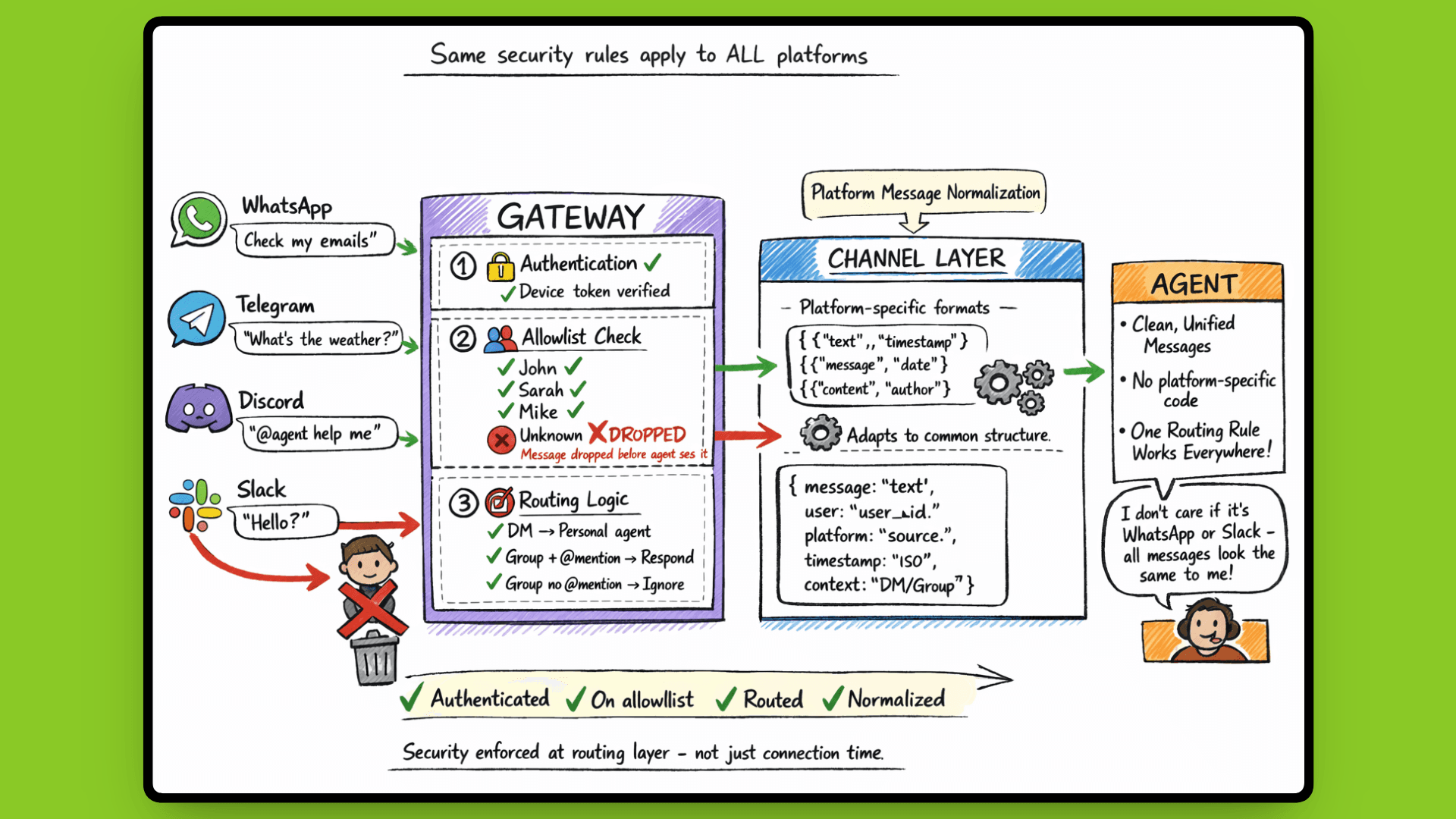
Once a platform is authenticated, every message it sends goes through routing logic. The Gateway decides where the message goes and whether the agent should respond based on rules you configure:
Messages from users on your allow list get processed
Messages from unknown users get dropped before the agent sees them
DMs route to your personal assistant agent
Group chats might only trigger responses when someone @mentions the agent directly
Network Binding: Local by Default
All this routing and authentication happens on your local machine. The Gateway binds to 127.0.0.1 (localhost) by default, not 0.0.0.0 (all network interfaces). This network binding determines who can connect to the Gateway in the first place.
Binding to 127.0.0.1 means only processes running on your machine can reach the Gateway, no external network access. Your agent isn't accessible from outside your machine unless you deliberately reconfigure the binding. This prevents accidental public exposure, a critical consideration given the Gateway has access to your filesystem, terminal, and connected APIs.
Every message follows the same path:
One process. All platforms. Centralized control. And everything stays local unless you explicitly decide otherwise.
Now that we understand how messages reach the agent, let's look at what happens once they get there.
The Agent Loop: From Message to Action
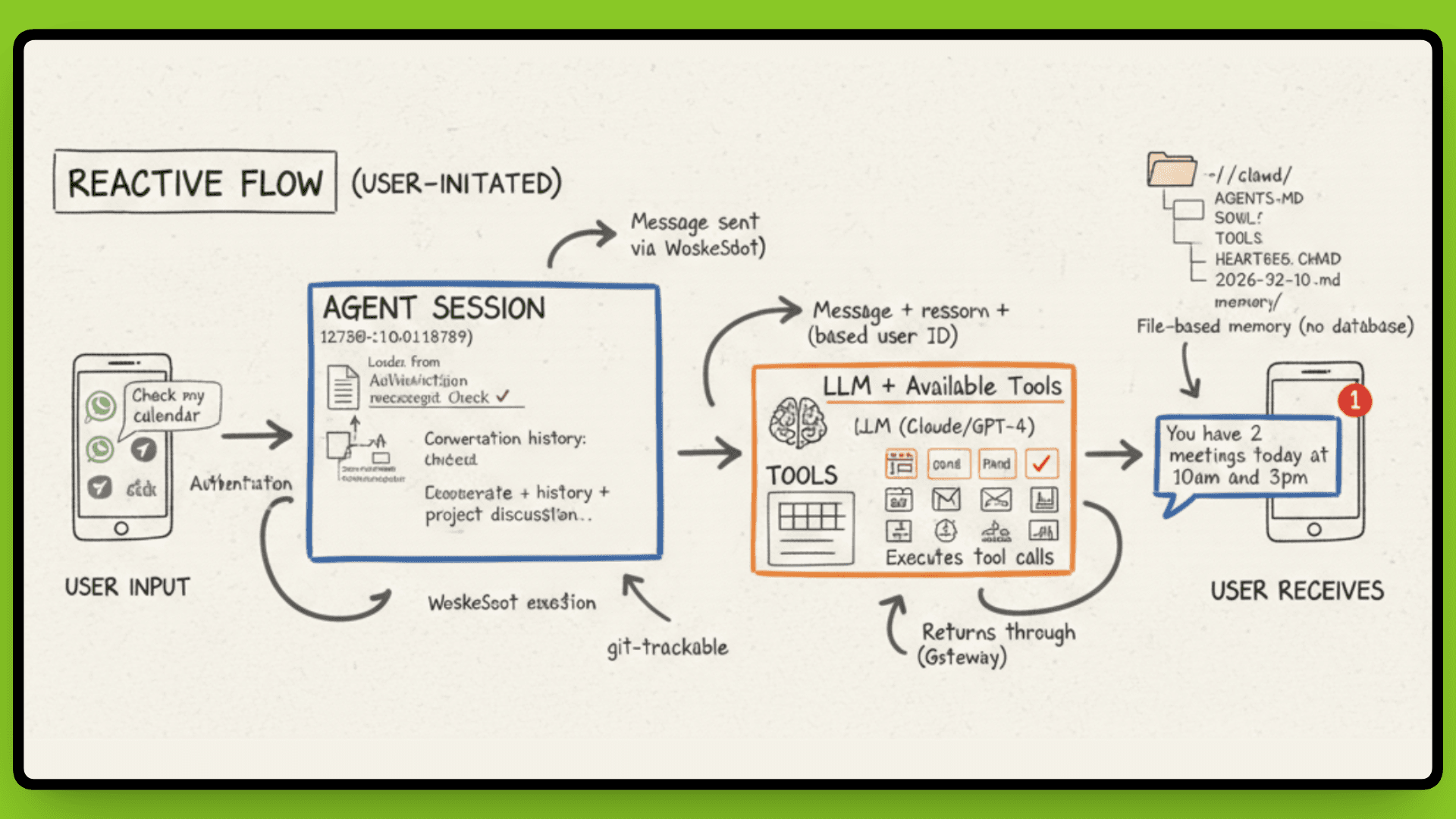
When a message hits the Gateway, it doesn't just forward blindly to an LLM. There's a processing cycle that turns your "check my calendar" into an actual response with context.
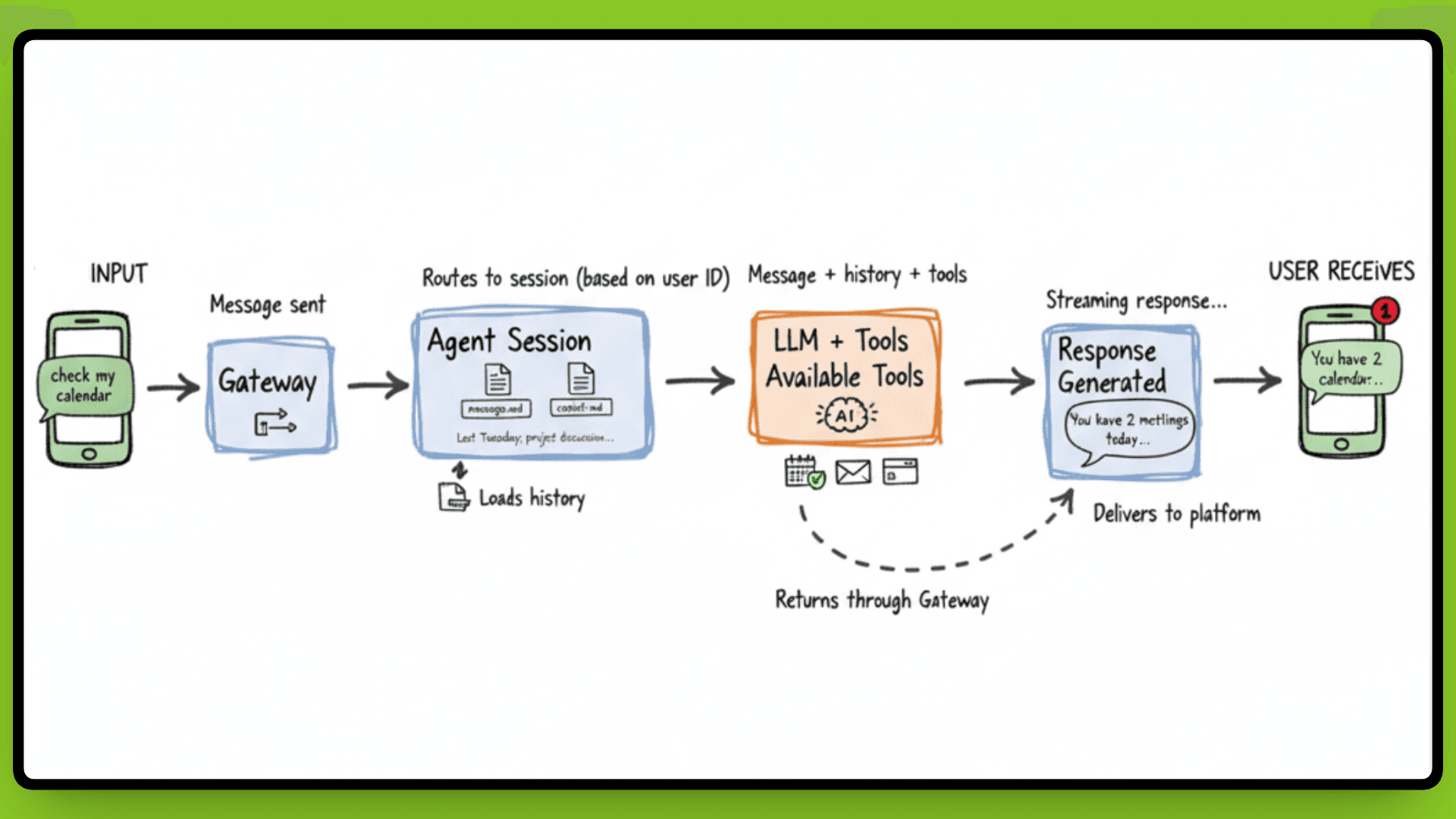
The Gateway routes the message to the appropriate agent session based on who sent it and where it came from. That session loads conversation history from the file system, everything you've said to this agent in the past, not just this conversation, but previous ones too. This is why your agent remembers you asked about a project last Tuesday.
The agent passes the message to the LLM along with available tools and skills. The model processes the request, decides if it needs to call a tool (like checking your calendar or sending an email), executes those actions, and generates a response. That response streams back through the Gateway to whichever platform you messaged from.
Context That Persists
Unlike a fresh ChatGPT conversation every time, OpenClaw sessions don't reset. The agent knows who you are, what you've asked before, and what's in your workspace. If you told it last week that you're working on Project XYZ, it remembers. If you saved notes in your workspace, it can reference them.
This persistence happens because everything stays in files on your machine. The agent reloads context every time it processes a message, but that context doesn't disappear when you close the chat. And you're not locked to one LLM, configure Claude for complex reasoning, GPT-4 for creative tasks, or a cheaper model for simple queries. The agent loop works the same regardless.
This file-based approach to memory is what makes the persistence possible. Let's look at how that actually works.
Persistent Memory: Everything is a File
OpenClaw doesn't use a database. Everything is stored ~/clawd/ as Markdown files.
Your agent's behavior is defined in AGENTS.md. Its personality and core instructions are stored in SOUL.md. Available tools are listed in TOOLS.md. Skills you've installed are saved in ~/clawd/skills/<skill>/SKILL.md. Memory logs are timestamped files with names like 2026-02-10-conversation.md.
Open any text editor, and you see exactly what your agent knows. Want to check what it remembers about your last project discussion? Open the memory log. Want to modify how it responds to calendar requests? Edit AGENTS.md. Want to see what tools it has access to? Read TOOLS.md.
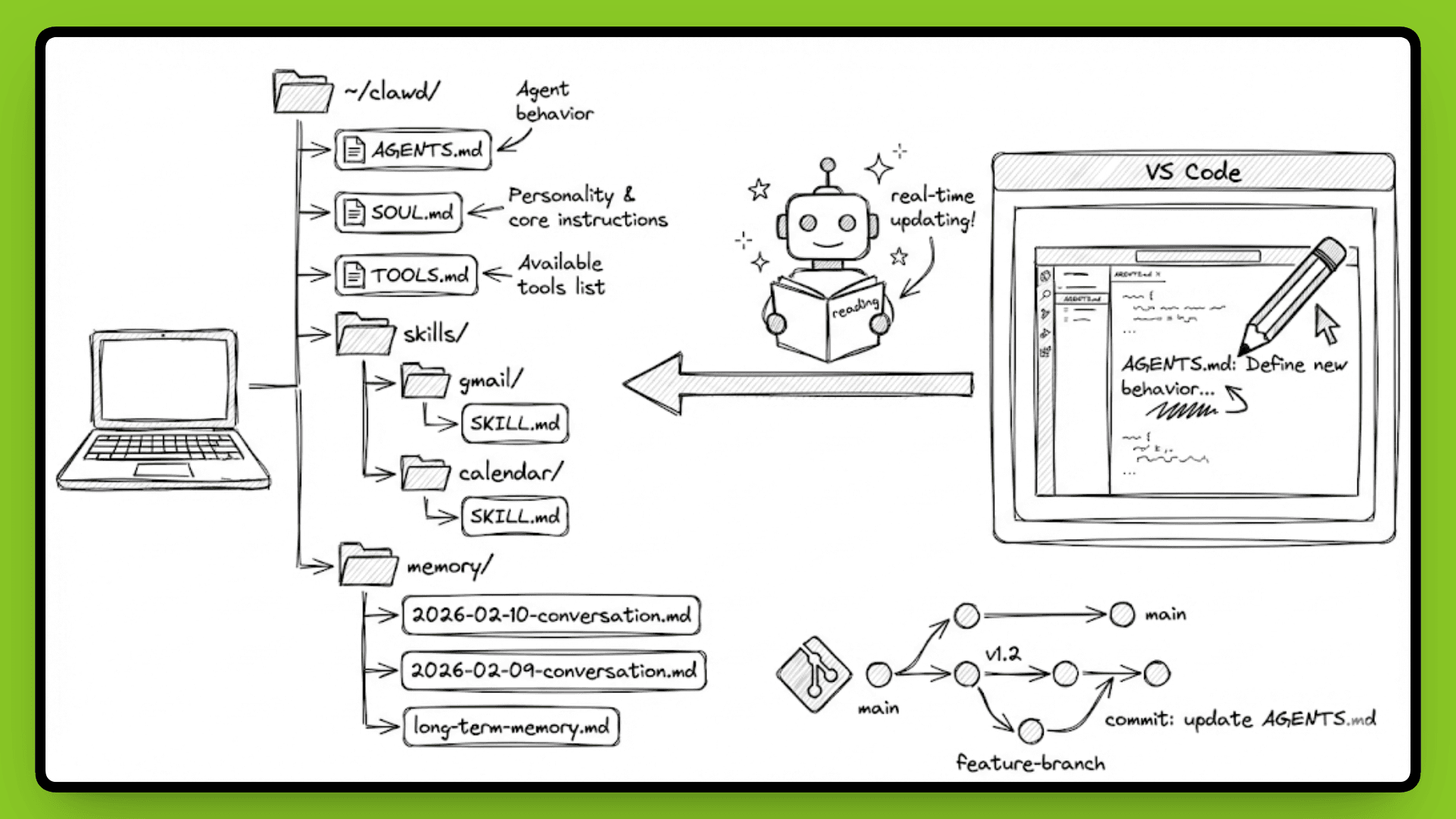
Since everything is plain text, version control works without extra setup. Run git init in ~/clawd/ and every change gets tracked. You can see when you added a new skill[we’ll learn about this in upcoming sections], when the agent updated its long-term memory, or when you modified its core instructions. If something breaks, roll back to a previous commit. Backups are simple, just copy the directory.
How Memory Organizes Itself
OpenClaw separates memory into layers. Daily logs capture short-term context, what you talked about today, what tasks are in progress, and what links you shared. These timestamped files accumulate over time.
Long-term memory is curated by the agent itself. As conversations happen, the agent decides what's important enough to remember permanently. Maybe you told it you prefer concise responses. Maybe you gave it standing instructions about how to handle certain types of requests. That information gets written to long-term memory files and persists across sessions.
If you're analyzing a dataset and your computer crashes, the agent reloads workspace state when it comes back up. It knows where you left off because that state lives in a file it can read on restart.
But memory alone doesn't make an agent proactive. For that, OpenClaw needs a mechanism to wake up and check things without you asking. That's where the heartbeat comes in.
Heartbeat: The Proactive Agent
Most AI assistants wait for you to ask a question. OpenClaw doesn't have to.
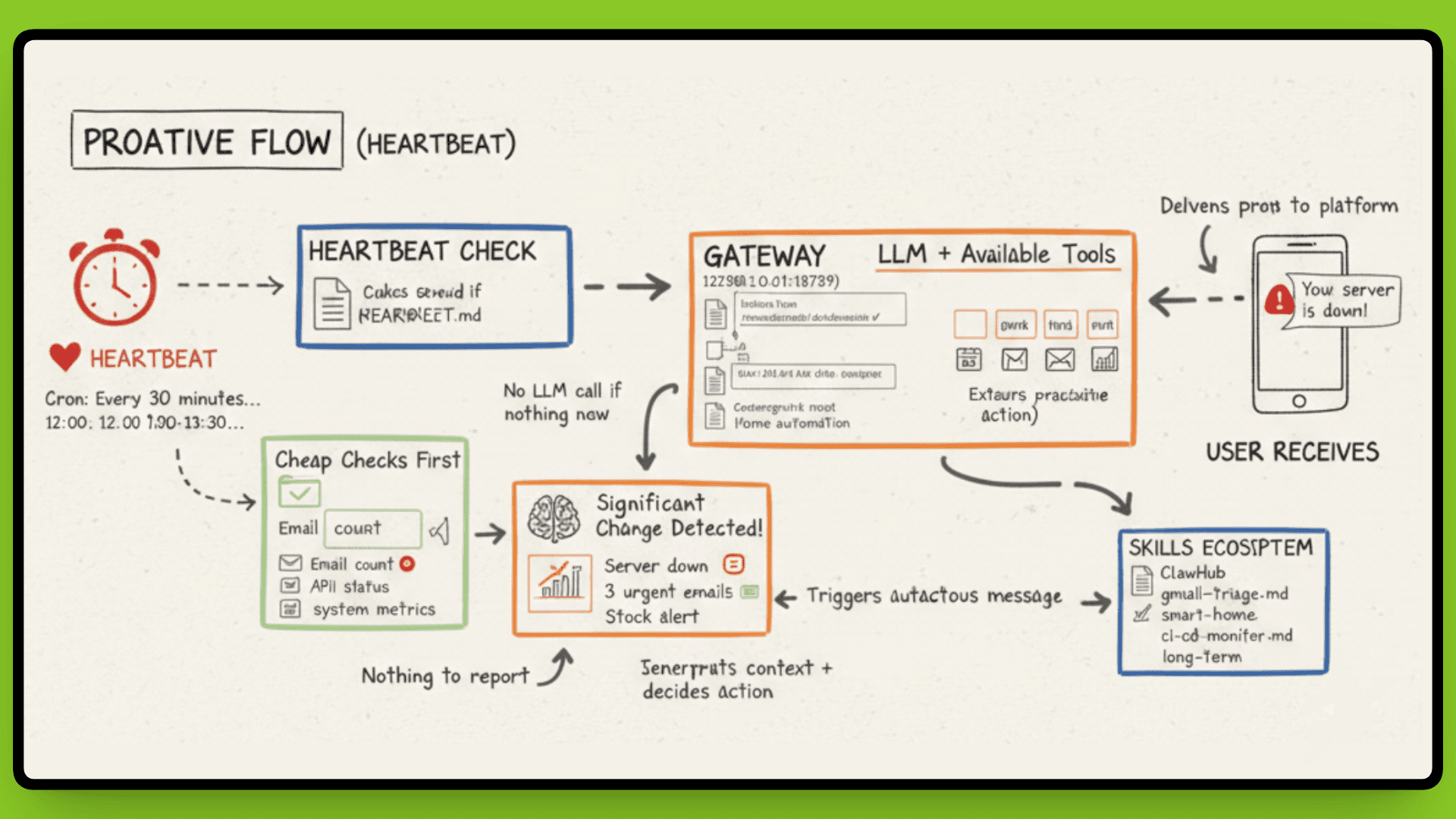
A cron job wakes your agent at whatever interval you configure, the default is every 30 minutes. The agent checks HEARTBEAT.md for instructions, runs a reasoning loop, and decides if it needs to tell you something. No prompt required.
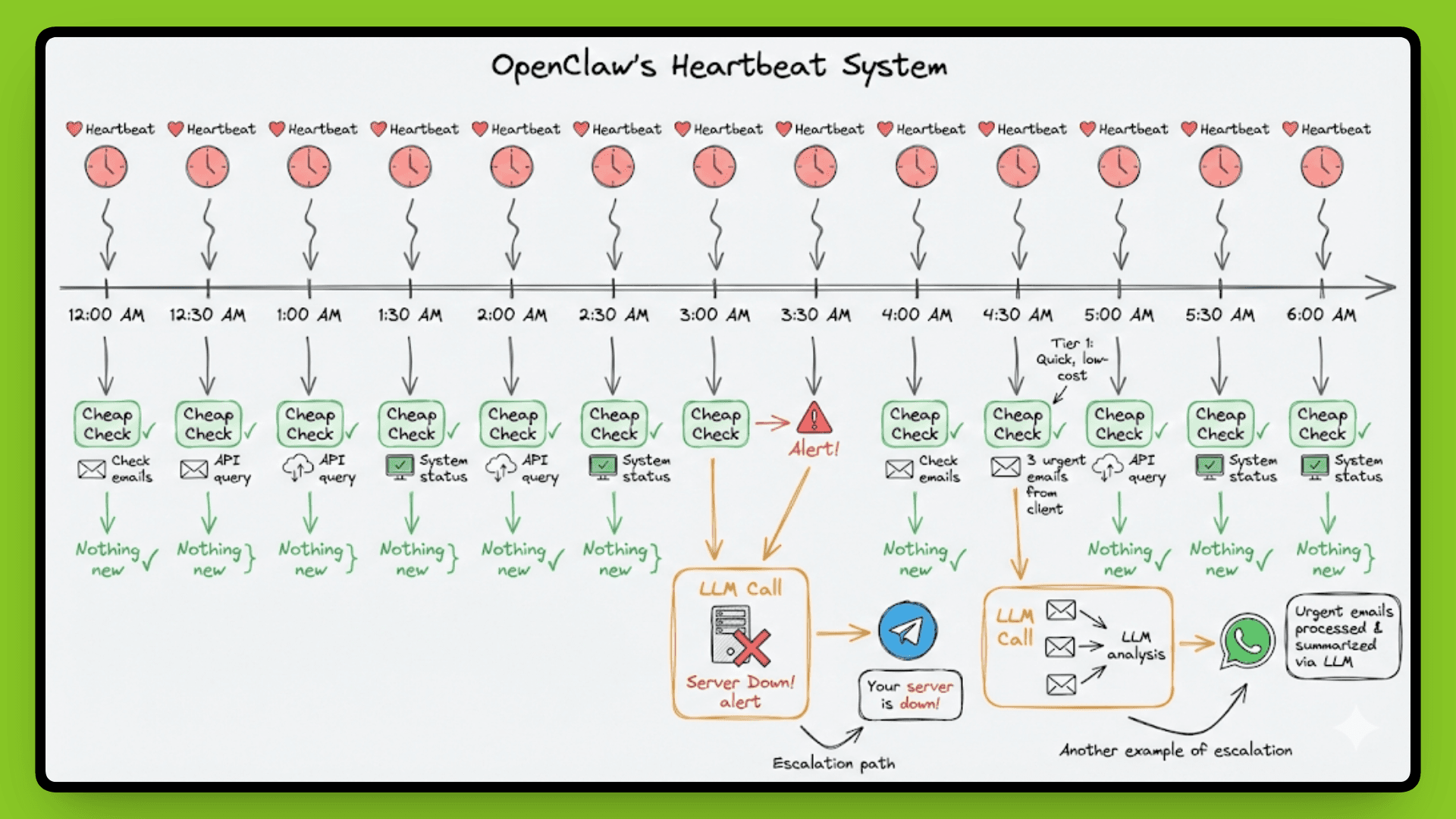
This is how you get proactive notifications. Your server goes down at 3 am, and the agent messages you on Telegram. A stock you're monitoring drops 15%, it executes a sell order, and confirms via WhatsApp. Three urgent emails from a client arrive, and it flags them immediately instead of waiting for you to check.
Cheap Checks First
OpenClaw doesn't call the LLM on every heartbeat(as you can see in the above image). That would burn through API costs fast. Instead, it uses a two-tier approach: cheap checks first, models only when needed.
The agent runs fast, deterministic scripts first, checking for new emails, calendar changes, or system alerts. These are simple pattern matches or API queries that cost nothing. Only when something significant changes does the agent escalate to the LLM for interpretation and decision-making.
For example, the cheap check sees "new email from landlord." That's a signal. The agent then calls Claude or GPT-4 to read the email, understand context from previous conversations about your lease, and decide if it needs to notify you or take action. If the heartbeat finds nothing new, no LLM call happens.
This design keeps costs reasonable while maintaining responsiveness. You're not paying for 48 LLM calls per day when nothing important is happening.
Configuration
The configuration for HEARTBEAT.md:
textevery: "30m" target: "whatsapp:+1234567890" active_hours: "9am-10pm"
The
active_hourssetting prevents your agent from waking you at 2 am with non-urgent updates.The
targetspecifies which platform and contact to send heartbeat messages to.The
everyparameter controls frequency, set it to"1h"for standard monitoring,"15m"for tighter checks if you're actively working, or"5m"if you need a near-real-time response.
Each heartbeat cycle loads the agent's current context, checks for conditions defined in the heartbeat instructions, and only sends a message if something actually needs attention. It's not spamming you every 30 minutes, it's checking every 30 minutes and speaking up when there's a reason.
This proactive capability is built in, but you can extend what the agent actually does during those checks. That's where skills come in.
Skills & Execution: Extending Agent Capabilities
OpenClaw uses a skill-based architecture where capabilities are defined in Markdown files, not compiled code.
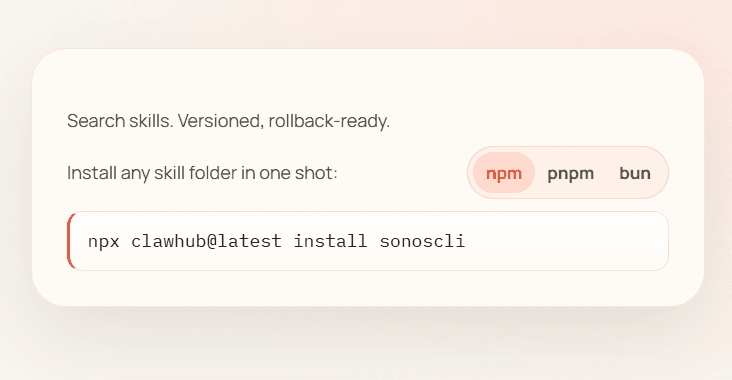
Each skill is present as ~/clawd/skills/<skill-name>/SKILL.md and contains instructions for interacting with APIs or performing workflows. The agent reads these files at runtime to understand available capabilities. Installation is immediate, no recompilation or server restarts. Over 100 community skills exist on ClawHub for Gmail, browser automation, home control, and more.
Execution Model
Skills execute wherever the OpenClaw process runs, your local machine, a VPS, or a managed container. The architecture stays identical: Gateway routes messages, agent loads skills from the filesystem, LLM calls happen directly (not proxied through a vendor), and results write back to local storage.
Aspect | Cloud AI Tools | OpenClaw |
|---|---|---|
Data storage | Vendor servers | Where process runs |
Execution | Vendor infrastructure | Your hardware/VPS |
API calls | Proxied through vendor | Direct from agent |
Tool restrictions set limits at the Gateway level. You can run the agent in sandboxed mode (restricted capabilities for safety) or full access mode (unrestricted system control). In sandboxed mode, it blocks writing to the filesystem and shell access. Full access mode lets you use terminal commands and control the browser. If the LLM tries to do something it's not allowed to, the Gateway stops it before it happens.
Regardless of where the process runs, connecting to messaging platforms requires authentication and security enforcement. That's where the Gateway's role becomes critical.
Security & Multi-Platform Handling
The Gateway enforces security at the routing layer, not just at connection time.
Once platforms are authenticated and connected, every message goes through security checks before reaching the agent. Allow lists control which users or groups get responses. If someone not on the list sends a message, the Gateway drops it before the agent sees it. This works across all platforms: WhatsApp, Telegram, Discord, Slack, using the same allow-list configuration.
How Multi-Platform Routing Works
The Channel Layer sits between platform connections and the agent. WhatsApp messages arrive in one format, Telegram in another, Discord in a third. The Channel Layer adapts these to a common internal structure so the agent doesn't need platform-specific code. It also handles platform events like reactions, typing indicators, and read receipts.
This abstraction means you can write one routing rule that applies to all platforms. "Only respond to @mentions in group chats" works the same whether the message came from Slack or Discord. The Channel Layer translates platform-specific mention formats into a standard structure that the Gateway understands.
Security Architecture: Layered Restrictions
OpenClaw's architecture assumes the LLM can be tricked. Prompt injection attacks are real, the architecture can't prevent them at the LLM level, so it limits damage through multiple enforcement layers:
Tool approval workflows gate dangerous operations (file deletion, shell commands, payments) with explicit user confirmation
Scoped permissions separate read and write access (read emails vs send emails, query database vs modify database)
Device token capabilities restrict what each connected device can do (DMs only, no group chats, read-only mode)
One compromised conversation shouldn't give access to everything. These layers don't stop a determined attacker who controls what the LLM reads, but they slow them down enough to notice and intervene. The 6,000-email deletion incident from the intro wasn't a design flaw, it demonstrated why these restrictions matter and why running an AI agent with full system access requires understanding the risks.
The architecture gives you control:
choose which platforms connect,
which users get responses,
which tools are available, and
which operations require approval.
That control is the tradeoff for running a persistent agent with access to your systems.
What else?
OpenClaw's architecture is surprisingly simple: a Gateway routes messages, an agent loop processes them with LLM and tools, memory is persisted as files, skills extend capabilities, and a heartbeat runs proactive checks. No database, no microservices, no vendor lock-in.
The design choices, file-based memory, Markdown skills, local execution, assumption of compromise, prioritize transparency and control over convenience. You see exactly what your agent knows, what it can do, and where it runs. The tradeoff is that you manage the infrastructure and accept the security risks that come with giving an AI access to your systems.
What makes OpenClaw interesting isn't revolutionary technology. It's the combination of persistent execution, proactive behavior, multi-platform integration, and modular capabilities in an architecture you can inspect and modify. Whether that's worth running depends on what you're building and how much control you need.
Introduction
OpenClaw, originally called ClawdBot, is trending everywhere. People are building insane things with it: an AI agent that rebuilds an entire website via Telegram, an AI agent platform where humans are only guests, and giving one AI full access to your system that can accidentally delete 6,000 emails because of a prompt injection attack.
Unlike ChatGPT or Claude sitting behind a web interface, OpenClaw runs as a persistent process on your hardware. You message it through WhatsApp, Telegram, or Slack. It messages you back. It can check things while you sleep. It has access to your filesystem, your terminal, and whatever APIs you give it.
The possibilities are wild. The security risks are real. And the technical architecture behind it explains both, and it's simpler than you'd think. Let's see how it actually works.
Gateway Architecture: The Central Nervous System
OpenClaw runs as a single Node.js process on your machine, listening on 127.0.0.1:18789 by default. This process is called the Gateway, which manages every messaging platform connection simultaneously: WhatsApp, Telegram, Discord, Slack, Signal, and others.
Think of it as the central nervous system. Every message coming in from any platform passes through the Gateway. Every response your agent generates goes back out through it. All communication happens via WebSocket protocol, which keeps connections open and allows real-time bidirectional messaging.

Session State, Routing, and Security
The Gateway handles three critical functions:
session state management,
message routing, and
security enforcement.
When a message arrives from WhatsApp, the Gateway determines which agent session should handle it based on the user, conversation context, or routing rules you've configured. It loads the appropriate session state, passes the message to the agent, waits for the LLM to generate a response, then routes that response back through the correct platform connection.
This centralized design solves a real technical problem. WhatsApp Web only allows one active session at a time. If you try running multiple instances, they conflict and kick each other off. The Gateway acts as that single session, then manages multiple agent conversations internally. Configure WhatsApp once, and the Gateway handles everything downstream. The same principle applies to every other platform.
Connection and Authentication Flow
When a platform wants to connect, it establishes a WebSocket connection and sends a connect request with device identity, basically, "I'm WhatsApp running on device XYZ, and I want to talk to your agent." The Gateway checks its pairing store. If this device has never connected before, it rejects the connection and waits for explicit approval.
Once approved, the Gateway issues a device token scoped to specific permissions. That token determines what this device can do:
which users it can message as,
which agent sessions it can access, and
what capabilities it has.
Future connections use this token for authentication instead of requiring re-approval every time.
Message Routing After Authentication
Once a platform is authenticated, every message it sends goes through routing logic. The Gateway decides where the message goes and whether the agent should respond based on rules you configure:
Messages from users on your allow list get processed
Messages from unknown users get dropped before the agent sees them
DMs route to your personal assistant agent
Group chats might only trigger responses when someone @mentions the agent directly
Network Binding: Local by Default
All this routing and authentication happens on your local machine. The Gateway binds to 127.0.0.1 (localhost) by default, not 0.0.0.0 (all network interfaces). This network binding determines who can connect to the Gateway in the first place.
Binding to 127.0.0.1 means only processes running on your machine can reach the Gateway, no external network access. Your agent isn't accessible from outside your machine unless you deliberately reconfigure the binding. This prevents accidental public exposure, a critical consideration given the Gateway has access to your filesystem, terminal, and connected APIs.
Every message follows the same path:
One process. All platforms. Centralized control. And everything stays local unless you explicitly decide otherwise.
Now that we understand how messages reach the agent, let's look at what happens once they get there.
The Agent Loop: From Message to Action
When a message hits the Gateway, it doesn't just forward blindly to an LLM. There's a processing cycle that turns your "check my calendar" into an actual response with context.

The Gateway routes the message to the appropriate agent session based on who sent it and where it came from. That session loads conversation history from the file system, everything you've said to this agent in the past, not just this conversation, but previous ones too. This is why your agent remembers you asked about a project last Tuesday.
The agent passes the message to the LLM along with available tools and skills. The model processes the request, decides if it needs to call a tool (like checking your calendar or sending an email), executes those actions, and generates a response. That response streams back through the Gateway to whichever platform you messaged from.
Context That Persists
Unlike a fresh ChatGPT conversation every time, OpenClaw sessions don't reset. The agent knows who you are, what you've asked before, and what's in your workspace. If you told it last week that you're working on Project XYZ, it remembers. If you saved notes in your workspace, it can reference them.
This persistence happens because everything stays in files on your machine. The agent reloads context every time it processes a message, but that context doesn't disappear when you close the chat. And you're not locked to one LLM, configure Claude for complex reasoning, GPT-4 for creative tasks, or a cheaper model for simple queries. The agent loop works the same regardless.
This file-based approach to memory is what makes the persistence possible. Let's look at how that actually works.
Persistent Memory: Everything is a File
OpenClaw doesn't use a database. Everything is stored ~/clawd/ as Markdown files.
Your agent's behavior is defined in AGENTS.md. Its personality and core instructions are stored in SOUL.md. Available tools are listed in TOOLS.md. Skills you've installed are saved in ~/clawd/skills/<skill>/SKILL.md. Memory logs are timestamped files with names like 2026-02-10-conversation.md.
Open any text editor, and you see exactly what your agent knows. Want to check what it remembers about your last project discussion? Open the memory log. Want to modify how it responds to calendar requests? Edit AGENTS.md. Want to see what tools it has access to? Read TOOLS.md.

Since everything is plain text, version control works without extra setup. Run git init in ~/clawd/ and every change gets tracked. You can see when you added a new skill[we’ll learn about this in upcoming sections], when the agent updated its long-term memory, or when you modified its core instructions. If something breaks, roll back to a previous commit. Backups are simple, just copy the directory.
How Memory Organizes Itself
OpenClaw separates memory into layers. Daily logs capture short-term context, what you talked about today, what tasks are in progress, and what links you shared. These timestamped files accumulate over time.
Long-term memory is curated by the agent itself. As conversations happen, the agent decides what's important enough to remember permanently. Maybe you told it you prefer concise responses. Maybe you gave it standing instructions about how to handle certain types of requests. That information gets written to long-term memory files and persists across sessions.
If you're analyzing a dataset and your computer crashes, the agent reloads workspace state when it comes back up. It knows where you left off because that state lives in a file it can read on restart.
But memory alone doesn't make an agent proactive. For that, OpenClaw needs a mechanism to wake up and check things without you asking. That's where the heartbeat comes in.
Heartbeat: The Proactive Agent
Most AI assistants wait for you to ask a question. OpenClaw doesn't have to.
A cron job wakes your agent at whatever interval you configure, the default is every 30 minutes. The agent checks HEARTBEAT.md for instructions, runs a reasoning loop, and decides if it needs to tell you something. No prompt required.

This is how you get proactive notifications. Your server goes down at 3 am, and the agent messages you on Telegram. A stock you're monitoring drops 15%, it executes a sell order, and confirms via WhatsApp. Three urgent emails from a client arrive, and it flags them immediately instead of waiting for you to check.
Cheap Checks First
OpenClaw doesn't call the LLM on every heartbeat(as you can see in the above image). That would burn through API costs fast. Instead, it uses a two-tier approach: cheap checks first, models only when needed.
The agent runs fast, deterministic scripts first, checking for new emails, calendar changes, or system alerts. These are simple pattern matches or API queries that cost nothing. Only when something significant changes does the agent escalate to the LLM for interpretation and decision-making.
For example, the cheap check sees "new email from landlord." That's a signal. The agent then calls Claude or GPT-4 to read the email, understand context from previous conversations about your lease, and decide if it needs to notify you or take action. If the heartbeat finds nothing new, no LLM call happens.
This design keeps costs reasonable while maintaining responsiveness. You're not paying for 48 LLM calls per day when nothing important is happening.
Configuration
The configuration for HEARTBEAT.md:
textevery: "30m" target: "whatsapp:+1234567890" active_hours: "9am-10pm"
The
active_hourssetting prevents your agent from waking you at 2 am with non-urgent updates.The
targetspecifies which platform and contact to send heartbeat messages to.The
everyparameter controls frequency, set it to"1h"for standard monitoring,"15m"for tighter checks if you're actively working, or"5m"if you need a near-real-time response.
Each heartbeat cycle loads the agent's current context, checks for conditions defined in the heartbeat instructions, and only sends a message if something actually needs attention. It's not spamming you every 30 minutes, it's checking every 30 minutes and speaking up when there's a reason.
This proactive capability is built in, but you can extend what the agent actually does during those checks. That's where skills come in.
Skills & Execution: Extending Agent Capabilities
OpenClaw uses a skill-based architecture where capabilities are defined in Markdown files, not compiled code.
Each skill is present as ~/clawd/skills/<skill-name>/SKILL.md and contains instructions for interacting with APIs or performing workflows. The agent reads these files at runtime to understand available capabilities. Installation is immediate, no recompilation or server restarts. Over 100 community skills exist on ClawHub for Gmail, browser automation, home control, and more.

Execution Model
Skills execute wherever the OpenClaw process runs, your local machine, a VPS, or a managed container. The architecture stays identical: Gateway routes messages, agent loads skills from the filesystem, LLM calls happen directly (not proxied through a vendor), and results write back to local storage.
Aspect | Cloud AI Tools | OpenClaw |
|---|---|---|
Data storage | Vendor servers | Where process runs |
Execution | Vendor infrastructure | Your hardware/VPS |
API calls | Proxied through vendor | Direct from agent |
Tool restrictions set limits at the Gateway level. You can run the agent in sandboxed mode (restricted capabilities for safety) or full access mode (unrestricted system control). In sandboxed mode, it blocks writing to the filesystem and shell access. Full access mode lets you use terminal commands and control the browser. If the LLM tries to do something it's not allowed to, the Gateway stops it before it happens.
Regardless of where the process runs, connecting to messaging platforms requires authentication and security enforcement. That's where the Gateway's role becomes critical.
Security & Multi-Platform Handling
The Gateway enforces security at the routing layer, not just at connection time.
Once platforms are authenticated and connected, every message goes through security checks before reaching the agent. Allow lists control which users or groups get responses. If someone not on the list sends a message, the Gateway drops it before the agent sees it. This works across all platforms: WhatsApp, Telegram, Discord, Slack, using the same allow-list configuration.

How Multi-Platform Routing Works
The Channel Layer sits between platform connections and the agent. WhatsApp messages arrive in one format, Telegram in another, Discord in a third. The Channel Layer adapts these to a common internal structure so the agent doesn't need platform-specific code. It also handles platform events like reactions, typing indicators, and read receipts.
This abstraction means you can write one routing rule that applies to all platforms. "Only respond to @mentions in group chats" works the same whether the message came from Slack or Discord. The Channel Layer translates platform-specific mention formats into a standard structure that the Gateway understands.
Security Architecture: Layered Restrictions
OpenClaw's architecture assumes the LLM can be tricked. Prompt injection attacks are real, the architecture can't prevent them at the LLM level, so it limits damage through multiple enforcement layers:
Tool approval workflows gate dangerous operations (file deletion, shell commands, payments) with explicit user confirmation
Scoped permissions separate read and write access (read emails vs send emails, query database vs modify database)
Device token capabilities restrict what each connected device can do (DMs only, no group chats, read-only mode)
One compromised conversation shouldn't give access to everything. These layers don't stop a determined attacker who controls what the LLM reads, but they slow them down enough to notice and intervene. The 6,000-email deletion incident from the intro wasn't a design flaw, it demonstrated why these restrictions matter and why running an AI agent with full system access requires understanding the risks.
The architecture gives you control:
choose which platforms connect,
which users get responses,
which tools are available, and
which operations require approval.
That control is the tradeoff for running a persistent agent with access to your systems.
What else?
OpenClaw's architecture is surprisingly simple: a Gateway routes messages, an agent loop processes them with LLM and tools, memory is persisted as files, skills extend capabilities, and a heartbeat runs proactive checks. No database, no microservices, no vendor lock-in.


The design choices, file-based memory, Markdown skills, local execution, assumption of compromise, prioritize transparency and control over convenience. You see exactly what your agent knows, what it can do, and where it runs. The tradeoff is that you manage the infrastructure and accept the security risks that come with giving an AI access to your systems.
What makes OpenClaw interesting isn't revolutionary technology. It's the combination of persistent execution, proactive behavior, multi-platform integration, and modular capabilities in an architecture you can inspect and modify. Whether that's worth running depends on what you're building and how much control you need.
We raised $5M to run your Engineering team on Autopilot
Watch our launch video
Talk to Sales
Turn engineering signals into leadership decisions
Connect with our team to see how Entelliegnce helps engineering leaders with full visibility into sprint performance, Team insights & Product Delivery
Talk to Sales
Turn engineering signals into leadership decisions
Connect with our team to see how Entelliegnce helps engineering leaders with full visibility into sprint performance, Team insights & Product Delivery
Try Entelligence now