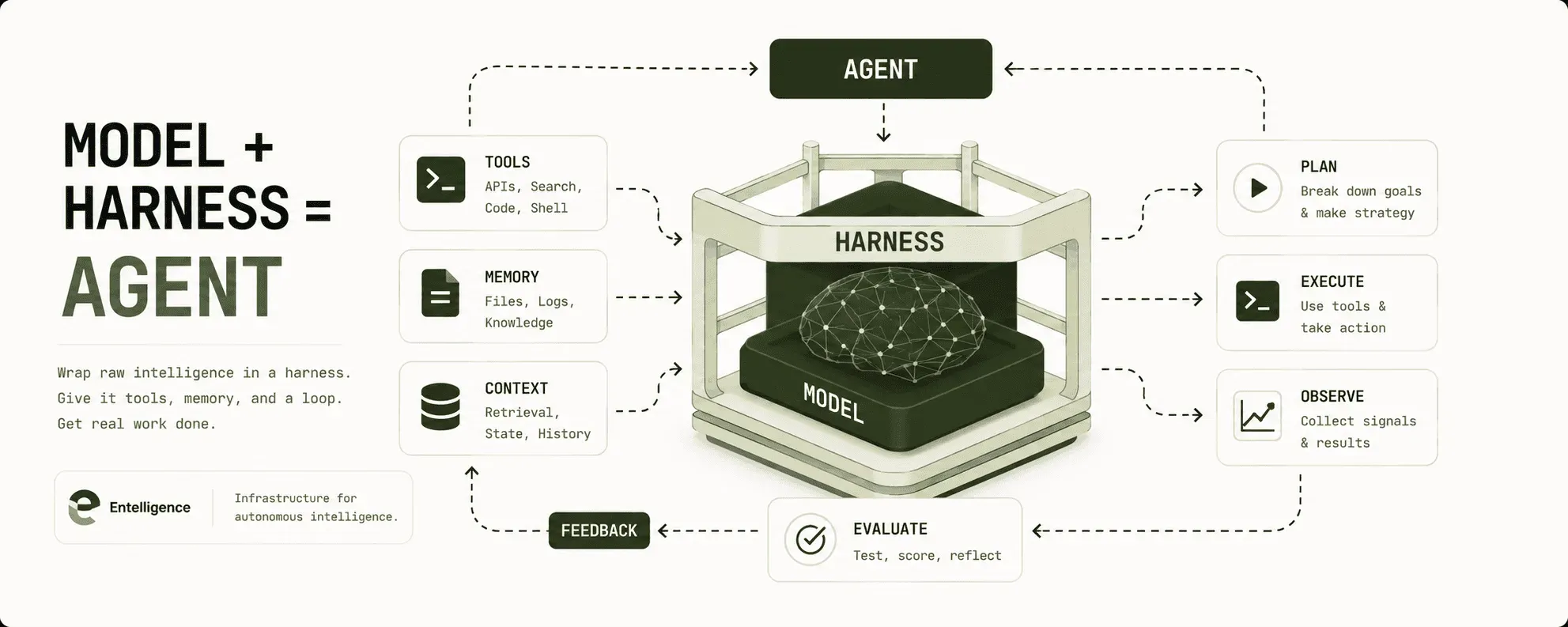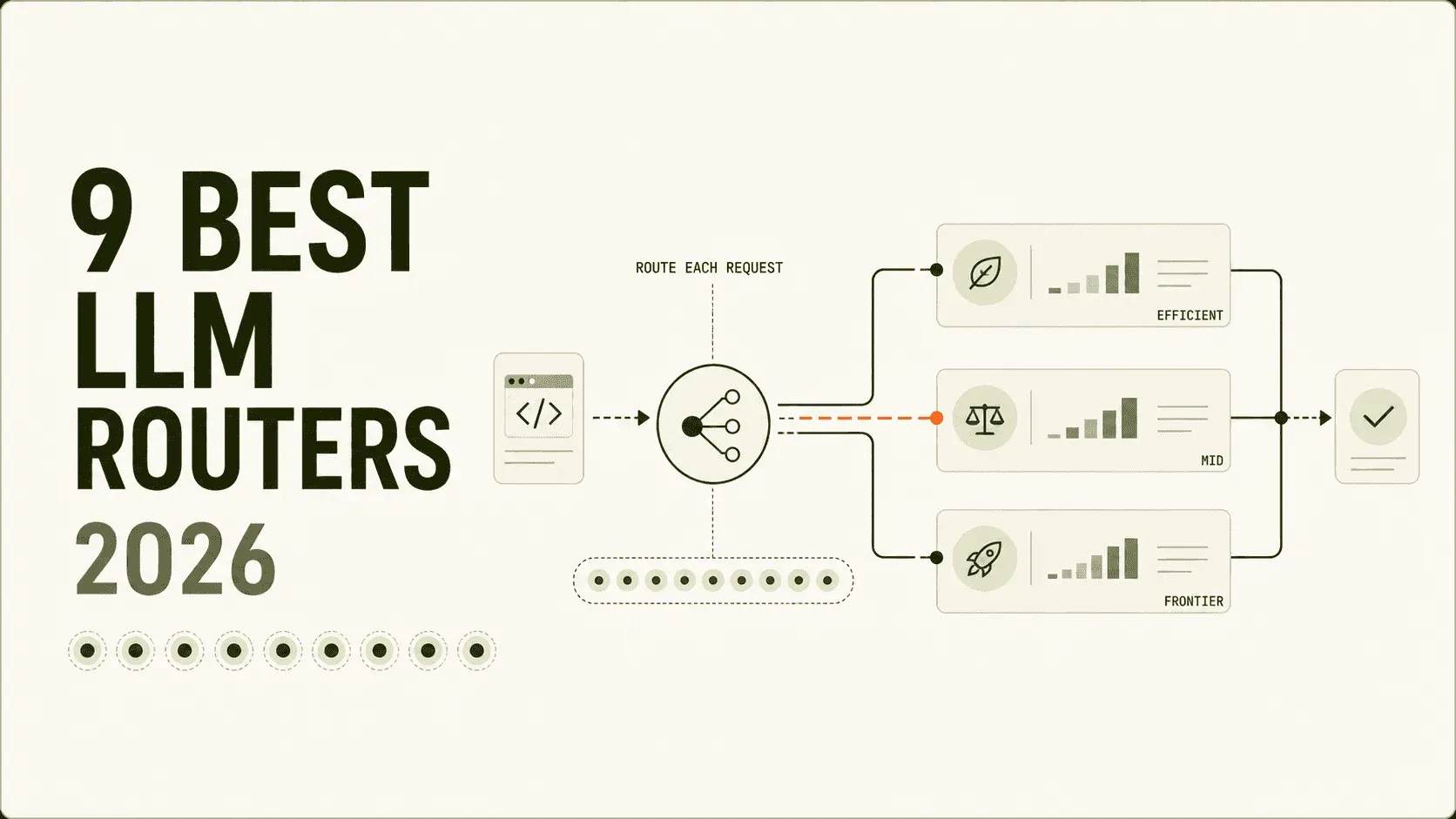
The most capable LLM is not the right model for every request.
Sending every task to a frontier model drives up cost. Sending everything to a smaller model buys a different bill: failed tool calls, repeated attempts, and work that never finishes.
An LLM router sits between an application or agent and the model providers. It chooses where each request should go based on signals such as quality, task complexity, cost, latency, policy, or provider health.
The label now covers several different products. Some predict which model will answer best. Others apply rules, balance traffic, or trigger fallbacks after an error.
The evidence has improved too. Router vendors now report 20–60% cost reductions, though those figures span different benchmarks, baselines, and production workloads.
This guide compares both kinds side by side and keeps the distinction visible.
Best LLM routers in 2026 at a glance
The nine strongest LLM routers in 2026 are OpenRouter Auto Router, Entelligence Model Router, Cursor Router, Ramp Router, Factory Router, Merge Gateway, Not Diamond, LiteLLM Router, and RouteLLM. Each wins on a different workload.
The right choice depends on yours: a router for coding agents, a general application gateway, a custom classifier, or open-source infrastructure.
The figures below are vendor-published results with different workloads and methodologies. Read them as the available evidence. No one has normalized these into a single leaderboard yet.
| LLM router | Best for | Notable published evidence | Availability |
| OpenRouter Auto Router | Fast managed setup | ~30 task types ranked on aggregate spend; 400+ models through the wider platform | Managed API |
| Entelligence Model Router | Coding agents across harnesses | 71/89 Terminal-Bench tasks; 65.5% less spend than Opus 5 | Self-hosted, local gateway, BYOK |
| Cursor Router | Teams already using Cursor | 600K+ training requests; millions in A/B tests; up to 60% savings | Cursor Teams and Enterprise |
| Ramp Router | High-volume production AI | 2.75T+ tokens routed monthly; ~30% savings; 30 ms added latency | Early access |
| Factory Router | Factory Droid sessions | 99% of Opus pass rate at 20% lower session cost on Terminal-Bench 2 | Private research preview |
| Merge Gateway | Embedded, per-customer routing controls | Windmill reports more than $10K saved monthly | Managed API and BYOK |
| Not Diamond | Custom learned routing | 30%+ cost savings; 5%+ accuracy gains; 10–100 ms recommendation latency | Managed routing API |
| LiteLLM Router | Self-hosted gateway control | 100+ LLM APIs; reported 8 ms P95 at 1K requests per second | Open source, cloud, or enterprise |
| RouteLLM | Open-source routing research | Up to 85% lower cost at 95% of GPT-4 benchmark performance | Self-hosted |
Last reviewed: August 3, 2026. Model pools, pricing, and preview status can change quickly, so verify the linked product documentation before deployment.
We reviewed current comparison articles to map the market, then checked every capability and statistic against first-party documentation. We did not run all nine products on one shared benchmark, so this list is unranked. Each entry names the workload it fits.
How to read the router statistics
The market now has more data than it did a year ago, but the numbers still measure different things.
- Entelligence and Factory publish task-completion results from terminal-based engineering benchmarks.
- Cursor reports online A/B tests using satisfaction and code keep rate, plus cost per commit.
- Ramp reports production volume, routing reliability, latency, and aggregate cost reduction.
- Merge publishes a customer case study with a monthly dollar saving.
- Not Diamond publishes aggregate customer and benchmark outcomes across workloads.
- OpenRouter publishes no routing benchmark at all. Its Auto Beta rankings come from aggregate platform spend, which measures what developers choose rather than what scores best.
- RouteLLM reports research-benchmark performance on an older strong-versus-weak model setup.
A 60% saving in an online A/B test is not directly comparable with a 20% reduction on Terminal-Bench. The quality denominator, model pool, session length, caching, and baseline all differ.
What to look for in an LLM router
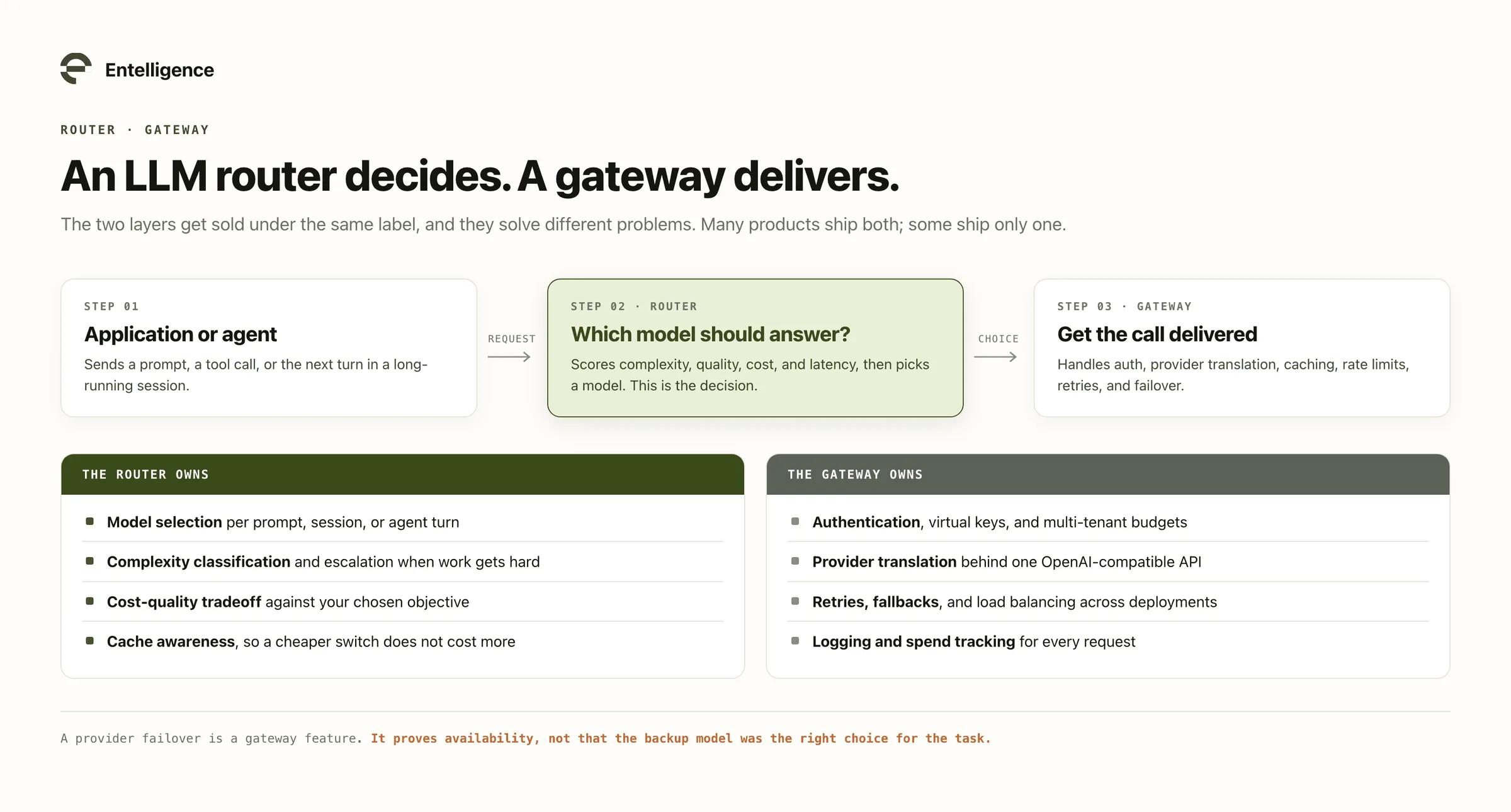
Start with the routing decision you actually need. A provider failover solves an availability problem. It does not prove that the backup model is the best choice for the task.
That distinction is the one most buyers get wrong, because routers and gateways are sold under the same label:
Evaluate each product across six criteria:
- Routing unit: Does it route one prompt, one session, or each turn inside a long-running agent trajectory?
- Decision method: Does it use a learned classifier, application-specific evaluations, fixed rules, or simple provider health?
- Model pool: Can it route across model families and providers, or only between a small predefined set?
- State and caching: Does it account for conversation history, prompt-cache state, and the cost of switching models mid-session?
- Observability: Can you see which model was selected, why it was selected, what it cost, and whether the work succeeded? Routing you cannot inspect becomes another blind spot in the AI visibility gap most engineering orgs already have.
- Deployment: Can you self-host, bring your own keys, enforce data residency, and keep prompts inside your environment?
Token price is the last thing to check. Measure quality, task completion, total session cost, latency, and reliability on traffic that resembles your production workload.
Here is how the nine products score against those criteria, starting with the one that takes the least work to try.
1. OpenRouter Auto Router: Best for fast managed setup
OpenRouter Auto Router is the simplest way to try automatic model selection across a large managed catalog. Set the model name to openrouter/auto-beta, and the service classifies the prompt before choosing a model.
Note the slug. The original openrouter/auto is deprecated, and the two versions decide differently:
| Version | Status | How it selects |
| openrouter/auto-beta | Current | OpenRouter’s own task-type rankings, from aggregate spend over a trailing 7-day window |
| openrouter/auto | Deprecated | Not Diamond’s learned routing |
Auto Beta classifies each request into roughly 30 task types, then routes to the most-used model for that task, filtered by your chosen cost-quality tradeoff. Popularity stands in for quality here, so the pick reflects market consensus rather than a score on your workload.
OpenRouter’s wider platform provides an OpenAI-compatible interface to more than 400 models across many providers. The response identifies the selected model, and developers can restrict the pool with provider or model patterns.
OpenRouter also supports session stickiness, which reduces unnecessary model changes during a conversation. Stickiness pins the choice it already made, unlike a per-turn router of the kind covered next.
There is no extra fee for the Auto Router. The response is charged at the routed model’s standard rate, subject to OpenRouter’s platform terms.
Choose OpenRouter Auto when: you want broad model access and automatic selection behind one managed API without operating routing infrastructure.
2. Entelligence Model Router: Best for coding agents
Entelligence Model Router is built specifically for coding agents such as Claude Code, Codex, Cursor, and OpenCode. It evaluates each turn and routes it through an efficient, mid-tier, or frontier lane based on task difficulty, latency, and cost.
That per-turn decision matters because an agent session changes as it runs. Reading a file, planning a cross-repository change, reacting to a test failure, and writing a summary do not require the same model.
Entelligence also watches the trajectory for evidence that the agent is stuck. It can escalate when failures repeat, then step back down after progress resumes. Session pinning and prompt-cache awareness help prevent a nominally cheaper model switch from increasing the total bill.
Key capabilities include:
- Under-50 ms local classification for each turn
- Automatic escalation and provider failover when an agent or model struggles
- Self-hosted BYOK deployment, with provider keys kept in the customer environment
- Per-request cost logs and spend visibility by agent, model, and team
- A two-command setup that leaves the existing coding workflow in place
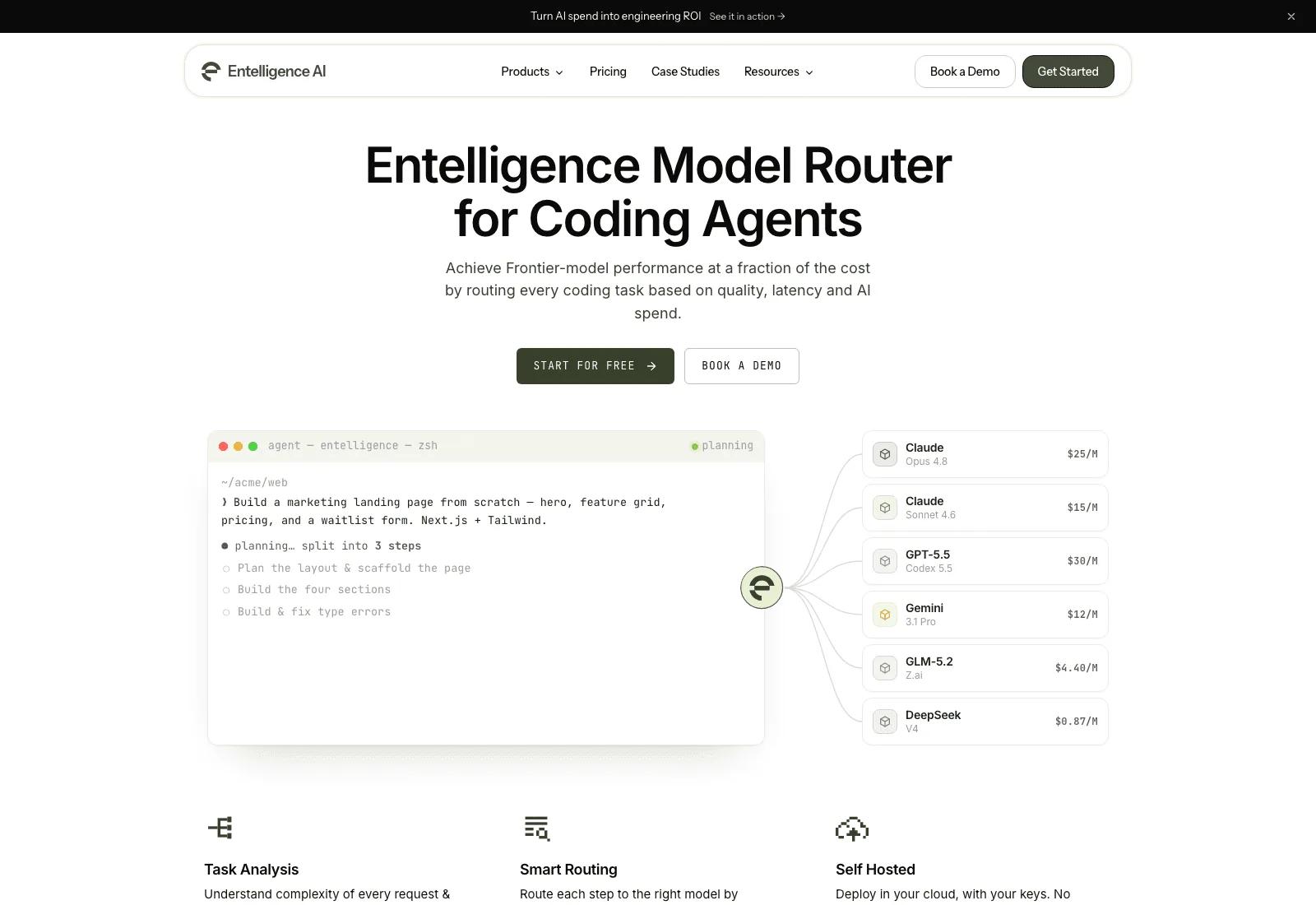
Source: Entelligence Model Router. Product-page screenshot captured August 2026.
In an Entelligence-published 89-task Terminal-Bench 2.1 comparison, the router produced the following results:
| Configuration | Tasks solved | Accuracy | Total cost | Cost per solved task |
| Entelligence Router | 71 / 89 | 79.8% | $65.75 | $0.93 |
| Claude Opus 5 | 63 / 89 | 70.8% | $190.62 | $3.03 |
| Claude Opus 4.8 | 58 / 89 | 65.2% | $155.33 | $2.68 |
That run put the router eight tasks ahead of Opus 5 with 65.5% less total spend. It was a vendor-run, single-seed benchmark, so teams should still validate the result on their own repositories and agent harnesses.
Choose Entelligence when: your main workload is a long-running coding agent and you want model choice to adapt during the session, not only at the first prompt.
3. Cursor Router: Best for teams already using Cursor
Cursor Router classifies each coding request before a model runs. It uses the query, conversation context, task complexity, domain, and observed model behavior to choose a route.
Cursor has training data almost no one else can match because it already handles hundreds of millions of coding requests each week. The company says it trained the router on more than 600,000 live requests and evaluated it across millions of live requests.
Its published production results include:
- About 60% lower cost for Auto Intelligence at similar satisfaction to Cursor’s Fable baseline
- About 15% higher satisfaction than Opus 4.8 at nearly the same cost
- About 36% lower cost for Auto Balance while landing above Opus 4.8 on satisfaction
- $6.76 per commit in Intelligence mode and $4.63 in Balance, versus $7.34 for Opus 4.8 and $12.69 for Fable 5
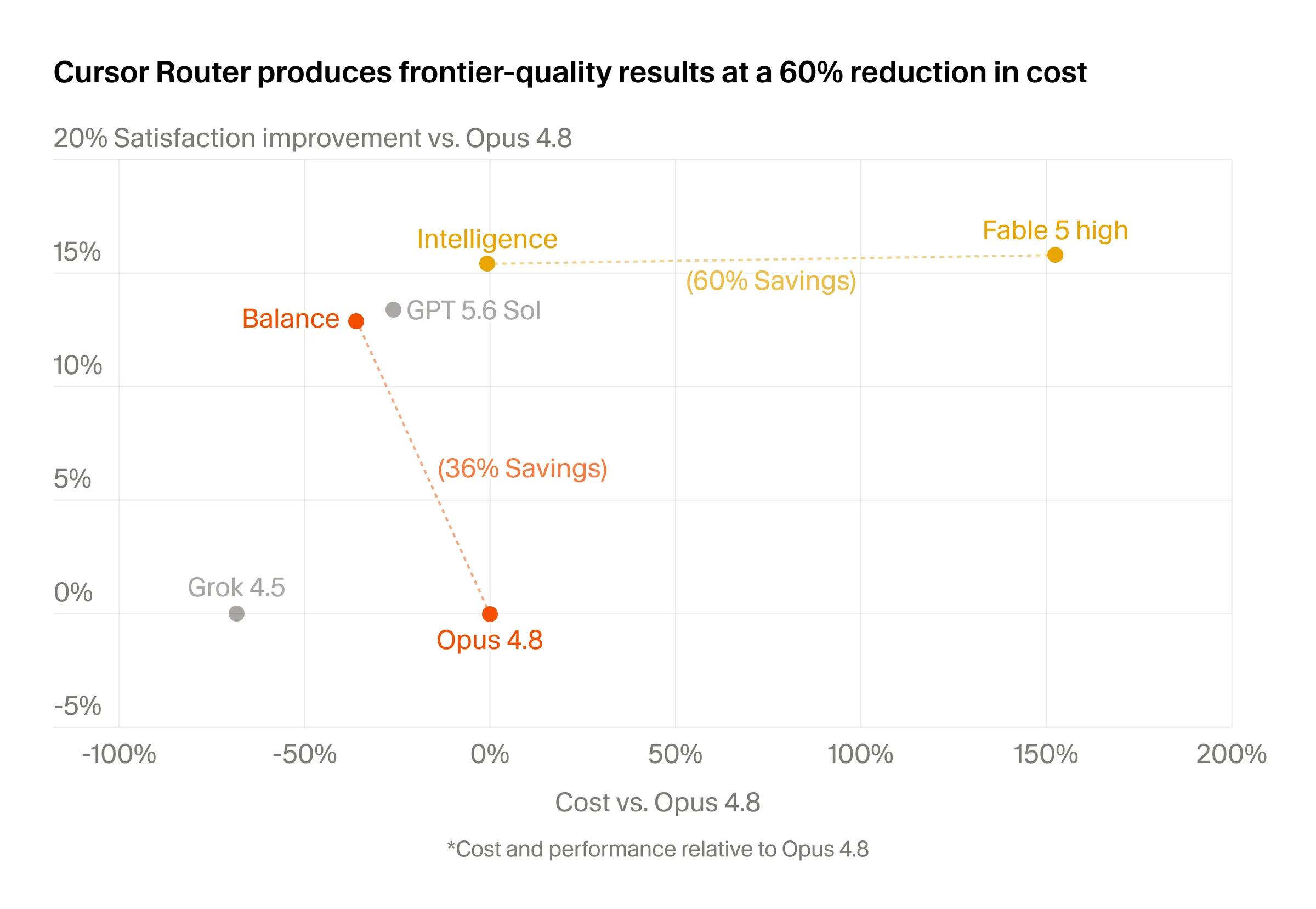
Source: Cursor Router launch. Cursor-published online A/B-test results.
Across three high-volume early-access accounts with thousands of users, Cursor reports 30–50% lower costs than pricing the same traffic entirely at Opus 4.8 rates, with no measured quality decline.
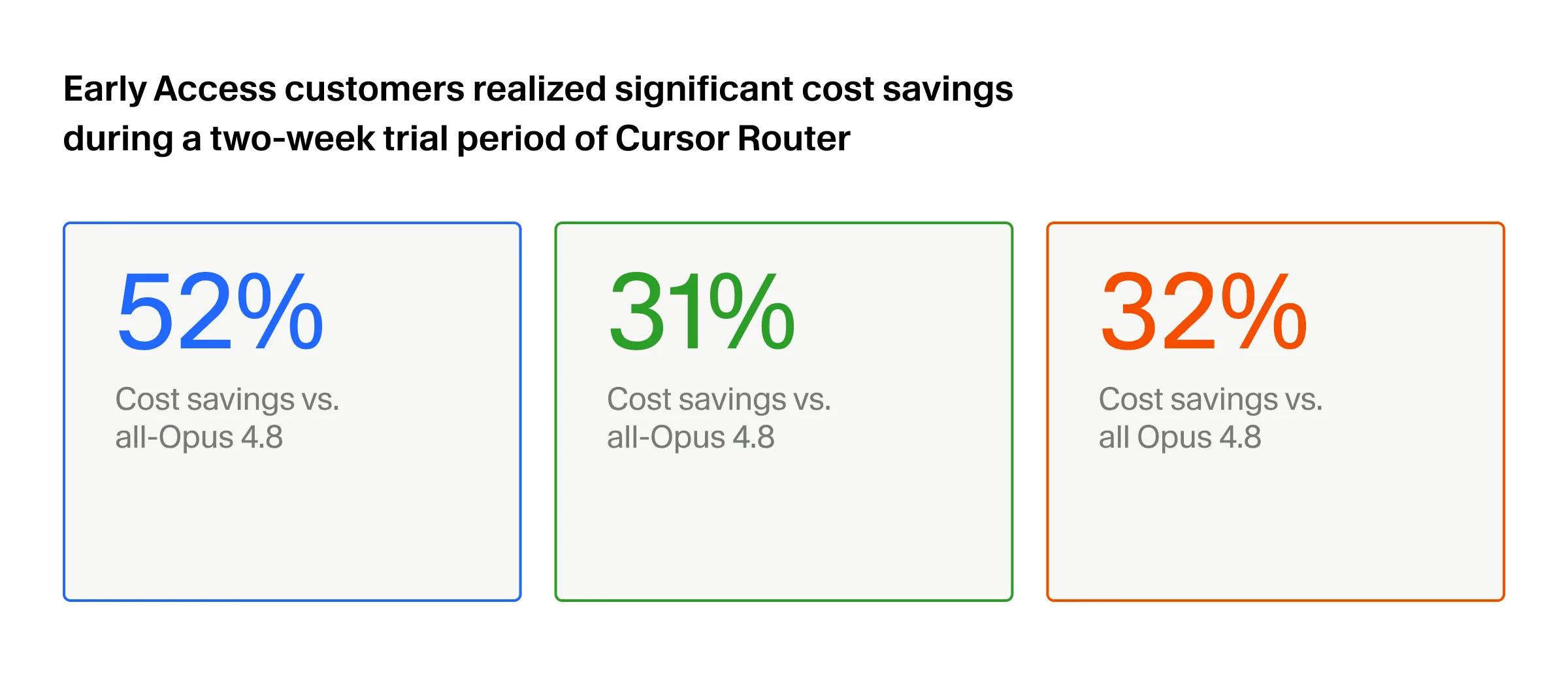
Source: Cursor Router launch. Cursor-published early-access savings from a two-week trial.
Worth noting that Cursor’s own chart shows 52%, 31%, and 32%, so the top account sits just outside the 30–50% range the post describes in prose. The gap is small, but it is a reminder to read the chart rather than the headline.
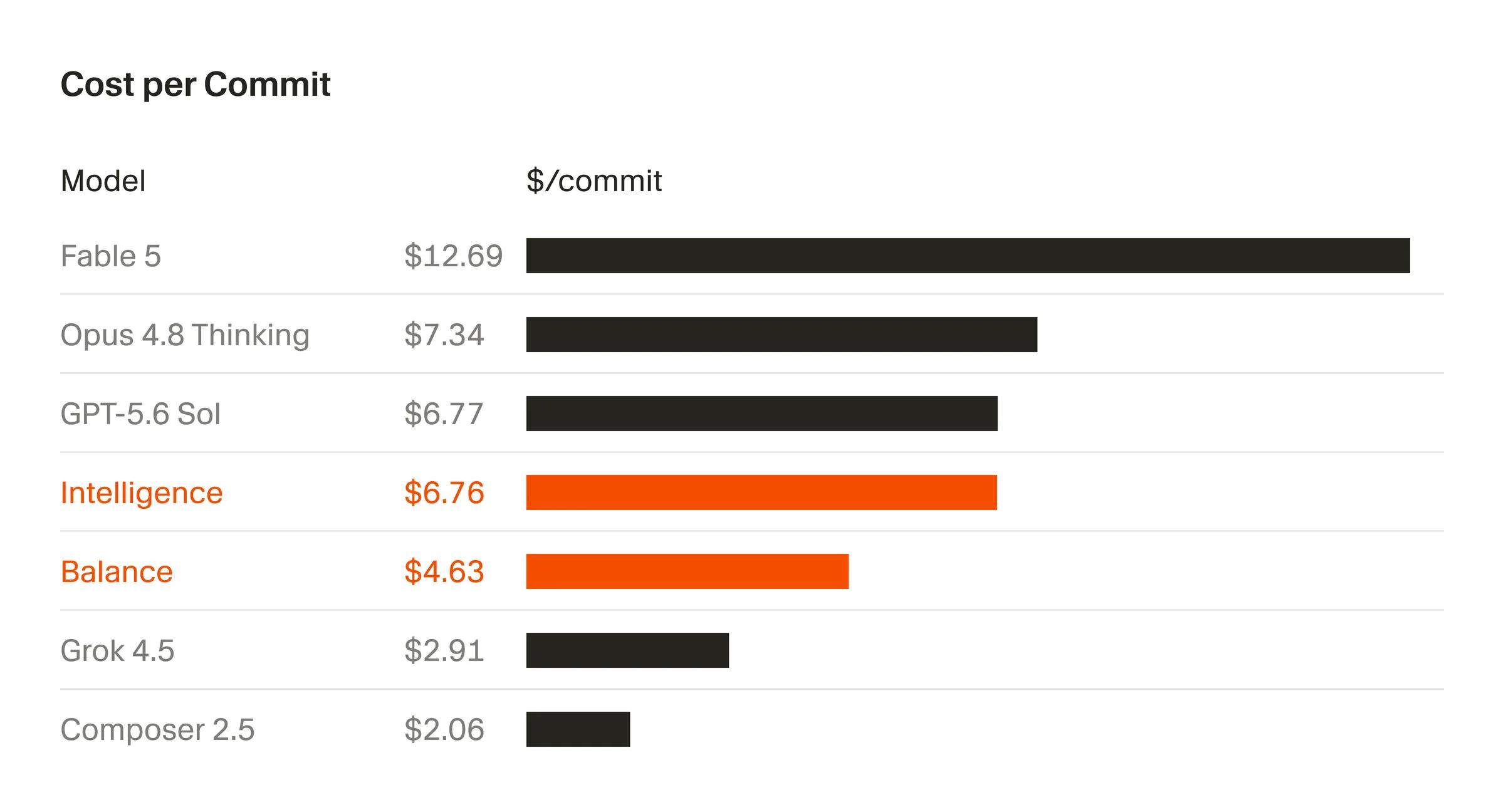
Source: Cursor Router launch. Vendor-reported cost per commit.
The router is cache-aware, and Cursor says its cost figures include cache misses created by switching models. Admins can choose Intelligence, Balance, or Cost mode and control rollout by team.
The limitation is portability. Cursor Router is available on Cursor Teams and Enterprise across its own desktop, web, iOS, CLI, and SDK surfaces.
Choose Cursor Router when: Cursor is already your standard coding environment and production user-satisfaction data matters more than an offline benchmark alone.
4. Ramp Router: Best for high-volume production AI
Ramp Router grew out of more than 100 AI use cases inside Ramp. It evaluates new models against real work and sends eligible requests to the lowest-cost model that clears its quality bar.
Ramp publishes four concrete operating figures:
| Metric | Ramp-published result |
| Tokens routed monthly | 2.75T+ |
| LLM cost reduction | ~30% |
| Added routing latency | 30 ms |
| Successful routes | 99.9% |
The service also applies more than 100 optimizations, including caching, context compaction, spend controls, and provider timing. Ramp says those optimizations cut its own LLM bill by 30% while improving speed and model fit.
At launch, Router is free apart from model tokens charged at list price. Access is still gated, and the first 500 invited users are offered $100 in promotional credits.
The public page provides strong scale, latency, and reliability evidence. It provides less detail about the exact quality dataset behind the aggregate 30% saving, so teams should still run application-specific evaluations.
Choose Ramp Router when: you need a general-purpose router with production-scale cost, latency, and reliability data, not only coding-agent benchmarks.
5. Factory Router: Best for Factory Droid sessions
Factory Router chooses a model for each Droid session and can move the session to a stronger model if the first choice struggles. It also routes across providers when endpoints degrade or capacity becomes constrained.
Factory reports results against Claude Opus 4.7 on two engineering benchmarks:
| Benchmark | Relative pass rate | Session-cost reduction | Cost per successful run |
| Terminal-Bench 2 | 99% of Opus | 20% lower | 80.5% of Opus |
| Legacy-Bench | 96% of Opus | 25% lower | 78.0% of Opus |
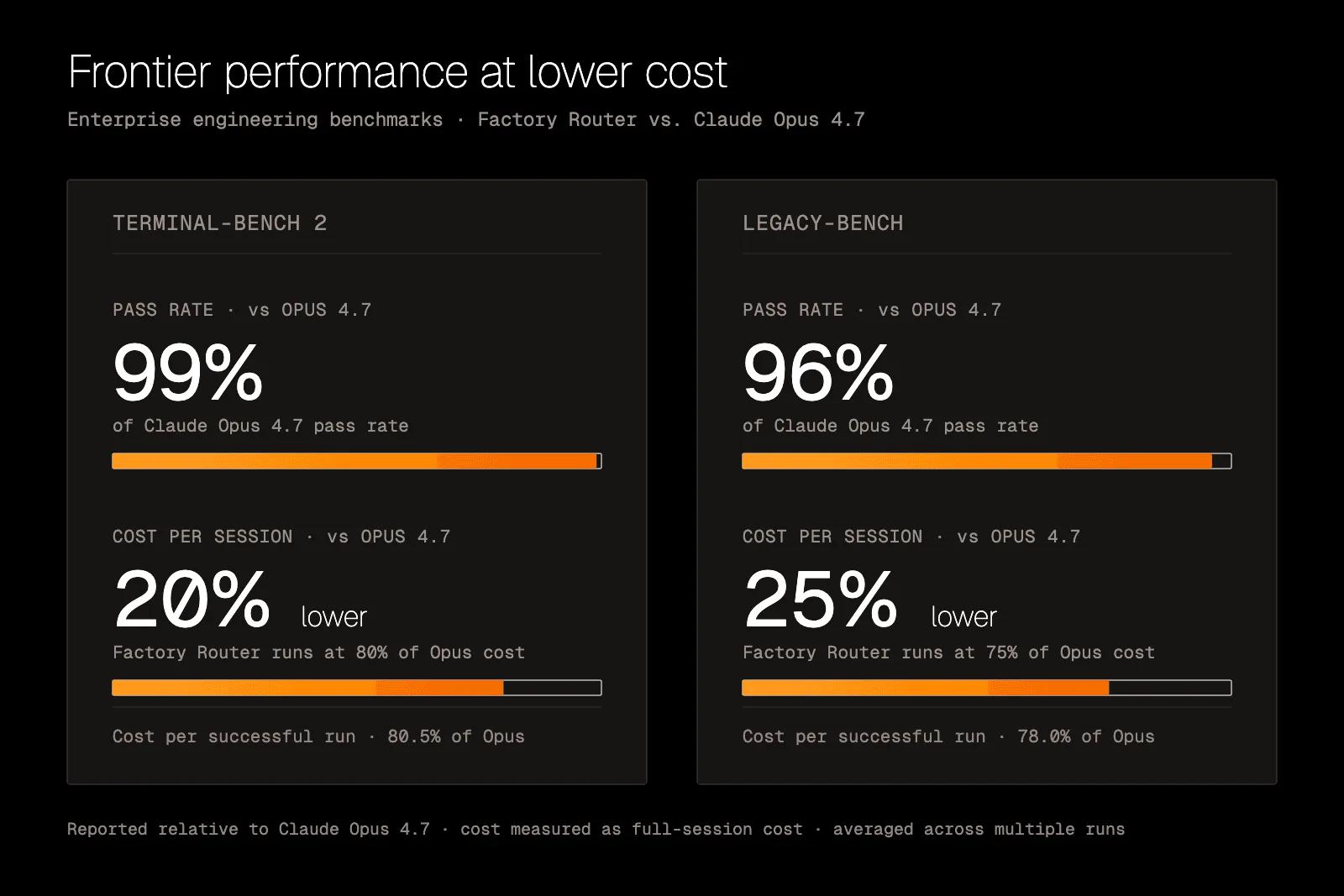
Source: Factory Router announcement. Factory-published benchmark results.
Terminal-Bench 2 covered all 89 tasks, and Factory says both suites were run multiple times. It also reports 99.9%+ request reliability across models, providers, and capacity sources.
Factory’s Pareto analysis adds useful context. Push the routing policy toward cheap and the pass rate falls away fast:
| Aggressive configuration | Cost vs Opus | Pass rate |
| Terminal-Bench 2 | 56% | 81% |
| Legacy-Bench | 30% | 49% |
Halving spend on Legacy-Bench cost roughly half the completed work. The failed runs eat the savings.
Factory Router is currently a private research preview in the Factory CLI and Desktop App. It is not a general-purpose gateway for arbitrary applications.
Choose Factory Router when: your team already uses Factory Droids and wants session-level model selection with enterprise routing policies.
6. Merge Gateway: Best for embedded customer routing controls
Merge Gateway combines intelligent model selection with an application gateway. It can route by cost, latency, quality, provider health, or a customer-defined benchmark mix.
Its Build Your Own Router feature lets teams weight curated benchmarks, upload their own scores, restrict the model pool, and inspect a plain-language explanation for every decision. Product companies can expose separate credentials, budgets, routing rules, and policies to each customer.
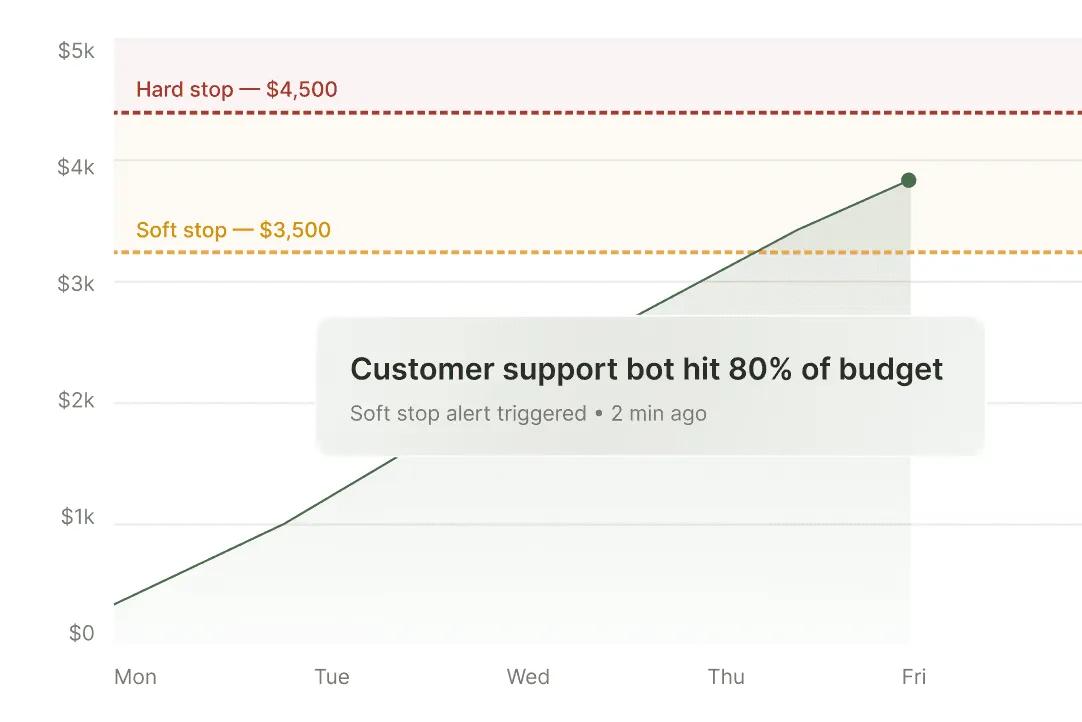
Source: Merge Gateway. Per-customer budget alerts and soft-stop controls.
Merge’s public model catalog currently lists at least 243 streaming-capable, 204 tool-calling, and 190 zero-data-retention model entries. Its pricing page states a 5% markup on provider costs, while BYOK traffic costs $0.05 per million tokens.
The strongest outcome evidence is a Windmill case study. Windmill moved a fleet of 25+ agents from OpenRouter to Merge with one pull request and roughly 100 lines of code. It reports saving more than $10,000 per month without sacrificing performance.
Treat that as one customer case study, not a controlled benchmark. It is still a concrete dollar outcome, which most gateway vendors never publish at all.
Choose Merge Gateway when: you are building a multi-tenant AI product and want each customer to control models, budgets, keys, and routing policy.
7. Not Diamond: Best for custom learned routing
Not Diamond is a model selector rather than a gateway. Its API recommends which model should receive a request; the application executes that recommendation through its existing provider or gateway.
Not Diamond publishes the following headline results:
- 30%+ cost savings across customer workloads
- 5%+ accuracy gains
- 2× faster development cycles
- 39% average accuracy improvement in Rootly’s SRE benchmarks, with some use cases more than doubling
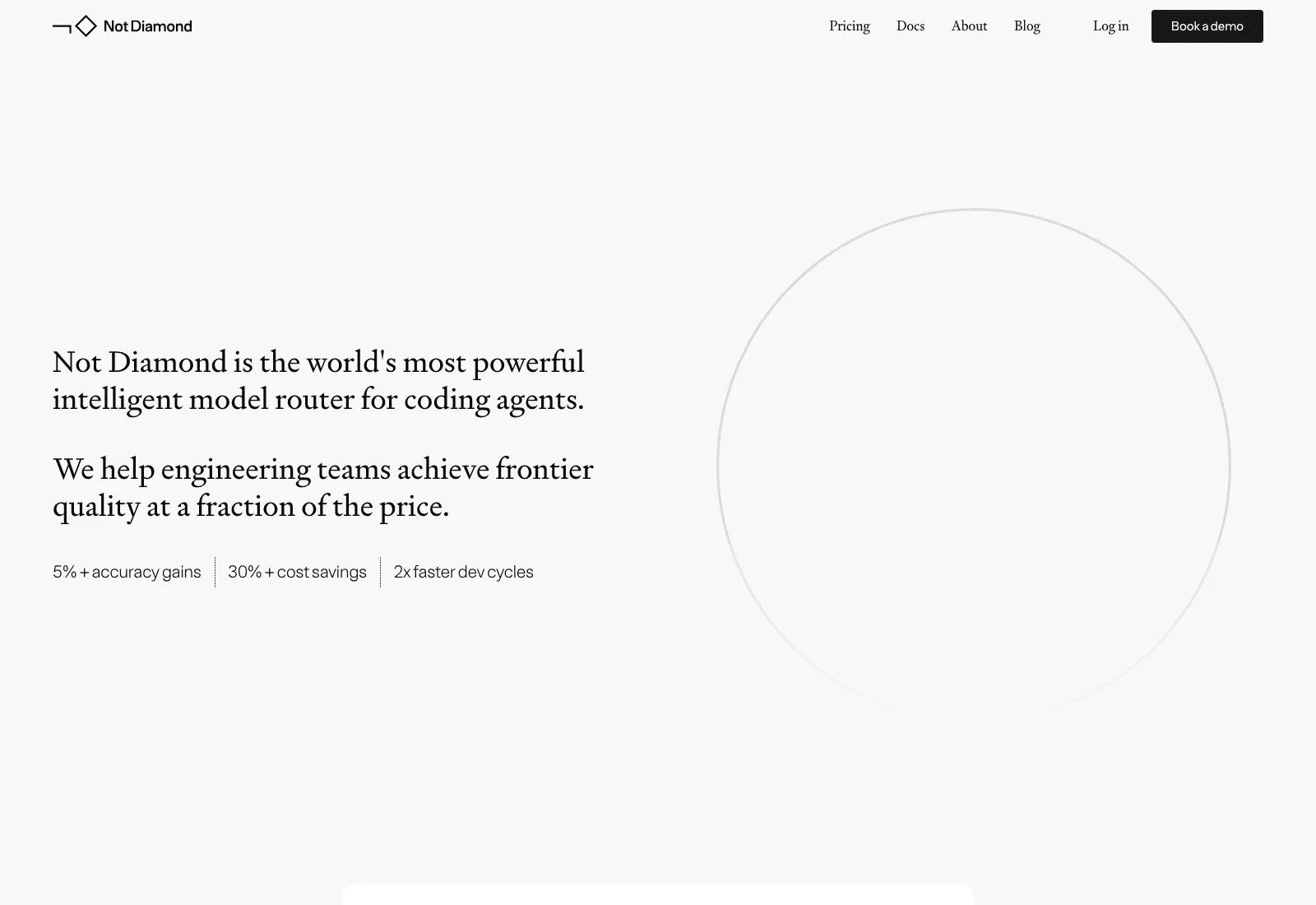
Source: Not Diamond. Vendor-published headline outcomes; product-page screenshot captured August 2026.
Teams can start with a pre-trained router or train a custom router on their own prompts and evaluation criteria. The routing objective can prioritize quality, cost, or latency.
Recommendations take 10–100 ms, depending on the amount of router training data. Pay-as-you-go pricing is $0.05 per million tokens routed, with volume-based discounts on the Enterprise plan. The coding-agent router remains an early-access offering and claims 30%+ savings without a code-quality reduction.
Not Diamond was the learned selection layer behind OpenRouter’s original openrouter/auto router, which OpenRouter has since deprecated in favor of its own task-type rankings. Not Diamond is SOC 2 and ISO 27001 compliant and offers custom zero-data-retention policies for enterprise deployments.
Choose Not Diamond when: you want learned, application-specific selection while keeping your existing gateway, provider contracts, and execution path.
8. LiteLLM Router: Best self-hosted gateway building block
LiteLLM provides an OpenAI-compatible interface across more than 100 LLM APIs. Its router handles retries, fallbacks, load balancing, cost tracking, and traffic distribution across deployments.
That makes LiteLLM valuable infrastructure, but its core router solves a different problem from a learned model selector. It is strongest at deciding which healthy deployment should serve a requested model, based on strategies and operational signals.
Teams can use the Python SDK inside an application or run the proxy as a central gateway. The proxy adds virtual keys, budgets, rate limits, authentication, and multi-tenant spend management.
The project reports 8 ms P95 latency at 1,000 requests per second. Its GitHub repository has more than 55,000 stars, reflecting a much larger open-source adoption footprint than research-only routers.
LiteLLM can also sit underneath a learned selector. The selector chooses the model; LiteLLM handles provider translation, credentials, retries, and delivery.
Choose LiteLLM when: you want an open-source gateway inside your infrastructure and are comfortable supplying the model-selection policy yourself.
9. RouteLLM: Best open-source research framework
RouteLLM is an Apache-2.0 framework from LMSYS for serving and evaluating learned routers. It makes one core decision: send a query to a cheaper model or a stronger model.
The project includes matrix factorization, weighted ranking, BERT classification, and causal-LLM routing methods. It can run as an OpenAI-compatible server and uses a threshold to control the cost-quality tradeoff.
The repository reports up to 85% cost reduction while retaining 95% of GPT-4 performance on selected benchmarks. It also claims performance comparable with commercial routers at more than 40% lower cost.
Those results use older model pairs and preference data. RouteLLM has not kept pace with the fast-moving commercial pools in this list, so treat it as a reproducible research baseline rather than a turnkey production control plane.
Choose RouteLLM when: you want open-source learned routing and are prepared to own evaluation, model updates, threshold calibration, hosting, and operations.
LiteLLM or RouteLLM: which open-source option?
They are often shortlisted together and they do opposite halves of the job.
| LiteLLM | RouteLLM | |
| Layer | Gateway | Model selector |
| Core question | Which healthy deployment serves this model? | Cheap model or strong model? |
| Method | Operational signals and strategies | Matrix factorization, weighted ranking, BERT, causal LLM |
| License | MIT, except the separately licensed enterprise/ directory | Apache-2.0 |
| GitHub stars | 55,000+ | ~5,300 |
| Production readiness | Widely deployed | Research baseline |
| You still supply | The selection policy | The gateway, hosting, and evaluation |
The honest answer for most teams is both, or neither. LiteLLM underneath a learned selector covers the full path; RouteLLM alone still needs a gateway around it.
Also consider: cloud-native and policy routers
Four other products remain strong choices when infrastructure fit matters more than a broad independent model pool.
| Router | Best fit | Important constraint or data point |
| Microsoft Foundry Model Router | Azure-native AI | Cost, Balanced, and Quality modes; automatic failover; smallest model limits the pool’s effective context window. |
| Amazon Bedrock Intelligent Prompt Routing | AWS-native AI | Exactly two models from one family; optimized for English; no learning from application-specific performance data. |
| Vertex AI Model Optimizer | Gemini-only routing | Cost, Balanced, and Quality preferences; currently a paid experimental offering. |
| Portkey AI Gateway | Enterprise policy routing | Free Developer tier includes 10K recorded logs monthly; Production is $49 monthly for 100K logs; conditional rather than learned routing by default. |
Which LLM router should you choose?
Start from the workload, not the feature list.
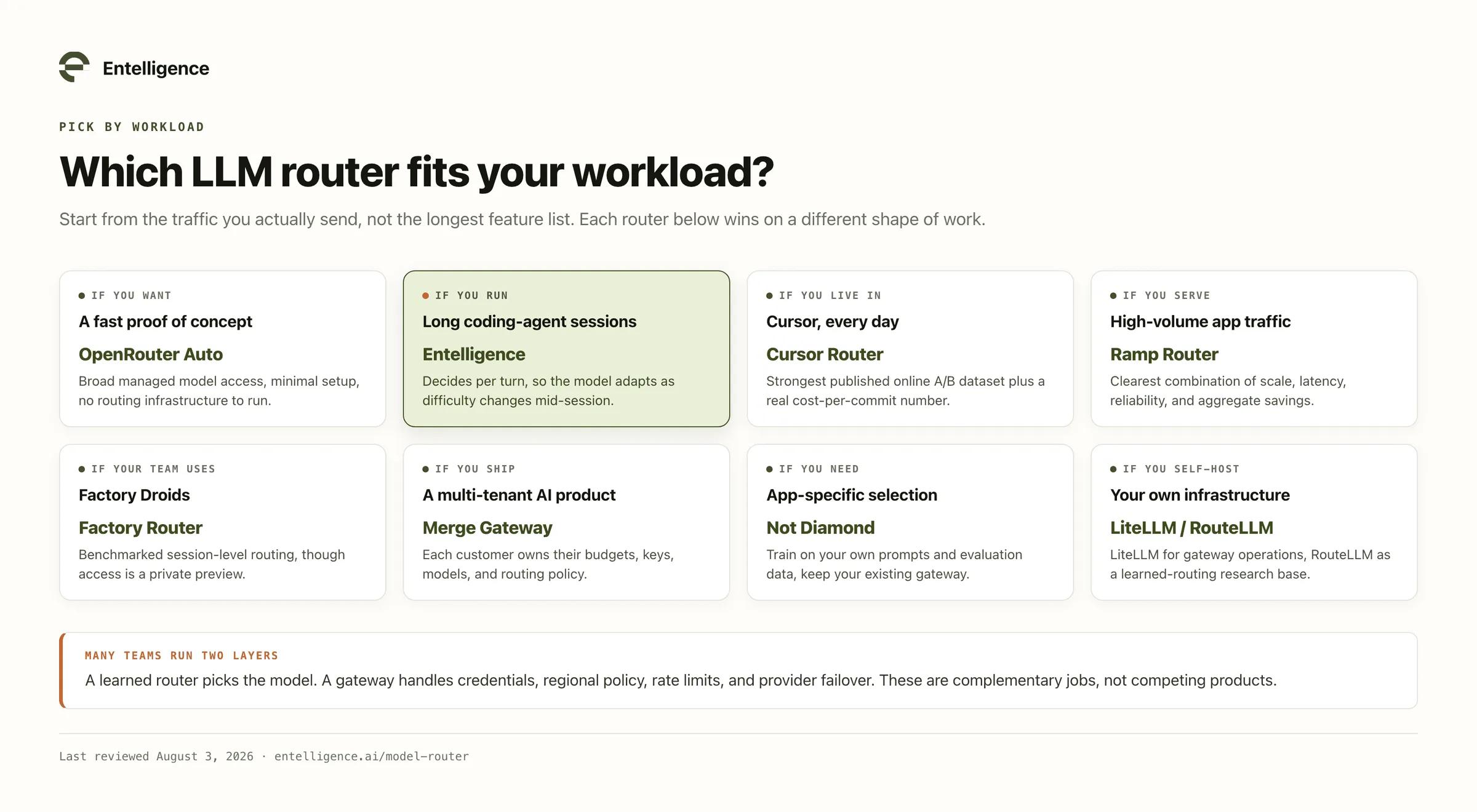
Some teams will use two layers. A learned router can select the model, while a gateway handles credentials, regional policy, rate limits, and provider failover.
How to evaluate a model router
Test the router as a system. A handful of impressive model picks proves nothing about the traffic you actually send.
Build a representative evaluation set from real prompts or agent traces. Include easy requests, difficult reasoning, long context, tool use, repeated failures, and provider errors.
Then measure:
- Task success rate: Did the application or agent complete the work?
- Cost per successful outcome: What did completed work cost, including retries and failed sessions? This pairs directly with the AI metrics engineering leaders should already track.
- Routing accuracy: Did expensive models receive the requests that actually needed them?
- End-to-end latency: What overhead did classification, fallback, and model switching add?
- Cache efficiency: Did switching models destroy a valuable warm prompt cache?
- Reliability: Did the system recover from rate limits, timeouts, and provider outages?
- Traceability: Can an engineer explain and reproduce each routing decision?
The cheapest route is not the one with the lowest token price. It is the route that completes the task at the lowest total cost while meeting the quality bar.
Frequently asked questions
What is an LLM router?
An LLM router is a decision layer that sends each request to a model or provider based on criteria such as task complexity, expected quality, cost, latency, policy, or availability.
Which LLM router is best in 2026?
There is no single winner, because the nine products optimize for different workloads.
- Fastest to try: OpenRouter Auto Router, behind one managed API
- Coding agents: Entelligence Model Router, which decides per turn
- Highest published production scale: Ramp Router, at 2.75T+ tokens monthly
- Self-hosted control: LiteLLM for gateway operations, RouteLLM for learned routing research
Is OpenRouter an LLM router?
Yes. Set the model name to openrouter/auto-beta and OpenRouter classifies your prompt into one of roughly 30 task types, then routes to the model developers most rely on for that task. There is no extra fee beyond the routed model’s rate.
The older openrouter/auto slug, powered by Not Diamond, is deprecated. The wider OpenRouter platform is an AI gateway, providing an OpenAI-compatible interface to more than 400 models.
How much does an LLM router cost?
Pricing models differ by product, based on the vendor pages cited in this guide:
| Router | Published pricing |
| Ramp Router | Free at launch, apart from model tokens at list price |
| Merge Gateway | 5% markup on provider costs; $0.05 per million tokens on BYOK |
| Not Diamond | $0.05 per million tokens routed, with Enterprise volume discounts |
| OpenRouter Auto | Routed model’s standard rate, with no additional routing fee |
| Portkey | Free Developer tier; Production at $49 monthly |
| LiteLLM, RouteLLM | Open source, so you pay for hosting and operations |
What is the difference between an LLM router and an AI gateway?
The router decides where a request should go. The gateway handles access and operational controls such as authentication, provider translation, logging, caching, rate limits, and fallbacks.
Many products combine both. Others provide only the selection logic or only the gateway.
Can an LLM router reduce AI costs without lowering quality?
It can, when the workload contains a meaningful mix of easy and hard requests. Smaller models can handle routine work while frontier models remain available for requests that need them.
The result depends on routing quality, task mix, retries, cache behavior, and how success is measured. Validate savings with cost per successful outcome. Token price alone will flatter almost any router.
Do coding agents need a specialized model router?
They benefit from one because coding sessions are long, stateful, and tool-heavy. The difficulty can change after every file read, command, edit, or test result.
A one-shot prompt classifier sees only the request at the beginning. A coding-agent router can use the evolving trajectory to decide when to escalate or step back down.
Route coding-agent work by the turn
A coding agent should not pay frontier-model prices to read every file, rerun every test, and summarize every completed change. It should still reach frontier reasoning when the work becomes difficult.
Entelligence Model Router makes that choice on each turn while preserving the coding tools and workflows a team already uses.