
How to Reduce Bugs in Code: 7 Strategies That Work
Jan 1, 2026
Jan 1, 2026
Did you know that 80% of software system costs get consumed by bug fixes? That means for every dollar you invest in development, 80 cents goes to maintenance and bug fixes instead of building new features.
The real challenge is not that bugs exist but that they reach production in the first place. Teams that catch issues during development instead of after release see their maintenance costs drop significantly while shipping velocity increases.
In this guide, we show you how to reduce bugs in code with the top 7 strategies you can implement right away. Plus, we break down how you can track the impact of your bug reduction efforts. Let’s get into it.
Key Takeaways
Automated code reviews catch critical bugs like race conditions, memory leaks, and security vulnerabilities that manual reviews often miss.
Writing clean, modular code with single responsibilities makes bugs easier to spot and fix quickly.
Continuous Integration with automated testing catches integration issues within minutes of each commit.
Teams that combine human code reviews with automated tools catch significantly more issues than manual reviews alone.
Tracking bug escape rates and fix time helps you measure improvement and identify patterns in your codebase.
What Are Bugs in Code?
Bugs are flaws in software that cause programs to behave unexpectedly or produce incorrect results. They range from simple syntax errors that prevent code from compiling to complex logic issues that only surface under specific conditions.
Not all bugs are equal. Syntax errors get caught by compilers immediately. Logic bugs compile fine but produce wrong results. Performance bugs slow down your application. Security bugs create vulnerabilities that attackers can exploit.
For instance, a missing null check can crash your application when users enter unexpected input, while an unawaited database connection can slowly leak memory until your service fails.
Why Is Reducing Bugs Important?
Bugs drain engineering resources faster than almost any other problem. When developers spend significant time fixing defects instead of building features, product roadmaps slip, and competitive advantage shrinks.
Here's why reducing bugs matters for your team:
Financial impact hits hard: Post-release bugs cost substantially more to fix than issues caught during development because they require emergency patches, customer support overhead, and potential rollbacks.
Emergency responses drain resources: One critical bug can trigger hours of incident response, pulling multiple engineers away from planned work and disrupting sprint goals.
Revenue and reputation suffer: A race condition that causes payment failures can result in lost revenue, customer complaints, and damage to brand reputation that takes months to repair.
Team morale declines: Engineers get frustrated when the same types of issues keep appearing, QA teams lose trust in development processes, and product managers struggle to commit to release dates.
Retention becomes harder: This cycle creates stress, reduces job satisfaction, and makes it harder to retain top talent who want to build features instead of fixing preventable bugs.
Customer trust erodes: Users who experience frequent bugs switch to competitors, leave negative reviews, and warn others away from your product, directly impacting growth.
In software development, bugs can breach SLAs and risk contract renewals. The cost of prevention is always lower than the cost of fixing problems after they reach customers.
How to Reduce Bugs in Code: 7 Effective Strategies
Reducing bugs requires combining multiple proven approaches that catch issues at different stages of development. Each strategy addresses specific bug types and works best when integrated into your daily workflow.
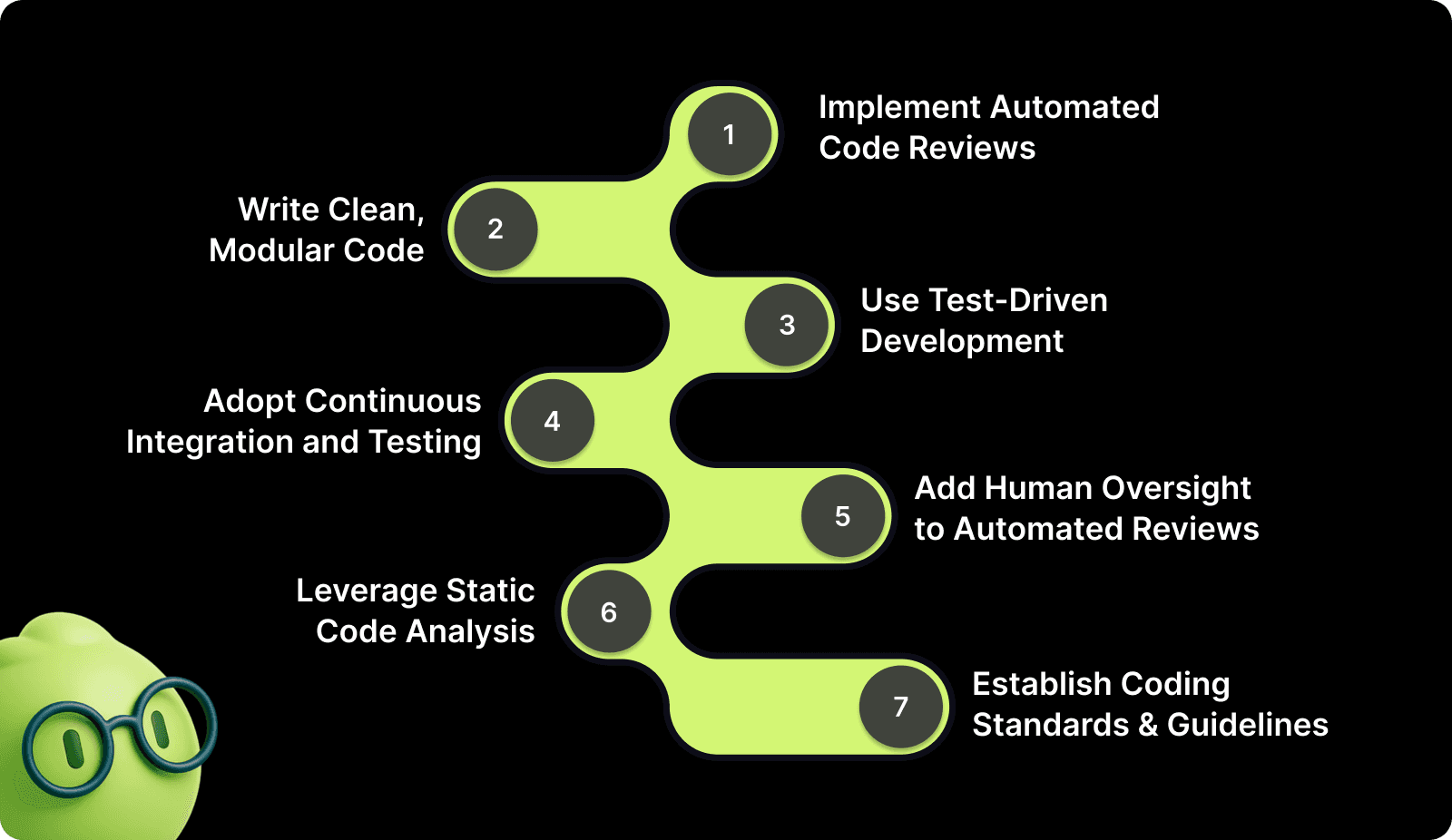
Here are the strategies that help teams catch bugs before they reach production:
1. Implement Automated Code Reviews
Automated code reviews analyze every line you write, catching issues humans often miss. Unlike manual reviews that check logic and architecture, automated tools spot subtle problems like uninitialized variables, potential null pointer exceptions, and resource leaks.
These tools provide several advantages, such as:
Continuous analysis: Every pull request gets reviewed immediately, providing feedback within minutes instead of hours, so developers fix issues while context is fresh.
Full codebase context: The analysis covers your entire repository, detecting how changes in one file affect others across multiple services and components.
Pattern detection: Automated systems recognize common bug patterns like missing await keywords, unclosed resources, and potential race conditions that humans overlook.
Consistency: Every review follows the same standards without fatigue, ensuring junior and senior code gets equal scrutiny.
For example, if you modify a database schema, automated reviews flag all queries that need updates to match the new structure, preventing runtime failures when old queries hit the new schema.
2. Write Clean, Modular Code
Clean code prevents bugs before they happen. When functions do one thing well, bugs have fewer places to hide. When variable names clearly describe their purpose, you spot logical errors faster.
Breaking code into manageable pieces makes bugs visible in several ways, including:
Single responsibility functions: Each function handles one task, making it testable independently and making bugs obvious through focused logic.
Clear naming: When every function that fetches data starts with get, every boolean starts with is or has, and every async function includes Async, bugs become visible through inconsistency.
Low complexity: If a conditional statement requires paper and pencil to reason through, rewrite it by extracting complex conditions into well-named boolean variables.
Consistent patterns: Following the same naming conventions across your codebase helps reviewers spot mistakes and makes maintenance easier.
Break large functions into smaller ones with single responsibilities. A 200-line function that handles user registration, sends emails, and updates analytics is a bug factory. Split it into validateUserInput(), createUserAccount(), sendWelcomeEmail(), and trackRegistration(). Each function becomes testable independently, making bugs obvious.
3. Use Test-Driven Development (TDD)
Test-Driven Development flips the typical workflow. Instead of writing code and then testing it, you write tests first. This forces you to think through requirements, edge cases, and expected behavior before implementation.
The TDD approach delivers clear benefits, including:
Requirements clarity: Writing tests first forces you to define exactly what the code should do, catching ambiguous requirements before implementation.
Edge case handling: Tests make you ask critical questions like what happens if the input is null, the list is empty, or the user enters negative numbers.
Immediate feedback: When tests fail, you know instantly which commit caused the problem while the context is still fresh in your mind.
Refactoring safety: With comprehensive tests in place, you can refactor confidently knowing tests will catch any regressions you introduce.
The TDD cycle follows a simple three-step rhythm that keeps your focus narrow and catches bugs as you introduce them:
Step | Action | Purpose |
Red | Write a failing test for the next small piece of functionality | Define expected behavior before implementation |
Green | Write the minimum code needed to pass that test | Implement only what's necessary |
Refactor | Clean up your code while keeping tests green | Improve code quality without breaking functionality |
This rhythm catches bugs immediately instead of weeks later. For example, when you write a test expecting calculateDiscount(100, 0.2) to return 80, you catch the bug if your implementation multiplies instead of subtracts. The test fails immediately, not in production, when a customer complains about wrong pricing.
4. Adopt Continuous Integration and Testing
Continuous Integration runs automated tests on every commit, catching integration bugs within minutes. When developers merge code multiple times daily, CI ensures each change works with everyone else's updates.
Here’s how CI provides continuous protection against integration issues:
Immediate detection: Push code to your repository, CI server pulls the changes, builds the application, runs all tests, and reports results within minutes.
Fresh context: If tests fail, you know immediately which commit caused the problem and can fix it while you remember what you changed.
Multi-environment testing: Run tests against multiple operating systems, database versions, and browser types to catch environment-specific bugs early.
Integration validation: When multiple developers work on different features, CI runs the entire test suite and exposes conflicts before they reach production.
CI catches bugs that manual testing misses. When five developers work on different features, their code can conflict in subtle ways. Your authentication change breaks someone's API endpoint. Their database migration fails with your new query. CI runs the entire test suite, exposing these conflicts before they reach production.
For instance, code that works on your local Mac might fail on the production Linux server because of path separator differences. CI testing across environments catches these platform-specific issues before deployment.
5. Add Human Oversight to Automated Reviews
Thorough code reviews can help in catching bugs that automated tools miss and improve code quality across your team. A second pair of eyes spots logic errors, questions unclear assumptions, and suggests better approaches.
Here’s how effective reviews deliver value through focused attention:
Substance over style: Look for incorrect business logic, missing error handling, potential performance issues, and security risks rather than formatting debates.
Manageable chunks: A 50-line pull request gets thorough attention while a 1,000-line pull request gets rubber-stamped because reviewers lack time and context.
Specific questions: Ask whether error handling covers all failure modes, if loops can cause performance problems with large datasets, and if user input gets validated properly.
Combined approaches: Let automated tools handle syntax and style while humans focus on architecture, business logic, and code maintainability.
Pro Tip: Review small changes frequently instead of large changes rarely. Encourage developers to break work into small, reviewable chunks. The best teams combine human and automated reviews, where tools flag missing null checks and humans question whether the entire approach makes sense.
For example, automated reviews might catch that a function is missing a return statement in one code path, while human reviewers notice that the business logic itself is flawed and needs a different approach entirely.
6. Leverage Static Code Analysis
Static analysis examines code without running it, detecting potential bugs, security vulnerabilities, and code smells. These tools understand programming language rules and common error patterns, flagging issues before you even compile.
Static analysis catches problems that cause production incidents, such as:
Null pointer issues: Detects dereferences that crash your service when variables contain unexpected null values under certain conditions.
Resource leaks: Identifies unclosed database connections, file handles, and network sockets that exhaust system resources over time.
Dead code detection: Flags code that never executes, suggesting logic errors or incomplete implementations that need attention.
Security scanning: Finds SQL injection risks, cross-site scripting holes, and hardcoded credentials that create vulnerabilities.
Modern static analysis goes beyond simple pattern matching. Tools build control flow graphs to track how data moves through your program. They detect race conditions in concurrent code. They flag when functions promise to return values but have paths that don't.
For instance, a function declared to return a User object but has an if branch with no return statement gets flagged immediately. Static analysis also catches when you forget to await an async database call, which would cause the code to continue executing before the query completes.
7. Establish Coding Standards and Guidelines
Consistent coding standards reduce bugs by making code predictable. When everyone follows the same patterns for error handling, naming conventions, and code organization, bugs become obvious through inconsistency.
Clear coding standards should cover these essential areas:
Documented patterns: Define how errors should be handled, when to use exceptions versus return codes, and what naming conventions apply to classes and functions.
Automatic enforcement: Use linters to check code style on every commit, code formatters to ensure consistent structure, and pre-commit hooks to block rule violations.
Critical coverage: Require initializing all variables before use, handling errors from external calls, and deleting commented-out code instead of committing it.
Logic documentation: Document complex logic with comments explaining the why, not the what, helping reviewers understand intent.
Document your standards clearly. How should errors be handled? When should you use exceptions versus return codes? What naming convention applies to classes, functions, and variables? Where should the configuration go? These decisions prevent bugs caused by mixing incompatible approaches.
For example, if half your team uses promises and half uses callbacks for async operations, bugs multiply at the boundaries where these different approaches interact. Standards eliminate these inconsistencies.
Common Mistakes That Happen While Reducing Bugs
Even teams committed to quality can make mistakes that affect bug reduction efforts. Recognizing these patterns helps you avoid wasting time on approaches that don't work.
Here are the most common mistakes to watch out for:
Skipping tests to save time: Tests feel like overhead when deadlines loom, but skipping them creates more work later when bugs reach production and require emergency fixes that disrupt planned work.
Ignoring compiler warnings: Warnings signal potential issues that can become bugs under the right conditions, like unused variables suggesting incomplete logic or implicit type conversions causing data loss.
Over-complicated code: Clever, compact code impresses other developers but creates bugs because complexity hides edge cases and makes changes risky for anyone maintaining the code.
Insufficient review depth: Quickly approving pull requests without careful inspection lets subtle bugs through, especially logic errors and missing error handling that automated tools miss.
Not tracking bug patterns: When you fix bugs without analyzing root causes, the same types of issues keep appearing because underlying problems stay unaddressed, and teams repeat mistakes.

How to Track Bug Reduction Effectiveness?
Measuring bug reduction shows whether your strategies work and helps you identify areas needing improvement. The right metrics tell you if processes are catching bugs earlier and preventing production incidents.
Here's how to track your progress:
Bug escape rate: Measure what percentage of bugs reach production versus getting caught in development, showing whether your prevention strategies are working.
Time spent on fixes: Monitor how much development time goes to fixing defects versus building features, with successful teams spending less time on bugs over time.
Production incident count: Track how many critical bugs cause customer-facing issues each month, breaking down by severity to understand impact.
Review effectiveness: Calculate what percentage of code review comments get addressed, with high acceptance rates indicating reviews find real issues.
For instance, teams using automated code reviews typically see declining incident counts and fewer high-severity issues within the first three months. This data shows your bug reduction strategies are working and helps justify continued investment in quality tools.
Reduce Bugs with Automated Code Reviews Using Entelligence AI
Manual code reviews help, but they miss the subtle bugs that cause production incidents. Developers review dozens of pull requests weekly, leading to fatigue, inconsistent quality, and critical issues slipping through.
Entelligence AI catches bugs before they reach production by analyzing every line of code with full repository context. The platform spots issues humans often miss, such as race conditions, memory leaks, security vulnerabilities, and logic errors, then provides actionable fixes you can apply in one click.
Here's how Entelligence AI helps engineering teams reduce bugs:
Intelligent PR Reviews: Automated analysis detects correctness issues, performance problems, and security risks with full codebase context, not just line-by-line checks.
One-Click Fixes: Apply production-ready code suggestions instantly across all affected files without manual edits.
Real-Time IDE Integration: Catch bugs as you code in VS Code, Cursor, and Windsurf with immediate feedback and automated fixes.
Security Scanning: Block vulnerabilities before merge with SAST analysis, secret detection, and infrastructure-as-code checks.
Team Analytics: Track bug patterns, review quality, and code health metrics to identify where your team morale needs improvement.
Allocore reduced review time by 70% and caught critical bugs across 862 pull requests in eight weeks using Entelligence AI. The platform flagged security weaknesses, race conditions, and memory leaks that would have caused production incidents, saving the team over 45 hours monthly on bug fixes.

Final Thoughts
Reducing bugs requires systematic approaches, not just individual effort. Automated code reviews catch issues humans miss. Clean, modular code prevents bugs from hiding. Test-Driven Development forces you to handle edge cases upfront. Together, these strategies can reduce production bugs significantly.
The key is catching bugs early, when they're cheap and easy to fix. Entelligence AI gives your team automated reviews, security scanning, and real-time feedback so bugs get caught during development, not after deployment.
Ready to ship code with confidence? Start your 14-day free trial and see how Entelligence AI helps your team catch bugs before they become problems.
FAQs
1. What causes most bugs in code?
Most bugs stem from human error during coding, like incorrect assumptions, typing mistakes, or misunderstanding requirements. Complex code with too many interconnections creates unpredictable side effects that lead to bugs.
2. How can automated code reviews reduce bugs?
Automated reviews analyze every line of code to spot issues humans often miss, like race conditions, memory leaks, and security vulnerabilities. They provide immediate feedback on pull requests, catching bugs before merge.
3. What's the difference between static analysis and code reviews?
Static analysis examines code without running it to detect potential bugs and security issues automatically. Code reviews involve humans evaluating logic, architecture, and business requirements that tools can't assess.
4. How long does it take to see bug reduction results?
Teams typically see measurable improvement within several weeks of implementing automated reviews and better testing practices. Bug escape rates drop as developers get faster feedback and learn from automated suggestions.
5. How do I get my team to adopt better bug reduction practices?
Start with automated tools that provide immediate value without changing workflows. Share metrics showing time saved and bugs caught. Gradually introduce practices like TDD once the team sees benefits.
Did you know that 80% of software system costs get consumed by bug fixes? That means for every dollar you invest in development, 80 cents goes to maintenance and bug fixes instead of building new features.
The real challenge is not that bugs exist but that they reach production in the first place. Teams that catch issues during development instead of after release see their maintenance costs drop significantly while shipping velocity increases.
In this guide, we show you how to reduce bugs in code with the top 7 strategies you can implement right away. Plus, we break down how you can track the impact of your bug reduction efforts. Let’s get into it.
Key Takeaways
Automated code reviews catch critical bugs like race conditions, memory leaks, and security vulnerabilities that manual reviews often miss.
Writing clean, modular code with single responsibilities makes bugs easier to spot and fix quickly.
Continuous Integration with automated testing catches integration issues within minutes of each commit.
Teams that combine human code reviews with automated tools catch significantly more issues than manual reviews alone.
Tracking bug escape rates and fix time helps you measure improvement and identify patterns in your codebase.
What Are Bugs in Code?
Bugs are flaws in software that cause programs to behave unexpectedly or produce incorrect results. They range from simple syntax errors that prevent code from compiling to complex logic issues that only surface under specific conditions.
Not all bugs are equal. Syntax errors get caught by compilers immediately. Logic bugs compile fine but produce wrong results. Performance bugs slow down your application. Security bugs create vulnerabilities that attackers can exploit.
For instance, a missing null check can crash your application when users enter unexpected input, while an unawaited database connection can slowly leak memory until your service fails.
Why Is Reducing Bugs Important?
Bugs drain engineering resources faster than almost any other problem. When developers spend significant time fixing defects instead of building features, product roadmaps slip, and competitive advantage shrinks.
Here's why reducing bugs matters for your team:
Financial impact hits hard: Post-release bugs cost substantially more to fix than issues caught during development because they require emergency patches, customer support overhead, and potential rollbacks.
Emergency responses drain resources: One critical bug can trigger hours of incident response, pulling multiple engineers away from planned work and disrupting sprint goals.
Revenue and reputation suffer: A race condition that causes payment failures can result in lost revenue, customer complaints, and damage to brand reputation that takes months to repair.
Team morale declines: Engineers get frustrated when the same types of issues keep appearing, QA teams lose trust in development processes, and product managers struggle to commit to release dates.
Retention becomes harder: This cycle creates stress, reduces job satisfaction, and makes it harder to retain top talent who want to build features instead of fixing preventable bugs.
Customer trust erodes: Users who experience frequent bugs switch to competitors, leave negative reviews, and warn others away from your product, directly impacting growth.
In software development, bugs can breach SLAs and risk contract renewals. The cost of prevention is always lower than the cost of fixing problems after they reach customers.
How to Reduce Bugs in Code: 7 Effective Strategies
Reducing bugs requires combining multiple proven approaches that catch issues at different stages of development. Each strategy addresses specific bug types and works best when integrated into your daily workflow.

Here are the strategies that help teams catch bugs before they reach production:
1. Implement Automated Code Reviews
Automated code reviews analyze every line you write, catching issues humans often miss. Unlike manual reviews that check logic and architecture, automated tools spot subtle problems like uninitialized variables, potential null pointer exceptions, and resource leaks.
These tools provide several advantages, such as:
Continuous analysis: Every pull request gets reviewed immediately, providing feedback within minutes instead of hours, so developers fix issues while context is fresh.
Full codebase context: The analysis covers your entire repository, detecting how changes in one file affect others across multiple services and components.
Pattern detection: Automated systems recognize common bug patterns like missing await keywords, unclosed resources, and potential race conditions that humans overlook.
Consistency: Every review follows the same standards without fatigue, ensuring junior and senior code gets equal scrutiny.
For example, if you modify a database schema, automated reviews flag all queries that need updates to match the new structure, preventing runtime failures when old queries hit the new schema.
2. Write Clean, Modular Code
Clean code prevents bugs before they happen. When functions do one thing well, bugs have fewer places to hide. When variable names clearly describe their purpose, you spot logical errors faster.
Breaking code into manageable pieces makes bugs visible in several ways, including:
Single responsibility functions: Each function handles one task, making it testable independently and making bugs obvious through focused logic.
Clear naming: When every function that fetches data starts with get, every boolean starts with is or has, and every async function includes Async, bugs become visible through inconsistency.
Low complexity: If a conditional statement requires paper and pencil to reason through, rewrite it by extracting complex conditions into well-named boolean variables.
Consistent patterns: Following the same naming conventions across your codebase helps reviewers spot mistakes and makes maintenance easier.
Break large functions into smaller ones with single responsibilities. A 200-line function that handles user registration, sends emails, and updates analytics is a bug factory. Split it into validateUserInput(), createUserAccount(), sendWelcomeEmail(), and trackRegistration(). Each function becomes testable independently, making bugs obvious.
3. Use Test-Driven Development (TDD)
Test-Driven Development flips the typical workflow. Instead of writing code and then testing it, you write tests first. This forces you to think through requirements, edge cases, and expected behavior before implementation.
The TDD approach delivers clear benefits, including:
Requirements clarity: Writing tests first forces you to define exactly what the code should do, catching ambiguous requirements before implementation.
Edge case handling: Tests make you ask critical questions like what happens if the input is null, the list is empty, or the user enters negative numbers.
Immediate feedback: When tests fail, you know instantly which commit caused the problem while the context is still fresh in your mind.
Refactoring safety: With comprehensive tests in place, you can refactor confidently knowing tests will catch any regressions you introduce.
The TDD cycle follows a simple three-step rhythm that keeps your focus narrow and catches bugs as you introduce them:
Step | Action | Purpose |
Red | Write a failing test for the next small piece of functionality | Define expected behavior before implementation |
Green | Write the minimum code needed to pass that test | Implement only what's necessary |
Refactor | Clean up your code while keeping tests green | Improve code quality without breaking functionality |
This rhythm catches bugs immediately instead of weeks later. For example, when you write a test expecting calculateDiscount(100, 0.2) to return 80, you catch the bug if your implementation multiplies instead of subtracts. The test fails immediately, not in production, when a customer complains about wrong pricing.
4. Adopt Continuous Integration and Testing
Continuous Integration runs automated tests on every commit, catching integration bugs within minutes. When developers merge code multiple times daily, CI ensures each change works with everyone else's updates.
Here’s how CI provides continuous protection against integration issues:
Immediate detection: Push code to your repository, CI server pulls the changes, builds the application, runs all tests, and reports results within minutes.
Fresh context: If tests fail, you know immediately which commit caused the problem and can fix it while you remember what you changed.
Multi-environment testing: Run tests against multiple operating systems, database versions, and browser types to catch environment-specific bugs early.
Integration validation: When multiple developers work on different features, CI runs the entire test suite and exposes conflicts before they reach production.
CI catches bugs that manual testing misses. When five developers work on different features, their code can conflict in subtle ways. Your authentication change breaks someone's API endpoint. Their database migration fails with your new query. CI runs the entire test suite, exposing these conflicts before they reach production.
For instance, code that works on your local Mac might fail on the production Linux server because of path separator differences. CI testing across environments catches these platform-specific issues before deployment.
5. Add Human Oversight to Automated Reviews
Thorough code reviews can help in catching bugs that automated tools miss and improve code quality across your team. A second pair of eyes spots logic errors, questions unclear assumptions, and suggests better approaches.
Here’s how effective reviews deliver value through focused attention:
Substance over style: Look for incorrect business logic, missing error handling, potential performance issues, and security risks rather than formatting debates.
Manageable chunks: A 50-line pull request gets thorough attention while a 1,000-line pull request gets rubber-stamped because reviewers lack time and context.
Specific questions: Ask whether error handling covers all failure modes, if loops can cause performance problems with large datasets, and if user input gets validated properly.
Combined approaches: Let automated tools handle syntax and style while humans focus on architecture, business logic, and code maintainability.
Pro Tip: Review small changes frequently instead of large changes rarely. Encourage developers to break work into small, reviewable chunks. The best teams combine human and automated reviews, where tools flag missing null checks and humans question whether the entire approach makes sense.
For example, automated reviews might catch that a function is missing a return statement in one code path, while human reviewers notice that the business logic itself is flawed and needs a different approach entirely.
6. Leverage Static Code Analysis
Static analysis examines code without running it, detecting potential bugs, security vulnerabilities, and code smells. These tools understand programming language rules and common error patterns, flagging issues before you even compile.
Static analysis catches problems that cause production incidents, such as:
Null pointer issues: Detects dereferences that crash your service when variables contain unexpected null values under certain conditions.
Resource leaks: Identifies unclosed database connections, file handles, and network sockets that exhaust system resources over time.
Dead code detection: Flags code that never executes, suggesting logic errors or incomplete implementations that need attention.
Security scanning: Finds SQL injection risks, cross-site scripting holes, and hardcoded credentials that create vulnerabilities.
Modern static analysis goes beyond simple pattern matching. Tools build control flow graphs to track how data moves through your program. They detect race conditions in concurrent code. They flag when functions promise to return values but have paths that don't.
For instance, a function declared to return a User object but has an if branch with no return statement gets flagged immediately. Static analysis also catches when you forget to await an async database call, which would cause the code to continue executing before the query completes.
7. Establish Coding Standards and Guidelines
Consistent coding standards reduce bugs by making code predictable. When everyone follows the same patterns for error handling, naming conventions, and code organization, bugs become obvious through inconsistency.
Clear coding standards should cover these essential areas:
Documented patterns: Define how errors should be handled, when to use exceptions versus return codes, and what naming conventions apply to classes and functions.
Automatic enforcement: Use linters to check code style on every commit, code formatters to ensure consistent structure, and pre-commit hooks to block rule violations.
Critical coverage: Require initializing all variables before use, handling errors from external calls, and deleting commented-out code instead of committing it.
Logic documentation: Document complex logic with comments explaining the why, not the what, helping reviewers understand intent.
Document your standards clearly. How should errors be handled? When should you use exceptions versus return codes? What naming convention applies to classes, functions, and variables? Where should the configuration go? These decisions prevent bugs caused by mixing incompatible approaches.
For example, if half your team uses promises and half uses callbacks for async operations, bugs multiply at the boundaries where these different approaches interact. Standards eliminate these inconsistencies.
Common Mistakes That Happen While Reducing Bugs
Even teams committed to quality can make mistakes that affect bug reduction efforts. Recognizing these patterns helps you avoid wasting time on approaches that don't work.
Here are the most common mistakes to watch out for:
Skipping tests to save time: Tests feel like overhead when deadlines loom, but skipping them creates more work later when bugs reach production and require emergency fixes that disrupt planned work.
Ignoring compiler warnings: Warnings signal potential issues that can become bugs under the right conditions, like unused variables suggesting incomplete logic or implicit type conversions causing data loss.
Over-complicated code: Clever, compact code impresses other developers but creates bugs because complexity hides edge cases and makes changes risky for anyone maintaining the code.
Insufficient review depth: Quickly approving pull requests without careful inspection lets subtle bugs through, especially logic errors and missing error handling that automated tools miss.
Not tracking bug patterns: When you fix bugs without analyzing root causes, the same types of issues keep appearing because underlying problems stay unaddressed, and teams repeat mistakes.

How to Track Bug Reduction Effectiveness?
Measuring bug reduction shows whether your strategies work and helps you identify areas needing improvement. The right metrics tell you if processes are catching bugs earlier and preventing production incidents.
Here's how to track your progress:
Bug escape rate: Measure what percentage of bugs reach production versus getting caught in development, showing whether your prevention strategies are working.
Time spent on fixes: Monitor how much development time goes to fixing defects versus building features, with successful teams spending less time on bugs over time.
Production incident count: Track how many critical bugs cause customer-facing issues each month, breaking down by severity to understand impact.
Review effectiveness: Calculate what percentage of code review comments get addressed, with high acceptance rates indicating reviews find real issues.
For instance, teams using automated code reviews typically see declining incident counts and fewer high-severity issues within the first three months. This data shows your bug reduction strategies are working and helps justify continued investment in quality tools.
Reduce Bugs with Automated Code Reviews Using Entelligence AI
Manual code reviews help, but they miss the subtle bugs that cause production incidents. Developers review dozens of pull requests weekly, leading to fatigue, inconsistent quality, and critical issues slipping through.
Entelligence AI catches bugs before they reach production by analyzing every line of code with full repository context. The platform spots issues humans often miss, such as race conditions, memory leaks, security vulnerabilities, and logic errors, then provides actionable fixes you can apply in one click.
Here's how Entelligence AI helps engineering teams reduce bugs:
Intelligent PR Reviews: Automated analysis detects correctness issues, performance problems, and security risks with full codebase context, not just line-by-line checks.
One-Click Fixes: Apply production-ready code suggestions instantly across all affected files without manual edits.
Real-Time IDE Integration: Catch bugs as you code in VS Code, Cursor, and Windsurf with immediate feedback and automated fixes.
Security Scanning: Block vulnerabilities before merge with SAST analysis, secret detection, and infrastructure-as-code checks.
Team Analytics: Track bug patterns, review quality, and code health metrics to identify where your team morale needs improvement.
Allocore reduced review time by 70% and caught critical bugs across 862 pull requests in eight weeks using Entelligence AI. The platform flagged security weaknesses, race conditions, and memory leaks that would have caused production incidents, saving the team over 45 hours monthly on bug fixes.

Final Thoughts
Reducing bugs requires systematic approaches, not just individual effort. Automated code reviews catch issues humans miss. Clean, modular code prevents bugs from hiding. Test-Driven Development forces you to handle edge cases upfront. Together, these strategies can reduce production bugs significantly.
The key is catching bugs early, when they're cheap and easy to fix. Entelligence AI gives your team automated reviews, security scanning, and real-time feedback so bugs get caught during development, not after deployment.
Ready to ship code with confidence? Start your 14-day free trial and see how Entelligence AI helps your team catch bugs before they become problems.
FAQs
1. What causes most bugs in code?
Most bugs stem from human error during coding, like incorrect assumptions, typing mistakes, or misunderstanding requirements. Complex code with too many interconnections creates unpredictable side effects that lead to bugs.
2. How can automated code reviews reduce bugs?
Automated reviews analyze every line of code to spot issues humans often miss, like race conditions, memory leaks, and security vulnerabilities. They provide immediate feedback on pull requests, catching bugs before merge.
3. What's the difference between static analysis and code reviews?
Static analysis examines code without running it to detect potential bugs and security issues automatically. Code reviews involve humans evaluating logic, architecture, and business requirements that tools can't assess.
4. How long does it take to see bug reduction results?
Teams typically see measurable improvement within several weeks of implementing automated reviews and better testing practices. Bug escape rates drop as developers get faster feedback and learn from automated suggestions.
5. How do I get my team to adopt better bug reduction practices?
Start with automated tools that provide immediate value without changing workflows. Share metrics showing time saved and bugs caught. Gradually introduce practices like TDD once the team sees benefits.

Your questions,
Your questions,
Decoded
Decoded
What makes Entelligence different?
Unlike tools that just flag issues, Entelligence understands context — detecting, explaining, and fixing problems while aligning with product goals and team standards.
Does it replace human reviewers?
No. It amplifies them. Entelligence handles repetitive checks so engineers can focus on architecture, logic, and innovation.
What tools does it integrate with?
It fits right into your workflow — GitHub, GitLab, Jira, Linear, Slack, and more. No setup friction, no context switching.
How secure is my code?
Your code never leaves your environment. Entelligence uses encrypted processing and complies with top industry standards like SOC 2 and HIPAA.
Who is it built for?
Fast-growing engineering teams that want to scale quality, security, and velocity without adding more manual reviews or overhead.

What makes Entelligence different?
Does it replace human reviewers?
What tools does it integrate with?
How secure is my code?
Who is it built for?