Top Jellyfish Competitors and Alternatives for 2025

Dec 1, 2025

Dec 1, 2025

Tracking engineering performance and aligning it with business goals is essential, but it’s not always straightforward. 65% of engineers experienced burnout in the past year, which highlights a growing issue in the field: tools often focus on high-level metrics but miss the important insights into your well-being. 

While Jellyfish provides valuable resource allocation data, it falls short in offering real-time insights that will help you optimize workflows and avoid burnout. 

In this article, we’ll explore top Jellyfish competitors that go beyond basic tracking, providing real-time data and actionable developer insights to help you improve productivity, reduce burnout, and create more effective engineering workflows.

Overview

  • Jellyfish offers high-level reporting but lacks real-time insights and developer-focused data.

  • Alternatives like Axify, LinearB, and Waydev provide real-time data, better developer insights, and actionable performance metrics. 

  • Key features to look for include resource allocation, forecasting, and developer workload insights. 

  • Entelligence AI helps in offering real-time insights, sprint clarity, and performance visibility, optimizing workflows and team collaboration. 

  • The best alternative depends on your team’s size, focus, and integration needs for seamless performance improvement.

Jellyfish – The Benchmark for High-Level Reporting

Jellyfish is a tool designed for engineering managers and executives like you to track how engineering resources are being spent. It provides data on things like how much time you spend on different tasks (like roadmap work, support, or unplanned tasks).
Jellyfish – The Benchmark for High-Level Reporting

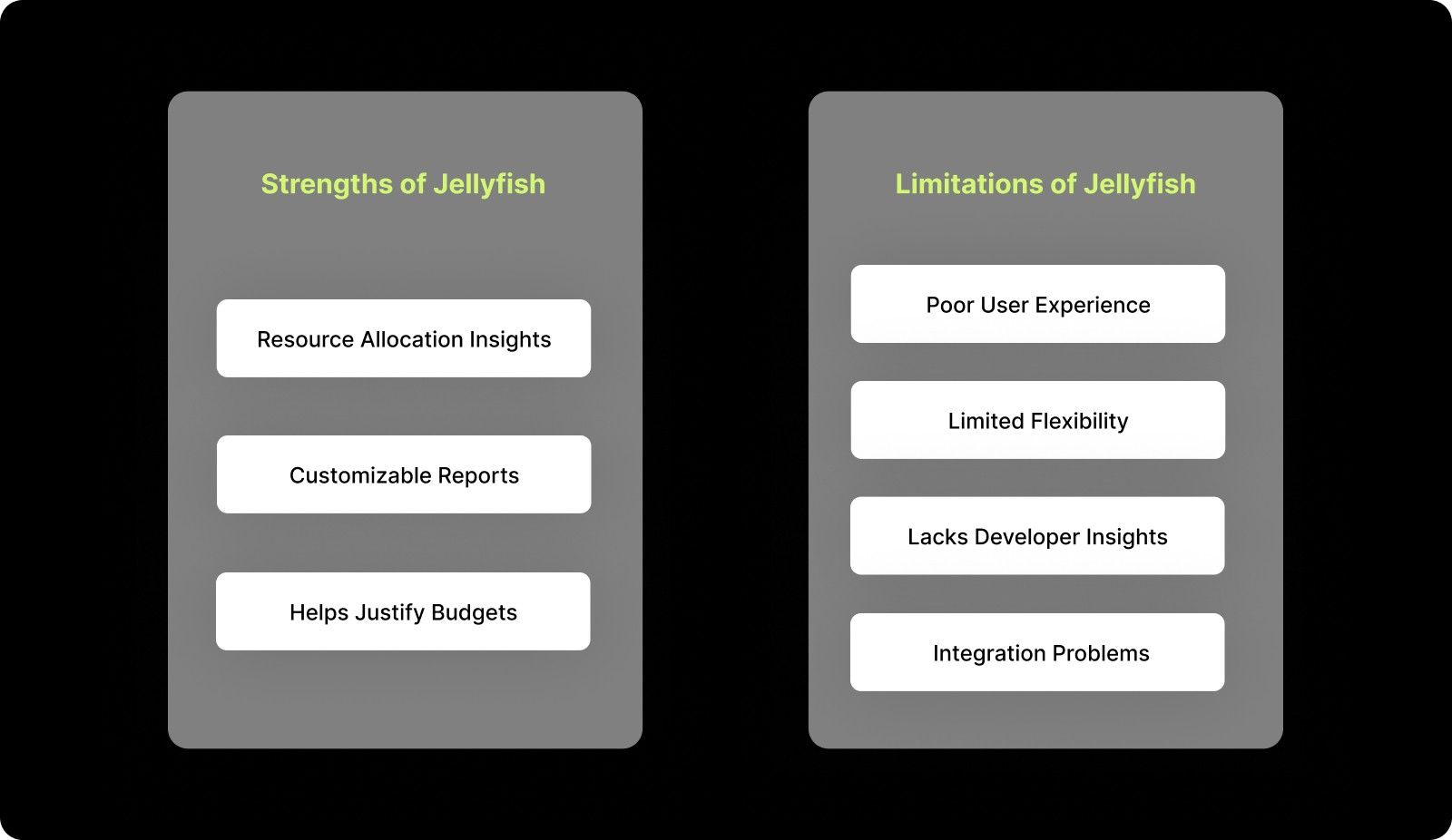
Strengths of Jellyfish:

  • Resource Allocation Insights: Jellyfish helps you understand where engineering time is going, whether it’s for planned work or support tasks.

  • Customizable Reports: It provides reports that you can customize to present data in a way that suits your business goals.

  • Helps Justify Budgets: The platform helps you show how engineering investments align with business objectives.

Limitations of Jellyfish:

  • Poor User Experience (UX): The interface is not very intuitive and can make it hard to extract meaningful data quickly.

  • Limited Flexibility: Jellyfish doesn’t allow much customization of metrics. If you have a unique need, it might not be able to meet that.

  • Lacks Developer Insights: Jellyfish does not provide much data about how you are actually working, like how you’re feeling or whether you’re at risk of burnout.

  • Integration Problems: Some users experience issues when integrating Jellyfish with services like Okta and Jira, leading to inconsistencies.

Also Read: Sprint Review Guide: Definition, Goals, and Tips

Key Gaps in Jellyfish – Why Alternatives Are Needed

While Jellyfish is useful for high-level reporting, it has significant gaps when it comes to developer productivity and team insights. You may need real-time data and actionable insights that can drive immediate improvements.

Why Alternatives Are Better:

  • Metrics Without Context: Jellyfish tells you where time is spent, but it doesn’t explain why things are happening or how to fix them.

  • Real-Time Insights: You may need immediate data that helps you identify bottlenecks and blockers in your workflows.

  • Developer Experience: Jellyfish doesn’t track important aspects like developer burnout. This is critical for ensuring long-term productivity.

Alternatives to Jellyfish offer better insights, real-time data, and a focus on improving your performance, something that Jellyfish lacks.
The Key Features to Look for in Alternatives

When evaluating alternatives, focus on features that provide real-time insights, seamless integration, workload tracking, forecasting, resource allocation, outcome-oriented metrics, and cross-functional visibility to meet your unique needs.

1. Real-Time Resource Allocation

Look for tools that provide real-time tracking of your activities, allowing you to quickly identify where time is being spent and act to avoid delays or inefficiencies.

2. R&D Cost Modeling

Some platforms offer R&D cost modeling, helping you track how engineering expenditures align with overall business goals, ensuring your spending is efficient and impactful.

3. Forecasting Tools

Choose platforms with forecasting capabilities that help predict future needs, including hiring requirements and adjustments to your roadmap, enabling proactive planning.

4. Data Unification

The platform should offer seamless integration with your existing tools (like Git, Jira, and CI/CD systems) to provide a centralized view of all critical data.

5. Developer Workload Insights

Tracking developer workload distribution is important for preventing burnout and maintaining high team morale, ensuring you and your team remain productive without overworking.

6. Outcome-Oriented Metrics

Look for alternatives that focus on outcome-based metrics like DORA and SPACE, which help measure both speed and quality, giving you a complete picture of your performance.

7. Cross-Functional Insights

Choose platforms that provide customized views for executives, managers, and developers, ensuring that everyone has access to the right data to make informed decisions at every level.

Also Read: Understanding Code Scanning for Vulnerabilities

Top Alternatives to Jellyfish – A Comprehensive Comparison

Let’s take a look at some of the best Jellyfish alternatives available today:

1. Swarmia

Swarmia offers real-time insights into engineering workflows, improving collaboration by identifying bottlenecks. It provides actionable data to optimize processes, ensuring more efficient delivery and better alignment.

Key Features:

  • Integrates with CI/CD tools: Tracks development progress and automates insights from CI/CD tools like Jenkins, GitHub, etc.

  • Helps set norms for better workflow: Defines standards to optimize collaboration and workflows.

  • Slack integration for instant context: Sends real-time updates and alerts directly to Slack, ensuring you stay aligned and responsive.

Pros:

  • Easy to use and offers real-time insights.

  • Focuses on team collaboration and productivity.

Cons:

  • Jira process changes may be needed.

  • No public API, limiting automation.

Pricing: Standard costs at $39 per developer per month

G2 Rating: 4.4/5

2. LinearB

LinearB uses AI to automate workflows, focusing especially on PR reviews and Git workflows. It helps you improve productivity through real-time cycle time insights and DORA metrics.

Key Features:

  • Automates Git workflows: Automates pull requests, merges, and code reviews to optimize processes.

  • Real-time cycle time insights: Tracks the time it takes for tasks to progress, identifying areas for improvement.

  • Focuses on DORA metrics: Helps track delivery speed and quality using industry-standard DORA metrics.

Pros:

  • Helps improve PR workflow efficiency.

  • Provides real-time visibility into your performance.

Cons:

  • Requires full repo access, raising potential security concerns.

Pricing: Starts at $19/month per contributor.

G2 Rating: 4.6/5

3. Axify

Axify helps you optimize workflows and track cycle times through Value Stream Mapping (VSM), offering detailed insights into work progress and identifying bottlenecks.

Key Features:

  • Value Stream Mapping (VSM): Tracks work progress to identify bottlenecks and optimize workflows.

  • Real-time cycle time analysis: Provides insights into time spent across stages of the process.

  • CIO dashboard for high-level visibility: Offers a comprehensive view of overall engineering performance.

Pros:

  • Great for finding bottlenecks in the workflow.

  • Provides granular insights into your performance.

Cons:

  • Free plan limited to 3 users.

  • Enterprise features can be expensive.

Pricing: Starts at $29/user/month.

G2 Rating: 4.3/5

4. Waydev

Waydev focuses on Git analytics using AI to provide insights into code performance and PR reviews, helping you identify areas for improvement in development workflows.

Key Features:

  • AI-powered Git analytics: Offers deep insights into Git repository activity and development metrics.

  • Customizable reporting for leaders: Enables tailored reporting for team leads and executives.

  • Real-time code performance insights: Tracks the performance of code and provides actionable recommendations.

Pros:

  • Automates PR analysis to reduce review time.

  • Provides actionable insights for you.

Cons:

  • Can lead to misguided evaluations based on lines of code.

Pricing: Starts at $29 per active contributor per month.

G2 Rating: 4.8/5

5. Pluralsight Flow

Pluralsight Flow helps track your performance and code review trends through real-time insights. It focuses on improving collaboration and coaching for both you and your team's development.

Key Features:

  • Tracks DORA metrics: Provides metrics for tracking software delivery performance, including speed and quality.

  • Executive dashboards for high-level insights: Offers comprehensive visibility at an executive level.

  • Collaboration tools for remote teams: Helps you stay aligned and collaborate effectively, even remotely.

Pros:

  • Great for you and your team's development and coaching.

  • Provides insights into performance and collaboration.

Cons:

  • Expensive for smaller teams.

  • Needs more transparency in how metrics are calculated.

Pricing: Starts at $499/year per contributor.

G2 Rating: 4.1/5

6. Code Climate Velocity

Code Climate Velocity focuses on code quality and developer productivity using Git analytics, offering real-time insights into code performance and efficiency.

Key Features:

  • Provides pull request analysis: Analyzes pull requests to track progress and bottlenecks.

  • Automated data hygiene: Ensures the accuracy of metrics by automatically cleaning data for better reliability.

Pros:

  • Focuses on code quality and efficiency.

  • Offers insights into Git activity.

Cons:

  • Limited in tracking business impact compared to other platforms.

Pricing: Starts at $449 per year per seat.

G2 Rating: 4.3/5

7. Allstacks

Allstacks is an AI-driven platform that helps forecast delivery risks and track performance. The tool enables you to predict bottlenecks and adjust your workflows in real-time.

Key Features:

  • Risk assessment and timeline tracking: Provides visibility into potential risks and delays in the project lifecycle.

  • Custom dashboards for workflow optimization: Allows you to tailor dashboards to optimize workflow tracking and performance metrics.

Pros:

  • Helps predict project risks before they occur.

  • Provides clear visibility into your performance.

Cons:

  • Data may not always be updated in real-time.

Pricing: Starts at $400/year per contributor.

G2 Rating: 4.5/5

8. DX

DX combines DORA metrics with developer feedback to improve your efficiency and overall experience. It provides real-time alerts and actionable insights for continuous workflow improvement.

Key Features:

  • Tracks developer feedback alongside performance metrics: Captures valuable developer sentiment alongside hard metrics.

  • Real-time alerts for workflow improvements: Helps you identify areas for improvement instantly through real-time alerts.

Pros:

  • Customizable dashboards for both leadership and teams.

  • Focuses on developer experience.

Cons:

  • The broad focus may overwhelm users seeking simpler insights.

Pricing: Custom pricing.

G2 Rating: 4.7/5
How to Choose the Best Alternative Based on Your Needs?

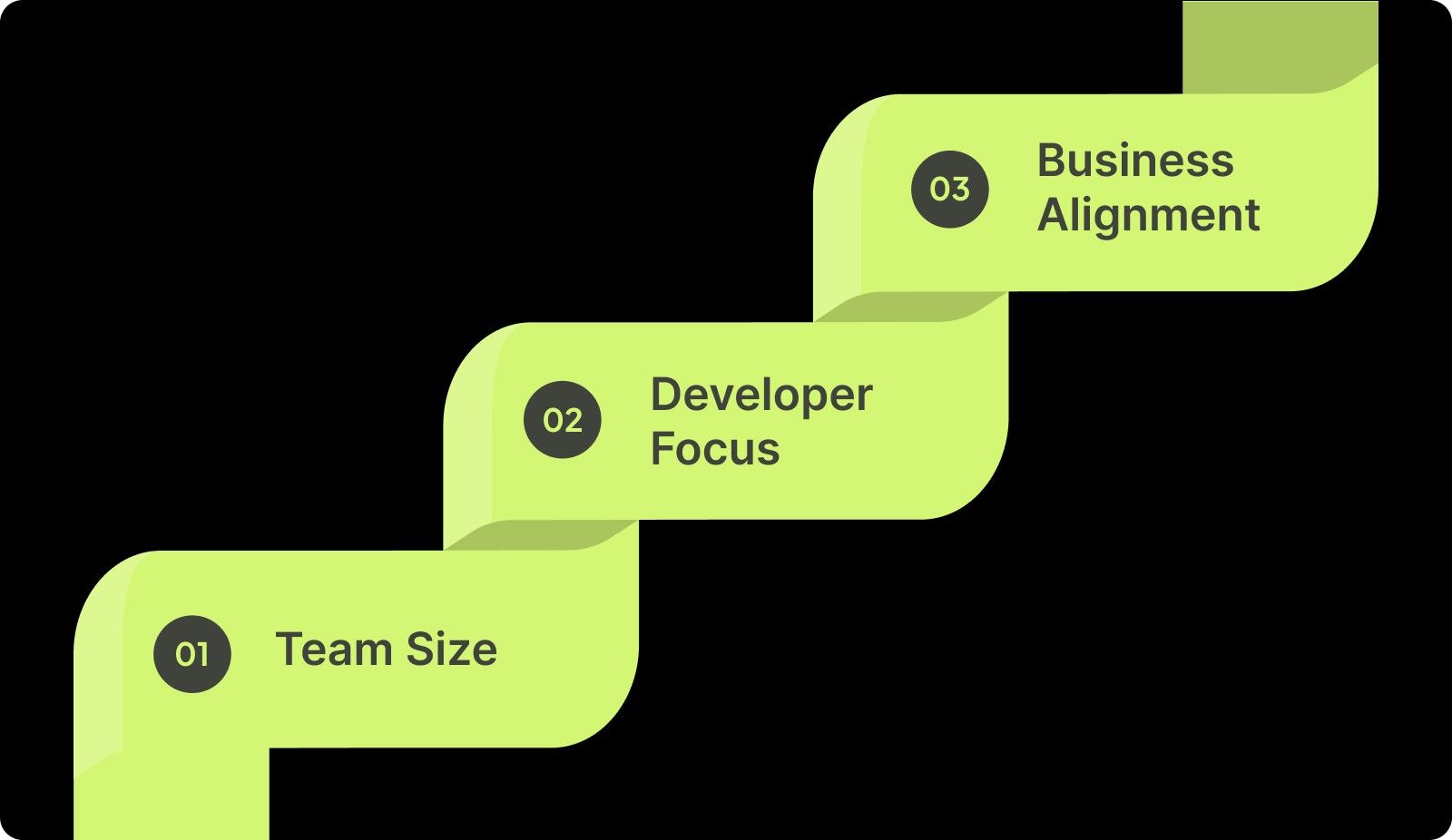
Selecting the best alternative depends on your size, goals, and specific needs. Consider factors like workflow complexity, your well-being, and alignment with business objectives when making your choice.
How to Choose the Best Alternative Based on Your Needs?

1. Team Size

If you have a larger team, LinearB provides robust tools and scalability, while Waydev is more suitable for smaller teams. It offers a simpler setup and smoother workflow analysis for you and your team with fewer resources.

2. Developer Focus

If your well-being and feedback loops are a must, DX or Axify are ideal alternatives. These platforms emphasize your experience, helping you track productivity while maintaining morale.

3. Business Alignment

If you are focused on aligning engineering performance with business goals, platforms like Pluralsight Flow or Swarmia are better suited. These alternatives offer strong business-centric metrics and clearer project alignment.

Also Read: Understanding Velocity in Agile Software Development

How Entelligence AI Can Help Align Your Engineering Performance?

Engineers like you often rely on tools that provide high-level metrics but lack real-time insights into your workflows. While Jellyfish offers valuable data, it falls short in helping you take immediate action to address bottlenecks and improve productivity.

That’s where Entelligence AI steps in. Unlike traditional tools that focus primarily on resource allocation, Entelligence AI offers a comprehensive suite that provides real-time, developer-centric insights and team-level clarity. 

Automating key tasks like code reviews and PR analysis helps you to focus more on building and less on overhead, while delivering deeper visibility into both team performance and code quality.

Key Features of Entelligence AI:

  • Real-Time Developer Insights: Track your workload, detect burnout risks, and measure your sentiment to ensure a healthy, productive you.

  • Sprint-Level Clarity Dashboards: Monitor progress, identify blockers, and automate retrospectives, all in real-time.

  • Context-Rich Code Reviews: Automate code reviews with AI-powered context, improving quality and reducing review time.

  • Org-Wide Visibility: Get a clear view of your performance and productivity across the entire engineering organization, enabling data-driven decisions.

  • Seamless Tool Integrations: Integrates with GitHub, Jira, CI/CD systems, and more, giving you a single source of truth.

With Entelligence AI, you help yourself to take actionable steps toward improvement. It’s about aligning your engineering efforts with business goals and ensuring sustained growth and efficiency across the organization.
Conclusion

While Jellyfish excels at high-level reporting and budget alignment, it lacks real-time insights and developer-focused data. If you are seeking actionable insights and an all-inclusive view of performance, alternatives like Axify, LinearB, and Waydev offer better solutions.

Entelligence AI takes it a step further by delivering real-time developer insights, sprint-level clarity, and team performance visibility. It’s designed to optimize engineering workflows and enhance collaboration.

If you're looking to improve your engineering workflows, Entelligence AI is the solution. Book a demo today to see how we can help you perform at your best.

FAQs

1. What is Jellyfish software used for?

Jellyfish is an engineering management platform that helps track engineering productivity and align resources with business goals. It also provides data-driven insights into your performance and R&D investments.

2. What are the benefits of using tools like Jellyfish?

Tools like Jellyfish provide visibility into resource allocation, help justify R&D investments, offer customizable reports, and ensure better budget alignment with overall business goals.

3. How does Jellyfish help with resource allocation?

Jellyfish tracks how much time engineers like you spend on roadmap vs. support tasks. This ensures better resource distribution and alignment with business priorities.

4. What metrics are tracked to measure engineering team efficiency?

Engineering performance tools track metrics like DORA, cycle time, and time allocation, offering insights into delivery speed, quality, and team performance.

Tracking engineering performance and aligning it with business goals is essential, but it’s not always straightforward. 65% of engineers experienced burnout in the past year, which highlights a growing issue in the field: tools often focus on high-level metrics but miss the important insights into your well-being. 

While Jellyfish provides valuable resource allocation data, it falls short in offering real-time insights that will help you optimize workflows and avoid burnout. 

In this article, we’ll explore top Jellyfish competitors that go beyond basic tracking, providing real-time data and actionable developer insights to help you improve productivity, reduce burnout, and create more effective engineering workflows.

Overview

  • Jellyfish offers high-level reporting but lacks real-time insights and developer-focused data.

  • Alternatives like Axify, LinearB, and Waydev provide real-time data, better developer insights, and actionable performance metrics. 

  • Key features to look for include resource allocation, forecasting, and developer workload insights. 

  • Entelligence AI helps in offering real-time insights, sprint clarity, and performance visibility, optimizing workflows and team collaboration. 

  • The best alternative depends on your team’s size, focus, and integration needs for seamless performance improvement.

Jellyfish – The Benchmark for High-Level Reporting

Jellyfish is a tool designed for engineering managers and executives like you to track how engineering resources are being spent. It provides data on things like how much time you spend on different tasks (like roadmap work, support, or unplanned tasks).

Jellyfish – The Benchmark for High-Level Reporting

Strengths of Jellyfish:

  • Resource Allocation Insights: Jellyfish helps you understand where engineering time is going, whether it’s for planned work or support tasks.

  • Customizable Reports: It provides reports that you can customize to present data in a way that suits your business goals.

  • Helps Justify Budgets: The platform helps you show how engineering investments align with business objectives.

Limitations of Jellyfish:

  • Poor User Experience (UX): The interface is not very intuitive and can make it hard to extract meaningful data quickly.

  • Limited Flexibility: Jellyfish doesn’t allow much customization of metrics. If you have a unique need, it might not be able to meet that.

  • Lacks Developer Insights: Jellyfish does not provide much data about how you are actually working, like how you’re feeling or whether you’re at risk of burnout.

  • Integration Problems: Some users experience issues when integrating Jellyfish with services like Okta and Jira, leading to inconsistencies.

Also Read: Sprint Review Guide: Definition, Goals, and Tips

Key Gaps in Jellyfish – Why Alternatives Are Needed

While Jellyfish is useful for high-level reporting, it has significant gaps when it comes to developer productivity and team insights. You may need real-time data and actionable insights that can drive immediate improvements.

Why Alternatives Are Better:

  • Metrics Without Context: Jellyfish tells you where time is spent, but it doesn’t explain why things are happening or how to fix them.

  • Real-Time Insights: You may need immediate data that helps you identify bottlenecks and blockers in your workflows.

  • Developer Experience: Jellyfish doesn’t track important aspects like developer burnout. This is critical for ensuring long-term productivity.

Alternatives to Jellyfish offer better insights, real-time data, and a focus on improving your performance, something that Jellyfish lacks.

The Key Features to Look for in Alternatives

When evaluating alternatives, focus on features that provide real-time insights, seamless integration, workload tracking, forecasting, resource allocation, outcome-oriented metrics, and cross-functional visibility to meet your unique needs.

1. Real-Time Resource Allocation

Look for tools that provide real-time tracking of your activities, allowing you to quickly identify where time is being spent and act to avoid delays or inefficiencies.

2. R&D Cost Modeling

Some platforms offer R&D cost modeling, helping you track how engineering expenditures align with overall business goals, ensuring your spending is efficient and impactful.

3. Forecasting Tools

Choose platforms with forecasting capabilities that help predict future needs, including hiring requirements and adjustments to your roadmap, enabling proactive planning.

4. Data Unification

The platform should offer seamless integration with your existing tools (like Git, Jira, and CI/CD systems) to provide a centralized view of all critical data.

5. Developer Workload Insights

Tracking developer workload distribution is important for preventing burnout and maintaining high team morale, ensuring you and your team remain productive without overworking.

6. Outcome-Oriented Metrics

Look for alternatives that focus on outcome-based metrics like DORA and SPACE, which help measure both speed and quality, giving you a complete picture of your performance.

7. Cross-Functional Insights

Choose platforms that provide customized views for executives, managers, and developers, ensuring that everyone has access to the right data to make informed decisions at every level.

Also Read: Understanding Code Scanning for Vulnerabilities

Top Alternatives to Jellyfish – A Comprehensive Comparison

Let’s take a look at some of the best Jellyfish alternatives available today:

1. Swarmia

Swarmia offers real-time insights into engineering workflows, improving collaboration by identifying bottlenecks. It provides actionable data to optimize processes, ensuring more efficient delivery and better alignment.

Key Features:

  • Integrates with CI/CD tools: Tracks development progress and automates insights from CI/CD tools like Jenkins, GitHub, etc.

  • Helps set norms for better workflow: Defines standards to optimize collaboration and workflows.

  • Slack integration for instant context: Sends real-time updates and alerts directly to Slack, ensuring you stay aligned and responsive.

Pros:

  • Easy to use and offers real-time insights.

  • Focuses on team collaboration and productivity.

Cons:

  • Jira process changes may be needed.

  • No public API, limiting automation.

Pricing: Standard costs at $39 per developer per month

G2 Rating: 4.4/5

2. LinearB

LinearB uses AI to automate workflows, focusing especially on PR reviews and Git workflows. It helps you improve productivity through real-time cycle time insights and DORA metrics.

Key Features:

  • Automates Git workflows: Automates pull requests, merges, and code reviews to optimize processes.

  • Real-time cycle time insights: Tracks the time it takes for tasks to progress, identifying areas for improvement.

  • Focuses on DORA metrics: Helps track delivery speed and quality using industry-standard DORA metrics.

Pros:

  • Helps improve PR workflow efficiency.

  • Provides real-time visibility into your performance.

Cons:

  • Requires full repo access, raising potential security concerns.

Pricing: Starts at $19/month per contributor.

G2 Rating: 4.6/5

3. Axify

Axify helps you optimize workflows and track cycle times through Value Stream Mapping (VSM), offering detailed insights into work progress and identifying bottlenecks.

Key Features:

  • Value Stream Mapping (VSM): Tracks work progress to identify bottlenecks and optimize workflows.

  • Real-time cycle time analysis: Provides insights into time spent across stages of the process.

  • CIO dashboard for high-level visibility: Offers a comprehensive view of overall engineering performance.

Pros:

  • Great for finding bottlenecks in the workflow.

  • Provides granular insights into your performance.

Cons:

  • Free plan limited to 3 users.

  • Enterprise features can be expensive.

Pricing: Starts at $29/user/month.

G2 Rating: 4.3/5

4. Waydev

Waydev focuses on Git analytics using AI to provide insights into code performance and PR reviews, helping you identify areas for improvement in development workflows.

Key Features:

  • AI-powered Git analytics: Offers deep insights into Git repository activity and development metrics.

  • Customizable reporting for leaders: Enables tailored reporting for team leads and executives.

  • Real-time code performance insights: Tracks the performance of code and provides actionable recommendations.

Pros:

  • Automates PR analysis to reduce review time.

  • Provides actionable insights for you.

Cons:

  • Can lead to misguided evaluations based on lines of code.

Pricing: Starts at $29 per active contributor per month.

G2 Rating: 4.8/5

5. Pluralsight Flow

Pluralsight Flow helps track your performance and code review trends through real-time insights. It focuses on improving collaboration and coaching for both you and your team's development.

Key Features:

  • Tracks DORA metrics: Provides metrics for tracking software delivery performance, including speed and quality.

  • Executive dashboards for high-level insights: Offers comprehensive visibility at an executive level.

  • Collaboration tools for remote teams: Helps you stay aligned and collaborate effectively, even remotely.

Pros:

  • Great for you and your team's development and coaching.

  • Provides insights into performance and collaboration.

Cons:

  • Expensive for smaller teams.

  • Needs more transparency in how metrics are calculated.

Pricing: Starts at $499/year per contributor.

G2 Rating: 4.1/5

6. Code Climate Velocity

Code Climate Velocity focuses on code quality and developer productivity using Git analytics, offering real-time insights into code performance and efficiency.

Key Features:

  • Provides pull request analysis: Analyzes pull requests to track progress and bottlenecks.

  • Automated data hygiene: Ensures the accuracy of metrics by automatically cleaning data for better reliability.

Pros:

  • Focuses on code quality and efficiency.

  • Offers insights into Git activity.

Cons:

  • Limited in tracking business impact compared to other platforms.

Pricing: Starts at $449 per year per seat.

G2 Rating: 4.3/5

7. Allstacks

Allstacks is an AI-driven platform that helps forecast delivery risks and track performance. The tool enables you to predict bottlenecks and adjust your workflows in real-time.

Key Features:

  • Risk assessment and timeline tracking: Provides visibility into potential risks and delays in the project lifecycle.

  • Custom dashboards for workflow optimization: Allows you to tailor dashboards to optimize workflow tracking and performance metrics.

Pros:

  • Helps predict project risks before they occur.

  • Provides clear visibility into your performance.

Cons:

  • Data may not always be updated in real-time.

Pricing: Starts at $400/year per contributor.

G2 Rating: 4.5/5

8. DX

DX combines DORA metrics with developer feedback to improve your efficiency and overall experience. It provides real-time alerts and actionable insights for continuous workflow improvement.

Key Features:

  • Tracks developer feedback alongside performance metrics: Captures valuable developer sentiment alongside hard metrics.

  • Real-time alerts for workflow improvements: Helps you identify areas for improvement instantly through real-time alerts.

Pros:

  • Customizable dashboards for both leadership and teams.

  • Focuses on developer experience.

Cons:

  • The broad focus may overwhelm users seeking simpler insights.

Pricing: Custom pricing.

G2 Rating: 4.7/5

How to Choose the Best Alternative Based on Your Needs?

Selecting the best alternative depends on your size, goals, and specific needs. Consider factors like workflow complexity, your well-being, and alignment with business objectives when making your choice.

How to Choose the Best Alternative Based on Your Needs?

1. Team Size

If you have a larger team, LinearB provides robust tools and scalability, while Waydev is more suitable for smaller teams. It offers a simpler setup and smoother workflow analysis for you and your team with fewer resources.

2. Developer Focus

If your well-being and feedback loops are a must, DX or Axify are ideal alternatives. These platforms emphasize your experience, helping you track productivity while maintaining morale.

3. Business Alignment

If you are focused on aligning engineering performance with business goals, platforms like Pluralsight Flow or Swarmia are better suited. These alternatives offer strong business-centric metrics and clearer project alignment.

Also Read: Understanding Velocity in Agile Software Development

How Entelligence AI Can Help Align Your Engineering Performance?

Engineers like you often rely on tools that provide high-level metrics but lack real-time insights into your workflows. While Jellyfish offers valuable data, it falls short in helping you take immediate action to address bottlenecks and improve productivity.

That’s where Entelligence AI steps in. Unlike traditional tools that focus primarily on resource allocation, Entelligence AI offers a comprehensive suite that provides real-time, developer-centric insights and team-level clarity. 

Automating key tasks like code reviews and PR analysis helps you to focus more on building and less on overhead, while delivering deeper visibility into both team performance and code quality.

Key Features of Entelligence AI:

  • Real-Time Developer Insights: Track your workload, detect burnout risks, and measure your sentiment to ensure a healthy, productive you.

  • Sprint-Level Clarity Dashboards: Monitor progress, identify blockers, and automate retrospectives, all in real-time.

  • Context-Rich Code Reviews: Automate code reviews with AI-powered context, improving quality and reducing review time.

  • Org-Wide Visibility: Get a clear view of your performance and productivity across the entire engineering organization, enabling data-driven decisions.

  • Seamless Tool Integrations: Integrates with GitHub, Jira, CI/CD systems, and more, giving you a single source of truth.

With Entelligence AI, you help yourself to take actionable steps toward improvement. It’s about aligning your engineering efforts with business goals and ensuring sustained growth and efficiency across the organization.

Conclusion

While Jellyfish excels at high-level reporting and budget alignment, it lacks real-time insights and developer-focused data. If you are seeking actionable insights and an all-inclusive view of performance, alternatives like Axify, LinearB, and Waydev offer better solutions.

Entelligence AI takes it a step further by delivering real-time developer insights, sprint-level clarity, and team performance visibility. It’s designed to optimize engineering workflows and enhance collaboration.

If you're looking to improve your engineering workflows, Entelligence AI is the solution. Book a demo today to see how we can help you perform at your best.

FAQs

1. What is Jellyfish software used for?

Jellyfish is an engineering management platform that helps track engineering productivity and align resources with business goals. It also provides data-driven insights into your performance and R&D investments.

2. What are the benefits of using tools like Jellyfish?

Tools like Jellyfish provide visibility into resource allocation, help justify R&D investments, offer customizable reports, and ensure better budget alignment with overall business goals.

3. How does Jellyfish help with resource allocation?

Jellyfish tracks how much time engineers like you spend on roadmap vs. support tasks. This ensures better resource distribution and alignment with business priorities.

4. What metrics are tracked to measure engineering team efficiency?

Engineering performance tools track metrics like DORA, cycle time, and time allocation, offering insights into delivery speed, quality, and team performance.
Your questions,

Your questions,

Decoded

Decoded

What makes Entelligence different?

Unlike tools that just flag issues, Entelligence understands context — detecting, explaining, and fixing problems while aligning with product goals and team standards.

Does it replace human reviewers?

No. It amplifies them. Entelligence handles repetitive checks so engineers can focus on architecture, logic, and innovation.

What tools does it integrate with?

It fits right into your workflow — GitHub, GitLab, Jira, Linear, Slack, and more. No setup friction, no context switching.

How secure is my code?

Your code never leaves your environment. Entelligence uses encrypted processing and complies with top industry standards like SOC 2 and HIPAA.

Who is it built for?

Fast-growing engineering teams that want to scale quality, security, and velocity without adding more manual reviews or overhead.

What makes Entelligence different?
Does it replace human reviewers?
What tools does it integrate with?
How secure is my code?
Who is it built for?

Drop your details

We’ll reach out before your next deploy hits production.

We’ll reach out before your next deploy hits production.