10 Proven Strategies to Manage Your Software Development Team

Nov 28, 2025

Nov 28, 2025

Measuring your software developer productivity can lead to significant improvements. Research has shown that by implementing structured productivity metrics, companies have seen a 20% improvement in employee experience scores. 

This highlights how leadership and effective management can directly impact team morale and overall performance. In this article, we’ll explore 10 proven strategies for managing your software development team more effectively. 

From aligning team goals with business objectives to improving communication and utilizing data-driven metrics, these strategies will help you optimize your team’s productivity and create an environment where everyone can grow.

Key Takeaways

  • Start leading strategically by aligning your team's efforts with business goals and removing roadblocks to performance.

  • Set SMART goals that directly impact business success and drive focused, measurable outcomes.

  • Use tools like Slack and Jira to manage workflows and eliminate communication friction.

  • Delegate based on strengths, cultivating collaboration over competition for higher productivity.

  • Cultivate a feedback-driven culture to keep your team agile and continuously improving.

What are the Challenges That Come From Managing Your Software Teams?

Managing your software teams comes with unique challenges. From differing skill sets to complex technical issues, these obstacles can affect productivity and team morale if not properly addressed. Let’s dive into some of the most common challenges.
What are the Challenges That Come From Managing Your Software Teams?

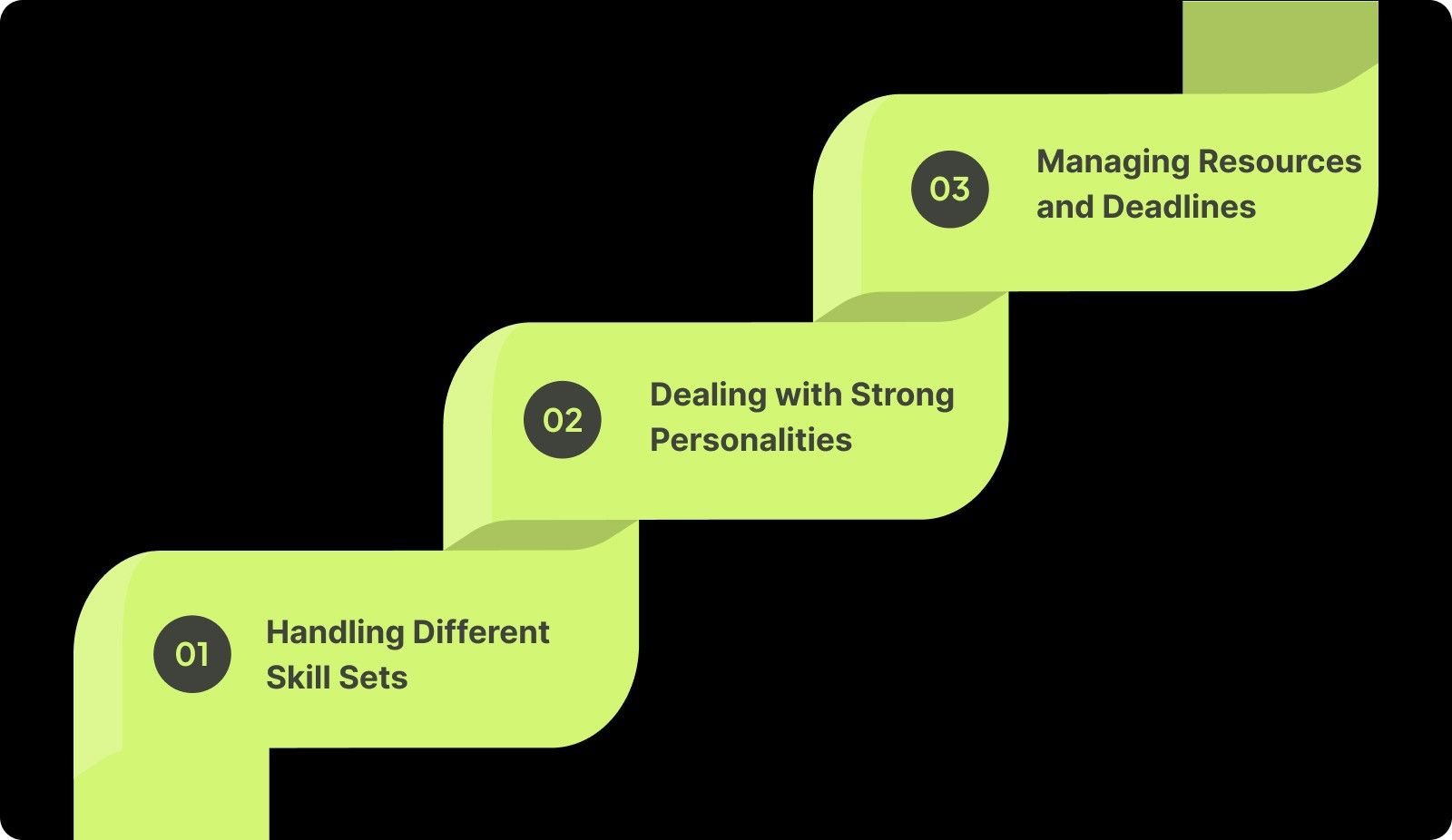
1. Handling Different Skill Sets

Every developer brings a unique skill set, making it challenging to balance tasks effectively. You may often struggle to ensure each developer is working at their optimal level while avoiding overwhelming those with less experience. Additionally, disparities in skill levels can lead to bottlenecks, delays, or frustration if not managed carefully. 

2. Dealing with Strong Personalities

In a software team, you often find developers with strong opinions about how things should be done. These strong personalities can clash, leading to conflict and miscommunication. As a manager, you need to support collaboration while ensuring that everyone’s voice is heard without allowing one person to dominate the conversation.

3. Managing Resources and Deadlines

Keeping track of resource allocation, meeting deadlines, and maintaining high-quality work is one of the toughest parts of managing your software teams. It becomes even more difficult when facing unexpected delays, sudden team changes, or unclear project requirements. 

Addressing these challenges will set the foundation for a more efficient, collaborative team. Now, let's explore 10 proven strategies to manage your software team effectively.

Also Read: Understanding Code Coverage: Meaning, Metrics, and Measurement
10 Proven Strategies to Manage Your Software Team 

Managing a software team means helping your team succeed and feel supported. These 10 strategies will help you build a supportive, team-focused environment where everyone can excel and reach their full potential.

1. Lead as a Strategic Partner, Not Just a Manager

Your job as a leader isn’t to micromanage tasks. You have to create an environment where your team can execute with clarity and confidence. Instead of jumping into the technical details yourself, focus on aligning engineering work with business goals and removing blockers that slow your team down.

Here’s what you need to do to lead strategically:

  • Connect priorities to business outcomes: Make sure every project ties back to a measurable goal.

  • Remove friction, don’t control tasks: Ask, “What’s blocking progress?” instead of “What are you working on?”

  • Motivate team leads to make decisions: Delegate ownership of technical decisions instead of approving every detail.

  • Communicate what matters most: Clarify what’s urgent, what’s important, and why.

  • Use data to guide direction: Rely on engineering insights (velocity, PR cycle time, blockers) instead of assumptions.

Pro Tip: Hold short, weekly 1:1s with team leads to discuss challenges and decisions; not status reports. This positions you as a partner who clears the path, not a supervisor who checks in.

2. Set SMART Goals and Align with Business Outcomes

Clear goals keep your team focused and prevent wasted effort. Use SMART goals, Specific, Measurable, Achievable, Relevant, and Time-bound, to define success and ensure that every initiative supports the broader business strategy. When your engineers understand why something matters (not just what to build), they execute with more ownership and urgency.

Here’s what you need to do to set goals that drive meaningful outcomes:

  • Define the problem, not just the task: Clarify what needs to improve and why it matters.

  • Make goals measurable: Attach metrics like delivery time, quality, or customer impact.

  • Ensure relevance: Tie goals back to revenue, customer value, or strategic priorities.

  • Set realistic timelines: Avoid overloading sprints. Velocity data keeps expectations grounded.

  • Review progress regularly: Revisit goals every sprint or milestone to adapt if priorities shift.

Pro Tip: Use OKRs (Objectives and Key Results) to make goal-setting transparent and cross-functional. When your team clearly sees how their work drives business outcomes, execution becomes more intentional and focused.

3. Simplify Communication with the Right Tools

Effective communication is important for ensuring that your team works efficiently and stays aligned with project goals. With the variety of tools available, it’s easy to let communication become fragmented. Centralizing communication in the right tools allows your team to access all updates and discussions in one place, reducing unnecessary back-and-forth and improving focus.

Here’s how to simplify communication:

  • Centralize communication: Use a single tool (like Slack or Microsoft Teams) to house all team discussions, avoiding scattered threads and channels across multiple platforms.

  • Integrate project updates: Connect project management tools (like Jira or Trello) directly with communication tools, ensuring updates automatically flow into team discussions.

  • Use channels for specific topics: Set up dedicated channels for different projects or tasks so your team can easily track progress and avoid irrelevant messages.

  • Encourage asynchronous communication: Enable your team to share updates and feedback on their own schedule, minimizing meeting overload.

  • Monitor tool overload: Keep the number of tools to a minimum and regularly assess which tools are actually adding value.

Pro Tip: Integrate Jira with Slack to ensure that your team gets real-time project updates directly within your communication platform, eliminating the need to toggle between tools.

4. Assign Tasks Based on Strengths, Not Just Roles

Task assignment should align with each developer's unique skills and strengths. By understanding what your developer excels at and assigning tasks that tap into their specific expertise, you ensure that the work is completed more efficiently and with greater satisfaction.

Here’s how to assign tasks based on strengths:

  • Understand each developer’s skills: Keep an updated record of each team member’s strengths, preferred working styles, and areas of interest.

  • Match tasks to expertise: Assign complex tasks to developers who excel in those areas, and simpler tasks to those who are still building those skills.

  • Consider career growth: Give developers opportunities to take on tasks that challenge them, enabling both skill growth and job satisfaction.

  • Delegate based on personal preferences: Understand individual motivations and tailor assignments to what excites and engages them.

  • Adjust tasks dynamically: As developers improve or change interests, be flexible and adapt their assignments accordingly.

Pro Tip: Regularly assess your team's skills and interests through one-on-ones to keep track of their growth and match them with tasks that keep them motivated and engaged.

5. Promote Collaboration, Not Competition

In software development, collaboration far outweighs competition. By encouraging teamwork and knowledge-sharing, you create a more supportive environment where ideas are freely exchanged, and your entire team works toward shared objectives. A collaborative mindset promotes sustainable success and a stronger team culture.

Here’s how to promote collaboration:

  • Facilitate knowledge sharing: Create spaces for your developers to share insights, experiences, and solutions with the team, whether through documentation or informal discussions.

  • Encourage collective problem-solving: When faced with challenges, approach them as a team rather than assigning individual responsibility for solving issues.

  • Align goals around team success: Set team-based objectives so success is shared, rather than focusing on individual performance metrics.

  • Use pair programming: Promote collaborative coding by having developers work together on tasks, ensuring that multiple perspectives are considered.

  • Create cross-functional groups: Encourage your developers to collaborate with other departments (design, QA, etc.) to create understanding and improve team synergy.

Pro Tip: Organize pair programming and collaborative code review sessions to ensure that knowledge is shared, and everyone is aligned on the solution. This makes your team's success the priority.

6. Manage Performance with Data-Driven Metrics

Effective performance management relies on clear, objective metrics that allow you to track progress and provide actionable feedback. Rather than relying on subjective evaluations, using KPIs like commit frequency, code quality, and bug resolution times helps create a data-driven approach that reveals true team performance.

Here’s how to manage performance with data-driven metrics:

  • Track commit frequency: Monitor how often code is being committed to understand productivity and consistency in output.

  • Measure code quality: Use static code analysis tools to ensure your code is clean, efficient, and maintainable.

  • Evaluate bug resolution time: Track how quickly bugs are addressed to understand how well your team is reacting to issues and minimizing technical debt.

  • Use cycle time: Measure how long it takes to move a task from start to finish, highlighting bottlenecks and inefficiencies.

  • Assess team collaboration: Monitor the frequency of code reviews, pair programming, and team discussions to gauge your team's collaboration levels.

Pro Tip: Use sprint retrospectives to analyze performance data like bug resolution times and commit frequency. This allows the team to make data-backed adjustments for future sprints, rather than relying on anecdotal feedback.

Also Read: Sprint Review Guide: Definition, Goals, and Tips
7. Prioritize Developer Well-being and Work-Life Balance

Your developer's well-being is important to maintaining long-term productivity and promoting a healthy work environment. The tech industry often demands long hours, but without proper balance, burnout becomes a real risk. As a leader, it’s your responsibility to ensure your team is well-rested and supported, preventing burnout and promoting sustainable performance.

Here’s how to prioritize your developer well-being:

  • Encourage flexible working hours: Allow your team to work when they are most productive, accommodating their personal schedules.

  • Promote regular breaks: Remind your team to take short breaks to recharge throughout the day, preventing fatigue and increasing focus.

  • Offer mental health resources: Provide access to counseling services, mental health apps, or stress-relief programs to support your team’s mental well-being.

  • Monitor workload: Regularly check in with your team to ensure no one is consistently overburdened with tasks or tight deadlines.

  • Promote a supportive culture: Create an environment where it’s okay to speak up about work-life balance and encourage open conversations about mental health.

Pro Tip: Implement flexible working hours and encourage your team to take regular breaks. Make mental health resources available, and ensure no developer is consistently overloaded.

8. Use AI and Automation to Eliminate Repetitive Tasks

Repetitive tasks like documentation, code reviews, and bug tracking are time-consuming but essential. By using AI and automation, you can offload these routine tasks and allow your developers to focus on more valuable, creative work. Automating these processes not only improves efficiency but also enhances the quality of your team’s output.

Here’s how AI and automation can help:

  • Automate code reviews: Use AI-powered tools like Entelligence AI to automate the review process, reducing manual effort and boosting review cycles.

  • Update documentation automatically: Keep documentation current with minimal effort, ensuring that it always reflects the latest code changes.

  • Identify bugs early: AI tools can scan the codebase to identify bugs early in the development cycle, reducing time spent on debugging.

  • Integrate seamlessly with existing tools: Choose AI solutions that integrate smoothly with your existing development environment, minimizing disruption and enhancing workflow.

Pro Tip: Use AI to automate code reviews and documentation. This not only reduces repetitive tasks but also frees up valuable developer time. It also allows your team to focus on innovation and complex challenges.

9. Build Trust and Recognize Team Contributions

Recognizing team contributions is essential for building trust and maintaining a high level of engagement. Whether big or small, acknowledging achievements helps create a culture of appreciation and keeps motivation high. Developers who feel valued are more likely to stay engaged and produce quality work.

Here’s how to build trust and recognize contributions:

  • Acknowledge both big and small wins: Celebrate every achievement, whether it’s completing a challenging feature or resolving a tricky bug.

  • Publicly recognize efforts: Make recognition visible by celebrating team accomplishments in meetings or through company-wide channels.

  • Facilitate peer-to-peer recognition: Encourage team members to recognize each other’s efforts, creating a culture of mutual appreciation.

  • Provide meaningful rewards: Offer rewards or incentives that are meaningful to your team, whether it’s through bonuses, additional responsibilities, or simple public acknowledgment.

  • Encourage a positive environment: Create an atmosphere where all contributions are valued, making it clear that everyone’s efforts matter.

Pro Tip: Use leaderboards or gamification to highlight top performers. Also, ensure that all your team members are recognized for their contributions in a meaningful way, boosting morale across the board.

10. Ensure Continuous Feedback and Adaptation

Feedback should be an ongoing, dynamic process that helps your team adapt to challenges and continuously improve. Regular check-ins provide your team with the opportunity to express concerns, offer ideas, and align on performance expectations. Creating a feedback loop creates a culture of growth, helping everyone stay aligned and focused on your team’s goals.

Here’s how to ensure continuous feedback and adaptation:

  • Establish regular feedback cycles: Schedule frequent 1:1s and team reviews to discuss performance, goals, and challenges.

  • Encourage two-way communication: Make feedback a two-way street where your team feels comfortable providing feedback to you as well.

  • Implement peer reviews: Include feedback from peers in the process to give team members a broader perspective on their performance.

  • Use self-assessments: Encourage your team members to reflect on their work and identify areas for personal improvement.

  • Adapt to changing needs: Use feedback to adjust priorities, tasks, and workflows in response to new information or challenges.

Pro Tip: Set up continuous feedback systems that include peer reviews, self-assessments, and feedback from leadership. This helps your team stay aligned, promotes continuous improvement, and ensures no one is left behind.

Also Read: What Are DORA Metrics and Why Do They Matter?

As you implement these strategies for in-office teams, managing a remote software team requires a different set of considerations. Let’s explore key aspects to keep your remote team aligned, engaged, and performing at their best.

What to Consider for a Remote Software Team?

Managing a remote software team comes with unique challenges that require proactive solutions. Focusing on communication, technology, and support ensures that your team stays aligned, productive, and engaged, despite physical distance. Here’s what to consider for effective remote team management.

1. Establish Regular Communication

Ensure daily or weekly check-ins to discuss goals, blockers, and feedback. Use video calls to have a personal connection and reduce misunderstandings. Structured communication channels prevent confusion and promote clear, actionable updates to keep your entire team aligned.

2. Use Technology to Your Advantage

Utilize project management tools like Jira or Trello to track tasks and milestones. Cloud-based platforms like Google Workspace allow real-time collaboration on documents, while automation tools can reduce repetitive tasks. Technology can always help simplify workflows and boost team efficiency remotely.

3. Clarify Expectations

Set clear guidelines on availability, response times, and task ownership. Make sure all team members understand their roles and responsibilities in relation to project goals. Establishing well-defined expectations ensures everyone works towards a shared vision and reduces ambiguity in a remote setting.

Effective remote team management requires a combination of clear communication, the right technology, and a focus on ongoing support. By keeping expectations transparent and tracking outcomes, you create a productive and motivated team, driving success no matter where team members are located.

Optimize Software Team Management with Entelligence AI

Managing a software team comes with its challenges. Balancing task assignments, ensuring clear communication, and maintaining productivity are all essential yet demanding aspects of leadership. Keeping everything on track while meeting deadlines can often feel overwhelming.

Entelligence AI simplifies these complexities by providing data-backed insights, automating performance tracking, and optimizing workflows. It enables leaders like you to focus on high-level strategy while minimizing manual efforts.

Key Features of Entelligence AI:

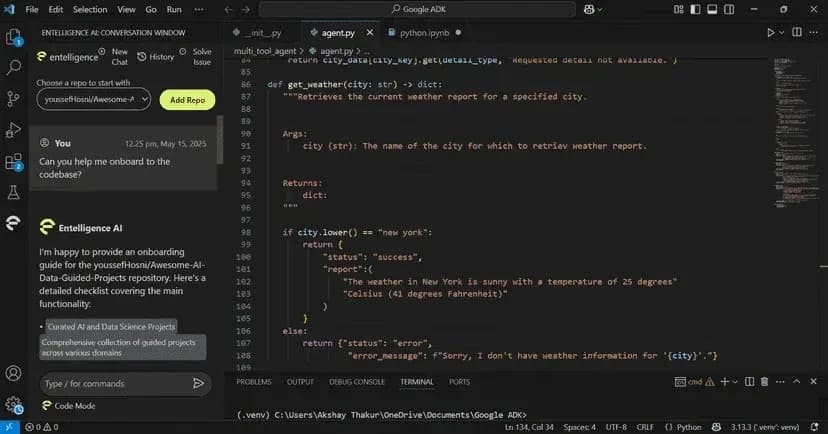
  • Context-Aware Code Reviews: Automatically suggest improvements during code reviews, saving time and enhancing code quality.

  • Automated Documentation: Keep project documentation up-to-date without manual effort, ensuring your team has accurate references at all times.

  • Sprint Assessments: Use AI-driven insights to evaluate sprint performance, helping to identify bottlenecks and improve future workflows.

  • Real-Time Team Insights: Gain a comprehensive view of your team’s performance, collaboration, and productivity metrics, enabling smarter decision-making.

  • Seamless Integrations: Easily integrate with your existing development tools like Slack and Microsoft Teams to ensure a smooth workflow.

With Entelligence AI, you can ensure your team works more efficiently and stays aligned, all while achieving better results with less effort.
Conclusion

Managing a software development team in 2025 is about more than just overseeing tasks. You have to create an environment where your team can grow and achieve both personal and business goals. By focusing on strategic leadership, clear goal-setting, collaboration, and continuous improvement, you can help your software team reach new heights of productivity and success.

To help you manage your software development team more effectively, Entelligence AI can provide AI-powered insights and tools, simplifying workflows and improving code quality.

Start your demo with Entelligence today and see how AI-driven insights can enhance your team’s performance and drive better results.

FAQs

Q. What makes managing a software team difficult?

Managing a software team is challenging due to the complexity of technical issues, differing skill sets, tight deadlines, and maintaining clear communication. Balancing productivity with team morale and aligning goals can also be a major hurdle.

Q. What is the most effective tool for managing a team of developers?

Entelligence AI is an effective tool for managing your team of developers. It provides real-time insights into team performance, automates repetitive tasks, and integrates directly with IDEs. This helps in improving productivity, code quality, and collaboration across your team.

Q. How can I improve communication within my software development team?

To improve communication, centralize tools like Slack for real-time updates and Jira for project management. Regular check-ins, clear documentation, and transparent feedback systems help keep everyone on the same page and reduce misunderstandings.

Q. How can I prevent burnout in my software development team?

Prevent burnout by promoting a healthy work-life balance. Encourage flexible hours, ensure manageable workloads, and offer mental health support. Regular breaks and open communication about stress levels also help maintain your long-term team well-being.

Q. What metrics should I track to ensure my software team is productive?

Track key performance metrics like commit frequency, code quality, bug resolution times, and sprint velocity. These provide insights into individual performance and team efficiency, helping you optimize workflows and identify areas for improvement.
Measuring your software developer productivity can lead to significant improvements. Research has shown that by implementing structured productivity metrics, companies have seen a 20% improvement in employee experience scores. 

This highlights how leadership and effective management can directly impact team morale and overall performance. In this article, we’ll explore 10 proven strategies for managing your software development team more effectively. 

From aligning team goals with business objectives to improving communication and utilizing data-driven metrics, these strategies will help you optimize your team’s productivity and create an environment where everyone can grow.

Key Takeaways

  • Start leading strategically by aligning your team's efforts with business goals and removing roadblocks to performance.

  • Set SMART goals that directly impact business success and drive focused, measurable outcomes.

  • Use tools like Slack and Jira to manage workflows and eliminate communication friction.

  • Delegate based on strengths, cultivating collaboration over competition for higher productivity.

  • Cultivate a feedback-driven culture to keep your team agile and continuously improving.

What are the Challenges That Come From Managing Your Software Teams?

Managing your software teams comes with unique challenges. From differing skill sets to complex technical issues, these obstacles can affect productivity and team morale if not properly addressed. Let’s dive into some of the most common challenges.

What are the Challenges That Come From Managing Your Software Teams?

1. Handling Different Skill Sets

Every developer brings a unique skill set, making it challenging to balance tasks effectively. You may often struggle to ensure each developer is working at their optimal level while avoiding overwhelming those with less experience. Additionally, disparities in skill levels can lead to bottlenecks, delays, or frustration if not managed carefully. 

2. Dealing with Strong Personalities

In a software team, you often find developers with strong opinions about how things should be done. These strong personalities can clash, leading to conflict and miscommunication. As a manager, you need to support collaboration while ensuring that everyone’s voice is heard without allowing one person to dominate the conversation.

3. Managing Resources and Deadlines

Keeping track of resource allocation, meeting deadlines, and maintaining high-quality work is one of the toughest parts of managing your software teams. It becomes even more difficult when facing unexpected delays, sudden team changes, or unclear project requirements. 

Addressing these challenges will set the foundation for a more efficient, collaborative team. Now, let's explore 10 proven strategies to manage your software team effectively.

Also Read: Understanding Code Coverage: Meaning, Metrics, and Measurement

10 Proven Strategies to Manage Your Software Team 

Managing a software team means helping your team succeed and feel supported. These 10 strategies will help you build a supportive, team-focused environment where everyone can excel and reach their full potential.

1. Lead as a Strategic Partner, Not Just a Manager

Your job as a leader isn’t to micromanage tasks. You have to create an environment where your team can execute with clarity and confidence. Instead of jumping into the technical details yourself, focus on aligning engineering work with business goals and removing blockers that slow your team down.

Here’s what you need to do to lead strategically:

  • Connect priorities to business outcomes: Make sure every project ties back to a measurable goal.

  • Remove friction, don’t control tasks: Ask, “What’s blocking progress?” instead of “What are you working on?”

  • Motivate team leads to make decisions: Delegate ownership of technical decisions instead of approving every detail.

  • Communicate what matters most: Clarify what’s urgent, what’s important, and why.

  • Use data to guide direction: Rely on engineering insights (velocity, PR cycle time, blockers) instead of assumptions.

Pro Tip: Hold short, weekly 1:1s with team leads to discuss challenges and decisions; not status reports. This positions you as a partner who clears the path, not a supervisor who checks in.

2. Set SMART Goals and Align with Business Outcomes

Clear goals keep your team focused and prevent wasted effort. Use SMART goals, Specific, Measurable, Achievable, Relevant, and Time-bound, to define success and ensure that every initiative supports the broader business strategy. When your engineers understand why something matters (not just what to build), they execute with more ownership and urgency.

Here’s what you need to do to set goals that drive meaningful outcomes:

  • Define the problem, not just the task: Clarify what needs to improve and why it matters.

  • Make goals measurable: Attach metrics like delivery time, quality, or customer impact.

  • Ensure relevance: Tie goals back to revenue, customer value, or strategic priorities.

  • Set realistic timelines: Avoid overloading sprints. Velocity data keeps expectations grounded.

  • Review progress regularly: Revisit goals every sprint or milestone to adapt if priorities shift.

Pro Tip: Use OKRs (Objectives and Key Results) to make goal-setting transparent and cross-functional. When your team clearly sees how their work drives business outcomes, execution becomes more intentional and focused.

3. Simplify Communication with the Right Tools

Effective communication is important for ensuring that your team works efficiently and stays aligned with project goals. With the variety of tools available, it’s easy to let communication become fragmented. Centralizing communication in the right tools allows your team to access all updates and discussions in one place, reducing unnecessary back-and-forth and improving focus.

Here’s how to simplify communication:

  • Centralize communication: Use a single tool (like Slack or Microsoft Teams) to house all team discussions, avoiding scattered threads and channels across multiple platforms.

  • Integrate project updates: Connect project management tools (like Jira or Trello) directly with communication tools, ensuring updates automatically flow into team discussions.

  • Use channels for specific topics: Set up dedicated channels for different projects or tasks so your team can easily track progress and avoid irrelevant messages.

  • Encourage asynchronous communication: Enable your team to share updates and feedback on their own schedule, minimizing meeting overload.

  • Monitor tool overload: Keep the number of tools to a minimum and regularly assess which tools are actually adding value.

Pro Tip: Integrate Jira with Slack to ensure that your team gets real-time project updates directly within your communication platform, eliminating the need to toggle between tools.

4. Assign Tasks Based on Strengths, Not Just Roles

Task assignment should align with each developer's unique skills and strengths. By understanding what your developer excels at and assigning tasks that tap into their specific expertise, you ensure that the work is completed more efficiently and with greater satisfaction.

Here’s how to assign tasks based on strengths:

  • Understand each developer’s skills: Keep an updated record of each team member’s strengths, preferred working styles, and areas of interest.

  • Match tasks to expertise: Assign complex tasks to developers who excel in those areas, and simpler tasks to those who are still building those skills.

  • Consider career growth: Give developers opportunities to take on tasks that challenge them, enabling both skill growth and job satisfaction.

  • Delegate based on personal preferences: Understand individual motivations and tailor assignments to what excites and engages them.

  • Adjust tasks dynamically: As developers improve or change interests, be flexible and adapt their assignments accordingly.

Pro Tip: Regularly assess your team's skills and interests through one-on-ones to keep track of their growth and match them with tasks that keep them motivated and engaged.

5. Promote Collaboration, Not Competition

In software development, collaboration far outweighs competition. By encouraging teamwork and knowledge-sharing, you create a more supportive environment where ideas are freely exchanged, and your entire team works toward shared objectives. A collaborative mindset promotes sustainable success and a stronger team culture.

Here’s how to promote collaboration:

  • Facilitate knowledge sharing: Create spaces for your developers to share insights, experiences, and solutions with the team, whether through documentation or informal discussions.

  • Encourage collective problem-solving: When faced with challenges, approach them as a team rather than assigning individual responsibility for solving issues.

  • Align goals around team success: Set team-based objectives so success is shared, rather than focusing on individual performance metrics.

  • Use pair programming: Promote collaborative coding by having developers work together on tasks, ensuring that multiple perspectives are considered.

  • Create cross-functional groups: Encourage your developers to collaborate with other departments (design, QA, etc.) to create understanding and improve team synergy.

Pro Tip: Organize pair programming and collaborative code review sessions to ensure that knowledge is shared, and everyone is aligned on the solution. This makes your team's success the priority.

6. Manage Performance with Data-Driven Metrics

Effective performance management relies on clear, objective metrics that allow you to track progress and provide actionable feedback. Rather than relying on subjective evaluations, using KPIs like commit frequency, code quality, and bug resolution times helps create a data-driven approach that reveals true team performance.

Here’s how to manage performance with data-driven metrics:

  • Track commit frequency: Monitor how often code is being committed to understand productivity and consistency in output.

  • Measure code quality: Use static code analysis tools to ensure your code is clean, efficient, and maintainable.

  • Evaluate bug resolution time: Track how quickly bugs are addressed to understand how well your team is reacting to issues and minimizing technical debt.

  • Use cycle time: Measure how long it takes to move a task from start to finish, highlighting bottlenecks and inefficiencies.

  • Assess team collaboration: Monitor the frequency of code reviews, pair programming, and team discussions to gauge your team's collaboration levels.

Pro Tip: Use sprint retrospectives to analyze performance data like bug resolution times and commit frequency. This allows the team to make data-backed adjustments for future sprints, rather than relying on anecdotal feedback.

Also Read: Sprint Review Guide: Definition, Goals, and Tips

7. Prioritize Developer Well-being and Work-Life Balance

Your developer's well-being is important to maintaining long-term productivity and promoting a healthy work environment. The tech industry often demands long hours, but without proper balance, burnout becomes a real risk. As a leader, it’s your responsibility to ensure your team is well-rested and supported, preventing burnout and promoting sustainable performance.

Here’s how to prioritize your developer well-being:

  • Encourage flexible working hours: Allow your team to work when they are most productive, accommodating their personal schedules.

  • Promote regular breaks: Remind your team to take short breaks to recharge throughout the day, preventing fatigue and increasing focus.

  • Offer mental health resources: Provide access to counseling services, mental health apps, or stress-relief programs to support your team’s mental well-being.

  • Monitor workload: Regularly check in with your team to ensure no one is consistently overburdened with tasks or tight deadlines.

  • Promote a supportive culture: Create an environment where it’s okay to speak up about work-life balance and encourage open conversations about mental health.

Pro Tip: Implement flexible working hours and encourage your team to take regular breaks. Make mental health resources available, and ensure no developer is consistently overloaded.

8. Use AI and Automation to Eliminate Repetitive Tasks

Repetitive tasks like documentation, code reviews, and bug tracking are time-consuming but essential. By using AI and automation, you can offload these routine tasks and allow your developers to focus on more valuable, creative work. Automating these processes not only improves efficiency but also enhances the quality of your team’s output.

Here’s how AI and automation can help:

  • Automate code reviews: Use AI-powered tools like Entelligence AI to automate the review process, reducing manual effort and boosting review cycles.

  • Update documentation automatically: Keep documentation current with minimal effort, ensuring that it always reflects the latest code changes.

  • Identify bugs early: AI tools can scan the codebase to identify bugs early in the development cycle, reducing time spent on debugging.

  • Integrate seamlessly with existing tools: Choose AI solutions that integrate smoothly with your existing development environment, minimizing disruption and enhancing workflow.

Pro Tip: Use AI to automate code reviews and documentation. This not only reduces repetitive tasks but also frees up valuable developer time. It also allows your team to focus on innovation and complex challenges.

9. Build Trust and Recognize Team Contributions

Recognizing team contributions is essential for building trust and maintaining a high level of engagement. Whether big or small, acknowledging achievements helps create a culture of appreciation and keeps motivation high. Developers who feel valued are more likely to stay engaged and produce quality work.

Here’s how to build trust and recognize contributions:

  • Acknowledge both big and small wins: Celebrate every achievement, whether it’s completing a challenging feature or resolving a tricky bug.

  • Publicly recognize efforts: Make recognition visible by celebrating team accomplishments in meetings or through company-wide channels.

  • Facilitate peer-to-peer recognition: Encourage team members to recognize each other’s efforts, creating a culture of mutual appreciation.

  • Provide meaningful rewards: Offer rewards or incentives that are meaningful to your team, whether it’s through bonuses, additional responsibilities, or simple public acknowledgment.

  • Encourage a positive environment: Create an atmosphere where all contributions are valued, making it clear that everyone’s efforts matter.

Pro Tip: Use leaderboards or gamification to highlight top performers. Also, ensure that all your team members are recognized for their contributions in a meaningful way, boosting morale across the board.

10. Ensure Continuous Feedback and Adaptation

Feedback should be an ongoing, dynamic process that helps your team adapt to challenges and continuously improve. Regular check-ins provide your team with the opportunity to express concerns, offer ideas, and align on performance expectations. Creating a feedback loop creates a culture of growth, helping everyone stay aligned and focused on your team’s goals.

Here’s how to ensure continuous feedback and adaptation:

  • Establish regular feedback cycles: Schedule frequent 1:1s and team reviews to discuss performance, goals, and challenges.

  • Encourage two-way communication: Make feedback a two-way street where your team feels comfortable providing feedback to you as well.

  • Implement peer reviews: Include feedback from peers in the process to give team members a broader perspective on their performance.

  • Use self-assessments: Encourage your team members to reflect on their work and identify areas for personal improvement.

  • Adapt to changing needs: Use feedback to adjust priorities, tasks, and workflows in response to new information or challenges.

Pro Tip: Set up continuous feedback systems that include peer reviews, self-assessments, and feedback from leadership. This helps your team stay aligned, promotes continuous improvement, and ensures no one is left behind.

Also Read: What Are DORA Metrics and Why Do They Matter?

As you implement these strategies for in-office teams, managing a remote software team requires a different set of considerations. Let’s explore key aspects to keep your remote team aligned, engaged, and performing at their best.

What to Consider for a Remote Software Team?

Managing a remote software team comes with unique challenges that require proactive solutions. Focusing on communication, technology, and support ensures that your team stays aligned, productive, and engaged, despite physical distance. Here’s what to consider for effective remote team management.

1. Establish Regular Communication

Ensure daily or weekly check-ins to discuss goals, blockers, and feedback. Use video calls to have a personal connection and reduce misunderstandings. Structured communication channels prevent confusion and promote clear, actionable updates to keep your entire team aligned.

2. Use Technology to Your Advantage

Utilize project management tools like Jira or Trello to track tasks and milestones. Cloud-based platforms like Google Workspace allow real-time collaboration on documents, while automation tools can reduce repetitive tasks. Technology can always help simplify workflows and boost team efficiency remotely.

3. Clarify Expectations

Set clear guidelines on availability, response times, and task ownership. Make sure all team members understand their roles and responsibilities in relation to project goals. Establishing well-defined expectations ensures everyone works towards a shared vision and reduces ambiguity in a remote setting.

Effective remote team management requires a combination of clear communication, the right technology, and a focus on ongoing support. By keeping expectations transparent and tracking outcomes, you create a productive and motivated team, driving success no matter where team members are located.

Optimize Software Team Management with Entelligence AI

Managing a software team comes with its challenges. Balancing task assignments, ensuring clear communication, and maintaining productivity are all essential yet demanding aspects of leadership. Keeping everything on track while meeting deadlines can often feel overwhelming.

Entelligence AI simplifies these complexities by providing data-backed insights, automating performance tracking, and optimizing workflows. It enables leaders like you to focus on high-level strategy while minimizing manual efforts.

Key Features of Entelligence AI:

  • Context-Aware Code Reviews: Automatically suggest improvements during code reviews, saving time and enhancing code quality.

  • Automated Documentation: Keep project documentation up-to-date without manual effort, ensuring your team has accurate references at all times.

  • Sprint Assessments: Use AI-driven insights to evaluate sprint performance, helping to identify bottlenecks and improve future workflows.

  • Real-Time Team Insights: Gain a comprehensive view of your team’s performance, collaboration, and productivity metrics, enabling smarter decision-making.

  • Seamless Integrations: Easily integrate with your existing development tools like Slack and Microsoft Teams to ensure a smooth workflow.

With Entelligence AI, you can ensure your team works more efficiently and stays aligned, all while achieving better results with less effort.

Conclusion

Managing a software development team in 2025 is about more than just overseeing tasks. You have to create an environment where your team can grow and achieve both personal and business goals. By focusing on strategic leadership, clear goal-setting, collaboration, and continuous improvement, you can help your software team reach new heights of productivity and success.

To help you manage your software development team more effectively, Entelligence AI can provide AI-powered insights and tools, simplifying workflows and improving code quality.

Start your demo with Entelligence today and see how AI-driven insights can enhance your team’s performance and drive better results.

FAQs

Q. What makes managing a software team difficult?

Managing a software team is challenging due to the complexity of technical issues, differing skill sets, tight deadlines, and maintaining clear communication. Balancing productivity with team morale and aligning goals can also be a major hurdle.

Q. What is the most effective tool for managing a team of developers?

Entelligence AI is an effective tool for managing your team of developers. It provides real-time insights into team performance, automates repetitive tasks, and integrates directly with IDEs. This helps in improving productivity, code quality, and collaboration across your team.

Q. How can I improve communication within my software development team?

To improve communication, centralize tools like Slack for real-time updates and Jira for project management. Regular check-ins, clear documentation, and transparent feedback systems help keep everyone on the same page and reduce misunderstandings.

Q. How can I prevent burnout in my software development team?

Prevent burnout by promoting a healthy work-life balance. Encourage flexible hours, ensure manageable workloads, and offer mental health support. Regular breaks and open communication about stress levels also help maintain your long-term team well-being.

Q. What metrics should I track to ensure my software team is productive?

Track key performance metrics like commit frequency, code quality, bug resolution times, and sprint velocity. These provide insights into individual performance and team efficiency, helping you optimize workflows and identify areas for improvement.
Your questions,

Your questions,

Decoded

Decoded

What makes Entelligence different?

Unlike tools that just flag issues, Entelligence understands context — detecting, explaining, and fixing problems while aligning with product goals and team standards.

Does it replace human reviewers?

No. It amplifies them. Entelligence handles repetitive checks so engineers can focus on architecture, logic, and innovation.

What tools does it integrate with?

It fits right into your workflow — GitHub, GitLab, Jira, Linear, Slack, and more. No setup friction, no context switching.

How secure is my code?

Your code never leaves your environment. Entelligence uses encrypted processing and complies with top industry standards like SOC 2 and HIPAA.

Who is it built for?

Fast-growing engineering teams that want to scale quality, security, and velocity without adding more manual reviews or overhead.

What makes Entelligence different?
Does it replace human reviewers?
What tools does it integrate with?
How secure is my code?
Who is it built for?

Drop your details

We’ll reach out before your next deploy hits production.

We’ll reach out before your next deploy hits production.