

Bitbucket Code Review: Setup, Best Practices, and Tips

Dec 12, 2025

Dec 12, 2025

If you lead an engineering team, you already know code reviews aren’t the problem; slow, inconsistent code reviews are. And lately, even McKinsey has been calling out the same thing: teams don’t lose speed because of bad code, they lose it because of broken review flow and constant context-switching.

In practice, code reviews already eat meaningful time: open-source contributors report about 6.4 hours/week on reviews (Google’s case study clocks 3.2 hours). This is the time that becomes handoff waste when reviewers are inconsistent or distracted.

You don’t need another primer on what a PR is; you need a playbook that fixes the real issues: stalled reviews, nonstop context-switching, noisy feedback, and “automation” that adds work instead of removing it.

This guide shows you how to set up Bitbucket, so reviews move faster, reviewers stay disciplined, automation works as intended, and the hidden review tax disappears.

Overview

  • A smooth Bitbucket review pipeline starts with structure, not UI: Branch protections, merge checks, reviewer groups, and PR templates eliminate most delays before a reviewer even opens the diff.

  • Small, well-scoped PRs dramatically accelerate review speed: Industry data shows PRs under about 300 lines consistently move faster and get more accurate feedback, reducing rework and context switching.

  • CI automation removes most low-value reviewer work: Bitbucket Pipelines can run linting, tests, dependency checks, and security scans on every PR, ensuring reviewers focus on logic and risk rather than formatting or failures.

  • Using Bitbucket’s UI intentionally shortens review cycles: Commit-by-commit navigation, full-file views, file-tree filtering, inline tasks, and surfaced CI results allow reviewers to evaluate code with minimal reconstruction time.

  • Bitbucket handles diffs, but Entelligence handles context: While Bitbucket shows what changed, Entelligence AI analyzes the entire codebase to reveal cross-file issues, architectural risks, documentation gaps, and team-level quality trends.

Bitbucket Code Review Fundamentals

At the fundamentals level, code review in Bitbucket is less about learning the UI and more about setting up durable, repeatable patterns that stop review work from leaking time.

These fundamentals, policies, ownership, automation gates, and review hygiene ensure reviewers focus on real design and safety decisions, not formatting, stale context, or hidden cross-file issues.

Here’s what every team should lock in from the start:

  • Protect branches and enforce essential merge checks:
    Require approvals, successful CI, and security scans on key branches so every merge meets a minimum quality bar without manual policing.

  • Use reviewer groups or CODEOWNERS for consistent routing:
    Automate who gets pulled into a review so context owners are notified immediately, and PRs never wait because “no one knew who should review it.”

  • Keep PRs small and structured with templates:
    Smaller diffs + a standard template (summary, risks, testing notes) make reviews faster and reduce the need for clarification cycles.

  • Shift low-value checks to CI before reviewers step in:
    Let Pipelines handle formatting, linting, tests, and dependency/security scanning so reviewers focus on logic and design instead of noise.

  • Make reviews easier to consume with clean commits and context:
    Encourage focused commits and include supporting artifacts (screenshots, test cases, sample inputs) so reviewers don’t waste time reconstructing intent.

  • Track review health metrics and set simple SLAs:
    Monitor time-to-first-review, PR size, and merge velocity; use lightweight SLAs or reviewer rotations to keep queues moving without burnout.

Once you have the fundamentals dialed in, it’s time to put structure behind them. That’s where Bitbucket’s setup makes or breaks how smoothly reviews move.

Setting Up Bitbucket for Effective Code Reviews

Setting up Bitbucket the right way establishes predictable flow: reviewers know what to do, automation fires reliably, and every PR enters the pipeline with the right structure.
Setting Up Bitbucket for Effective Code Reviews

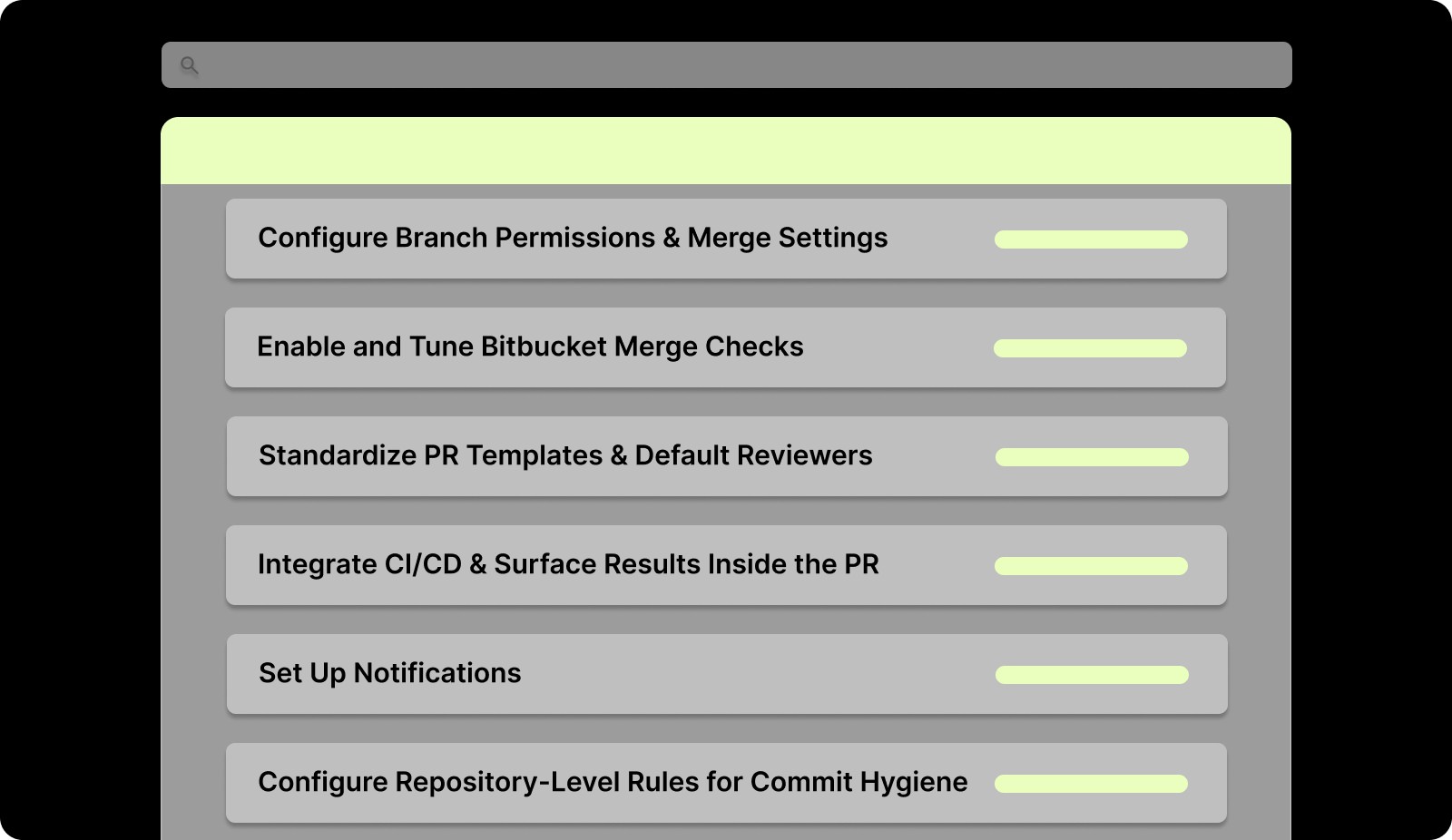
Below is the setup sequence teams should follow to make Bitbucket reviews fast, disciplined, and low-friction.

Step 1: Configure Branch Permissions and Merge Settings

Set clear rules for who can push, who can merge, and what conditions must be met before a merge is allowed.

  • Lock down main, release, and other protected branches.

  • Require approvals, passing builds, and clean security checks before merging.

  • Disable direct pushes to critical branches to avoid bypassing review entirely.

This ensures every PR enters a controlled workflow instead of relying on tribal knowledge or ad hoc reviewer decisions.

Step 2: Enable and Tune Bitbucket Merge Checks

Merge checks act as the system’s quality gate, not the reviewer’s burden.

  • Require at least one or two approvals (depending on repo risk level).

  • Make successful CI runs mandatory for merge.

  • Add checks for unresolved comments, open tasks, or failing security scans.

When tuned correctly, merge checks eliminate entire categories of avoidable review churn.

Step 3: Standardize PR Templates and Default Reviewers

Bitbucket’s default templates and reviewer settings remove inconsistency from the moment a PR is created.

  • Use PR templates to define structure: summary, intent, risks, and test notes.

  • Assign default reviewers or reviewer groups for specific directories or components.

  • Apply CODEOWNERS-like patterns to automatically pull in the right people.

This reduces back-and-forth and ensures each PR starts with complete context.

Step 4: Integrate CI/CD and Surface Results Inside the PR

A properly connected CI pipeline significantly speeds up Bitbucket reviews.

  • Run unit tests, linters, and style checks on every PR.

  • Add SAST, dependency scanning, and secret detection for security workflows.

  • Display all results in the PR so reviewers don’t jump between tools.

The goal is simple: reviewers should see everything they need in one place.

Step 5: Set Up Notifications and Review Workflows That Prevent Stale PRs

Notifications aren’t just alerts; they shape reviewer behavior.

  • Configure Slack or email notifications for PR assignments, failed checks, and requested changes.

  • Use Bitbucket’s “watched repositories” and personal review queues to surface what needs attention.

  • Establish a lightweight rotation or “reviewer on duty” model for busy teams.

Good review flow depends on surfacing the right PRs at the right time.

Step 6: Configure Repository-Level Rules for Commit Hygiene

A well-organized repository reduces noise before a reviewer even opens the diff.

  • Enforce commit signing or message guidelines.

  • Block large, unrelated changes using file-size or diff-based warnings.

  • Use pre-commit hooks (local or shared) to prevent formatting drift.

This makes each PR cleaner, more predictable, and easier to evaluate.

Set up gets the workflow ready; now it’s about using Bitbucket’s review UI effectively so reviewers spend less time digging and more time evaluating.

Navigating the Bitbucket Code Review UI

The UI of Bitbucket turns code review into a unified, context-rich workspace: you don’t have to jump across multiple tools, diff, CI, comments, and history live side-by-side. When you use it intentionally, you shorten context setup time and make your reviews more reliable.

Here are the proven UI workflows that help reviewers move fast and stay focused:

  • Review-by-commit: Step through commits in order. This preserves author intent and avoids commenting on obsolete code.

  • Full-file view instead of snippets: Open the entire file to see surrounding context — this helps catch logic or API-boundary issues that diff snippets hide.

  • Use file tree and filters to isolate relevant files: The file-tree navigator lets you quickly jump to changed files; filters and search help if PRs affect many files.

  • Inline comments and tasks for precise feedback: You can comment on a whole PR, a file, or exact lines, and convert comments into tasks for follow-up.

  • Merge insight with integrated CI/build and security results: Bitbucket shows build status, test results, and security scan results inside the PR, so you don’t need to cross-check separate dashboards.

  • Use unified or side-by-side diff view depending on review needs: For quick scans, unified diff helps; for deeper logic or comparison work, side-by-side helps. Bitbucket supports both.

Also Read: How to Use AI for Code Reviews on GitHub?

With the review interface covered, the next piece is making sure every pull request enters the system in a clean, structured state. That starts with how the PR is created.

Step-by-Step: Creating a Bitbucket Pull Request for Review

High-performing teams don’t treat PR creation as an afterthought; they treat it as the first quality gate. When a PR enters the queue fully prepared, reviewers move faster, context is clear, and the review pipeline stays unblocked.

This section breaks down the exact sequence Bitbucket expects so your PRs are clean, complete, and ready for fast decisions.

Step

What Bitbucket Supports

1. Prepare your branch

PRs can only be created from a branch or fork.

2. Compare branches

Bitbucket shows diffs and commit history before PR creation.

3. Add PR details

Title required; description optional with support for links/attachments.

4. Add reviewers

Assign individual reviewers or groups during creation.

5. Check build status

CI/Pipelines results appear directly in the PR view.

6. Create the PR

PR tracks diffs, commits, comments, tasks, and approvals in one place.

7. Auto-close branch (optional)

Option to delete the source branch automatically after the merge.

Want every PR reviewed and merged faster, without sacrificing quality? Try Entelligence AI’s real-time, in-IDE code review and PR automation to catch bugs early, auto-format code, and simplify merge workflows. Book your demo now!

A well-built PR is only half the win; how the author presents and frames the change has an even bigger impact on review speed. That’s where best practices come in.

Best Practices for Bitbucket PR Authors

Authors who structure their PRs around Bitbucket’s native capabilities create reviews that are easier to get through, easier to validate, and far less likely to stall.

These are the Bitbucket-specific author practices proven to reduce review time and increase approval consistency:

  • Use the branch comparison view before opening the PR: Bitbucket’s compare tool shows all commits and diffs upfront, helping authors catch accidental changes before reviewers do.

  • Fill out metadata Bitbucket surfaces to reviewers: Link Jira issues, attach screenshots, and add context so the PR overview tab becomes the reviewer’s starting point.

  • Mark WIP using Draft PRs: Bitbucket’s draft state prevents early notifications and keeps reviewers from entering half-finished work.

  • Trigger a fresh pipeline run before requesting review: Builds and security checks display inside the PR; ensuring they pass early eliminates the #1 cause of stalled reviews.

  • Add reviewers through groups or CODEOWNERS mappings: Bitbucket auto-suggests owners based on directory rules. Authors should rely on these to route PRs correctly.

  • Enable “close branch on merge” for feature branches: Keeps the repo clean and prevents reviewers from navigating outdated branches during future audits.

Also Read: How to Conduct a Code Quality Audit: A Comprehensive Guide

Strong PRs only pay off when reviewers match that standard. The next step is defining what effective reviewing looks like inside Bitbucket.

Best Practices for Bitbucket Reviewers

Bitbucket’s review tools provide clear signals, build status, file history, commit order, and tasks that reviewers can use to evaluate changes quickly and accurately.
Best Practices for Bitbucket Reviewers

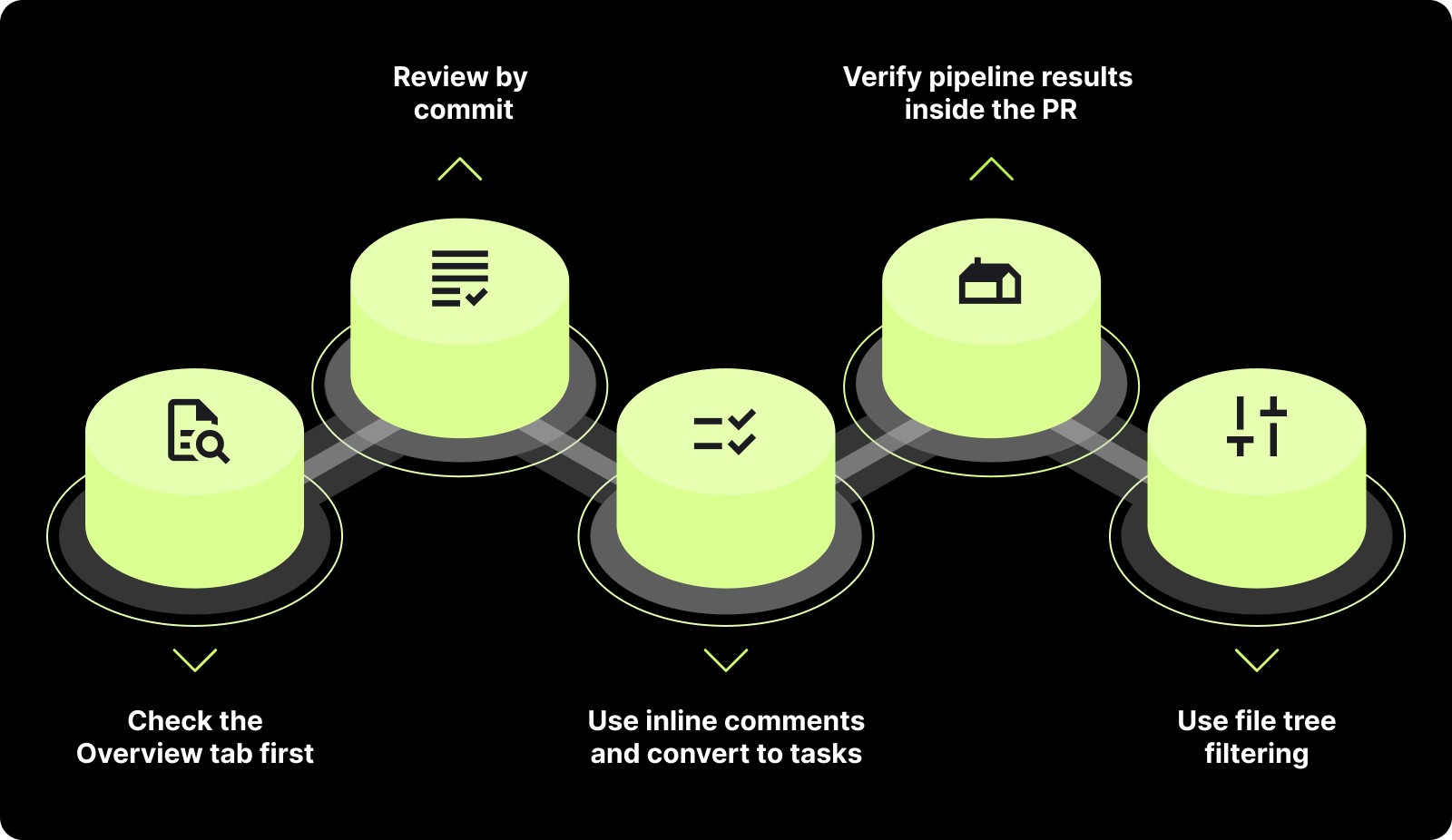
These practices are based strictly on Bitbucket’s documented review capabilities:

  • Check the Overview tab first: Bitbucket displays build status, linked issues, and recent activity here.

  • Review by commit: Bitbucket supports commit-by-commit navigation to track how changes evolved.

  • Use inline comments and convert to tasks: Tasks remain visible until resolved.

  • Verify pipeline results inside the PR: Bitbucket shows test failures, security checks, and logs directly in the review.

  • Use file tree filtering: Navigate only the changed files instead of scrolling through the entire diff.

Next, it’s time to offload the repetitive review work to CI and AI.

Automating Bitbucket Code Reviews with CI and AI

When automation handles the boilerplate, reviewers focus on architecture, logic, and real risk, and PRs flow faster. Here are concrete, documented ways to automate Bitbucket code reviews so quality and speed scale together:

  • Use Bitbucket Pipelines for CI on every PR: define your build-/test-/deploy steps in bitbucket-pipelines.yml so tests and builds run automatically on push or PR.

  • Enable automatic integration and functional tests (with services): Pipelines supports multi-container setups (e.g., app + database) so integration tests can run in a clean, reproducible environment.

  • Leverage code-insights & automated reports in PRs: static analysis, dependency checks, test reports, or security scans can surface directly in the PR view, letting reviewers see pass/fail status at a glance.

  • Combine AI-based tools with Pipelines to auto-review code: integrating AI linters or PR-analysis bots (e.g., for style, code smells, security) into CI helps catch common problems before human review.

  • Fail fast and prevent flawed merges: automation gates (tests, security, lint) before review, ensure no PR enters review without passing basic validations — reducing wasted reviewer time.

Suggested Read: Static Code Analysis: A Complete Guide to Improving Your Code

Even with strong automation, Bitbucket can only review what it sees in the diff. Entelligence steps in to reveal everything it doesn’t.

Where Bitbucket Ends and Entelligence Begins

Even with solid PR workflows, Bitbucket can only show the diff. It can’t reveal cross-file risk, architectural impact, or team-wide patterns, and that’s where fast-moving teams start to feel the slowdown.

Entelligence AI fills that gap by adding the deeper context and analysis Bitbucket doesn’t provide, turning every review into a system-aware decision instead of a line-by-line check.

Here’s the point where Bitbucket stops and Entelligence takes over:

Bitbucket Limitation

What Entelligence Adds (Verified Facts)

PR diffs show only file-level changes; no system-wide or cross-file insight.

AI PR Review that analyzes the full codebase to detect bugs, cross-file issues, and architectural risks.

Human review cycles cause slowdown and uneven review quality.

AI Code Review in IDE (e.g., VS Code) that flags issues before commit, reducing PR load.

Docs fall out of sync with code, causing onboarding and knowledge gaps.

Automatic Documentation Generation that updates docs based on code changes.

Limited visibility into review velocity, hotspots, and code quality trends.

Engineering Analytics Dashboards showing team performance, quality metrics, and bottlenecks.

Also Read: Exploring PR Review AI Tools: Boost Code Quality Fast

Conclusion

A well-run code review process isn’t about adding more steps; it’s about removing friction. When your setup, authoring, reviewing, and automation all align, reviews stop being a bottleneck and start becoming a lever for predictable delivery. The teams that win are the ones that treat review flow as a system, not a task.

And if you want that system to scale, Entelligence AI fills the gaps Bitbucket can’t cover. It sees patterns across files, repos, and teams, gives reviewers architectural context they’d never surface manually, and brings consistency to an inherently inconsistent human process.

It turns review from a reactive chore into an intelligent, proactive safeguard for quality.

If you’re ready to see how Entelligence can level up your Bitbucket workflow end-to-end, book a demo and experience the difference for yourself!

FAQs

1. How can I make Bitbucket code reviews faster without changing tools?

Improve merge checks, use PR templates, apply reviewer groups, and move routine checks to CI. These steps reduce delays and help reviewers focus on meaningful issues instead of setup work.

2. What is a good PR size for efficient reviews in Bitbucket?

Most engineering teams see faster reviews when PRs stay under 300 lines of actual code change. Smaller, well-scoped PRs reduce cognitive load and lead to more accurate feedback.

3. How do I maintain consistent review quality across multiple teams?

Use standardized templates, CODEOWNERS or reviewer groups, and checklists that align with Bitbucket’s built-in features, such as the Overview tab, commit history, and tasks.

4. Which automated checks should run before requesting a review?

At minimum, run linting, unit tests, dependency checks, and security scans. Bitbucket Pipelines can run all of these and display results directly inside the pull request.

5. Why add Entelligence AI if Bitbucket already handles pull requests and CI?

Bitbucket focuses on diffs and basic validation. Entelligence AI provides deeper context by analyzing the entire codebase, identifying cross-file risks, generating documentation, and giving engineering leaders visibility into quality and performance patterns.

If you lead an engineering team, you already know code reviews aren’t the problem; slow, inconsistent code reviews are. And lately, even McKinsey has been calling out the same thing: teams don’t lose speed because of bad code, they lose it because of broken review flow and constant context-switching.

In practice, code reviews already eat meaningful time: open-source contributors report about 6.4 hours/week on reviews (Google’s case study clocks 3.2 hours). This is the time that becomes handoff waste when reviewers are inconsistent or distracted.

You don’t need another primer on what a PR is; you need a playbook that fixes the real issues: stalled reviews, nonstop context-switching, noisy feedback, and “automation” that adds work instead of removing it.

This guide shows you how to set up Bitbucket, so reviews move faster, reviewers stay disciplined, automation works as intended, and the hidden review tax disappears.

Overview

  • A smooth Bitbucket review pipeline starts with structure, not UI: Branch protections, merge checks, reviewer groups, and PR templates eliminate most delays before a reviewer even opens the diff.

  • Small, well-scoped PRs dramatically accelerate review speed: Industry data shows PRs under about 300 lines consistently move faster and get more accurate feedback, reducing rework and context switching.

  • CI automation removes most low-value reviewer work: Bitbucket Pipelines can run linting, tests, dependency checks, and security scans on every PR, ensuring reviewers focus on logic and risk rather than formatting or failures.

  • Using Bitbucket’s UI intentionally shortens review cycles: Commit-by-commit navigation, full-file views, file-tree filtering, inline tasks, and surfaced CI results allow reviewers to evaluate code with minimal reconstruction time.

  • Bitbucket handles diffs, but Entelligence handles context: While Bitbucket shows what changed, Entelligence AI analyzes the entire codebase to reveal cross-file issues, architectural risks, documentation gaps, and team-level quality trends.

Bitbucket Code Review Fundamentals

At the fundamentals level, code review in Bitbucket is less about learning the UI and more about setting up durable, repeatable patterns that stop review work from leaking time.

These fundamentals, policies, ownership, automation gates, and review hygiene ensure reviewers focus on real design and safety decisions, not formatting, stale context, or hidden cross-file issues.

Here’s what every team should lock in from the start:

  • Protect branches and enforce essential merge checks:
    Require approvals, successful CI, and security scans on key branches so every merge meets a minimum quality bar without manual policing.

  • Use reviewer groups or CODEOWNERS for consistent routing:
    Automate who gets pulled into a review so context owners are notified immediately, and PRs never wait because “no one knew who should review it.”

  • Keep PRs small and structured with templates:
    Smaller diffs + a standard template (summary, risks, testing notes) make reviews faster and reduce the need for clarification cycles.

  • Shift low-value checks to CI before reviewers step in:
    Let Pipelines handle formatting, linting, tests, and dependency/security scanning so reviewers focus on logic and design instead of noise.

  • Make reviews easier to consume with clean commits and context:
    Encourage focused commits and include supporting artifacts (screenshots, test cases, sample inputs) so reviewers don’t waste time reconstructing intent.

  • Track review health metrics and set simple SLAs:
    Monitor time-to-first-review, PR size, and merge velocity; use lightweight SLAs or reviewer rotations to keep queues moving without burnout.

Once you have the fundamentals dialed in, it’s time to put structure behind them. That’s where Bitbucket’s setup makes or breaks how smoothly reviews move.

Setting Up Bitbucket for Effective Code Reviews

Setting up Bitbucket the right way establishes predictable flow: reviewers know what to do, automation fires reliably, and every PR enters the pipeline with the right structure.

Setting Up Bitbucket for Effective Code Reviews

Below is the setup sequence teams should follow to make Bitbucket reviews fast, disciplined, and low-friction.

Step 1: Configure Branch Permissions and Merge Settings

Set clear rules for who can push, who can merge, and what conditions must be met before a merge is allowed.

  • Lock down main, release, and other protected branches.

  • Require approvals, passing builds, and clean security checks before merging.

  • Disable direct pushes to critical branches to avoid bypassing review entirely.

This ensures every PR enters a controlled workflow instead of relying on tribal knowledge or ad hoc reviewer decisions.

Step 2: Enable and Tune Bitbucket Merge Checks

Merge checks act as the system’s quality gate, not the reviewer’s burden.

  • Require at least one or two approvals (depending on repo risk level).

  • Make successful CI runs mandatory for merge.

  • Add checks for unresolved comments, open tasks, or failing security scans.

When tuned correctly, merge checks eliminate entire categories of avoidable review churn.

Step 3: Standardize PR Templates and Default Reviewers

Bitbucket’s default templates and reviewer settings remove inconsistency from the moment a PR is created.

  • Use PR templates to define structure: summary, intent, risks, and test notes.

  • Assign default reviewers or reviewer groups for specific directories or components.

  • Apply CODEOWNERS-like patterns to automatically pull in the right people.

This reduces back-and-forth and ensures each PR starts with complete context.

Step 4: Integrate CI/CD and Surface Results Inside the PR

A properly connected CI pipeline significantly speeds up Bitbucket reviews.

  • Run unit tests, linters, and style checks on every PR.

  • Add SAST, dependency scanning, and secret detection for security workflows.

  • Display all results in the PR so reviewers don’t jump between tools.

The goal is simple: reviewers should see everything they need in one place.

Step 5: Set Up Notifications and Review Workflows That Prevent Stale PRs

Notifications aren’t just alerts; they shape reviewer behavior.

  • Configure Slack or email notifications for PR assignments, failed checks, and requested changes.

  • Use Bitbucket’s “watched repositories” and personal review queues to surface what needs attention.

  • Establish a lightweight rotation or “reviewer on duty” model for busy teams.

Good review flow depends on surfacing the right PRs at the right time.

Step 6: Configure Repository-Level Rules for Commit Hygiene

A well-organized repository reduces noise before a reviewer even opens the diff.

  • Enforce commit signing or message guidelines.

  • Block large, unrelated changes using file-size or diff-based warnings.

  • Use pre-commit hooks (local or shared) to prevent formatting drift.

This makes each PR cleaner, more predictable, and easier to evaluate.

Set up gets the workflow ready; now it’s about using Bitbucket’s review UI effectively so reviewers spend less time digging and more time evaluating.

Navigating the Bitbucket Code Review UI

The UI of Bitbucket turns code review into a unified, context-rich workspace: you don’t have to jump across multiple tools, diff, CI, comments, and history live side-by-side. When you use it intentionally, you shorten context setup time and make your reviews more reliable.

Here are the proven UI workflows that help reviewers move fast and stay focused:

  • Review-by-commit: Step through commits in order. This preserves author intent and avoids commenting on obsolete code.

  • Full-file view instead of snippets: Open the entire file to see surrounding context — this helps catch logic or API-boundary issues that diff snippets hide.

  • Use file tree and filters to isolate relevant files: The file-tree navigator lets you quickly jump to changed files; filters and search help if PRs affect many files.

  • Inline comments and tasks for precise feedback: You can comment on a whole PR, a file, or exact lines, and convert comments into tasks for follow-up.

  • Merge insight with integrated CI/build and security results: Bitbucket shows build status, test results, and security scan results inside the PR, so you don’t need to cross-check separate dashboards.

  • Use unified or side-by-side diff view depending on review needs: For quick scans, unified diff helps; for deeper logic or comparison work, side-by-side helps. Bitbucket supports both.

Also Read: How to Use AI for Code Reviews on GitHub?

With the review interface covered, the next piece is making sure every pull request enters the system in a clean, structured state. That starts with how the PR is created.

Step-by-Step: Creating a Bitbucket Pull Request for Review

High-performing teams don’t treat PR creation as an afterthought; they treat it as the first quality gate. When a PR enters the queue fully prepared, reviewers move faster, context is clear, and the review pipeline stays unblocked.

This section breaks down the exact sequence Bitbucket expects so your PRs are clean, complete, and ready for fast decisions.

Step

What Bitbucket Supports

1. Prepare your branch

PRs can only be created from a branch or fork.

2. Compare branches

Bitbucket shows diffs and commit history before PR creation.

3. Add PR details

Title required; description optional with support for links/attachments.

4. Add reviewers

Assign individual reviewers or groups during creation.

5. Check build status

CI/Pipelines results appear directly in the PR view.

6. Create the PR

PR tracks diffs, commits, comments, tasks, and approvals in one place.

7. Auto-close branch (optional)

Option to delete the source branch automatically after the merge.

Want every PR reviewed and merged faster, without sacrificing quality? Try Entelligence AI’s real-time, in-IDE code review and PR automation to catch bugs early, auto-format code, and simplify merge workflows. Book your demo now!

A well-built PR is only half the win; how the author presents and frames the change has an even bigger impact on review speed. That’s where best practices come in.

Best Practices for Bitbucket PR Authors

Authors who structure their PRs around Bitbucket’s native capabilities create reviews that are easier to get through, easier to validate, and far less likely to stall.

These are the Bitbucket-specific author practices proven to reduce review time and increase approval consistency:

  • Use the branch comparison view before opening the PR: Bitbucket’s compare tool shows all commits and diffs upfront, helping authors catch accidental changes before reviewers do.

  • Fill out metadata Bitbucket surfaces to reviewers: Link Jira issues, attach screenshots, and add context so the PR overview tab becomes the reviewer’s starting point.

  • Mark WIP using Draft PRs: Bitbucket’s draft state prevents early notifications and keeps reviewers from entering half-finished work.

  • Trigger a fresh pipeline run before requesting review: Builds and security checks display inside the PR; ensuring they pass early eliminates the #1 cause of stalled reviews.

  • Add reviewers through groups or CODEOWNERS mappings: Bitbucket auto-suggests owners based on directory rules. Authors should rely on these to route PRs correctly.

  • Enable “close branch on merge” for feature branches: Keeps the repo clean and prevents reviewers from navigating outdated branches during future audits.

Also Read: How to Conduct a Code Quality Audit: A Comprehensive Guide

Strong PRs only pay off when reviewers match that standard. The next step is defining what effective reviewing looks like inside Bitbucket.

Best Practices for Bitbucket Reviewers

Bitbucket’s review tools provide clear signals, build status, file history, commit order, and tasks that reviewers can use to evaluate changes quickly and accurately.

Best Practices for Bitbucket Reviewers

These practices are based strictly on Bitbucket’s documented review capabilities:

  • Check the Overview tab first: Bitbucket displays build status, linked issues, and recent activity here.

  • Review by commit: Bitbucket supports commit-by-commit navigation to track how changes evolved.

  • Use inline comments and convert to tasks: Tasks remain visible until resolved.

  • Verify pipeline results inside the PR: Bitbucket shows test failures, security checks, and logs directly in the review.

  • Use file tree filtering: Navigate only the changed files instead of scrolling through the entire diff.

Next, it’s time to offload the repetitive review work to CI and AI.

Automating Bitbucket Code Reviews with CI and AI

When automation handles the boilerplate, reviewers focus on architecture, logic, and real risk, and PRs flow faster. Here are concrete, documented ways to automate Bitbucket code reviews so quality and speed scale together:

  • Use Bitbucket Pipelines for CI on every PR: define your build-/test-/deploy steps in bitbucket-pipelines.yml so tests and builds run automatically on push or PR.

  • Enable automatic integration and functional tests (with services): Pipelines supports multi-container setups (e.g., app + database) so integration tests can run in a clean, reproducible environment.

  • Leverage code-insights & automated reports in PRs: static analysis, dependency checks, test reports, or security scans can surface directly in the PR view, letting reviewers see pass/fail status at a glance.

  • Combine AI-based tools with Pipelines to auto-review code: integrating AI linters or PR-analysis bots (e.g., for style, code smells, security) into CI helps catch common problems before human review.

  • Fail fast and prevent flawed merges: automation gates (tests, security, lint) before review, ensure no PR enters review without passing basic validations — reducing wasted reviewer time.

Suggested Read: Static Code Analysis: A Complete Guide to Improving Your Code

Even with strong automation, Bitbucket can only review what it sees in the diff. Entelligence steps in to reveal everything it doesn’t.

Where Bitbucket Ends and Entelligence Begins

Even with solid PR workflows, Bitbucket can only show the diff. It can’t reveal cross-file risk, architectural impact, or team-wide patterns, and that’s where fast-moving teams start to feel the slowdown.

Entelligence AI fills that gap by adding the deeper context and analysis Bitbucket doesn’t provide, turning every review into a system-aware decision instead of a line-by-line check.

Here’s the point where Bitbucket stops and Entelligence takes over:

Bitbucket Limitation

What Entelligence Adds (Verified Facts)

PR diffs show only file-level changes; no system-wide or cross-file insight.

AI PR Review that analyzes the full codebase to detect bugs, cross-file issues, and architectural risks.

Human review cycles cause slowdown and uneven review quality.

AI Code Review in IDE (e.g., VS Code) that flags issues before commit, reducing PR load.

Docs fall out of sync with code, causing onboarding and knowledge gaps.

Automatic Documentation Generation that updates docs based on code changes.

Limited visibility into review velocity, hotspots, and code quality trends.

Engineering Analytics Dashboards showing team performance, quality metrics, and bottlenecks.

Also Read: Exploring PR Review AI Tools: Boost Code Quality Fast

Conclusion

A well-run code review process isn’t about adding more steps; it’s about removing friction. When your setup, authoring, reviewing, and automation all align, reviews stop being a bottleneck and start becoming a lever for predictable delivery. The teams that win are the ones that treat review flow as a system, not a task.

And if you want that system to scale, Entelligence AI fills the gaps Bitbucket can’t cover. It sees patterns across files, repos, and teams, gives reviewers architectural context they’d never surface manually, and brings consistency to an inherently inconsistent human process.

It turns review from a reactive chore into an intelligent, proactive safeguard for quality.

If you’re ready to see how Entelligence can level up your Bitbucket workflow end-to-end, book a demo and experience the difference for yourself!

FAQs

1. How can I make Bitbucket code reviews faster without changing tools?

Improve merge checks, use PR templates, apply reviewer groups, and move routine checks to CI. These steps reduce delays and help reviewers focus on meaningful issues instead of setup work.

2. What is a good PR size for efficient reviews in Bitbucket?

Most engineering teams see faster reviews when PRs stay under 300 lines of actual code change. Smaller, well-scoped PRs reduce cognitive load and lead to more accurate feedback.

3. How do I maintain consistent review quality across multiple teams?

Use standardized templates, CODEOWNERS or reviewer groups, and checklists that align with Bitbucket’s built-in features, such as the Overview tab, commit history, and tasks.

4. Which automated checks should run before requesting a review?

At minimum, run linting, unit tests, dependency checks, and security scans. Bitbucket Pipelines can run all of these and display results directly inside the pull request.

5. Why add Entelligence AI if Bitbucket already handles pull requests and CI?

Bitbucket focuses on diffs and basic validation. Entelligence AI provides deeper context by analyzing the entire codebase, identifying cross-file risks, generating documentation, and giving engineering leaders visibility into quality and performance patterns.

Your questions,

Your questions,

Decoded

Decoded

What makes Entelligence different?

Unlike tools that just flag issues, Entelligence understands context — detecting, explaining, and fixing problems while aligning with product goals and team standards.

Does it replace human reviewers?

No. It amplifies them. Entelligence handles repetitive checks so engineers can focus on architecture, logic, and innovation.

What tools does it integrate with?

It fits right into your workflow — GitHub, GitLab, Jira, Linear, Slack, and more. No setup friction, no context switching.

How secure is my code?

Your code never leaves your environment. Entelligence uses encrypted processing and complies with top industry standards like SOC 2 and HIPAA.

Who is it built for?

Fast-growing engineering teams that want to scale quality, security, and velocity without adding more manual reviews or overhead.

What makes Entelligence different?
Does it replace human reviewers?
What tools does it integrate with?
How secure is my code?
Who is it built for?

Drop your details

We’ll reach out before your next deploy hits production.

We’ll reach out before your next deploy hits production.