
Top 15 Jira Metrics for Engineering Teams: The Complete Implementation Guide

Jan 20, 2026

Jan 20, 2026

Your Jira instance holds a treasure trove of data, yet you might only glance at burndown charts. The real challenge is knowing which numbers truly reflect your team's health, speed, and quality. You track velocity, but does it feel disconnected from why deployments are slow?

You count bugs, but can't predict the next incident. Raw data without the right framework creates noise, not clarity. This gap between data and actionable insight prevents you from making strategic improvements.

You need a system that connects workflow bottlenecks to delivery delays and code changes to production stability. The right Jira metrics transform anecdotal stand-ups into focused problem-solving sessions.

In this guide, you will learn the essential Jira metrics you need to build a high-performing engineering organization.

Quick Look

  • Prioritize Cycle Time: Focus on the speed of moving work from "In Progress" to "Done" to find hidden bottlenecks.

  • Track Defect Escape Rate: Measure how many bugs reach production to evaluate the effectiveness of your QA process.

  • Standardize Your Workflow: Ensure every team uses the same status categories so your organizational data stays clean and comparable.

  • Avoid Velocity Comparisons: Never compare the velocity of two different squads, as this leads to point inflation and data gaming.

  • Use Automated Insights: Connect your Jira data to AI suites to automate documentation and get a deeper view of team health.

What are Jira Metrics?

Jira metrics are quantifiable data points derived from issue tracking, statuses, and metadata to measure team performance and workflow health. They act as the data engine for your organization by converting raw ticket transitions into insights for decision-making.

A metric is only valuable if it filters out noise and answers what process change you should make tomorrow. Understanding when a data point becomes a high-level goal helps you avoid vanity reporting and micromanagement.

While understanding the theory of data-driven engineering is the first step, you need a specific set of indicators to evaluate your team's output accurately.

Also read: Understanding Velocity in Agile Software Development

Top 15 Jira Metrics for Engineering and Product Teams

Measuring the right data requires a balance between speed, quality, and predictability across the entire software development life cycle.
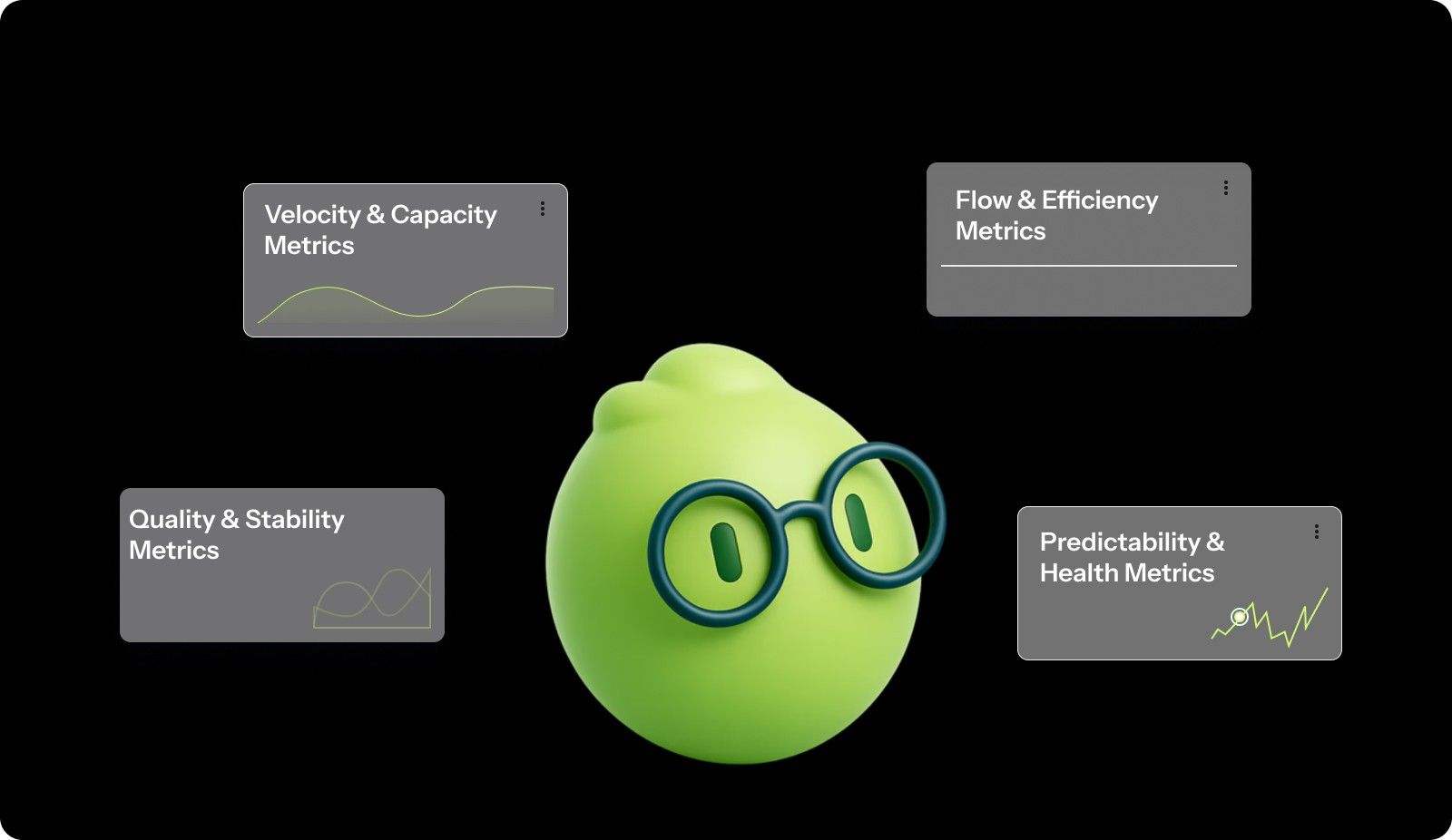
Top 15 Jira Metrics for Engineering and Product Teams

I. Velocity & Capacity Metrics

These data points help you understand how much work your team can realistically handle during a specific sprint or timeframe.

1. Sprint Velocity

This represents the amount of work a team can tackle during a single sprint by summing the story points of all completed tasks. It helps managers forecast future release dates based on the team's historical output.

  • Key Components: Completed story points and sprint duration.

  • How to Measure: Use the Velocity Chart in Jira to see the sum of points for all "Done" issues.

  • Formula: Velocity = Σ(Story Points of Completed Issues)

2. Commitment Reliability

This metric tracks the percentage of work the team actually finished compared to what they committed to during sprint planning. High reliability indicates a mature team that understands its capacity and can plan predictably.

  • Key Components: Initial sprint commitment and final points completed.

  • How to Measure: Compare the "Committed" column to the "Completed" column in your Jira Sprint Report.

  • Formula: (Points Completed / Points Committed) * 100

3. Capacity Utilization 

This measures how much of your team's total available time is being spent on Jira tickets versus administrative tasks or meetings. It prevents burnout by highlighting when a team is consistently operating at 100% or higher capacity.

  • Key Components: Logged work hours and total available team hours.

  • How to Measure: Use a workload pie chart or time tracking report to compare logged time against the team's weekly limit.

  • Formula: (Logged Hours / Available Hours) * 100

II. Flow & Efficiency Metrics

Flow metrics track how work moves through your development system and identify exactly where tasks stall or get stuck.

1. Cycle Time 

This tracks the total time an issue spends in an "active" state, from the moment a developer starts work until it is marked as done. It is the primary metric for measuring the internal efficiency of your development process.

  • Key Components: Start timestamp and resolution timestamp.

  • How to Measure: Check the Jira Control Chart and filter for the specific statuses that represent active development.

2. Lead Time

This measures the total clock time from the moment a customer or stakeholder makes a request to the moment it is delivered. It provides a holistic view of your responsiveness, including time spent sitting in the backlog.

  • Key Components: Creation date and completion date.

  • How to Measure: Pull the "Created" and "Resolved" fields using JQL to find the total duration for each issue.

3. Work in Progress (WIP)

This counts the number of tickets currently being worked on across the team at any specific time. Excessive WIP is a leading indicator of context switching and indicates that the team is starting too many tasks without finishing them.

  • Key Components: Current count of issues in "In Progress" or "In Review" statuses.

  • How to Measure: Look at the Cumulative Flow Diagram to see the width of the "In Progress" bands.

4. Throughput

This is the raw count of tickets your team completes over a specific period, regardless of their size or complexity. It serves as a useful sanity check against Velocity, ensuring that "point inflation" isn't hiding a drop in actual ticket output.

  • Key Components: Issue count and time period.

  • How to Measure: Count the number of tickets moved to "Done" per week or month using the Jira search tool.

5. Bottleneck Index

This identifies which specific stage of your workflow, such as "Peer Review" or "UAT," is holding onto tickets for the longest duration. Identifying these "clogs" allows managers to reallocate resources to the specific phase slowing down the team.

  • Key Components: Time spent in each individual status.

  • How to Measure: Use the "Time in Status" report to find columns where tickets spend more than 40% of their life.

Stop manually calculating your Cycle Time. Digging through Jira timestamps to find bottlenecks is a drain on your engineering leadership. Book a demo to see how Entelligence AI automates flow metrics by linking your Jira tickets directly to real-time code execution and PR activity.

III. Quality & Stability Metrics

Shipping fast is a risk if your code is riddled with bugs that frustrate your customers and slow down your developers.

1. Defect Density

This calculates the number of bugs found in a piece of software relative to its size or complexity. It helps you identify high-risk modules in your codebase that may require a complete refactor or more rigorous testing.

  • Key Components: Bug count and total story points delivered.

  • How to Measure: Divide the number of "Bug" issue types by the total points in a completed version.

  • Formula: Defect Density = Total Defects Found / Total Story Points Delivered

2. Defect Escape Rate

This measures the effectiveness of your QA process by tracking how many bugs were missed during testing and reported by users in production. A high escape rate suggests that your internal testing environments do not accurately mirror real-world usage.

  • Key Components: Production bugs and internal bugs.

  • How to Measure: Label bugs as "Internal" or "External" and compare the counts for each release cycle.

  • Formula: (Production Defects / Total Defects) * 100

3. Mean Time to Resolution (MTTR)

This measures the average time your team takes to fix a bug or resolve an incident once it has been reported. It is a critical metric for support and SRE teams to ensure that customer-facing issues are handled within the SLA.

  • Key Components: Bug-reported time and bug-resolution time.

  • How to Measure: Average the lead time of all issue types marked as "Bug" or "Incident" over thirty days.

4. Change Failure Rate

This tracks the percentage of code deployments that result in a failure, requiring a rollback or an emergency hotfix. It is a key DORA metric that balances speed against the stability of your production environment.

  • Key Components: Total deployments and total failed deployments.

  • How to Measure: Track the number of "Rollback" or "Hotfix" tickets created immediately following a production release.

IV. Predictability & Health Metrics

Predictability ensures that your stakeholders can trust your timelines and that your team maintains a sustainable pace without burnout.

1. Sprint Burndown Variance

This measures the gap between your team's actual progress and the "ideal" path toward finishing all work by the end of the sprint. It helps Scrum Masters identify "late-sprint panics" where most work is suddenly moved to Done on the final day.

  • Key Components: Remaining points and time remaining in the sprint.

  • How to Measure: View the Sprint Burndown Chart and look for large gaps between the actual and ideal lines.

2. Scope Creep

This tracks work that was added to a sprint after it had already begun, which can derail the team’s original goals. While some change is inevitable, high scope creep indicates poor requirements gathering or stakeholder interference.

  • Key Components: Points at start and points at end.

  • How to Measure: Look for the asterisk in the Jira Burndown Chart that indicates work was added after the start.

3. Code Survival Rate

This measures how much of the code committed actually stays in the codebase without being reverted or heavily refactored shortly after. Low survival rates suggest that code is being rushed or that architectural reviews are not happening early enough.

  • Key Components: Commits made and commits reverted.

  • How to Measure: Track the frequency of "Revert" commits relative to the total number of PRs merged during the sprint.

Identifying the right data points is a significant milestone, but these metrics are only as reliable as the workflow that generates them. To move from abstract numbers to actionable insights, you must follow a structured blueprint.

Also read: How to Measure Developer Productivity Effectively

How to Implement Jira Metrics: A Step-by-Step Process

You cannot manage what you do not measure, and you cannot measure what you do not define clearly within your workflow. This blueprint ensures your data is clean before you start building reports or dashboards for your engineering leadership team.

Step 1: The Workflow Audit

If your workflow only has two steps, like "To Do" and "Done," your metrics will be vague and completely useless for improvement. A standardized workflow allows you to see exactly where work stalls, whether it is in development, review, or testing.

Action Steps:

  1. List every custom status currently used across all projects to identify redundant categories and messy naming conventions.

  2. Map these statuses to the three core Jira status categories: To Do, In Progress, and Done.

  3. Establish a clear "In Review" status to separate coding time from the peer review process for better cycle time accuracy.

  4. Configure your board to hide issues that have been in the "Done" category for over two weeks to keep data fresh.

  5. Verify that every transition requires a manual or automated trigger to maintain the integrity of your timestamps.

Step 2: Calculating Advanced Metrics

Pulling data manually is slow, so you should use Jira Query Language (JQL) to create dynamic filters for your most important metrics. This allows you to build a control chart that visualizes your cycle time trends over the last thirty days.

Action Steps:

  1. Open the Jira Issue Search and enter the JQL query: project = "PROJ" AND status = Done AND resolved >= -30d.

  2. Export the results to a spreadsheet to calculate the average time spent between the "In Progress" and "Done" timestamps.

  3. Plot the data on a scatter graph to identify outliers that represent blocked tickets or complex technical debt.

  4. Share the results with the team to identify specific patterns in the tickets that took the longest to resolve.

  5. Set a baseline for your team based on the 85th percentile of your historical cycle time data.

For example, one team noticed their cycle time was spiking due to a massive backlog in the "Peer Review" column. By setting a WIP limit of 2 on that column, they forced the team to finish reviews before starting new tasks. This small change reduced their average cycle time within just two sprint cycles.

JQL alone won't give you the full story. While JQL is powerful, it lacks the context of your codebase. Entelligence AI bridges the "Context Gap" by enriching your Jira data with insights from GitHub and your internal documentation. Book a demo to move beyond raw numbers to true strategic clarity.

Step 3: Edge Cases

Data is rarely perfect, and you must account for specific variables that can skew your reports and lead to wrong conclusions.

  • The Weekend Problem: Most Jira reports include weekends, which can make your MTTR look much worse than it actually is for the team.

  • The Blocked Ticket Dilemma: You must decide if the clock stops when a ticket is blocked or if it keeps running to reflect reality.

  • Velocity Gaming: If you compare velocity across squads, teams will start inflating their points to look more productive on your dashboard.

Building a metrics-ready workflow creates the foundation, yet the true value of this data is realized in how your team interacts with it during daily operations. Transitioning from raw calculation to strategic application requires a set of best practices.

Also read: Understanding Code Scanning for Vulnerabilities

3 Strategic Best Practices for Reviewing Metrics

Reviewing data should be a collaborative process that helps the team improve, rather than a top-down exercise in monitoring. Effective leaders use Jira metrics to start conversations about process improvements and resource allocation during their weekly meetings.

1. The "5-Minute Standup" Check

Display your sprint burndown and current WIP count on a screen every morning to keep the team focused on finishing active work. This practice prevents developers from picking up new tickets when several are already stuck in the "In Review" or "QA" columns. 

Impact:

  • Reduces context switching for developers.

  • Highlights blocked work before it stalls the entire sprint.

  • Encourages the team to help each other finish high priority tasks.

2. The Metrics-Driven Retrospective

Use the Cumulative Flow Diagram to visualize the flow of work and identify long term patterns that lead to team frustration. Instead of arguing about why a sprint felt slow, you can point to a widening "Review" band and discuss hiring or process changes/

Impact:

  • Replaces anecdotal complaints with objective data points.

  • Helps the team reach a consensus on the biggest bottlenecks.

  • Tracks if process changes actually led to a measurable improvement.

3. Standardizing "Definition of Done"

Inconsistent labeling ruins your data accuracy, so you must ensure every team member understands what it means to move a ticket to "Done." A ticket is not done until the code is merged, documented, and the tests have passed in a staging environment.

Impact:

  • Prevents tickets from bouncing back from "Done" to "In Progress."

  • Ensures that velocity reflects high-quality, shippable work.

  • Improves the reliability of your release dates for product stakeholders.

Even with the best practices in place, manual tracking and native reports often reach a ceiling when managing multiple squads or complex repositories. To scale your insights, you need to explore advanced reporting tools

Tools for Advanced Jira Reporting

While Jira provides several built-in gadgets, large engineering organizations often need more sophisticated tools to get a full view of productivity.

  • Native Jira Gadgets: Use the "Average Age Chart" to find old tickets that are cluttering your backlog and the "Pie Chart" for distribution.

  • Advanced Apps: Platforms like Entelligence AI provide an end-to-end suite that connects code quality and PR reviews with team performance data. Tools like eazyBI allow for complex data mapping that Jira cannot handle natively, while Custom Charts for Jira simplifies dashboard creation.

  • Automation: Set up a Jira Automation rule to create an "Alert Ticket" or Slack notification when a bug's MTTR exceeds your SLA.

Having the right tools simplifies the reporting process, but technology cannot replace the need for a healthy, data-literate culture. To ensure your metrics lead to improvement rather than friction, you must be aware of the common pitfalls that can undermine your measurement strategy.

Common Mistakes to Avoid When Measuring Data

Metrics are a powerful tool, but they can be destructive if used without empathy or an understanding of the engineering context.

1. Micromanagement

Using metrics like individual commit counts to punish developers leads to a toxic culture where people optimize for the metric rather than the product.

Solution: Always review metrics at the team or squad level to encourage collaboration rather than internal competition among your engineers.

2. Over-measuring

Tracking fifty different metrics creates data fatigue, where the team ignores the dashboard because it is too complex to understand or act upon.

Solution: Pick three "North Star" metrics, like Cycle Time, Defect Escape Rate, and Velocity, and ignore everything else until those are stable.

3. Ignoring Context

A sudden spike in cycle time might look bad on a chart, but it could mean the team is finally tackling massive technical debt.

Solution: Use your data to ask questions like "What happened here?" rather than making immediate assumptions about team performance based on a graph.

Avoiding these common traps is essential for maintaining team trust while pursuing organizational excellence. However, achieving this balance manually is difficult for growing teams, which is why a unified platform is necessary to connect daily code execution with high-level strategic clarity.

Also read: Decoding Source Code Management Tools: Types, Benefits, & Top Picks

Entelligence AI: Unifying Engineering Velocity and Quality

Engineering leaders lose clarity when data is scattered across Jira, GitHub, and Slack. Standard reports show a slowdown but miss the "why," leading to missed deadlines and lower code quality.

Entelligence AI unifies engineering productivity by linking daily code execution with high-level insights. Our platform gives leaders total clarity to make data-driven decisions without chasing manual reports.

  • Contextual Code Reviews: Our AI provides feedback within your IDE based on your specific architecture and standards to reduce review cycles.

  • Sprint Assessment: You get an automated health check that surfaces blockers and bottlenecks without manual tracking or status meetings.

  • Individual and Team Insights: We track PR activity and bug fixes to highlight top contributors and areas that need coaching or support.

  • Leaderboards: Gamification features rank developers based on quality and contribution to drive team engagement and morale in a healthy way.

  • Automated Documentation: Our agent generates and updates documentation as your code evolves to keep your team in sync and reduce manual overhead.

Entelligence AI ensures every role in the engineering organization has clarity into progress and performance across all repositories and teams.

Conclusion

Mastering Jira metrics is about balancing speed, quality, and team health. Focus on cycle time and defect escape rates to move from vanity charts to real process improvements. Start by standardizing your workflow and selecting a few metrics that align with your quarterly goals.

Entelligence AI turns your Jira data into a strategic asset by providing deep context and visibility. Our suite surfaces what actually matters so your team can focus on building products without the noise.

Ready to gain total visibility into your engineering productivity? Get Book a demo now.

FAQs

Q. What is the most important Jira metric for engineering teams to start with?

Start with Cycle Time. It is a direct, hard-to-game measure of your process efficiency. A shorter Cycle Time means work gets done faster with less waiting. It immediately highlights bottlenecks and provides a clear baseline for improvement experiments, like implementing WIP limits.

Q. How often should we review our Jira metrics?

Review flow metrics (Cycle Time, WIP, Throughput) in your daily stand-up for awareness. Conduct a deeper, analytical review of quality and predictability metrics (Defect Density, Commitment Reliability, Burndown Variance) during your bi-weekly sprint retrospectives. This cadence ensures timely reaction and strategic adjustment.

Q. Can Jira metrics be used for individual performance reviews?

No, you should not use team process metrics for individual performance evaluations. This practice destroys psychological safety, encourages gaming the system (e.g., inflating story points), and shifts focus from process improvement to self-preservation. Metrics are tools for the team to improve its system.

Q. Our team doesn't use story points. Can we still calculate Velocity?

Yes, you can use Throughput (count of tickets completed per sprint) as a proxy for velocity. While less refined than points, a consistent ticket count per sprint can still provide useful forecasting data. The key is consistency in your definition of what constitutes a typical "ticket."

Q. How do we handle metrics for bugs and maintenance work that aren't story-pointed?

For unpointed work like bugs, focus on time-based and rate-based metrics. Track Mean Time to Resolution (MTTR) for responsiveness and Defect Escape Rate for quality. You can allocate a percentage of sprint capacity to "unplanned work" and track that as a metric against Scope Creep.
Your Jira instance holds a treasure trove of data, yet you might only glance at burndown charts. The real challenge is knowing which numbers truly reflect your team's health, speed, and quality. You track velocity, but does it feel disconnected from why deployments are slow?

You count bugs, but can't predict the next incident. Raw data without the right framework creates noise, not clarity. This gap between data and actionable insight prevents you from making strategic improvements.

You need a system that connects workflow bottlenecks to delivery delays and code changes to production stability. The right Jira metrics transform anecdotal stand-ups into focused problem-solving sessions.

In this guide, you will learn the essential Jira metrics you need to build a high-performing engineering organization.

Quick Look

  • Prioritize Cycle Time: Focus on the speed of moving work from "In Progress" to "Done" to find hidden bottlenecks.

  • Track Defect Escape Rate: Measure how many bugs reach production to evaluate the effectiveness of your QA process.

  • Standardize Your Workflow: Ensure every team uses the same status categories so your organizational data stays clean and comparable.

  • Avoid Velocity Comparisons: Never compare the velocity of two different squads, as this leads to point inflation and data gaming.

  • Use Automated Insights: Connect your Jira data to AI suites to automate documentation and get a deeper view of team health.

What are Jira Metrics?

Jira metrics are quantifiable data points derived from issue tracking, statuses, and metadata to measure team performance and workflow health. They act as the data engine for your organization by converting raw ticket transitions into insights for decision-making.

A metric is only valuable if it filters out noise and answers what process change you should make tomorrow. Understanding when a data point becomes a high-level goal helps you avoid vanity reporting and micromanagement.

While understanding the theory of data-driven engineering is the first step, you need a specific set of indicators to evaluate your team's output accurately.

Also read: Understanding Velocity in Agile Software Development

Top 15 Jira Metrics for Engineering and Product Teams

Measuring the right data requires a balance between speed, quality, and predictability across the entire software development life cycle.

Top 15 Jira Metrics for Engineering and Product Teams

I. Velocity & Capacity Metrics

These data points help you understand how much work your team can realistically handle during a specific sprint or timeframe.

1. Sprint Velocity

This represents the amount of work a team can tackle during a single sprint by summing the story points of all completed tasks. It helps managers forecast future release dates based on the team's historical output.

  • Key Components: Completed story points and sprint duration.

  • How to Measure: Use the Velocity Chart in Jira to see the sum of points for all "Done" issues.

  • Formula: Velocity = Σ(Story Points of Completed Issues)

2. Commitment Reliability

This metric tracks the percentage of work the team actually finished compared to what they committed to during sprint planning. High reliability indicates a mature team that understands its capacity and can plan predictably.

  • Key Components: Initial sprint commitment and final points completed.

  • How to Measure: Compare the "Committed" column to the "Completed" column in your Jira Sprint Report.

  • Formula: (Points Completed / Points Committed) * 100

3. Capacity Utilization 

This measures how much of your team's total available time is being spent on Jira tickets versus administrative tasks or meetings. It prevents burnout by highlighting when a team is consistently operating at 100% or higher capacity.

  • Key Components: Logged work hours and total available team hours.

  • How to Measure: Use a workload pie chart or time tracking report to compare logged time against the team's weekly limit.

  • Formula: (Logged Hours / Available Hours) * 100

II. Flow & Efficiency Metrics

Flow metrics track how work moves through your development system and identify exactly where tasks stall or get stuck.

1. Cycle Time 

This tracks the total time an issue spends in an "active" state, from the moment a developer starts work until it is marked as done. It is the primary metric for measuring the internal efficiency of your development process.

  • Key Components: Start timestamp and resolution timestamp.

  • How to Measure: Check the Jira Control Chart and filter for the specific statuses that represent active development.

2. Lead Time

This measures the total clock time from the moment a customer or stakeholder makes a request to the moment it is delivered. It provides a holistic view of your responsiveness, including time spent sitting in the backlog.

  • Key Components: Creation date and completion date.

  • How to Measure: Pull the "Created" and "Resolved" fields using JQL to find the total duration for each issue.

3. Work in Progress (WIP)

This counts the number of tickets currently being worked on across the team at any specific time. Excessive WIP is a leading indicator of context switching and indicates that the team is starting too many tasks without finishing them.

  • Key Components: Current count of issues in "In Progress" or "In Review" statuses.

  • How to Measure: Look at the Cumulative Flow Diagram to see the width of the "In Progress" bands.

4. Throughput

This is the raw count of tickets your team completes over a specific period, regardless of their size or complexity. It serves as a useful sanity check against Velocity, ensuring that "point inflation" isn't hiding a drop in actual ticket output.

  • Key Components: Issue count and time period.

  • How to Measure: Count the number of tickets moved to "Done" per week or month using the Jira search tool.

5. Bottleneck Index

This identifies which specific stage of your workflow, such as "Peer Review" or "UAT," is holding onto tickets for the longest duration. Identifying these "clogs" allows managers to reallocate resources to the specific phase slowing down the team.

  • Key Components: Time spent in each individual status.

  • How to Measure: Use the "Time in Status" report to find columns where tickets spend more than 40% of their life.

Stop manually calculating your Cycle Time. Digging through Jira timestamps to find bottlenecks is a drain on your engineering leadership. Book a demo to see how Entelligence AI automates flow metrics by linking your Jira tickets directly to real-time code execution and PR activity.

III. Quality & Stability Metrics

Shipping fast is a risk if your code is riddled with bugs that frustrate your customers and slow down your developers.

1. Defect Density

This calculates the number of bugs found in a piece of software relative to its size or complexity. It helps you identify high-risk modules in your codebase that may require a complete refactor or more rigorous testing.

  • Key Components: Bug count and total story points delivered.

  • How to Measure: Divide the number of "Bug" issue types by the total points in a completed version.

  • Formula: Defect Density = Total Defects Found / Total Story Points Delivered

2. Defect Escape Rate

This measures the effectiveness of your QA process by tracking how many bugs were missed during testing and reported by users in production. A high escape rate suggests that your internal testing environments do not accurately mirror real-world usage.

  • Key Components: Production bugs and internal bugs.

  • How to Measure: Label bugs as "Internal" or "External" and compare the counts for each release cycle.

  • Formula: (Production Defects / Total Defects) * 100

3. Mean Time to Resolution (MTTR)

This measures the average time your team takes to fix a bug or resolve an incident once it has been reported. It is a critical metric for support and SRE teams to ensure that customer-facing issues are handled within the SLA.

  • Key Components: Bug-reported time and bug-resolution time.

  • How to Measure: Average the lead time of all issue types marked as "Bug" or "Incident" over thirty days.

4. Change Failure Rate

This tracks the percentage of code deployments that result in a failure, requiring a rollback or an emergency hotfix. It is a key DORA metric that balances speed against the stability of your production environment.

  • Key Components: Total deployments and total failed deployments.

  • How to Measure: Track the number of "Rollback" or "Hotfix" tickets created immediately following a production release.

IV. Predictability & Health Metrics

Predictability ensures that your stakeholders can trust your timelines and that your team maintains a sustainable pace without burnout.

1. Sprint Burndown Variance

This measures the gap between your team's actual progress and the "ideal" path toward finishing all work by the end of the sprint. It helps Scrum Masters identify "late-sprint panics" where most work is suddenly moved to Done on the final day.

  • Key Components: Remaining points and time remaining in the sprint.

  • How to Measure: View the Sprint Burndown Chart and look for large gaps between the actual and ideal lines.

2. Scope Creep

This tracks work that was added to a sprint after it had already begun, which can derail the team’s original goals. While some change is inevitable, high scope creep indicates poor requirements gathering or stakeholder interference.

  • Key Components: Points at start and points at end.

  • How to Measure: Look for the asterisk in the Jira Burndown Chart that indicates work was added after the start.

3. Code Survival Rate

This measures how much of the code committed actually stays in the codebase without being reverted or heavily refactored shortly after. Low survival rates suggest that code is being rushed or that architectural reviews are not happening early enough.

  • Key Components: Commits made and commits reverted.

  • How to Measure: Track the frequency of "Revert" commits relative to the total number of PRs merged during the sprint.

Identifying the right data points is a significant milestone, but these metrics are only as reliable as the workflow that generates them. To move from abstract numbers to actionable insights, you must follow a structured blueprint.

Also read: How to Measure Developer Productivity Effectively

How to Implement Jira Metrics: A Step-by-Step Process

You cannot manage what you do not measure, and you cannot measure what you do not define clearly within your workflow. This blueprint ensures your data is clean before you start building reports or dashboards for your engineering leadership team.

Step 1: The Workflow Audit

If your workflow only has two steps, like "To Do" and "Done," your metrics will be vague and completely useless for improvement. A standardized workflow allows you to see exactly where work stalls, whether it is in development, review, or testing.

Action Steps:

  1. List every custom status currently used across all projects to identify redundant categories and messy naming conventions.

  2. Map these statuses to the three core Jira status categories: To Do, In Progress, and Done.

  3. Establish a clear "In Review" status to separate coding time from the peer review process for better cycle time accuracy.

  4. Configure your board to hide issues that have been in the "Done" category for over two weeks to keep data fresh.

  5. Verify that every transition requires a manual or automated trigger to maintain the integrity of your timestamps.

Step 2: Calculating Advanced Metrics

Pulling data manually is slow, so you should use Jira Query Language (JQL) to create dynamic filters for your most important metrics. This allows you to build a control chart that visualizes your cycle time trends over the last thirty days.

Action Steps:

  1. Open the Jira Issue Search and enter the JQL query: project = "PROJ" AND status = Done AND resolved >= -30d.

  2. Export the results to a spreadsheet to calculate the average time spent between the "In Progress" and "Done" timestamps.

  3. Plot the data on a scatter graph to identify outliers that represent blocked tickets or complex technical debt.

  4. Share the results with the team to identify specific patterns in the tickets that took the longest to resolve.

  5. Set a baseline for your team based on the 85th percentile of your historical cycle time data.

For example, one team noticed their cycle time was spiking due to a massive backlog in the "Peer Review" column. By setting a WIP limit of 2 on that column, they forced the team to finish reviews before starting new tasks. This small change reduced their average cycle time within just two sprint cycles.

JQL alone won't give you the full story. While JQL is powerful, it lacks the context of your codebase. Entelligence AI bridges the "Context Gap" by enriching your Jira data with insights from GitHub and your internal documentation. Book a demo to move beyond raw numbers to true strategic clarity.

Step 3: Edge Cases

Data is rarely perfect, and you must account for specific variables that can skew your reports and lead to wrong conclusions.

  • The Weekend Problem: Most Jira reports include weekends, which can make your MTTR look much worse than it actually is for the team.

  • The Blocked Ticket Dilemma: You must decide if the clock stops when a ticket is blocked or if it keeps running to reflect reality.

  • Velocity Gaming: If you compare velocity across squads, teams will start inflating their points to look more productive on your dashboard.

Building a metrics-ready workflow creates the foundation, yet the true value of this data is realized in how your team interacts with it during daily operations. Transitioning from raw calculation to strategic application requires a set of best practices.

Also read: Understanding Code Scanning for Vulnerabilities

3 Strategic Best Practices for Reviewing Metrics

Reviewing data should be a collaborative process that helps the team improve, rather than a top-down exercise in monitoring. Effective leaders use Jira metrics to start conversations about process improvements and resource allocation during their weekly meetings.

1. The "5-Minute Standup" Check

Display your sprint burndown and current WIP count on a screen every morning to keep the team focused on finishing active work. This practice prevents developers from picking up new tickets when several are already stuck in the "In Review" or "QA" columns. 

Impact:

  • Reduces context switching for developers.

  • Highlights blocked work before it stalls the entire sprint.

  • Encourages the team to help each other finish high priority tasks.

2. The Metrics-Driven Retrospective

Use the Cumulative Flow Diagram to visualize the flow of work and identify long term patterns that lead to team frustration. Instead of arguing about why a sprint felt slow, you can point to a widening "Review" band and discuss hiring or process changes/

Impact:

  • Replaces anecdotal complaints with objective data points.

  • Helps the team reach a consensus on the biggest bottlenecks.

  • Tracks if process changes actually led to a measurable improvement.

3. Standardizing "Definition of Done"

Inconsistent labeling ruins your data accuracy, so you must ensure every team member understands what it means to move a ticket to "Done." A ticket is not done until the code is merged, documented, and the tests have passed in a staging environment.

Impact:

  • Prevents tickets from bouncing back from "Done" to "In Progress."

  • Ensures that velocity reflects high-quality, shippable work.

  • Improves the reliability of your release dates for product stakeholders.

Even with the best practices in place, manual tracking and native reports often reach a ceiling when managing multiple squads or complex repositories. To scale your insights, you need to explore advanced reporting tools

Tools for Advanced Jira Reporting

While Jira provides several built-in gadgets, large engineering organizations often need more sophisticated tools to get a full view of productivity.

  • Native Jira Gadgets: Use the "Average Age Chart" to find old tickets that are cluttering your backlog and the "Pie Chart" for distribution.

  • Advanced Apps: Platforms like Entelligence AI provide an end-to-end suite that connects code quality and PR reviews with team performance data. Tools like eazyBI allow for complex data mapping that Jira cannot handle natively, while Custom Charts for Jira simplifies dashboard creation.

  • Automation: Set up a Jira Automation rule to create an "Alert Ticket" or Slack notification when a bug's MTTR exceeds your SLA.

Having the right tools simplifies the reporting process, but technology cannot replace the need for a healthy, data-literate culture. To ensure your metrics lead to improvement rather than friction, you must be aware of the common pitfalls that can undermine your measurement strategy.

Common Mistakes to Avoid When Measuring Data

Metrics are a powerful tool, but they can be destructive if used without empathy or an understanding of the engineering context.

1. Micromanagement

Using metrics like individual commit counts to punish developers leads to a toxic culture where people optimize for the metric rather than the product.

Solution: Always review metrics at the team or squad level to encourage collaboration rather than internal competition among your engineers.

2. Over-measuring

Tracking fifty different metrics creates data fatigue, where the team ignores the dashboard because it is too complex to understand or act upon.

Solution: Pick three "North Star" metrics, like Cycle Time, Defect Escape Rate, and Velocity, and ignore everything else until those are stable.

3. Ignoring Context

A sudden spike in cycle time might look bad on a chart, but it could mean the team is finally tackling massive technical debt.

Solution: Use your data to ask questions like "What happened here?" rather than making immediate assumptions about team performance based on a graph.

Avoiding these common traps is essential for maintaining team trust while pursuing organizational excellence. However, achieving this balance manually is difficult for growing teams, which is why a unified platform is necessary to connect daily code execution with high-level strategic clarity.

Also read: Decoding Source Code Management Tools: Types, Benefits, & Top Picks

Entelligence AI: Unifying Engineering Velocity and Quality

Engineering leaders lose clarity when data is scattered across Jira, GitHub, and Slack. Standard reports show a slowdown but miss the "why," leading to missed deadlines and lower code quality.

Entelligence AI unifies engineering productivity by linking daily code execution with high-level insights. Our platform gives leaders total clarity to make data-driven decisions without chasing manual reports.

  • Contextual Code Reviews: Our AI provides feedback within your IDE based on your specific architecture and standards to reduce review cycles.

  • Sprint Assessment: You get an automated health check that surfaces blockers and bottlenecks without manual tracking or status meetings.

  • Individual and Team Insights: We track PR activity and bug fixes to highlight top contributors and areas that need coaching or support.

  • Leaderboards: Gamification features rank developers based on quality and contribution to drive team engagement and morale in a healthy way.

  • Automated Documentation: Our agent generates and updates documentation as your code evolves to keep your team in sync and reduce manual overhead.

Entelligence AI ensures every role in the engineering organization has clarity into progress and performance across all repositories and teams.

Conclusion

Mastering Jira metrics is about balancing speed, quality, and team health. Focus on cycle time and defect escape rates to move from vanity charts to real process improvements. Start by standardizing your workflow and selecting a few metrics that align with your quarterly goals.

Entelligence AI turns your Jira data into a strategic asset by providing deep context and visibility. Our suite surfaces what actually matters so your team can focus on building products without the noise.

Ready to gain total visibility into your engineering productivity? Get Book a demo now.

FAQs

Q. What is the most important Jira metric for engineering teams to start with?

Start with Cycle Time. It is a direct, hard-to-game measure of your process efficiency. A shorter Cycle Time means work gets done faster with less waiting. It immediately highlights bottlenecks and provides a clear baseline for improvement experiments, like implementing WIP limits.

Q. How often should we review our Jira metrics?

Review flow metrics (Cycle Time, WIP, Throughput) in your daily stand-up for awareness. Conduct a deeper, analytical review of quality and predictability metrics (Defect Density, Commitment Reliability, Burndown Variance) during your bi-weekly sprint retrospectives. This cadence ensures timely reaction and strategic adjustment.

Q. Can Jira metrics be used for individual performance reviews?

No, you should not use team process metrics for individual performance evaluations. This practice destroys psychological safety, encourages gaming the system (e.g., inflating story points), and shifts focus from process improvement to self-preservation. Metrics are tools for the team to improve its system.

Q. Our team doesn't use story points. Can we still calculate Velocity?

Yes, you can use Throughput (count of tickets completed per sprint) as a proxy for velocity. While less refined than points, a consistent ticket count per sprint can still provide useful forecasting data. The key is consistency in your definition of what constitutes a typical "ticket."

Q. How do we handle metrics for bugs and maintenance work that aren't story-pointed?

For unpointed work like bugs, focus on time-based and rate-based metrics. Track Mean Time to Resolution (MTTR) for responsiveness and Defect Escape Rate for quality. You can allocate a percentage of sprint capacity to "unplanned work" and track that as a metric against Scope Creep.

We raised $5M to run your Engineering team on Autopilot

We raised $5M to run your Engineering team on Autopilot

Watch our launch video

Talk to Sales

Turn engineering signals into leadership decisions

Connect with our team to see how Entelliegnce helps engineering leaders with full visibility into sprint performance, Team insights & Product Delivery

Talk to Sales

Turn engineering signals into leadership decisions

Connect with our team to see how Entelliegnce helps engineering leaders with full visibility into sprint performance, Team insights & Product Delivery

Try Entelligence now