What is Agile Capacity Planning? A Guide
Jan 20, 2026
Jan 20, 2026
According to the 17th Annual State of Agile Report, 71% of respondents reported using Agile in their software development lifecycle, highlighting how widely Agile practices are adopted across teams today.
Agile teams don’t just predict what to build, they also need to predict how much work they can realistically deliver in each iteration. That’s where agile capacity planning comes in.
Capacity planning helps Scrum and Agile teams estimate the amount of work they can complete in a sprint by analyzing team availability, skills, and workload history. This approach ensures that teams don’t overcommit, setting realistic expectations and delivering value consistently.
In this article, you will learn what agile capacity planning is, why it matters for delivery predictability and team well-being, and practical steps teams can take to implement it with examples and metrics you can use today.
Overview / Key Takeaways
Agile Capacity Planning helps teams realistically estimate the amount of work they can complete in a sprint by considering factors like team availability, skills, and workload history, ensuring predictable delivery.
Unlike traditional planning, agile capacity planning is dynamic, adjusting frequently to changes in priorities and availability, allowing teams to stay flexible and avoid overcommitting.
Practical steps for Agile capacity planning include auditing team availability, reviewing historical velocity, setting capacity in planning tools, and involving the entire team in planning to ensure alignment and shared ownership.
Entelligence AI enhances Agile capacity planning by automating forecasting, providing real-time sprint dashboards, offering visual capacity views, and sending alerts to avoid overcommitment.
Agile capacity planning improves delivery predictability and team well-being by ensuring teams can meet commitments without burnout, fostering a healthy work-life balance.
What Is Agile Capacity Planning?
Agile capacity planning is the practice of deciding how much work your team can realistically complete in a sprint based on actual availability and how the team has been delivering recently.
It is not a “people × hours” utilisation exercise. It also doesn’t replace estimation. Estimation tells you how big the work is. Capacity planning tells you how much of that work you can safely commit to without betting the sprint on perfect conditions.
A good capacity plan accounts for meetings, code reviews, support load, context switching, and unplanned work so the team can deliver with quality and sustainability.
With that foundation, let’s explore how Agile and Scrum teams actually calculate capacity in practice, ensuring they optimize both efficiency and predictability.
How Agile Teams Calculate Capacity
Calculating capacity may sound simple, but it requires attention to both availability and realistic productivity to ensure accurate planning and avoid over-commitment.
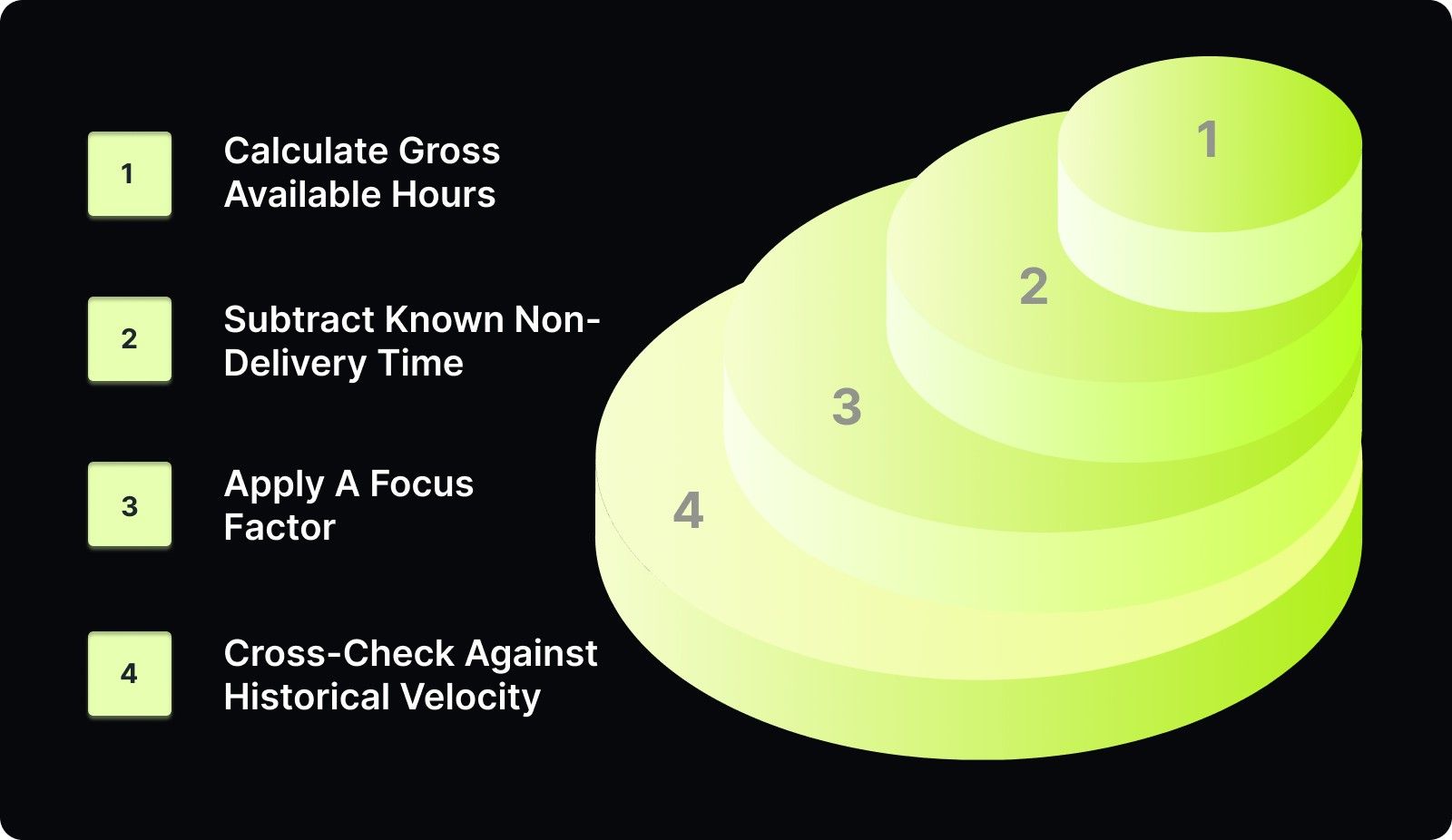
1. Calculate Gross Available Hours
Start with the total working time for the sprint before any deductions.
Formula:
Gross Hours = Working Days × Sum of Team Daily Hours
Worked Example:
Sprint length: 2 weeks → 10 working days
Team:
3 full-time engineers (7 hrs/day)
2 part-time engineers (3.5 hrs/day)
Daily team hours:
(3 × 7) + (2 × 3.5) = 21 + 7 = 28 hrs/day
Gross sprint hours:
10 × 28 = 280 hrs
This number represents total theoretical availability, not delivery capacity.
2. Subtract Known Non-Delivery Time
Next, remove time that is predictably unavailable for delivery work.
Known Non-Delivery Time Includes:
Planned leave or holidays
Sprint ceremonies (planning, review, retro, stand-ups)
Recurring meetings
Fixed obligations (support rotations, training)
Example Deductions:
Daily stand-ups: 15 min × 10 days = 2.5 hrs
Sprint planning + review + retro = 10 hrs
Planned time off = 8 hrs
Other recurring meetings = 7 hrs
Total non-delivery time = 27.5 hrs
Net Available Hours:
Net Available Hours = Gross Hours − Known Non-Delivery Time
280 − 27.5 = 252.5 hrs
3. Apply A Focus Factor
Even after removing known non-delivery time, not all remaining hours convert into productive delivery work. Context switching, code reviews, interruptions, and day-to-day friction reduce effective output.
Apply a focus factor to account for this reality.
Typical Focus Factor Range:
0.70 for complex or interrupt-heavy work
0.80–0.85 for stable, well-understood work
Example:
Delivery Capacity Hours = Net Available Hours × Focus Factor
252.5 × 0.8 ≈ 202 hrs
This is the number teams should plan against.
4. Cross-Check Against Historical Velocity
Capacity hours should always be validated against past delivery data.
If your team typically completes ~30 story points per sprint, but the new plan implies significantly more work, pause and adjust. Capacity planning should support honest forecasting, not justify higher commitments.
Use hours to prevent overload.
Use velocity to maintain estimation integrity.
Once capacity is calculated, the next step is to use it effectively in Agile planning, ensuring teams focus on high-priority tasks while maintaining a balanced workload.
Capacity Planning in the Agile Workflow
Once the team’s capacity is calculated, it is time to integrate it into the sprint planning process to ensure the work is manageable and meets stakeholder expectations.
Sprint Planning and Work Assignment
During sprint planning, teams review their backlog and select tasks based on their calculated capacity. This ensures the team only commits to work they can realistically complete within the sprint timeframe. The goal is to prioritize high-value tasks and avoid overburdening team members.
Example: If a team’s capacity is 40 hours, but the backlog contains 50 hours of tasks, the team should prioritize the most important tasks or defer the less critical tasks to future sprints.
Balancing Capacity and Velocity
Capacity and velocity should be used together to refine planning. While capacity is based on available time and team skills, velocity is based on historical performance. Using both metrics helps ensure that teams do not over-commit and can adjust their plans in real-time.
Example: If a team’s historical velocity is 30 story points but their calculated capacity is 40 hours, they might prioritize 25-30 story points based on the difficulty and complexity of the tasks.
Explicit Scope-Trade Rule Mid-Sprint
Agile capacity planning only works when scope discipline is enforced during the sprint. If urgent work enters mid-sprint, something must exit, or the sprint goal must change. There is no “free” work.
This rule prevents silent overcommitment and protects delivery predictability.
Dynamic Adjustment During the Sprint
Agile capacity planning isn’t static. Teams should reassess their capacity mid-sprint to account for any changes, such as new priorities, emerging blockers, or resource changes.
If urgent work enters mid-sprint, remove equal-sized work from the sprint backlog or renegotiate the sprint goal.
Track spillover as a planning signal, not a team effort issue.
Spillover indicates mismatched assumptions, not poor performance. Treat it as input for improving future capacity calculations, focus factors, or backlog sizing.
By enforcing explicit trade-offs and tracking signals objectively, teams maintain trust in planning while staying responsive to change.
Understanding how capacity planning works in the Agile workflow sets the stage for appreciating its impact on sustainable delivery and team health.
If you want capacity plans grounded in real engineering data, Entelligence AI can help. Get clear signals, fewer surprises, and better commitments. Book a free demo today!

Why Agile Capacity Planning Matters
Agile capacity planning matters because it increases confidence, minimizes surprises, and helps keep teams productive without causing burnout. By properly managing workload expectations, capacity planning ensures teams can stay on track while maintaining a healthy work-life balance.
Predictable Delivery and Forecasting
Effective capacity planning allows teams to accurately forecast what they can accomplish within a sprint, enhancing both delivery reliability and stakeholder expectations. Planning capacity helps teams focus on realistic goals, making it easier to communicate timelines and avoid over-promising, which leads to more predictable and reliable deliveries.
Better Resource Allocation
When teams properly plan their capacity, they can allocate resources more effectively, ensuring no one person is overloaded with tasks. Capacity planning helps balance workloads based on skills and availability, ensuring each team member contributes effectively without becoming overwhelmed, leading to a more harmonious and productive team environment.
Reduced Burnout and Higher Morale
When teams commit to realistic work that matches their actual capacity, they can avoid burnout. Over-committing causes stress, reduces productivity, and hurts morale. By setting achievable goals and maintaining a manageable workload, capacity planning ensures that the team remains engaged, motivated, and ready to tackle new challenges without feeling overwhelmed.
Now that we have covered why capacity planning is so important, let’s dive into the practical steps teams can take to effectively implement it.
Also Read: Top 10 Engineering Metrics to Track in 2025
Practical Steps for Agile Capacity Planning
Agile capacity planning becomes valuable when teams follow a clear, repeatable process that ensures realistic commitments and efficient delivery. The steps below produce a repeatable capacity model that teams can use every sprint.
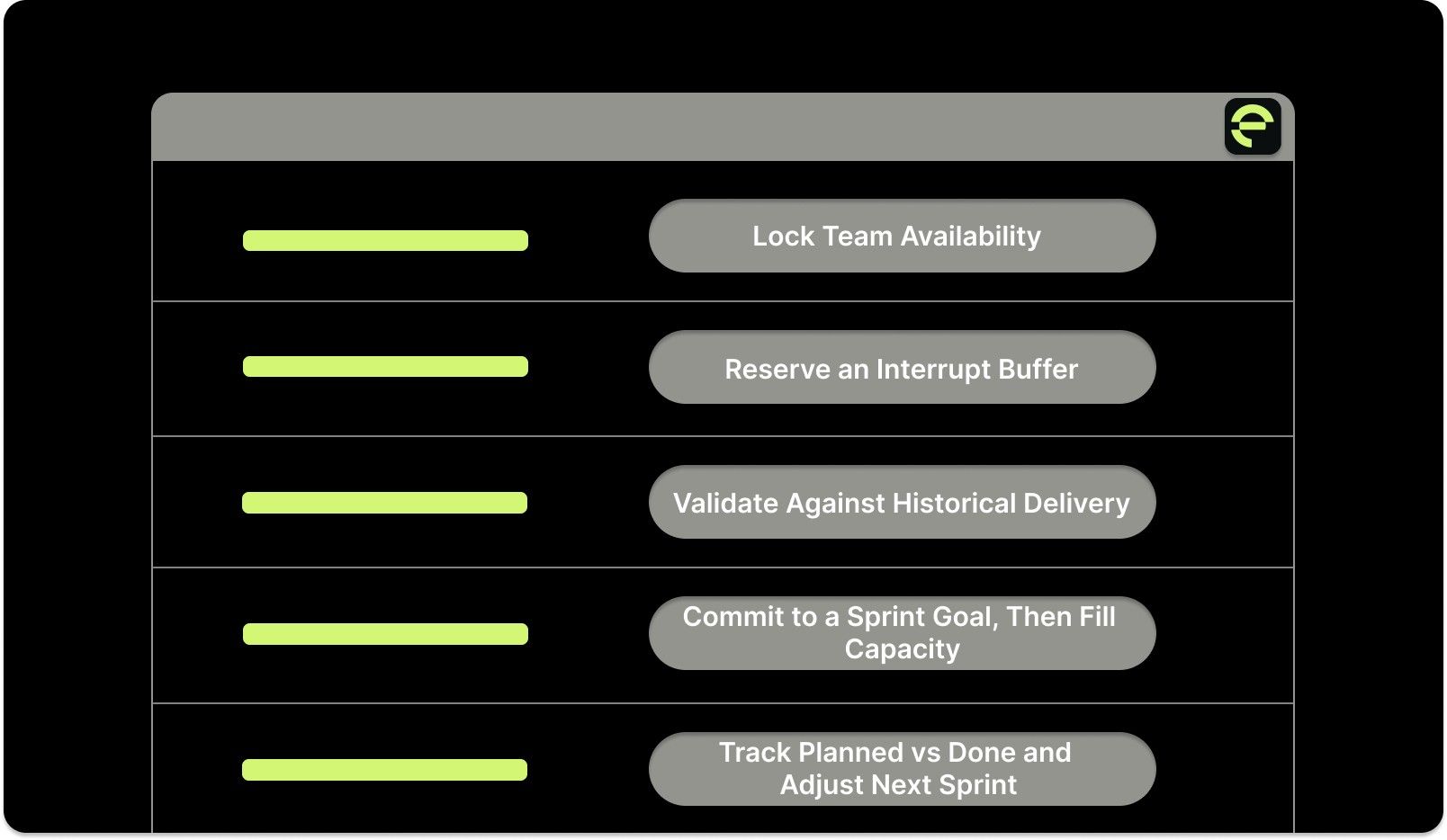
Step 1: Lock Team Availability
Start by fixing availability before discussing scope.
For each team member, list:
Planned leave or holidays
Fixed obligations (on-call rotations, support duties, training)
Recurring meetings and sprint ceremonies
Subtract these from working days to calculate net availability per person. Once availability is locked, do not adjust it to “make room” for more work. This becomes the foundation for all sprint commitments.
Deliverable: A simple availability table or capacity sheet by team member.
Step 2: Reserve an Interrupt Buffer
Not all work is planned, and pretending otherwise breaks capacity models.
Set aside a fixed buffer for interruptions such as:
Production issues
Ad-hoc stakeholder requests
Support escalations
Unplanned reviews or rework
Start with a 10–20% buffer of net available hours and adjust using historical data.
Increase the buffer for on-call teams or support-heavy sprints
Decrease it only when the interruption rates are consistently low
This buffer is not optional and should never be filled with backlog work.
Deliverable: An explicit interrupt buffer baked into the sprint capacity.
Step 3: Validate Against Historical Delivery
Before committing, sanity-check the plan using recent data.
Review the last 3–5 sprints for:
Completed velocity
Spillover or carryover work
Amount of unplanned work absorbed
If spillover appears frequently, reduce planned load before attempting to “fix” execution. Persistent spillover signals a planning issue, not a team effort problem.
Capacity should explain past delivery, not contradict it.
Deliverable: A validated capacity range grounded in recent sprint outcomes.
Step 4: Commit to a Sprint Goal, Then Fill Capacity
Commitment should follow intent, not backlog order.
First, define a clear sprint goal.
Then pull backlog items in priority order until capacity is reached.
Stop when capacity is full.
Do not:
Assume the last 10% will “somehow fit”
Rely on heroics or optimistic execution
Cram work in to satisfy backlog pressure
Capacity limits are commitments, not suggestions.
Deliverable: A sprint plan aligned to a goal, capped by capacity.
Step 5: Track Planned vs Done and Adjust Next Sprint
At the end of the sprint, capture planning accuracy signals.
Record:
Planned points or hours
Completed work
Unplanned work absorbed
Blockers or major disruptions
Use this data to:
Tune interrupt buffers
Adjust focus factors
Improve availability assumptions
Capacity planning improves only when teams close the feedback loop every sprint.
Deliverable: A planning feedback log used to refine the next sprint.
Planning is easier when you can see how your team is actually working. Entelligence AI surfaces the data you need to make confident, realistic commitments.
Also Read: How to Conduct a Code Quality Audit: A Comprehensive Guide
Technical Examples of Capacity Plans
This example shows how to move from hour-based capacity to a point-based sprint commitment without guesswork.
Let’s consider a real sprint scenario:
Sprint Setup
Sprint Length: 2 weeks (10 working days)
Team: 5 members
Total Hours per Day:
5 members × 7 hrs/day = 35 hrs/day
Sprint total = 10 × 35 = 350 hrs
Apply ~70% utilization → 245 hrs usable work capacity
This is the maximum safe delivery capacity for the sprint.
Backlog Fit Check
Assume backlog tasks:
Task A — 80 hrs
Task B — 30 hrs
Task C — 60 hrs
Task D — 70 hrs
Task E — 20 hrs
Total = 260 hrs
Team has 245 hrs capacity → must prioritize or split work.
Hours ↔ Story Points Bridge
Most Agile teams commit to story points. Use hours to validate, not replace, point-based planning.
Create the bridge using history:
Average delivery capacity (last 3–5 sprints): ~240 hours
Average completed velocity: 30 story points
Bridge:
240 ÷ 30 = ~8 hours per story point
Final Sprint Commitment
Using the bridge:
245 delivery hours ≈ 30 story points
Commit close to historical velocity, not optimistic capacity
Planning rule:
Plan scope in points
Cap commitment using hours
If points and hours disagree, reduce scope before the sprint starts
This approach keeps sprint commitments realistic while preserving Agile estimation practices.
How Entelligence AI Enhances Agile Capacity Planning
Most capacity plans fail because they rely on stale spreadsheets and incomplete views, a Jira board here, a velocity chart there, and gut feel in between. Entelligence AI closes that gap. It pulls real signals from your delivery flow: code reviews, PRs, sprint work, DORA metrics, and team activity. Then it turns that data into clear, actionable insight for managers and leaders.
Instead of guessing how much your team can take on, you see how the team is actually operating, in real time, sprint by sprint.
Here’s how Entelligence acts as a Sage and Companion for capacity planning, not just another dashboard:
Real-Time Team & Sprint Insights
Automatically surfaces completed work, delays, review load, and flow bottlenecks so future capacity planning is based on real execution data.AI-Generated Sprint Assessments
Provides clear summaries of what moved, what stalled, and why, helping managers set realistic expectations for the next cycle.Workload & Contribution Visibility
Shows who is overloaded, who has room, and how work is distributed across the team, essential for balancing capacity.Automated Code Reviews That Free Up Time
Deep, context-aware review suggestions reduce reviewer load and shorten PR cycles, increasing effective engineering capacity.Contextual Velocity & DORA Signals
Links velocity, deployment frequency, and quality indicators to planning, helping leaders set goals without overstressing teams.Healthy Competition & Recognition
Leaderboards highlight meaningful contributions (review quality, impact), promoting sustainable habits that support predictable capacity.Integrated, Always-Current Data
Pulls from GitHub, IDEs, and collaboration tools so capacity decisions reflect live operational reality, no manual reporting needed.

Conclusion
Agile capacity planning is essential for ensuring that teams can realistically commit to work and deliver it predictably and sustainably. By factoring in team availability, sprint events, and historical performance, teams can set achievable goals, avoid overcommitment, and maintain a steady development rhythm.
A structured approach to capacity planning, coupled with regular evaluation, helps teams improve their forecasting accuracy over time. With clear inputs, realistic assumptions, and ongoing refinement, teams can improve their ability to deliver value consistently without overburdening themselves.
Platforms like Entelligence AI make this process even more efficient. By providing real-time insights, highlighting bottlenecks, and offering visual capacity views, Entelligence AI enables teams and managers to make more informed decisions and maintain balance in their workloads.
To see how Entelligence AI can strengthen your capacity planning and improve delivery outcomes, book your demo today.
Frequently Asked Questions (FAQs)
1. What is agile capacity planning?
Agile capacity planning is the process of determining how much work a team can realistically complete in an upcoming iteration by considering availability, skill, and workload.
2. How is capacity planning different from velocity in Agile?
Capacity reflects actual available work hours; velocity measures past output and forecasts future sprint delivery.
3. When should Agile teams do capacity planning?
Capacity planning should happen during or just before sprint planning, so teams can plan workload based on current availability.
4. What factors influence capacity calculations?
Factors include team availability, holidays, planned time off, sprint events, and individual skills.
5. Can Agile capacity planning improve team morale?
Yes, realistic planning reduces overload and burnout, helping teams meet their sprint goals and stay motivated.
According to the 17th Annual State of Agile Report, 71% of respondents reported using Agile in their software development lifecycle, highlighting how widely Agile practices are adopted across teams today.
Agile teams don’t just predict what to build, they also need to predict how much work they can realistically deliver in each iteration. That’s where agile capacity planning comes in.
Capacity planning helps Scrum and Agile teams estimate the amount of work they can complete in a sprint by analyzing team availability, skills, and workload history. This approach ensures that teams don’t overcommit, setting realistic expectations and delivering value consistently.
In this article, you will learn what agile capacity planning is, why it matters for delivery predictability and team well-being, and practical steps teams can take to implement it with examples and metrics you can use today.
Overview / Key Takeaways
Agile Capacity Planning helps teams realistically estimate the amount of work they can complete in a sprint by considering factors like team availability, skills, and workload history, ensuring predictable delivery.
Unlike traditional planning, agile capacity planning is dynamic, adjusting frequently to changes in priorities and availability, allowing teams to stay flexible and avoid overcommitting.
Practical steps for Agile capacity planning include auditing team availability, reviewing historical velocity, setting capacity in planning tools, and involving the entire team in planning to ensure alignment and shared ownership.
Entelligence AI enhances Agile capacity planning by automating forecasting, providing real-time sprint dashboards, offering visual capacity views, and sending alerts to avoid overcommitment.
Agile capacity planning improves delivery predictability and team well-being by ensuring teams can meet commitments without burnout, fostering a healthy work-life balance.
What Is Agile Capacity Planning?
Agile capacity planning is the practice of deciding how much work your team can realistically complete in a sprint based on actual availability and how the team has been delivering recently.
It is not a “people × hours” utilisation exercise. It also doesn’t replace estimation. Estimation tells you how big the work is. Capacity planning tells you how much of that work you can safely commit to without betting the sprint on perfect conditions.
A good capacity plan accounts for meetings, code reviews, support load, context switching, and unplanned work so the team can deliver with quality and sustainability.
With that foundation, let’s explore how Agile and Scrum teams actually calculate capacity in practice, ensuring they optimize both efficiency and predictability.
How Agile Teams Calculate Capacity
Calculating capacity may sound simple, but it requires attention to both availability and realistic productivity to ensure accurate planning and avoid over-commitment.

1. Calculate Gross Available Hours
Start with the total working time for the sprint before any deductions.
Formula:
Gross Hours = Working Days × Sum of Team Daily Hours
Worked Example:
Sprint length: 2 weeks → 10 working days
Team:
3 full-time engineers (7 hrs/day)
2 part-time engineers (3.5 hrs/day)
Daily team hours:
(3 × 7) + (2 × 3.5) = 21 + 7 = 28 hrs/day
Gross sprint hours:
10 × 28 = 280 hrs
This number represents total theoretical availability, not delivery capacity.
2. Subtract Known Non-Delivery Time
Next, remove time that is predictably unavailable for delivery work.
Known Non-Delivery Time Includes:
Planned leave or holidays
Sprint ceremonies (planning, review, retro, stand-ups)
Recurring meetings
Fixed obligations (support rotations, training)
Example Deductions:
Daily stand-ups: 15 min × 10 days = 2.5 hrs
Sprint planning + review + retro = 10 hrs
Planned time off = 8 hrs
Other recurring meetings = 7 hrs
Total non-delivery time = 27.5 hrs
Net Available Hours:
Net Available Hours = Gross Hours − Known Non-Delivery Time
280 − 27.5 = 252.5 hrs
3. Apply A Focus Factor
Even after removing known non-delivery time, not all remaining hours convert into productive delivery work. Context switching, code reviews, interruptions, and day-to-day friction reduce effective output.
Apply a focus factor to account for this reality.
Typical Focus Factor Range:
0.70 for complex or interrupt-heavy work
0.80–0.85 for stable, well-understood work
Example:
Delivery Capacity Hours = Net Available Hours × Focus Factor
252.5 × 0.8 ≈ 202 hrs
This is the number teams should plan against.
4. Cross-Check Against Historical Velocity
Capacity hours should always be validated against past delivery data.
If your team typically completes ~30 story points per sprint, but the new plan implies significantly more work, pause and adjust. Capacity planning should support honest forecasting, not justify higher commitments.
Use hours to prevent overload.
Use velocity to maintain estimation integrity.
Once capacity is calculated, the next step is to use it effectively in Agile planning, ensuring teams focus on high-priority tasks while maintaining a balanced workload.
Capacity Planning in the Agile Workflow
Once the team’s capacity is calculated, it is time to integrate it into the sprint planning process to ensure the work is manageable and meets stakeholder expectations.
Sprint Planning and Work Assignment
During sprint planning, teams review their backlog and select tasks based on their calculated capacity. This ensures the team only commits to work they can realistically complete within the sprint timeframe. The goal is to prioritize high-value tasks and avoid overburdening team members.
Example: If a team’s capacity is 40 hours, but the backlog contains 50 hours of tasks, the team should prioritize the most important tasks or defer the less critical tasks to future sprints.
Balancing Capacity and Velocity
Capacity and velocity should be used together to refine planning. While capacity is based on available time and team skills, velocity is based on historical performance. Using both metrics helps ensure that teams do not over-commit and can adjust their plans in real-time.
Example: If a team’s historical velocity is 30 story points but their calculated capacity is 40 hours, they might prioritize 25-30 story points based on the difficulty and complexity of the tasks.
Explicit Scope-Trade Rule Mid-Sprint
Agile capacity planning only works when scope discipline is enforced during the sprint. If urgent work enters mid-sprint, something must exit, or the sprint goal must change. There is no “free” work.
This rule prevents silent overcommitment and protects delivery predictability.
Dynamic Adjustment During the Sprint
Agile capacity planning isn’t static. Teams should reassess their capacity mid-sprint to account for any changes, such as new priorities, emerging blockers, or resource changes.
If urgent work enters mid-sprint, remove equal-sized work from the sprint backlog or renegotiate the sprint goal.
Track spillover as a planning signal, not a team effort issue.
Spillover indicates mismatched assumptions, not poor performance. Treat it as input for improving future capacity calculations, focus factors, or backlog sizing.
By enforcing explicit trade-offs and tracking signals objectively, teams maintain trust in planning while staying responsive to change.
Understanding how capacity planning works in the Agile workflow sets the stage for appreciating its impact on sustainable delivery and team health.
If you want capacity plans grounded in real engineering data, Entelligence AI can help. Get clear signals, fewer surprises, and better commitments. Book a free demo today!

Why Agile Capacity Planning Matters
Agile capacity planning matters because it increases confidence, minimizes surprises, and helps keep teams productive without causing burnout. By properly managing workload expectations, capacity planning ensures teams can stay on track while maintaining a healthy work-life balance.
Predictable Delivery and Forecasting
Effective capacity planning allows teams to accurately forecast what they can accomplish within a sprint, enhancing both delivery reliability and stakeholder expectations. Planning capacity helps teams focus on realistic goals, making it easier to communicate timelines and avoid over-promising, which leads to more predictable and reliable deliveries.
Better Resource Allocation
When teams properly plan their capacity, they can allocate resources more effectively, ensuring no one person is overloaded with tasks. Capacity planning helps balance workloads based on skills and availability, ensuring each team member contributes effectively without becoming overwhelmed, leading to a more harmonious and productive team environment.
Reduced Burnout and Higher Morale
When teams commit to realistic work that matches their actual capacity, they can avoid burnout. Over-committing causes stress, reduces productivity, and hurts morale. By setting achievable goals and maintaining a manageable workload, capacity planning ensures that the team remains engaged, motivated, and ready to tackle new challenges without feeling overwhelmed.
Now that we have covered why capacity planning is so important, let’s dive into the practical steps teams can take to effectively implement it.
Also Read: Top 10 Engineering Metrics to Track in 2025
Practical Steps for Agile Capacity Planning
Agile capacity planning becomes valuable when teams follow a clear, repeatable process that ensures realistic commitments and efficient delivery. The steps below produce a repeatable capacity model that teams can use every sprint.

Step 1: Lock Team Availability
Start by fixing availability before discussing scope.
For each team member, list:
Planned leave or holidays
Fixed obligations (on-call rotations, support duties, training)
Recurring meetings and sprint ceremonies
Subtract these from working days to calculate net availability per person. Once availability is locked, do not adjust it to “make room” for more work. This becomes the foundation for all sprint commitments.
Deliverable: A simple availability table or capacity sheet by team member.
Step 2: Reserve an Interrupt Buffer
Not all work is planned, and pretending otherwise breaks capacity models.
Set aside a fixed buffer for interruptions such as:
Production issues
Ad-hoc stakeholder requests
Support escalations
Unplanned reviews or rework
Start with a 10–20% buffer of net available hours and adjust using historical data.
Increase the buffer for on-call teams or support-heavy sprints
Decrease it only when the interruption rates are consistently low
This buffer is not optional and should never be filled with backlog work.
Deliverable: An explicit interrupt buffer baked into the sprint capacity.
Step 3: Validate Against Historical Delivery
Before committing, sanity-check the plan using recent data.
Review the last 3–5 sprints for:
Completed velocity
Spillover or carryover work
Amount of unplanned work absorbed
If spillover appears frequently, reduce planned load before attempting to “fix” execution. Persistent spillover signals a planning issue, not a team effort problem.
Capacity should explain past delivery, not contradict it.
Deliverable: A validated capacity range grounded in recent sprint outcomes.
Step 4: Commit to a Sprint Goal, Then Fill Capacity
Commitment should follow intent, not backlog order.
First, define a clear sprint goal.
Then pull backlog items in priority order until capacity is reached.
Stop when capacity is full.
Do not:
Assume the last 10% will “somehow fit”
Rely on heroics or optimistic execution
Cram work in to satisfy backlog pressure
Capacity limits are commitments, not suggestions.
Deliverable: A sprint plan aligned to a goal, capped by capacity.
Step 5: Track Planned vs Done and Adjust Next Sprint
At the end of the sprint, capture planning accuracy signals.
Record:
Planned points or hours
Completed work
Unplanned work absorbed
Blockers or major disruptions
Use this data to:
Tune interrupt buffers
Adjust focus factors
Improve availability assumptions
Capacity planning improves only when teams close the feedback loop every sprint.
Deliverable: A planning feedback log used to refine the next sprint.
Planning is easier when you can see how your team is actually working. Entelligence AI surfaces the data you need to make confident, realistic commitments.
Also Read: How to Conduct a Code Quality Audit: A Comprehensive Guide
Technical Examples of Capacity Plans
This example shows how to move from hour-based capacity to a point-based sprint commitment without guesswork.
Let’s consider a real sprint scenario:
Sprint Setup
Sprint Length: 2 weeks (10 working days)
Team: 5 members
Total Hours per Day:
5 members × 7 hrs/day = 35 hrs/day
Sprint total = 10 × 35 = 350 hrs
Apply ~70% utilization → 245 hrs usable work capacity
This is the maximum safe delivery capacity for the sprint.
Backlog Fit Check
Assume backlog tasks:
Task A — 80 hrs
Task B — 30 hrs
Task C — 60 hrs
Task D — 70 hrs
Task E — 20 hrs
Total = 260 hrs
Team has 245 hrs capacity → must prioritize or split work.
Hours ↔ Story Points Bridge
Most Agile teams commit to story points. Use hours to validate, not replace, point-based planning.
Create the bridge using history:
Average delivery capacity (last 3–5 sprints): ~240 hours
Average completed velocity: 30 story points
Bridge:
240 ÷ 30 = ~8 hours per story point
Final Sprint Commitment
Using the bridge:
245 delivery hours ≈ 30 story points
Commit close to historical velocity, not optimistic capacity
Planning rule:
Plan scope in points
Cap commitment using hours
If points and hours disagree, reduce scope before the sprint starts
This approach keeps sprint commitments realistic while preserving Agile estimation practices.
How Entelligence AI Enhances Agile Capacity Planning
Most capacity plans fail because they rely on stale spreadsheets and incomplete views, a Jira board here, a velocity chart there, and gut feel in between. Entelligence AI closes that gap. It pulls real signals from your delivery flow: code reviews, PRs, sprint work, DORA metrics, and team activity. Then it turns that data into clear, actionable insight for managers and leaders.
Instead of guessing how much your team can take on, you see how the team is actually operating, in real time, sprint by sprint.
Here’s how Entelligence acts as a Sage and Companion for capacity planning, not just another dashboard:
Real-Time Team & Sprint Insights
Automatically surfaces completed work, delays, review load, and flow bottlenecks so future capacity planning is based on real execution data.AI-Generated Sprint Assessments
Provides clear summaries of what moved, what stalled, and why, helping managers set realistic expectations for the next cycle.Workload & Contribution Visibility
Shows who is overloaded, who has room, and how work is distributed across the team, essential for balancing capacity.Automated Code Reviews That Free Up Time
Deep, context-aware review suggestions reduce reviewer load and shorten PR cycles, increasing effective engineering capacity.Contextual Velocity & DORA Signals
Links velocity, deployment frequency, and quality indicators to planning, helping leaders set goals without overstressing teams.Healthy Competition & Recognition
Leaderboards highlight meaningful contributions (review quality, impact), promoting sustainable habits that support predictable capacity.Integrated, Always-Current Data
Pulls from GitHub, IDEs, and collaboration tools so capacity decisions reflect live operational reality, no manual reporting needed.

Conclusion
Agile capacity planning is essential for ensuring that teams can realistically commit to work and deliver it predictably and sustainably. By factoring in team availability, sprint events, and historical performance, teams can set achievable goals, avoid overcommitment, and maintain a steady development rhythm.
A structured approach to capacity planning, coupled with regular evaluation, helps teams improve their forecasting accuracy over time. With clear inputs, realistic assumptions, and ongoing refinement, teams can improve their ability to deliver value consistently without overburdening themselves.
Platforms like Entelligence AI make this process even more efficient. By providing real-time insights, highlighting bottlenecks, and offering visual capacity views, Entelligence AI enables teams and managers to make more informed decisions and maintain balance in their workloads.
To see how Entelligence AI can strengthen your capacity planning and improve delivery outcomes, book your demo today.
Frequently Asked Questions (FAQs)
1. What is agile capacity planning?
Agile capacity planning is the process of determining how much work a team can realistically complete in an upcoming iteration by considering availability, skill, and workload.
2. How is capacity planning different from velocity in Agile?
Capacity reflects actual available work hours; velocity measures past output and forecasts future sprint delivery.
3. When should Agile teams do capacity planning?
Capacity planning should happen during or just before sprint planning, so teams can plan workload based on current availability.
4. What factors influence capacity calculations?
Factors include team availability, holidays, planned time off, sprint events, and individual skills.
5. Can Agile capacity planning improve team morale?
Yes, realistic planning reduces overload and burnout, helping teams meet their sprint goals and stay motivated.

We raised $5M to run your Engineering team on Autopilot
Watch our launch video
Talk to Sales
Turn engineering signals into leadership decisions
Connect with our team to see how Entelliegnce helps engineering leaders with full visibility into sprint performance, Team insights & Product Delivery
Talk to Sales
Turn engineering signals into leadership decisions
Connect with our team to see how Entelliegnce helps engineering leaders with full visibility into sprint performance, Team insights & Product Delivery
Try Entelligence now