10 Strategic Best Practices for Implementing AI Code Assistant in Large Teams

Jan 19, 2026

Jan 19, 2026

Deploying an AI tool across a massive engineering organization often feels like a shortcut to instant productivity. However, simply buying 500 licenses for your developers does not automatically lead to a 500% increase in team output.

Large organizations face unique challenges like maintaining consistent coding standards and preventing new security vulnerabilities from entering the main codebase.

According to GitHub research, developers using AI assistants can complete tasks up to 55% faster than those working manually. Despite this potential, many enterprise rollouts fail because leaders focus on the software rather than the cultural and operational shifts required.

Managing a distributed team requires a structured approach to ensure AI becomes a teammate rather than a source of technical noise.

In this article, you will learn the strategic best practices for implementing an AI code assistant in large teams to ensure long-term success and security.

Need to Know

  • Adopt a Security-First Mindset: Establish hard guardrails to prevent proprietary code from training public models or introducing restrictive licenses.

  • Use a 3-Phase Rollout: Start with a representative pilot group before expanding to the entire organization to iron out workflow frictions.

  • Prioritize Contextual AI: Generic assistants often fail in large teams because they lack the specific context of your internal APIs and private libraries.

  • Redefine Your Metrics: Stop measuring lines of code and start tracking "Time-to-PR" and "Code Survival Rate" to measure real utility.

  • Establish a Center of Excellence: Create a dedicated group to curate "Golden Prompts" and standardize IDE configurations across all squads.

Why Implementation Fails at Scale: Identifying Common Large-Team Pitfalls

Most enterprise AI failures stem from a lack of centralized strategy and an over-reliance on individual developer initiative. Without clear guidance, your organization risks fragmenting into different silos where code quality and security standards vary wildly.

Large engineering teams typically struggle with these specific implementation hurdles:

  • The "Black Box" Problem: AI assistants may suggest libraries that are unvetted, deprecated, or even incorrect/unsupported dependencies, creating a massive maintenance burden for your senior engineers.

  • Inconsistent Adoption: You will likely find "AI Super-users" and "AI Skeptics" in the same department, leading to uneven velocity and fragmented codebase styles.

  • The Garbage In, Garbage Out Paradox: If your legacy codebase is undocumented or poorly structured, generic AI assistants will frequently suggest solutions that violate your internal patterns.

Establishing a structured framework helps you bypass these roadblocks by creating a repeatable process for every team in your organization.

Establishing a structured framework helps you bypass these roadblocks by creating a repeatable process for every team in your organization. Entelligence AI helps maintain this structure by providing the context needed to scale safely across thousands of repositories. Book a demo to see how to unify your engineering productivity.

Also read: 25 Practical OKR Examples for Software Engineers

Step-by-Step Framework for Rolling Out AI Assistants in Large Organizations

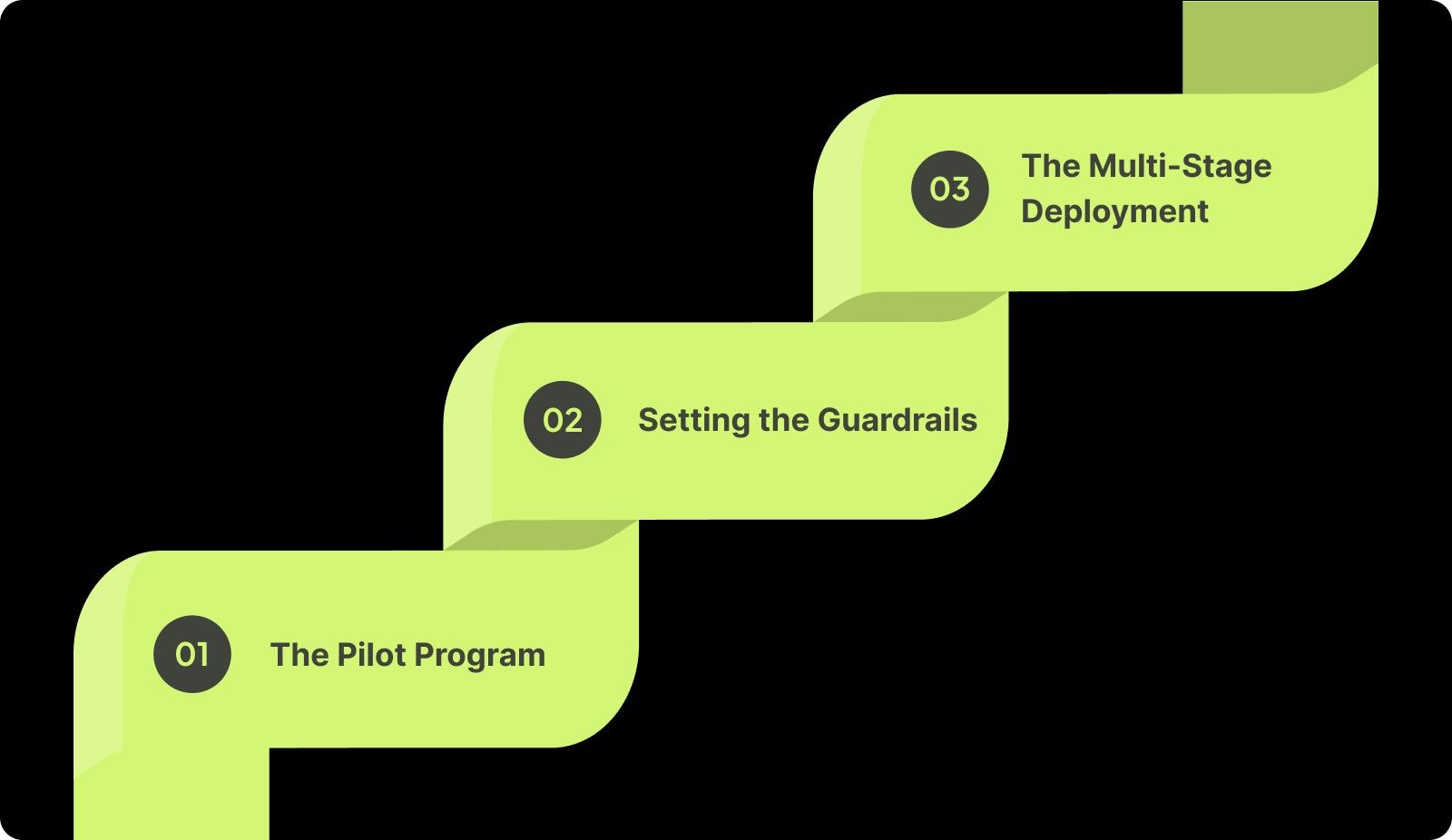
Scaling a new tool requires more than a simple installation link sent via a company-wide email. You need a phased approach that treats the AI rollout like a major product launch with clear milestones and feedback loops.
Step-by-Step Framework for Rolling Out AI Assistants in Large Organizations

Follow this progression to ensure a stable implementation across your organization:

Phase 1: The Pilot Program

Selecting a representative cross-functional squad for a 30-day trial allows you to identify localized friction points.

  • Step 1: Choose a team that works on a mix of greenfield and legacy projects to test the AI in various environments.

  • Step 2: Survey the pilot team weekly to measure qualitative metrics like "developer joy" and "cognitive load" during the trial.

  • Step 3: Document the specific types of tasks where the AI excels, such as unit test generation or boilerplate reduction.

  • Step 4: Compare cycle time (first commit → PR merged), PR review iterations, and post-merge regressions against the team’s baseline to spot early productivity and quality signals.

Phase 2: Setting the Guardrails

Creating an "AI Acceptable Use Policy" ensures every developer knows exactly what code can and cannot be sent to an LLM.

  • Step 1: Partner with your legal and security teams to define clear rules around proprietary data and third-party library usage.

  • Step 2: Create a whitelist of approved IDE extensions and plugins to prevent unvetted third-party tools from entering your ecosystem.

  • Step 3: Update your Pull Request (PR) templates to include a checkbox that identifies if a section of code was AI-generated.

  • Step 4: Set up automated repository scanning to detect any credentials or secrets that might be accidentally suggested by an assistant.

Phase 3: The Multi-Stage Deployment

Gradually scaling from 10% to 100% of the engineering org prevents your support channels from being overwhelmed by setup questions.

  • Step 1: Host "Train-the-Trainer" sessions where pilot members teach their respective squads the best ways to prompt the AI.

  • Step 2: Distribute a shared internal wiki that contains your organization's "Golden Prompts" for common architectural patterns and internal API calls.

  • Step 3: Monitor license utilization daily to ensure you are not paying for seats that are sitting idle or unactivated.

  • Step 4: Schedule monthly "Ask Me Anything" (AMA) sessions with your AI Center of Excellence to address evolving security concerns or workflow changes.

Systematically moving through these phases ensures that your team treats the AI assistant as a permanent part of their toolkit rather than a temporary trend.

Also read: Software Engineering Burnout: Prevention and Solutions Guide

10 Best Practices for Implementing AI Code Assistants at Scale

To move from basic usage to organizational excellence, you must treat your AI assistant as a strategic asset. These best practices for implementing AI code assistant in large teams focus on quality, consistency, and measurable business value.

1. Establish a "Center of Excellence" (CoE)

Creating a specialized team to vet prompts and tools ensures your AI strategy remains centralized and secure. This group acts as the bridge between your developers and leadership, providing the wisdom needed to filter out noisy tools.

Actions to take:

  • Select 3 to 5 senior engineers who are already successfully using AI in their daily workflows.

  • Task this group with creating a "standardized prompt library" for the entire organization to use.

  • Require the CoE to review new AI features every quarter to decide which ones should be adopted or ignored.

How it looks when implemented:

Developers have a single internal resource for "Golden Prompts" that align with the company's architectural standards. Leadership receives a monthly report on tool effectiveness and security compliance from a trusted internal source.
2. Contextualize the AI with Internal Documentation

Generic AI models often fail because they do not understand your private APIs or internal library conventions. Using context-aware platforms ensures the AI provides suggestions that actually work within your specific codebase.

Actions to take:

  • Feed your internal API schemas and SDK documentation into your AI assistant’s context window.

  • Use a tool that can index your private repositories to provide suggestions based on your existing design patterns.

  • Update your internal README files and documentation to ensure the AI has high-quality "truth" to reference.

How it looks when implemented:

The AI assistant stops suggesting public libraries when an internal alternative already exists. Developers spend less time correcting hallucinations and more time accepting accurate, company-specific code suggestions.

3. Implement "Human-in-the-Loop" Review Policies

AI is a powerful assistant, but it should never be the final decision-maker for production-level code. Enforcing a strict review policy ensures that every line of AI-generated code is read and validated by a human engineer.

Actions to take:

  • Add a mandatory tag like AI-Assisted to PR descriptions to alert reviewers of potential risks.

  • Require two human approvals for any code block that was primarily generated by an AI assistant.

  • Train reviewers to look specifically for "hallucinated" parameters or logic that seems correct but fails edge cases.

How it looks when implemented:

Senior engineers feel confident that AI-generated code meets the team's quality standards. The organization maintains a clear audit trail of which parts of the system were built with AI assistance.

4. Measure "Time-to-PR" instead of "Lines of Code"

Measuring productivity by the volume of code produced is a major trap when using AI assistants. Instead, focus on how quickly a developer can move a task from "In Progress" to a mergeable state.

Actions to take:

  • Baseline your team’s average "Cycle Time" before and after the AI rollout.

  • Track the number of PR review cycles needed for AI-assisted code versus manual code.

  • Calculate the "Code Survival Rate" to see how much AI code remains in the codebase after 48 hours.

How it looks when implemented:

Managers focus on the speed of value delivery rather than the raw quantity of characters typed. The team is incentivized to produce clean, mergeable code rather than just generating massive blocks of unvetted logic.

5. Standardize IDE Extensions and Configurations

Allowing developers to use any version of any AI tool leads to a fragmented and insecure development environment. Standardizing your configurations ensures everyone is working from the same baseline and using approved security patches.

Actions to take:

  • Lock down specific versions of AI plugins across the organization via your MDM or IDE management tool.

  • Share an .editorconfig or similar settings file that includes rules for AI formatting and linting.

  • Disable any AI features that are known to send code to unauthorized third-party servers for processing.

How it looks when implemented:

The entire engineering org uses a consistent set of tools that have been vetted by IT and Security. Troubleshooting becomes easier because every developer is working with the same software environment.

Also read: The Ultimate Guide to Engineering Project Collaboration

6. Integrate Security Scanning at the IDE Level

AI can accidentally suggest insecure coding patterns or include vulnerable dependencies in its output. Integrating real-time security scanning directly into the IDE helps developers catch these issues before they are ever committed.

Actions to take:

  • Deploy an IDE-based security tool that scans for SQL injection, XSS, and hardcoded secrets in real-time.

  • Configure the AI assistant to automatically run a security check on any large block of generated code.

  • Provide immediate remediation suggestions within the editor so developers can fix vulnerabilities instantly.

How it looks when implemented:

Security shifts "left" in the development cycle, reducing the number of vulnerabilities found during the QA phase. Developers learn to recognize insecure patterns through the constant feedback provided by the automated scanners.

7. Encourage Peer-to-Peer Learning

Large teams often have a vast gap in AI proficiency between their most and least experienced members. Democratizing expert workflows through shared communication channels helps raise the floor for the entire department.

Actions to take:

  • Create a dedicated Slack or Teams channel focused exclusively on "AI Wins" and "Prompt Sharing."

  • Host bi-weekly "Show and Tell" sessions where developers demonstrate a complex problem they solved with AI.

  • Build a "hall of fame" for prompts that saved the team a significant amount of manual labor or time.

How it looks when implemented:

Knowledge spreads organically through the organization without needing constant top-down training. Junior developers quickly adopt the advanced workflows used by their more experienced peers.

8. Address the "Junior Developer" Training Gap

There is a risk that junior developers will use AI as a crutch, preventing them from learning the fundamentals of your architecture. You must implement policies that ensure AI is used for acceleration, not for bypassing the learning process.

Actions to take:

  • Implement a "Drafting" policy where juniors must explain the logic of any AI-generated code during standups.

  • Encourage juniors to use AI as a "tutor" to explain existing code rather than just a tool to write new code.

  • Assign mentors to specifically review the AI usage patterns of their junior mentees to ensure growth.

How it looks when implemented:

Junior developers become more productive without losing their ability to solve problems from first principles. The organization avoids a "knowledge cliff" where nobody understands how the automated systems truly work.

9. Monitor License Utilization vs. Value

In large teams, it is common to pay for hundreds of licenses that are either unused or poorly utilized. Regular monitoring helps you reclaim costs and identify squads that may need additional training or support.

Actions to take:

  • Review active usage reports monthly to identify developers who have not logged into the AI tool for over 14 days.

  • Compare seat usage across different departments to find which teams are seeing the most benefit.

  • Survey low-usage teams to understand if they have specific technical blockers preventing them from using the AI.

How it looks when implemented:

The organization avoids wasting budget on "shelf-ware" that provides zero business value. Leadership can reallocate funds to teams that are demonstrating the highest ROI from the AI assistant.

10. Continuously Refine the "AI Tech Stack"

The world of AI is moving quickly, and a tool that worked six months ago might be obsolete today. Leaders must be willing to pivot from generic chat assistants to deep, context-aware platforms that integrate with the entire SDLC.

Actions to take:

  • Run an annual evaluation of the AI market to compare your current tools against new enterprise offerings.

  • Look for platforms like Entelligence AI that offer more than just code completion, such as automated documentation and sprint health.

  • Prioritize tools that can integrate with your existing CI/CD pipelines and project management software.

How it looks when implemented:

The engineering team always has access to the most advanced productivity tools available. The organization maintains a competitive edge by adopting integrated intelligence over siloed autocompletion tools.

Focusing on these strategic best practices allows you to scale your team's output while maintaining the rigorous standards required for enterprise software.

Unlike generic assistants, Entelligence AI uses your documentation and repository history to provide context-aware suggestions that align with your internal APIs. You can book a demo to see how this codebase intelligence eliminates hallucinations and streamlines the development lifecycle.

Also read: Best Practices for Effective Sprint Planning Meetings

Formulas and Frameworks to Measure the Success of AI ROI

Proving the value of an AI rollout is essential for maintaining your budget and executive support. You need a simple financial model and supporting delivery and quality signals to ensure you’re not buying speed with bugs.

The ROI Formula (Simple And Defensible)

Use a baseline from your pilot (before vs. after) and calculate ROI using fully loaded costs.

ROI = (Time Saved × Avg Fully-Loaded Hourly Rate − Total AI Cost) / Total AI Cost

How to define each input:

  • Time Saved: Median hours saved per developer per week on defined workflows (e.g., test generation, boilerplate, refactors), multiplied by the number of active users.

  • Avg Fully-Loaded Hourly Rate: Salary + benefits + overhead (use an internal finance estimate, not just base pay).

  • Total AI Cost: Licenses plus enablement costs (Center of Excellence time, training, security tooling, integration work).

Example (illustrative):

If 120 active engineers save 1.5 hours/week, the hourly rate is $90, and the total monthly cost is $35,000:
Monthly value ≈ 120 × 1.5 × 4 × $90 = $64,800
ROI ≈ ($64,800 − $35,000) / $35,000 = 0.85 (85%)

Tip: Use median time saved (not average) to avoid outliers inflating results.

Delivery Metrics (Did It Actually Speed Up Shipping?)

Track these before and after rollout, and segment by team + repo type (greenfield vs legacy):

  • Cycle Time: first commit → PR merged

  • Time-to-PR: ticket “in progress” → first PR opened

  • PR Churn: number of review rounds/rework commits per PR

  • Review Wait Time: how long PRs sit idle before feedback

  • Deployment Throughput (optional): changes shipped per week for the same service

These show whether AI reduces friction across the real workflow, not just in the editor.

Quality And Risk Signals (Are You “Buying Speed With Bugs”?)

Speed only counts if quality holds. Monitor:

  • Regression Rate: incidents, rollbacks, or hotfixes tied to recent merges

  • Defect Density Trend: bugs per release / per sprint (team-level, not individual)

  • Test Coverage Movement: especially around AI-assisted diffs

  • Security Findings: secret leaks, dependency vulnerabilities, policy violations caught in PR

If cycle time improves but regressions spike, you have a guardrails problem—not an adoption problem.

Developer Experience Signals (Adoption That Actually Sticks)

You need lightweight qualitative checks to explain why numbers moved.

  • Monthly 2-question pulse:

    • “AI helps me ship faster” (1–5)

    • “AI reduces my mental load” (1–5)

  • Adoption segmentation: super-users vs low-users, and the top 3 blockers for low usage

  • Retention proxy: % of weekly active users after 60–90 days

These reveal whether the rollout is sustainable or just novelty.

A Practical Measurement Cadence (So This Doesn’t Become Dashboard Theatre)

  • Week 0–2: Establish baselines (cycle time, churn, regressions).

  • Week 3–6: Measure pilot impact + tune guardrails (security/licensing/review norms).

  • Week 7–12: Scale to more teams and compare cohorts (AI-enabled vs control groups).

  • Quarterly: Re-evaluate tooling + prompt standards + training based on outcomes.

This approach keeps ROI measurement tied to real engineering outcomes: faster delivery, stable quality, and sustainable developer experience.

Common Mistakes and How to Avoid Them

Even with the best intentions, large-scale rollouts often run into predictable human and technical errors. Recognizing these mistakes early allows you to correct your course before they impact your overall engineering culture or security posture.
Common Mistakes and How to Avoid Them

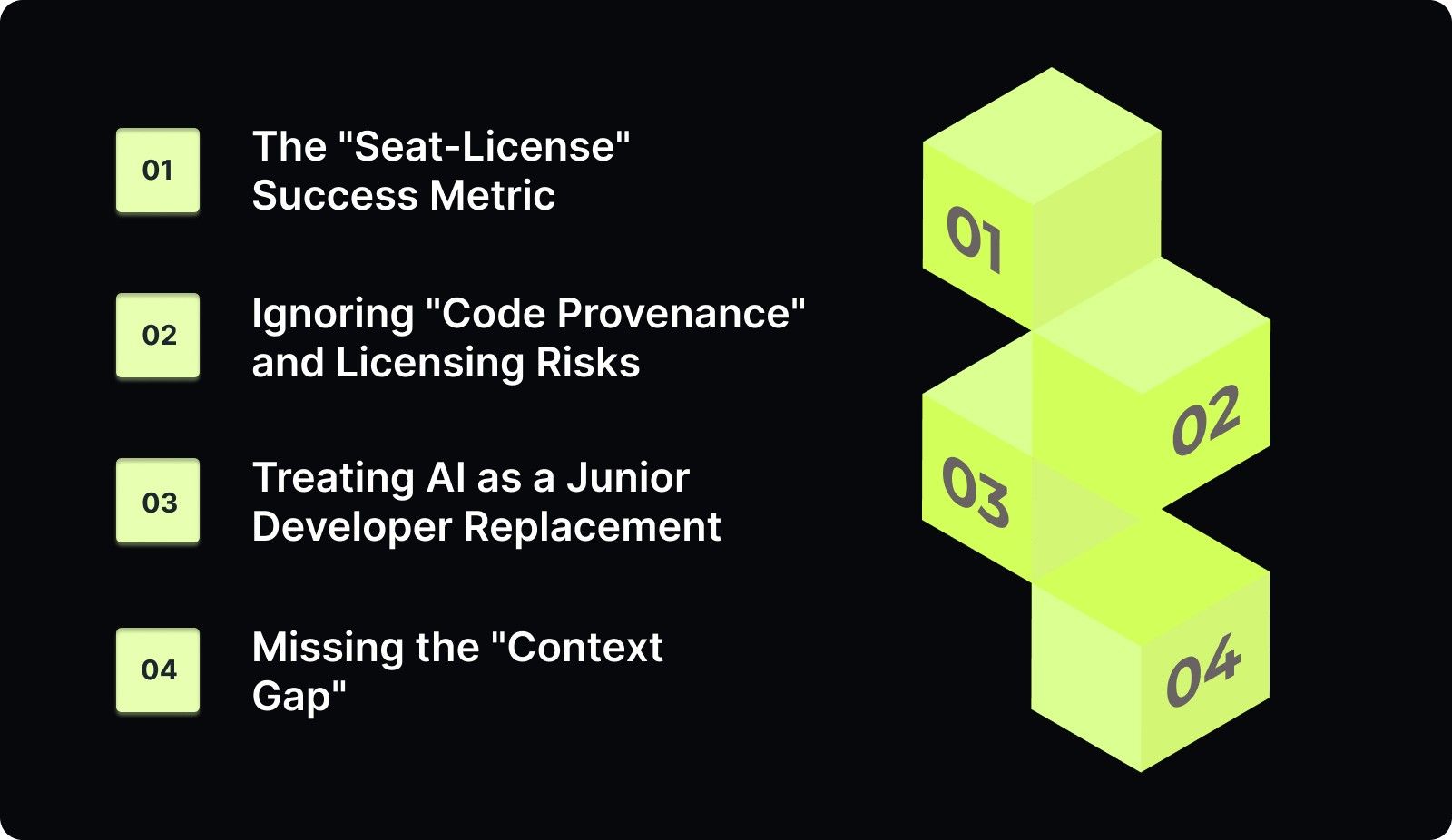
Avoid these common traps to keep your AI implementation on track:

1. The "Seat-License" Success Metric

Measuring success by how many licenses are assigned rather than how much code is actually "surviving" into production.

  • The Risk: High "shelf-ware" costs and a false sense of adoption while developers quietly revert to manual coding.

  • How to Avoid: Track Code Survival Rate, which is the percentage of AI-suggested code that remains in the repo after 48 hours without being deleted.

2. Ignoring "Code Provenance" and Licensing Risks

Allowing AI to suggest snippets from public repositories without checking for restrictive licenses like GPL or Copyleft.

  • The Risk: Potential legal liability and IP contamination that could compromise the commercial value of your software.

  • How to Avoid: Enable License Filtering at the organizational level and use platforms that respect the boundaries of your private repositories.

3. Treating AI as a Junior Developer Replacement

Assuming AI can handle the "easy stuff" for juniors, which inadvertently stops them from learning foundational system architecture.

  • The Risk: A "knowledge cliff" where your junior developers cannot debug or maintain the complex code the AI generated for them.

  • How to Avoid: Implement a "Drafting" Policy where juniors must explain the logic of every AI suggestion before they are allowed to submit a PR.

4. Missing the "Context Gap"

Using generic AI models that do not understand your internal APIs, custom frameworks, or established "tribal knowledge."

  • The Risk: AI suggesting code that looks syntactically correct but fails instantly because it uses incorrect internal parameters or patterns.

  • How to Avoid: Use Retrieval-Augmented Generation (RAG) or context-aware platforms that index your internal documentation and high-quality "golden" repositories.

Identifying these risks proactively allows you to build a more resilient and secure engineering organization.
Also read: Top 8 Developer Productivity Tools For Maximum Efficiency

Security and Compliance to Protect Large-Scale Codebases

In a large enterprise, a single security slip-up can have massive legal and financial consequences. Your AI implementation strategy must be built on a foundation of data sovereignty and proactive risk management to protect your company's most valuable asset: its source code.

Consider these pillars of a secure AI strategy:

  • Data Sovereignty: Ensure your contract with the AI provider explicitly states that your code is not used to train their public models.

  • Dependency Management: Implement automated checks to stop AI from suggesting deprecated or insecure packages that could open backdoors in your system.

  • Legal Considerations: Regularly audit your codebase for "copyright drift" to ensure your intellectual property remains fully protected and compliant with industry regulations.

Maintaining these standards ensures that your productivity gains do not come at the expense of your organization's security or legal standing.

Entelligence AI: Elevating Assistants from "Autocompleters" to "Teammates"

Standard AI assistants often struggle in large organizations because they lack the "big picture" of a 5,000-repo codebase. While a basic chat tool might help with a simple function, it cannot understand the complex dependencies and architectural nuances of an enterprise-scale monolith.

This lack of context leads to hallucinations, review bottlenecks, and a general loss of strategic clarity for engineering leadership. Entelligence AI is the end-to-end engineering productivity suite that unifies code quality, security, team management, and velocity.

We bridge the gap between day-to-day code execution and the strategic oversight leaders need, providing a comprehensive solution for the entire engineering organization.

Key features:

  • Contextual Code Reviews: Our AI understands your specific coding standards and architecture, reducing the back-and-forth between reviewers and developers.

  • Automated Documentation: Keep your internal wikis and architecture diagrams in sync with your actual code automatically, ensuring the AI always has a "source of truth."

  • Org-Wide Visibility: Performance dashboards provide trends and productivity insights across all teams, allowing leaders to make data-driven decisions without chasing reports.

Consolidating your engineering intelligence into a single platform ensures that every developer, manager, and leader has the clarity they need to ship high-quality products faster.

Also read: How To Revert A Git Pull Request

Conclusion

Successful AI implementation is often 20% technology and 80% cultural change. By following the best practices for implementing an AI code assistant in large teams, you ensure that your organization reaps the benefits of velocity while maintaining high standards for security and quality.

Building an AI-partnered culture requires a balance of clear guardrails, contextual data, and human oversight.

Managing the complexities of a large-scale engineering team requires more than just code completion. Entelligence AI provides the deep context and organizational visibility needed to scale your engineering intelligence safely and effectively.

Ready to move beyond basic autocompletion and scale your team's intelligence? Book a demo with Entelligence AI today.

FAQs

Q. How do we stop AI from hallucinating internal API calls?

Use Retrieval-Augmented Generation (RAG) to ground the AI in your actual documentation. Feed it your internal API specs, codebase documentation, and architecture guides. Platforms like Entelligence that integrate deeply with your codebase are designed to reduce hallucinations by operating within a known context, not a generic public one.

Q. Is it better to use one tool for the whole org or let teams choose?

Standardize on one approved tool initially. Tool-sprawl in large teams creates security management nightmares, fragmented knowledge, and inconsistent output. You can allow for a formalized evaluation process where teams can pilot alternatives, but the default should be a centrally managed, configured platform for consistency and security.

Q. What is the best way to train a team of 500+ on effective prompting?

Avoid massive, one-size-fits-all training sessions. Use a "train the trainer" model: educate your CoE and team champions. Then, support peer-to-peer learning through shared prompt libraries, community channels, and champion-led micro-workshops focused on specific use cases (e.g., "Prompting for Test Generation").

Q. How do we handle the "Legacy Code" challenge with AI?

Start by using the AI as an analysis and documentation tool for legacy systems. Ask it to explain complex functions, generate summaries, or create missing unit tests. This provides immediate value and helps the AI learn your legacy context. Prioritize contextualizing the AI for your most critical legacy services using RAG techniques.

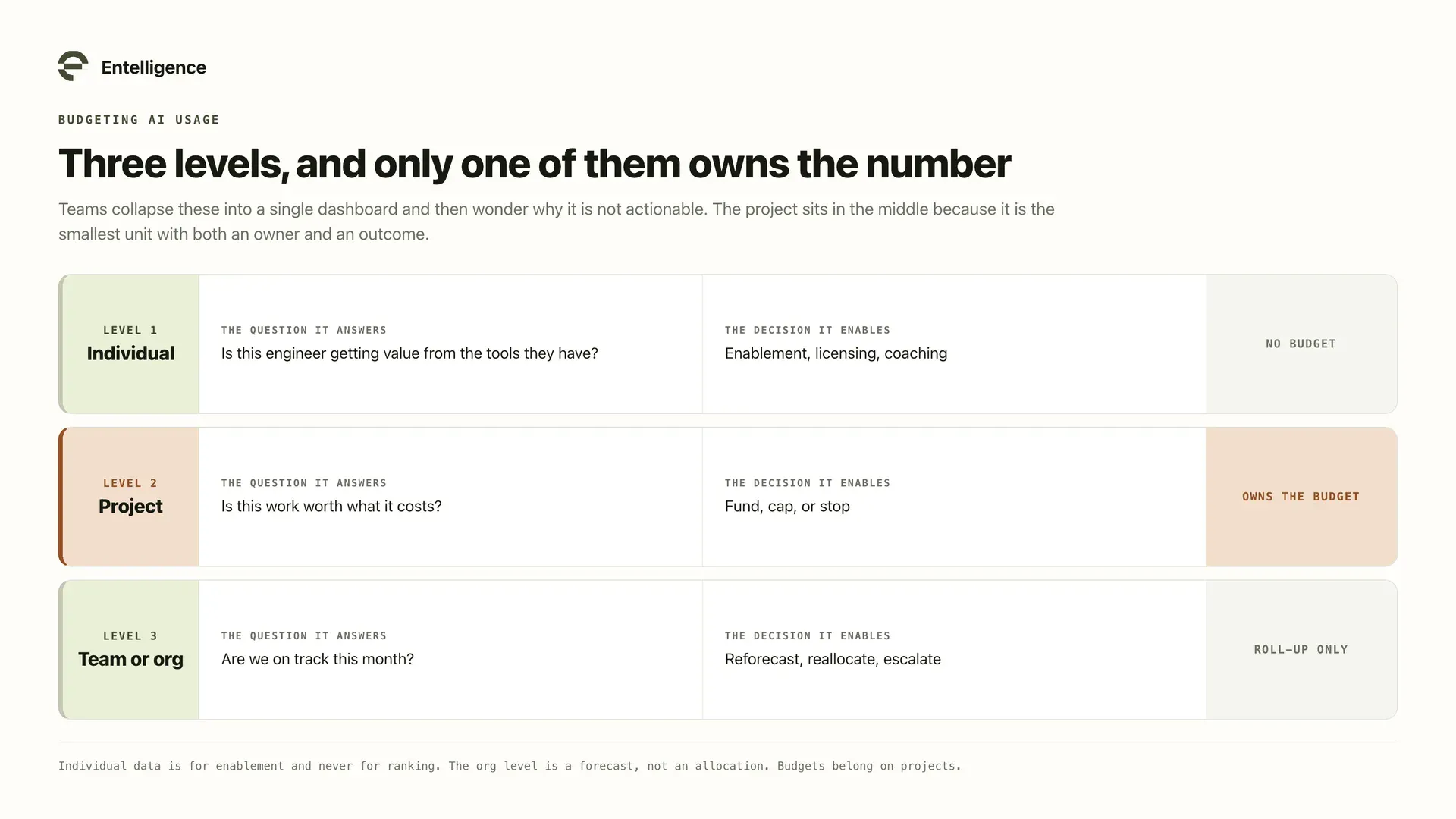
Q. How should we budget for AI code assistant licenses at scale?

Budget based on active, value-creating users, not total headcount. Run a phased rollout and use data from early phases to estimate the percentage of engineers who will become active, high-value users. Factor in not just license costs, but also the internal cost of the CoE, training, and security configuration.
Deploying an AI tool across a massive engineering organization often feels like a shortcut to instant productivity. However, simply buying 500 licenses for your developers does not automatically lead to a 500% increase in team output.

Large organizations face unique challenges like maintaining consistent coding standards and preventing new security vulnerabilities from entering the main codebase.

According to GitHub research, developers using AI assistants can complete tasks up to 55% faster than those working manually. Despite this potential, many enterprise rollouts fail because leaders focus on the software rather than the cultural and operational shifts required.

Managing a distributed team requires a structured approach to ensure AI becomes a teammate rather than a source of technical noise.

In this article, you will learn the strategic best practices for implementing an AI code assistant in large teams to ensure long-term success and security.

Need to Know

  • Adopt a Security-First Mindset: Establish hard guardrails to prevent proprietary code from training public models or introducing restrictive licenses.

  • Use a 3-Phase Rollout: Start with a representative pilot group before expanding to the entire organization to iron out workflow frictions.

  • Prioritize Contextual AI: Generic assistants often fail in large teams because they lack the specific context of your internal APIs and private libraries.

  • Redefine Your Metrics: Stop measuring lines of code and start tracking "Time-to-PR" and "Code Survival Rate" to measure real utility.

  • Establish a Center of Excellence: Create a dedicated group to curate "Golden Prompts" and standardize IDE configurations across all squads.

Why Implementation Fails at Scale: Identifying Common Large-Team Pitfalls

Most enterprise AI failures stem from a lack of centralized strategy and an over-reliance on individual developer initiative. Without clear guidance, your organization risks fragmenting into different silos where code quality and security standards vary wildly.

Large engineering teams typically struggle with these specific implementation hurdles:

  • The "Black Box" Problem: AI assistants may suggest libraries that are unvetted, deprecated, or even incorrect/unsupported dependencies, creating a massive maintenance burden for your senior engineers.

  • Inconsistent Adoption: You will likely find "AI Super-users" and "AI Skeptics" in the same department, leading to uneven velocity and fragmented codebase styles.

  • The Garbage In, Garbage Out Paradox: If your legacy codebase is undocumented or poorly structured, generic AI assistants will frequently suggest solutions that violate your internal patterns.

Establishing a structured framework helps you bypass these roadblocks by creating a repeatable process for every team in your organization.

Establishing a structured framework helps you bypass these roadblocks by creating a repeatable process for every team in your organization. Entelligence AI helps maintain this structure by providing the context needed to scale safely across thousands of repositories. Book a demo to see how to unify your engineering productivity.

Also read: 25 Practical OKR Examples for Software Engineers

Step-by-Step Framework for Rolling Out AI Assistants in Large Organizations

Scaling a new tool requires more than a simple installation link sent via a company-wide email. You need a phased approach that treats the AI rollout like a major product launch with clear milestones and feedback loops.

Step-by-Step Framework for Rolling Out AI Assistants in Large Organizations

Follow this progression to ensure a stable implementation across your organization:

Phase 1: The Pilot Program

Selecting a representative cross-functional squad for a 30-day trial allows you to identify localized friction points.

  • Step 1: Choose a team that works on a mix of greenfield and legacy projects to test the AI in various environments.

  • Step 2: Survey the pilot team weekly to measure qualitative metrics like "developer joy" and "cognitive load" during the trial.

  • Step 3: Document the specific types of tasks where the AI excels, such as unit test generation or boilerplate reduction.

  • Step 4: Compare cycle time (first commit → PR merged), PR review iterations, and post-merge regressions against the team’s baseline to spot early productivity and quality signals.

Phase 2: Setting the Guardrails

Creating an "AI Acceptable Use Policy" ensures every developer knows exactly what code can and cannot be sent to an LLM.

  • Step 1: Partner with your legal and security teams to define clear rules around proprietary data and third-party library usage.

  • Step 2: Create a whitelist of approved IDE extensions and plugins to prevent unvetted third-party tools from entering your ecosystem.

  • Step 3: Update your Pull Request (PR) templates to include a checkbox that identifies if a section of code was AI-generated.

  • Step 4: Set up automated repository scanning to detect any credentials or secrets that might be accidentally suggested by an assistant.

Phase 3: The Multi-Stage Deployment

Gradually scaling from 10% to 100% of the engineering org prevents your support channels from being overwhelmed by setup questions.

  • Step 1: Host "Train-the-Trainer" sessions where pilot members teach their respective squads the best ways to prompt the AI.

  • Step 2: Distribute a shared internal wiki that contains your organization's "Golden Prompts" for common architectural patterns and internal API calls.

  • Step 3: Monitor license utilization daily to ensure you are not paying for seats that are sitting idle or unactivated.

  • Step 4: Schedule monthly "Ask Me Anything" (AMA) sessions with your AI Center of Excellence to address evolving security concerns or workflow changes.

Systematically moving through these phases ensures that your team treats the AI assistant as a permanent part of their toolkit rather than a temporary trend.

Also read: Software Engineering Burnout: Prevention and Solutions Guide

10 Best Practices for Implementing AI Code Assistants at Scale

To move from basic usage to organizational excellence, you must treat your AI assistant as a strategic asset. These best practices for implementing AI code assistant in large teams focus on quality, consistency, and measurable business value.

1. Establish a "Center of Excellence" (CoE)

Creating a specialized team to vet prompts and tools ensures your AI strategy remains centralized and secure. This group acts as the bridge between your developers and leadership, providing the wisdom needed to filter out noisy tools.

Actions to take:

  • Select 3 to 5 senior engineers who are already successfully using AI in their daily workflows.

  • Task this group with creating a "standardized prompt library" for the entire organization to use.

  • Require the CoE to review new AI features every quarter to decide which ones should be adopted or ignored.

How it looks when implemented:

Developers have a single internal resource for "Golden Prompts" that align with the company's architectural standards. Leadership receives a monthly report on tool effectiveness and security compliance from a trusted internal source.

2. Contextualize the AI with Internal Documentation

Generic AI models often fail because they do not understand your private APIs or internal library conventions. Using context-aware platforms ensures the AI provides suggestions that actually work within your specific codebase.

Actions to take:

  • Feed your internal API schemas and SDK documentation into your AI assistant’s context window.

  • Use a tool that can index your private repositories to provide suggestions based on your existing design patterns.

  • Update your internal README files and documentation to ensure the AI has high-quality "truth" to reference.

How it looks when implemented:

The AI assistant stops suggesting public libraries when an internal alternative already exists. Developers spend less time correcting hallucinations and more time accepting accurate, company-specific code suggestions.

3. Implement "Human-in-the-Loop" Review Policies

AI is a powerful assistant, but it should never be the final decision-maker for production-level code. Enforcing a strict review policy ensures that every line of AI-generated code is read and validated by a human engineer.

Actions to take:

  • Add a mandatory tag like AI-Assisted to PR descriptions to alert reviewers of potential risks.

  • Require two human approvals for any code block that was primarily generated by an AI assistant.

  • Train reviewers to look specifically for "hallucinated" parameters or logic that seems correct but fails edge cases.

How it looks when implemented:

Senior engineers feel confident that AI-generated code meets the team's quality standards. The organization maintains a clear audit trail of which parts of the system were built with AI assistance.

4. Measure "Time-to-PR" instead of "Lines of Code"

Measuring productivity by the volume of code produced is a major trap when using AI assistants. Instead, focus on how quickly a developer can move a task from "In Progress" to a mergeable state.

Actions to take:

  • Baseline your team’s average "Cycle Time" before and after the AI rollout.

  • Track the number of PR review cycles needed for AI-assisted code versus manual code.

  • Calculate the "Code Survival Rate" to see how much AI code remains in the codebase after 48 hours.

How it looks when implemented:

Managers focus on the speed of value delivery rather than the raw quantity of characters typed. The team is incentivized to produce clean, mergeable code rather than just generating massive blocks of unvetted logic.

5. Standardize IDE Extensions and Configurations

Allowing developers to use any version of any AI tool leads to a fragmented and insecure development environment. Standardizing your configurations ensures everyone is working from the same baseline and using approved security patches.

Actions to take:

  • Lock down specific versions of AI plugins across the organization via your MDM or IDE management tool.

  • Share an .editorconfig or similar settings file that includes rules for AI formatting and linting.

  • Disable any AI features that are known to send code to unauthorized third-party servers for processing.

How it looks when implemented:

The entire engineering org uses a consistent set of tools that have been vetted by IT and Security. Troubleshooting becomes easier because every developer is working with the same software environment.

Also read: The Ultimate Guide to Engineering Project Collaboration

6. Integrate Security Scanning at the IDE Level

AI can accidentally suggest insecure coding patterns or include vulnerable dependencies in its output. Integrating real-time security scanning directly into the IDE helps developers catch these issues before they are ever committed.

Actions to take:

  • Deploy an IDE-based security tool that scans for SQL injection, XSS, and hardcoded secrets in real-time.

  • Configure the AI assistant to automatically run a security check on any large block of generated code.

  • Provide immediate remediation suggestions within the editor so developers can fix vulnerabilities instantly.

How it looks when implemented:

Security shifts "left" in the development cycle, reducing the number of vulnerabilities found during the QA phase. Developers learn to recognize insecure patterns through the constant feedback provided by the automated scanners.

7. Encourage Peer-to-Peer Learning

Large teams often have a vast gap in AI proficiency between their most and least experienced members. Democratizing expert workflows through shared communication channels helps raise the floor for the entire department.

Actions to take:

  • Create a dedicated Slack or Teams channel focused exclusively on "AI Wins" and "Prompt Sharing."

  • Host bi-weekly "Show and Tell" sessions where developers demonstrate a complex problem they solved with AI.

  • Build a "hall of fame" for prompts that saved the team a significant amount of manual labor or time.

How it looks when implemented:

Knowledge spreads organically through the organization without needing constant top-down training. Junior developers quickly adopt the advanced workflows used by their more experienced peers.

8. Address the "Junior Developer" Training Gap

There is a risk that junior developers will use AI as a crutch, preventing them from learning the fundamentals of your architecture. You must implement policies that ensure AI is used for acceleration, not for bypassing the learning process.

Actions to take:

  • Implement a "Drafting" policy where juniors must explain the logic of any AI-generated code during standups.

  • Encourage juniors to use AI as a "tutor" to explain existing code rather than just a tool to write new code.

  • Assign mentors to specifically review the AI usage patterns of their junior mentees to ensure growth.

How it looks when implemented:

Junior developers become more productive without losing their ability to solve problems from first principles. The organization avoids a "knowledge cliff" where nobody understands how the automated systems truly work.

9. Monitor License Utilization vs. Value

In large teams, it is common to pay for hundreds of licenses that are either unused or poorly utilized. Regular monitoring helps you reclaim costs and identify squads that may need additional training or support.

Actions to take:

  • Review active usage reports monthly to identify developers who have not logged into the AI tool for over 14 days.

  • Compare seat usage across different departments to find which teams are seeing the most benefit.

  • Survey low-usage teams to understand if they have specific technical blockers preventing them from using the AI.

How it looks when implemented:

The organization avoids wasting budget on "shelf-ware" that provides zero business value. Leadership can reallocate funds to teams that are demonstrating the highest ROI from the AI assistant.

10. Continuously Refine the "AI Tech Stack"

The world of AI is moving quickly, and a tool that worked six months ago might be obsolete today. Leaders must be willing to pivot from generic chat assistants to deep, context-aware platforms that integrate with the entire SDLC.

Actions to take:

  • Run an annual evaluation of the AI market to compare your current tools against new enterprise offerings.

  • Look for platforms like Entelligence AI that offer more than just code completion, such as automated documentation and sprint health.

  • Prioritize tools that can integrate with your existing CI/CD pipelines and project management software.

How it looks when implemented:

The engineering team always has access to the most advanced productivity tools available. The organization maintains a competitive edge by adopting integrated intelligence over siloed autocompletion tools.

Focusing on these strategic best practices allows you to scale your team's output while maintaining the rigorous standards required for enterprise software.

Unlike generic assistants, Entelligence AI uses your documentation and repository history to provide context-aware suggestions that align with your internal APIs. You can book a demo to see how this codebase intelligence eliminates hallucinations and streamlines the development lifecycle.

Also read: Best Practices for Effective Sprint Planning Meetings

Formulas and Frameworks to Measure the Success of AI ROI

Proving the value of an AI rollout is essential for maintaining your budget and executive support. You need a simple financial model and supporting delivery and quality signals to ensure you’re not buying speed with bugs.

The ROI Formula (Simple And Defensible)

Use a baseline from your pilot (before vs. after) and calculate ROI using fully loaded costs.

ROI = (Time Saved × Avg Fully-Loaded Hourly Rate − Total AI Cost) / Total AI Cost

How to define each input:

  • Time Saved: Median hours saved per developer per week on defined workflows (e.g., test generation, boilerplate, refactors), multiplied by the number of active users.

  • Avg Fully-Loaded Hourly Rate: Salary + benefits + overhead (use an internal finance estimate, not just base pay).

  • Total AI Cost: Licenses plus enablement costs (Center of Excellence time, training, security tooling, integration work).

Example (illustrative):

If 120 active engineers save 1.5 hours/week, the hourly rate is $90, and the total monthly cost is $35,000:
Monthly value ≈ 120 × 1.5 × 4 × $90 = $64,800
ROI ≈ ($64,800 − $35,000) / $35,000 = 0.85 (85%)

Tip: Use median time saved (not average) to avoid outliers inflating results.

Delivery Metrics (Did It Actually Speed Up Shipping?)

Track these before and after rollout, and segment by team + repo type (greenfield vs legacy):

  • Cycle Time: first commit → PR merged

  • Time-to-PR: ticket “in progress” → first PR opened

  • PR Churn: number of review rounds/rework commits per PR

  • Review Wait Time: how long PRs sit idle before feedback

  • Deployment Throughput (optional): changes shipped per week for the same service

These show whether AI reduces friction across the real workflow, not just in the editor.

Quality And Risk Signals (Are You “Buying Speed With Bugs”?)

Speed only counts if quality holds. Monitor:

  • Regression Rate: incidents, rollbacks, or hotfixes tied to recent merges

  • Defect Density Trend: bugs per release / per sprint (team-level, not individual)

  • Test Coverage Movement: especially around AI-assisted diffs

  • Security Findings: secret leaks, dependency vulnerabilities, policy violations caught in PR

If cycle time improves but regressions spike, you have a guardrails problem—not an adoption problem.

Developer Experience Signals (Adoption That Actually Sticks)

You need lightweight qualitative checks to explain why numbers moved.

  • Monthly 2-question pulse:

    • “AI helps me ship faster” (1–5)

    • “AI reduces my mental load” (1–5)

  • Adoption segmentation: super-users vs low-users, and the top 3 blockers for low usage

  • Retention proxy: % of weekly active users after 60–90 days

These reveal whether the rollout is sustainable or just novelty.

A Practical Measurement Cadence (So This Doesn’t Become Dashboard Theatre)

  • Week 0–2: Establish baselines (cycle time, churn, regressions).

  • Week 3–6: Measure pilot impact + tune guardrails (security/licensing/review norms).

  • Week 7–12: Scale to more teams and compare cohorts (AI-enabled vs control groups).

  • Quarterly: Re-evaluate tooling + prompt standards + training based on outcomes.

This approach keeps ROI measurement tied to real engineering outcomes: faster delivery, stable quality, and sustainable developer experience.

Common Mistakes and How to Avoid Them

Even with the best intentions, large-scale rollouts often run into predictable human and technical errors. Recognizing these mistakes early allows you to correct your course before they impact your overall engineering culture or security posture.

Common Mistakes and How to Avoid Them

Avoid these common traps to keep your AI implementation on track:

1. The "Seat-License" Success Metric

Measuring success by how many licenses are assigned rather than how much code is actually "surviving" into production.

  • The Risk: High "shelf-ware" costs and a false sense of adoption while developers quietly revert to manual coding.

  • How to Avoid: Track Code Survival Rate, which is the percentage of AI-suggested code that remains in the repo after 48 hours without being deleted.

2. Ignoring "Code Provenance" and Licensing Risks

Allowing AI to suggest snippets from public repositories without checking for restrictive licenses like GPL or Copyleft.

  • The Risk: Potential legal liability and IP contamination that could compromise the commercial value of your software.

  • How to Avoid: Enable License Filtering at the organizational level and use platforms that respect the boundaries of your private repositories.

3. Treating AI as a Junior Developer Replacement

Assuming AI can handle the "easy stuff" for juniors, which inadvertently stops them from learning foundational system architecture.

  • The Risk: A "knowledge cliff" where your junior developers cannot debug or maintain the complex code the AI generated for them.

  • How to Avoid: Implement a "Drafting" Policy where juniors must explain the logic of every AI suggestion before they are allowed to submit a PR.

4. Missing the "Context Gap"

Using generic AI models that do not understand your internal APIs, custom frameworks, or established "tribal knowledge."

  • The Risk: AI suggesting code that looks syntactically correct but fails instantly because it uses incorrect internal parameters or patterns.

  • How to Avoid: Use Retrieval-Augmented Generation (RAG) or context-aware platforms that index your internal documentation and high-quality "golden" repositories.

Identifying these risks proactively allows you to build a more resilient and secure engineering organization.

Also read: Top 8 Developer Productivity Tools For Maximum Efficiency

Security and Compliance to Protect Large-Scale Codebases

In a large enterprise, a single security slip-up can have massive legal and financial consequences. Your AI implementation strategy must be built on a foundation of data sovereignty and proactive risk management to protect your company's most valuable asset: its source code.

Consider these pillars of a secure AI strategy:

  • Data Sovereignty: Ensure your contract with the AI provider explicitly states that your code is not used to train their public models.

  • Dependency Management: Implement automated checks to stop AI from suggesting deprecated or insecure packages that could open backdoors in your system.

  • Legal Considerations: Regularly audit your codebase for "copyright drift" to ensure your intellectual property remains fully protected and compliant with industry regulations.

Maintaining these standards ensures that your productivity gains do not come at the expense of your organization's security or legal standing.

Entelligence AI: Elevating Assistants from "Autocompleters" to "Teammates"

Standard AI assistants often struggle in large organizations because they lack the "big picture" of a 5,000-repo codebase. While a basic chat tool might help with a simple function, it cannot understand the complex dependencies and architectural nuances of an enterprise-scale monolith.

This lack of context leads to hallucinations, review bottlenecks, and a general loss of strategic clarity for engineering leadership. Entelligence AI is the end-to-end engineering productivity suite that unifies code quality, security, team management, and velocity.

We bridge the gap between day-to-day code execution and the strategic oversight leaders need, providing a comprehensive solution for the entire engineering organization.

Key features:

  • Contextual Code Reviews: Our AI understands your specific coding standards and architecture, reducing the back-and-forth between reviewers and developers.

  • Automated Documentation: Keep your internal wikis and architecture diagrams in sync with your actual code automatically, ensuring the AI always has a "source of truth."

  • Org-Wide Visibility: Performance dashboards provide trends and productivity insights across all teams, allowing leaders to make data-driven decisions without chasing reports.

Consolidating your engineering intelligence into a single platform ensures that every developer, manager, and leader has the clarity they need to ship high-quality products faster.

Also read: How To Revert A Git Pull Request

Conclusion

Successful AI implementation is often 20% technology and 80% cultural change. By following the best practices for implementing an AI code assistant in large teams, you ensure that your organization reaps the benefits of velocity while maintaining high standards for security and quality.

Building an AI-partnered culture requires a balance of clear guardrails, contextual data, and human oversight.

Managing the complexities of a large-scale engineering team requires more than just code completion. Entelligence AI provides the deep context and organizational visibility needed to scale your engineering intelligence safely and effectively.

Ready to move beyond basic autocompletion and scale your team's intelligence? Book a demo with Entelligence AI today.

FAQs

Q. How do we stop AI from hallucinating internal API calls?

Use Retrieval-Augmented Generation (RAG) to ground the AI in your actual documentation. Feed it your internal API specs, codebase documentation, and architecture guides. Platforms like Entelligence that integrate deeply with your codebase are designed to reduce hallucinations by operating within a known context, not a generic public one.

Q. Is it better to use one tool for the whole org or let teams choose?

Standardize on one approved tool initially. Tool-sprawl in large teams creates security management nightmares, fragmented knowledge, and inconsistent output. You can allow for a formalized evaluation process where teams can pilot alternatives, but the default should be a centrally managed, configured platform for consistency and security.

Q. What is the best way to train a team of 500+ on effective prompting?

Avoid massive, one-size-fits-all training sessions. Use a "train the trainer" model: educate your CoE and team champions. Then, support peer-to-peer learning through shared prompt libraries, community channels, and champion-led micro-workshops focused on specific use cases (e.g., "Prompting for Test Generation").

Q. How do we handle the "Legacy Code" challenge with AI?

Start by using the AI as an analysis and documentation tool for legacy systems. Ask it to explain complex functions, generate summaries, or create missing unit tests. This provides immediate value and helps the AI learn your legacy context. Prioritize contextualizing the AI for your most critical legacy services using RAG techniques.

Q. How should we budget for AI code assistant licenses at scale?

Budget based on active, value-creating users, not total headcount. Run a phased rollout and use data from early phases to estimate the percentage of engineers who will become active, high-value users. Factor in not just license costs, but also the internal cost of the CoE, training, and security configuration.
We raised $5M to run your Engineering team on Autopilot

We raised $5M to run your Engineering team on Autopilot

Watch our launch video

Talk to Sales

Turn engineering signals into leadership decisions

Connect with our team to see how Entelliegnce helps engineering leaders with full visibility into sprint performance, Team insights & Product Delivery

Talk to Sales

Turn engineering signals into leadership decisions

Connect with our team to see how Entelliegnce helps engineering leaders with full visibility into sprint performance, Team insights & Product Delivery

Try Entelligence now