Bug Management 101: The Complete Implementation Guide for Engineering Teams

Jan 20, 2026

Jan 20, 2026

The "Bug Debt" cycle traps developers in reactive firefighting, stealing time from building new features. To escape this chaos, you need a systemic bug management approach. 

This means shifting from ad-hoc fixes to a proactive, automated culture where defect resolution is integral to your development lifecycle.

This shift is accelerating; recent data indicates that 20% of organizations have already replaced about 75% or more of their manual testing with automation.

In this article, you will learn a complete framework for bug management. We will cover the five-step lifecycle from detection to prevention, provide a step-by-step strategy with actionable formulas, and show you how to measure success to ship faster with higher quality.

An Overview

  • Implement a structured 5-step lifecycle. Move beyond simple tracking by adopting a system for Detection, Triage, Resolution, Verification, and Prevention.

  • 20% of organizations have replaced about 75% or more of their manual testing with automation.

  • Use a quantitative "Risk Score" for triage. Prioritize effectively with the formula: Risk Score = Severity × Frequency to cut through subjective "P1" debates.

  • Define and enforce a "Bug Bar." Establish clear, non-negotiable quality gates that must be met before any release can proceed.

  • Measure what matters: MTTR and Defect Leakage. Track Mean Time to Resolution to improve response speed, and monitor Defect Leakage to gauge your QA effectiveness.

  • Automate context and documentation. Use AI to link bugs to code, suggest fixes based on your architecture, and auto-generate root cause analysis, eliminating manual overhead.

What is Bug Management?

Bug management is a strategic lifecycle that governs how your team detects, triages, resolves, and prevents software defects in your codebase. It differs from simple bug tracking because tracking is just a list, while management is the overall strategy for improvement.

Every bug report should act as an actionable filter that eventually leads to a specific process change or architectural fix.

To move beyond basic tracking, you need a repeatable framework to handle defects as they arise.

Also read: How to Reduce Bugs in Code: 7 Strategies That Work

The 5 Steps of the Bug Management Lifecycle

A successful bug management strategy requires a clear flow that takes a defect from initial discovery to final prevention. This lifecycle ensures that no issues fall through the cracks and that your team learns from every mistake they make.
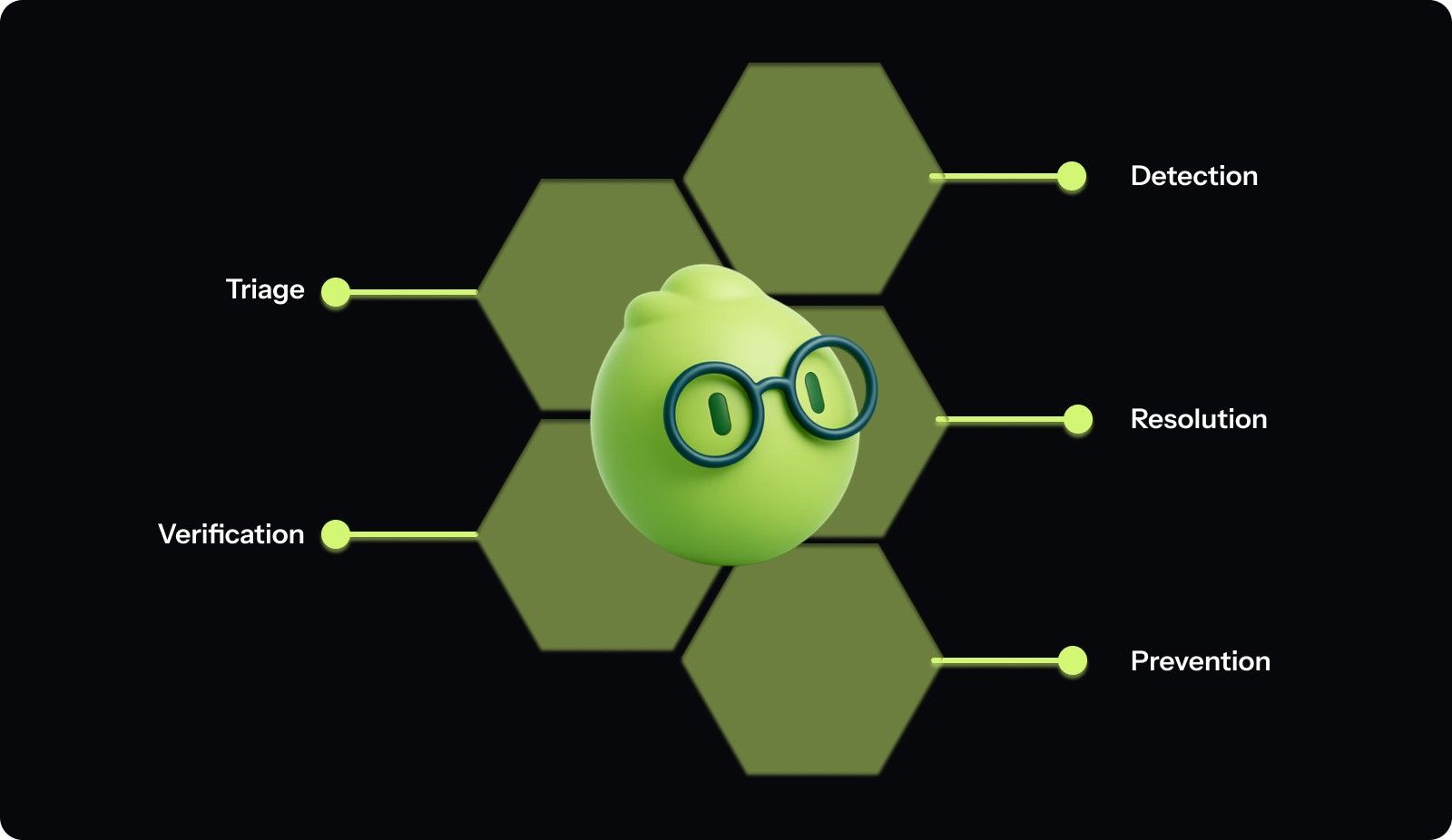
The 5 Steps of the Bug Management Lifecycle

Follow these steps to manage the lifecycle of every defect in your system:

1. Detection

Detection involves identifying a bug through automated monitoring tools, manual testing, or direct feedback from your users in production. You must capture as much technical context as possible during this initial phase to help your developers understand the root cause.

  • Integrate centralized logging to catch crashes before users report them.

  • Set up real-time alerts for high-frequency errors in your production environment.

  • Automate the capture of environment metadata like browser version and OS.

  • Encourage developers to write regression tests for every bug they find.

  • Use error-tracking tools to group similar bug instances into a single ticket.

2. Triage

Triage is the process of reviewing new bugs to determine their potential impact and the urgency required for a resolution. This stage prevents your backlog from becoming a graveyard of low-priority tasks that distract your team from important work.

  • Schedule a daily triage meeting with a rotating lead engineer.

  • Assign a severity level based on the functional impact of the bug.

  • Determine the priority based on how many users are currently affected.

  • Link the bug to the relevant product area or engineering squad.

  • Reject tickets that lack enough information to be reproduced by developers.

3. Resolution

Resolution is the active phase where an engineer identifies the root cause and writes the code necessary to fix it. This step should involve more than just a quick patch; it should address the underlying systemic issue.

  • Assign the bug to an engineer who has context on that module.

  • Create a dedicated branch for the fix to keep your history clean.

  • Perform a context-rich code review to ensure the fix is robust.

  • Update the internal documentation if the bug revealed a logic flaw.

  • Automate the fix suggestions using AI to reduce the total manual effort.

4. Verification

Verification ensures that the fix actually works as intended and does not introduce new bugs into the existing system. You must verify the fix in an environment that closely mirrors your actual production setup for accurate results.

  • Run the specific test case that originally failed during the detection phase.

  • Perform full regression testing on the affected module to prevent regressions.

  • Ask the original reporter to verify the fix in a staging environment.

  • Update the status of the ticket to "Resolved" only after successful testing.

  • Monitor production logs immediately after the fix is deployed for any issues.

Rather than treating this as a manual chore, Entelligence AI automatically keeps your internal wikis and documentation in sync with every pull request. Book a demo to see how your team can maintain a current knowledge base while focusing entirely on solving the next technical problem.

5. Prevention

Prevention is the final and most important stage, where you analyze the bug to ensure it never happens again. This turns every defect into a "Golden Prompt" that improves your team's long-term coding standards and architectural decisions.

  • Conduct a brief root cause analysis for every high-severity production bug.

  • Update your linting rules to catch similar code patterns in the future.

  • Share the lessons learned with the entire engineering team during retrospectives.

  • Add a new automated test to your CI/CD pipeline for that scenario.

  • Use AI to analyze bug trends and identify weak spots in your architecture.

Understanding the lifecycle is essential, but executing it without a clear strategy leads to an infinite backlog of unresolved issues.

How to Manage Bugs: A Step-by-Step Strategy

You need a practical manual to turn the theoretical lifecycle into a daily operation that your engineering team can follow. This strategy focuses on objective prioritization and measurable success to keep your quality standards high as you scale your operations.

Follow these practical steps to implement a high-velocity bug management system:

Step 1: The Triage Framework

You must establish a clear logic for prioritizing work, so your team does not waste time on cosmetic issues while critical features are broken. We recommend a P1 to P4 logic where P1 is a "blocker", and P4 is a "minor enhancement." This framework removes the subjectivity from triage meetings and ensures that everyone follows the same set of rules.

  • P1 (Critical): System is down, or a core feature is completely unusable for all users.

  • P2 (High): A major feature is broken, but a temporary workaround exists for the users.

  • P3 (Medium): A minor feature is failing, or there is a noticeable performance degradation.

  • P4 (Low): Cosmetic issues, typos, or small UI glitches that do not impact functionality.

To make this even more objective, use the following LaTeX formula:

Risk Score = Severity x Frequency

After completing this step, your team will stop arguing about what to fix first because the data will provide the answer.

Step 2: Implementing the "Bug Bar"

The "Bug Bar" is the minimum quality standard that a release must meet before it is allowed to reach your customers. For example, your bar might state that no P1 or P2 bugs can exist in a release candidate branch.

This creates a clear "Before/After" gate for your deployment pipeline and prevents low-quality code from slipping into production. You should expect fewer emergency rollbacks and higher customer satisfaction scores once this gate is strictly enforced by leadership.

Step 3: Measuring Success

You cannot improve what you do not measure, so you must track specific metrics to evaluate your bug management performance over time.

  • Defect Leakage: This measures the percentage of bugs that were missed by QA and found by users in production.

Defect Leakage = (Bugs in Prod / Total Bugs Found) * 100

  • MTTR (Mean Time to Repair): Calculate this by taking the average time from when a bug is triaged to when it is resolved.

    1. Collect the "Triage Date" and "Resolution Date" for all bugs in a month.

    2. Subtract the triage date from the resolution date for each individual ticket.

    3. Sum these durations and divide by the total number of bugs resolved.

Step 4: Real-World Edge Cases

Your strategy must account for the "Zombie Bug," which is a low-priority ticket that sits in your backlog for two years. We recommend a "purge or fix" policy where any P4 bug older than six months is automatically closed to reduce mental clutter.

Additionally, create a workflow for "Cannot Reproduce" (CNR) tickets where they are closed after three days if no new information is provided. This keeps your backlog fresh and ensures your developers only focus on actionable issues that truly matter.

While a manual strategy works for small squads, scaling these processes requires the right technical stack to avoid burnout.

Best Practices for Bug Management

Implementing the right habits will ensure your bug management system remains effective as your codebase grows in complexity and size.
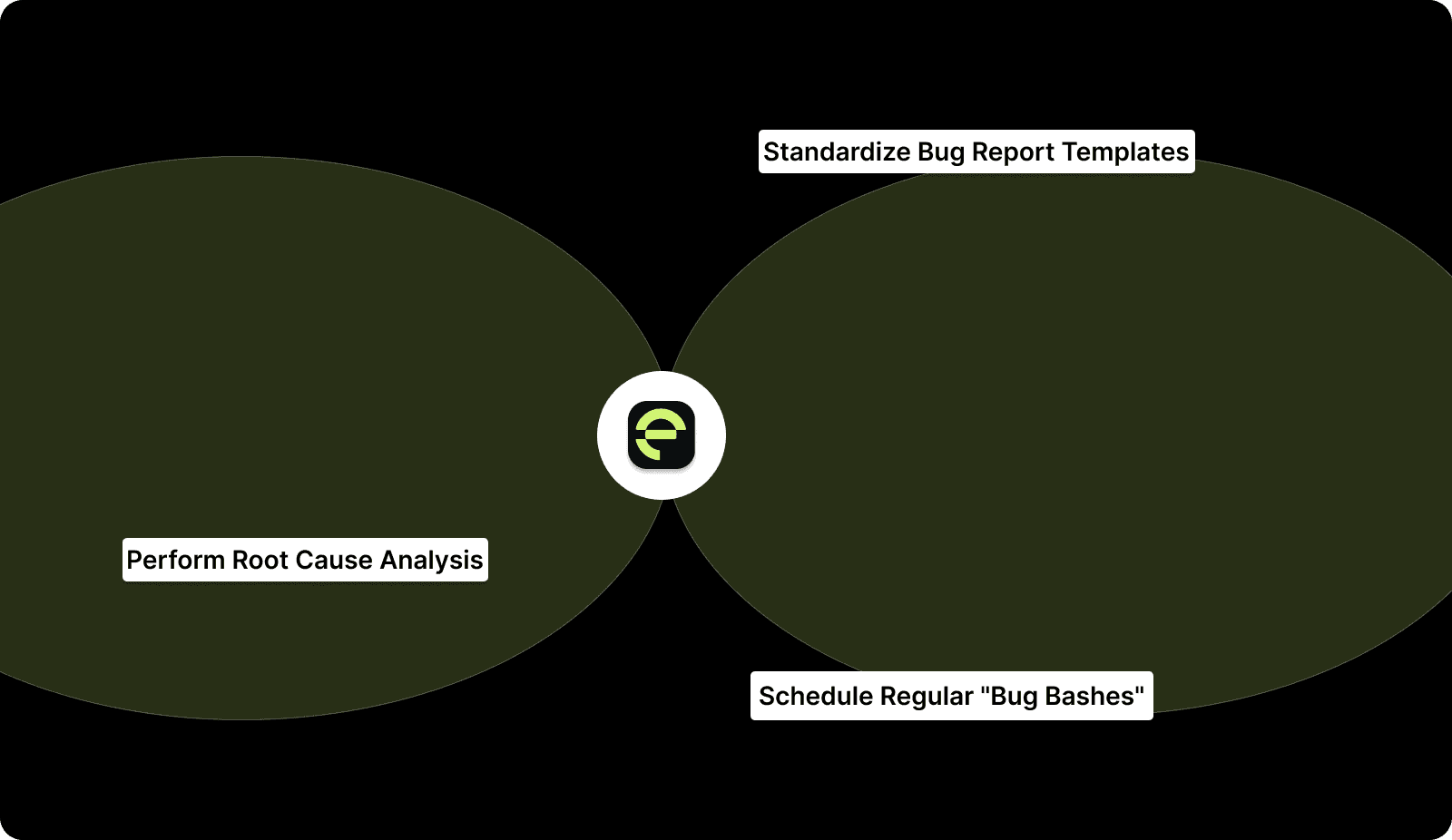
Best Practices for Bug Management

1. Perform Root Cause Analysis (RCA)

Use the "5 Whys" method to dig past the immediate symptom and find the actual systemic failure that allowed the bug. If a database connection failed, don't just restart the service; ask why the connection pool was exhausted in the first place.

This practice ensures that you are fixing the architecture rather than just patching the surface-level problem for a temporary fix.

Impact:

  • Reduces the recurrence of high-severity incidents.

  • Identifies deep architectural weaknesses before they cause a total failure.

  • Improves the collective technical wisdom of your entire engineering organization.

2. Standardize Bug Report Templates

Every bug report must include mandatory fields like logs, a video recording of the issue, and clear steps to reproduce the error. Without these details, your developers will waste hours going back and forth with reporters just to understand the basic problem.

A standardized template ensures that every ticket is "dev-ready" the moment it hits the triage queue for review.

Impact:

  • Cuts down the total time spent in the "Back and Forth" phase.

  • Increases the percentage of bugs that are resolved on the first attempt.

  • Provides a better historical record for future engineers who encounter similar issues.

3. Schedule Regular "Bug Bashes"

A bug bash is a dedicated sprint or a full day where the entire team stops feature work to focus exclusively on quality. This is an excellent way to clear out a growing backlog of P3 and P4 issues that are not urgent but impact polish.

It also encourages non-technical stakeholders to participate in the testing process and provide fresh perspectives on the product's UX.

Impact:

  • Improves the overall "polish" and feel of the user interface.

  • Boosts developer NPS by allowing them to clear out nagging technical debt.

  • Leads to higher sprint predictability by reducing the noise in the backlog.

Even with best practices, human error and lack of context remain the biggest hurdles to a bug-free codebase.

Entelligence AI supports this by providing context-rich fix suggestions directly in the IDE, helping developers identify the systemic cause of a bug before they submit a pull request. Book a demo to see how providing this architectural clarity reduces the need for repetitive "Bug Bashes" and long-term technical debt.

Also read: How Agile Metrics Improve Leadership Outcomes

Common Bug Management Mistakes

Even the most experienced engineering teams fall into traps that make their bug management efforts less effective and more frustrating.

1. Priority Inflation

When stakeholders feel that only "High" priority tickets get addressed, they start marking every small typo and cosmetic glitch as a P1. This leads to a "cry wolf" scenario where truly critical system failures are buried under a mountain of minor UI requests.

How to avoid:

  • Empower a single triage lead to downgrade tickets that do not meet P1 criteria.

  • Educate non-technical stakeholders on the specific definitions of each priority level.

  • Create a separate track for "Fast-Track UI" fixes so they don't need to be P1.

2. Fixing Symptoms, Not Systems

Developers often feel pressured to ship a quick patch to close a ticket, which often ignores the architectural root cause of the bug. This leads to the same bug reappearing in different forms or across different modules because the underlying logic remains broken.

How to avoid:

  • Make "Root Cause Analysis" a mandatory part of the pull request description.

  • Encourage senior engineers to look for patterns across multiple bug reports in one area.

  • Allocate specific time in the roadmap for architectural refactoring based on bug trends.

3. Manual Overhead

Forcing your developers to spend hours manually writing documentation, logs, and reproduction steps for every minor fix drains their productivity and morale. When the management process becomes more painful than the bug itself, developers will start ignoring or hiding issues to avoid the paperwork.

How to avoid:

  • Use automated tools to capture system logs and environment state.

  • Integrate AI to suggest fix documentation based on the code changes.

  • Keep your bug management tools integrated directly into the developer's IDE.

You can solve many of these issues by using AI to automate the "documentation" and "root cause analysis" parts of the fix.

Eliminating these manual bottlenecks requires a platform that unifies your entire engineering intelligence.

Also read: Top 34 Continuous Integration Metrics Every Engineering Team Should Track

Entelligence AI: Unifying Quality and Performance

Engineering leaders lose quality control when data is scattered across Jira, GitHub, and Slack. This fragmentation hides the "why" behind bugs, leading to repetitive errors and slow resolution times.

Entelligence AI unifies the engineering workflow by linking daily code execution to high-level performance metrics. Our platform provides the strategic clarity needed to manage the entire bug lifecycle.

  • Context-Rich Fixes: Our AI analyzes your codebase and suggests fixes based on your internal APIs and coding standards to ensure high-quality resolutions.

  • Automated RCA Docs: The platform generates root cause analysis documentation automatically, keeping your internal wiki and documentation in sync with every fix you merge.

  • Org-Wide Quality Dashboards: Gain total visibility into defect trends, MTTR, and leakage across all your repositories without chasing manual reports from different teams.

Entelligence AI ensures that every role in your organization has the clarity they need to ship faster with higher-quality code.

Also read: How to Manage Remote Engineering Teams: Tips and Strategies

Conclusion

Effective bug management is about moving toward a "Zero-Backlog" mindset where quality is integrated into every stage of the development cycle. By focusing on North Star metrics like MTTR and Defect Leakage, you can objectively measure your progress and identify where your processes need adjustment.

Standardizing your triage and resolution steps will remove the chaos from your workflow and allow your engineers to focus on building features.

Entelligence AI surfaces what actually matters so your team can spend less time on manual overhead and more time building impactful products. Our suite provides the context and intelligence required to turn your bug management strategy into a driver for engineering excellence.

Ready to gain total clarity? Book a demo with Entelligence AI today.

FAQs

Q. How do I prioritize bugs when everything is a "high" priority?

Use the quantitative Risk Score formula: Severity × Frequency. Score every new bug objectively on these scales (e.g., 1-5). The bug with the highest score gets worked on first. This depersonalizes the debate and aligns the team on what "high priority" truly means based on user impact and business urgency.

Q. What is the difference between a bug and technical debt?

A bug is a functional defect; the software does not behave as intended (e.g., a feature is broken, a calculation is wrong). Technical debt is a structural or design shortfall that makes the code harder to understand, modify, or extend (e.g., duplicated code, lack of tests, outdated libraries). Bugs need immediate fixing; technical debt requires scheduled refactoring.

Q. How do AI code assistants help with bug management?

AI assistants, especially context-aware ones, accelerate bug management in two key ways. First, they can suggest specific fixes during code review or when a bug is opened, drawing from knowledge of your codebase to provide relevant solutions. Second, they can automate the documentation and RCA process by summarizing changes and linking issues to code, reducing the manual overhead that slows teams down.

Q. How many bugs should be in a healthy backlog?

There's no perfect number, but a healthy backlog is actionable and relevant. Use a "Bug Cap" strategy: if your team's average throughput is 20 fixes per sprint, cap your prioritized backlog at 20-30 items. Regularly purge old, low-priority bugs that you know you'll never fix. A small, current backlog is better than a large, ignored one.

Q. Should we fix every bug we find?

No. The decision to fix a bug is a business and technical trade-off. For every low-severity/low-priority bug (P3/P4), ask: What is the user impact? What is the fix cost? Could fixing it introduce new risk? Often, the rational choice is to close a bug as "Won't Fix," documenting the reasoning. This preserves team velocity for high-value work.
The "Bug Debt" cycle traps developers in reactive firefighting, stealing time from building new features. To escape this chaos, you need a systemic bug management approach. 

This means shifting from ad-hoc fixes to a proactive, automated culture where defect resolution is integral to your development lifecycle.

This shift is accelerating; recent data indicates that 20% of organizations have already replaced about 75% or more of their manual testing with automation.

In this article, you will learn a complete framework for bug management. We will cover the five-step lifecycle from detection to prevention, provide a step-by-step strategy with actionable formulas, and show you how to measure success to ship faster with higher quality.

An Overview

  • Implement a structured 5-step lifecycle. Move beyond simple tracking by adopting a system for Detection, Triage, Resolution, Verification, and Prevention.

  • 20% of organizations have replaced about 75% or more of their manual testing with automation.

  • Use a quantitative "Risk Score" for triage. Prioritize effectively with the formula: Risk Score = Severity × Frequency to cut through subjective "P1" debates.

  • Define and enforce a "Bug Bar." Establish clear, non-negotiable quality gates that must be met before any release can proceed.

  • Measure what matters: MTTR and Defect Leakage. Track Mean Time to Resolution to improve response speed, and monitor Defect Leakage to gauge your QA effectiveness.

  • Automate context and documentation. Use AI to link bugs to code, suggest fixes based on your architecture, and auto-generate root cause analysis, eliminating manual overhead.

What is Bug Management?

Bug management is a strategic lifecycle that governs how your team detects, triages, resolves, and prevents software defects in your codebase. It differs from simple bug tracking because tracking is just a list, while management is the overall strategy for improvement.

Every bug report should act as an actionable filter that eventually leads to a specific process change or architectural fix.

To move beyond basic tracking, you need a repeatable framework to handle defects as they arise.

Also read: How to Reduce Bugs in Code: 7 Strategies That Work

The 5 Steps of the Bug Management Lifecycle

A successful bug management strategy requires a clear flow that takes a defect from initial discovery to final prevention. This lifecycle ensures that no issues fall through the cracks and that your team learns from every mistake they make.

The 5 Steps of the Bug Management Lifecycle

Follow these steps to manage the lifecycle of every defect in your system:

1. Detection

Detection involves identifying a bug through automated monitoring tools, manual testing, or direct feedback from your users in production. You must capture as much technical context as possible during this initial phase to help your developers understand the root cause.

  • Integrate centralized logging to catch crashes before users report them.

  • Set up real-time alerts for high-frequency errors in your production environment.

  • Automate the capture of environment metadata like browser version and OS.

  • Encourage developers to write regression tests for every bug they find.

  • Use error-tracking tools to group similar bug instances into a single ticket.

2. Triage

Triage is the process of reviewing new bugs to determine their potential impact and the urgency required for a resolution. This stage prevents your backlog from becoming a graveyard of low-priority tasks that distract your team from important work.

  • Schedule a daily triage meeting with a rotating lead engineer.

  • Assign a severity level based on the functional impact of the bug.

  • Determine the priority based on how many users are currently affected.

  • Link the bug to the relevant product area or engineering squad.

  • Reject tickets that lack enough information to be reproduced by developers.

3. Resolution

Resolution is the active phase where an engineer identifies the root cause and writes the code necessary to fix it. This step should involve more than just a quick patch; it should address the underlying systemic issue.

  • Assign the bug to an engineer who has context on that module.

  • Create a dedicated branch for the fix to keep your history clean.

  • Perform a context-rich code review to ensure the fix is robust.

  • Update the internal documentation if the bug revealed a logic flaw.

  • Automate the fix suggestions using AI to reduce the total manual effort.

4. Verification

Verification ensures that the fix actually works as intended and does not introduce new bugs into the existing system. You must verify the fix in an environment that closely mirrors your actual production setup for accurate results.

  • Run the specific test case that originally failed during the detection phase.

  • Perform full regression testing on the affected module to prevent regressions.

  • Ask the original reporter to verify the fix in a staging environment.

  • Update the status of the ticket to "Resolved" only after successful testing.

  • Monitor production logs immediately after the fix is deployed for any issues.

Rather than treating this as a manual chore, Entelligence AI automatically keeps your internal wikis and documentation in sync with every pull request. Book a demo to see how your team can maintain a current knowledge base while focusing entirely on solving the next technical problem.

5. Prevention

Prevention is the final and most important stage, where you analyze the bug to ensure it never happens again. This turns every defect into a "Golden Prompt" that improves your team's long-term coding standards and architectural decisions.

  • Conduct a brief root cause analysis for every high-severity production bug.

  • Update your linting rules to catch similar code patterns in the future.

  • Share the lessons learned with the entire engineering team during retrospectives.

  • Add a new automated test to your CI/CD pipeline for that scenario.

  • Use AI to analyze bug trends and identify weak spots in your architecture.

Understanding the lifecycle is essential, but executing it without a clear strategy leads to an infinite backlog of unresolved issues.

How to Manage Bugs: A Step-by-Step Strategy

You need a practical manual to turn the theoretical lifecycle into a daily operation that your engineering team can follow. This strategy focuses on objective prioritization and measurable success to keep your quality standards high as you scale your operations.

Follow these practical steps to implement a high-velocity bug management system:

Step 1: The Triage Framework

You must establish a clear logic for prioritizing work, so your team does not waste time on cosmetic issues while critical features are broken. We recommend a P1 to P4 logic where P1 is a "blocker", and P4 is a "minor enhancement." This framework removes the subjectivity from triage meetings and ensures that everyone follows the same set of rules.

  • P1 (Critical): System is down, or a core feature is completely unusable for all users.

  • P2 (High): A major feature is broken, but a temporary workaround exists for the users.

  • P3 (Medium): A minor feature is failing, or there is a noticeable performance degradation.

  • P4 (Low): Cosmetic issues, typos, or small UI glitches that do not impact functionality.

To make this even more objective, use the following LaTeX formula:

Risk Score = Severity x Frequency

After completing this step, your team will stop arguing about what to fix first because the data will provide the answer.

Step 2: Implementing the "Bug Bar"

The "Bug Bar" is the minimum quality standard that a release must meet before it is allowed to reach your customers. For example, your bar might state that no P1 or P2 bugs can exist in a release candidate branch.

This creates a clear "Before/After" gate for your deployment pipeline and prevents low-quality code from slipping into production. You should expect fewer emergency rollbacks and higher customer satisfaction scores once this gate is strictly enforced by leadership.

Step 3: Measuring Success

You cannot improve what you do not measure, so you must track specific metrics to evaluate your bug management performance over time.

  • Defect Leakage: This measures the percentage of bugs that were missed by QA and found by users in production.

Defect Leakage = (Bugs in Prod / Total Bugs Found) * 100

  • MTTR (Mean Time to Repair): Calculate this by taking the average time from when a bug is triaged to when it is resolved.

    1. Collect the "Triage Date" and "Resolution Date" for all bugs in a month.

    2. Subtract the triage date from the resolution date for each individual ticket.

    3. Sum these durations and divide by the total number of bugs resolved.

Step 4: Real-World Edge Cases

Your strategy must account for the "Zombie Bug," which is a low-priority ticket that sits in your backlog for two years. We recommend a "purge or fix" policy where any P4 bug older than six months is automatically closed to reduce mental clutter.

Additionally, create a workflow for "Cannot Reproduce" (CNR) tickets where they are closed after three days if no new information is provided. This keeps your backlog fresh and ensures your developers only focus on actionable issues that truly matter.

While a manual strategy works for small squads, scaling these processes requires the right technical stack to avoid burnout.

Best Practices for Bug Management

Implementing the right habits will ensure your bug management system remains effective as your codebase grows in complexity and size.

Best Practices for Bug Management

1. Perform Root Cause Analysis (RCA)

Use the "5 Whys" method to dig past the immediate symptom and find the actual systemic failure that allowed the bug. If a database connection failed, don't just restart the service; ask why the connection pool was exhausted in the first place.

This practice ensures that you are fixing the architecture rather than just patching the surface-level problem for a temporary fix.

Impact:

  • Reduces the recurrence of high-severity incidents.

  • Identifies deep architectural weaknesses before they cause a total failure.

  • Improves the collective technical wisdom of your entire engineering organization.

2. Standardize Bug Report Templates

Every bug report must include mandatory fields like logs, a video recording of the issue, and clear steps to reproduce the error. Without these details, your developers will waste hours going back and forth with reporters just to understand the basic problem.

A standardized template ensures that every ticket is "dev-ready" the moment it hits the triage queue for review.

Impact:

  • Cuts down the total time spent in the "Back and Forth" phase.

  • Increases the percentage of bugs that are resolved on the first attempt.

  • Provides a better historical record for future engineers who encounter similar issues.

3. Schedule Regular "Bug Bashes"

A bug bash is a dedicated sprint or a full day where the entire team stops feature work to focus exclusively on quality. This is an excellent way to clear out a growing backlog of P3 and P4 issues that are not urgent but impact polish.

It also encourages non-technical stakeholders to participate in the testing process and provide fresh perspectives on the product's UX.

Impact:

  • Improves the overall "polish" and feel of the user interface.

  • Boosts developer NPS by allowing them to clear out nagging technical debt.

  • Leads to higher sprint predictability by reducing the noise in the backlog.

Even with best practices, human error and lack of context remain the biggest hurdles to a bug-free codebase.

Entelligence AI supports this by providing context-rich fix suggestions directly in the IDE, helping developers identify the systemic cause of a bug before they submit a pull request. Book a demo to see how providing this architectural clarity reduces the need for repetitive "Bug Bashes" and long-term technical debt.

Also read: How Agile Metrics Improve Leadership Outcomes

Common Bug Management Mistakes

Even the most experienced engineering teams fall into traps that make their bug management efforts less effective and more frustrating.

1. Priority Inflation

When stakeholders feel that only "High" priority tickets get addressed, they start marking every small typo and cosmetic glitch as a P1. This leads to a "cry wolf" scenario where truly critical system failures are buried under a mountain of minor UI requests.

How to avoid:

  • Empower a single triage lead to downgrade tickets that do not meet P1 criteria.

  • Educate non-technical stakeholders on the specific definitions of each priority level.

  • Create a separate track for "Fast-Track UI" fixes so they don't need to be P1.

2. Fixing Symptoms, Not Systems

Developers often feel pressured to ship a quick patch to close a ticket, which often ignores the architectural root cause of the bug. This leads to the same bug reappearing in different forms or across different modules because the underlying logic remains broken.

How to avoid:

  • Make "Root Cause Analysis" a mandatory part of the pull request description.

  • Encourage senior engineers to look for patterns across multiple bug reports in one area.

  • Allocate specific time in the roadmap for architectural refactoring based on bug trends.

3. Manual Overhead

Forcing your developers to spend hours manually writing documentation, logs, and reproduction steps for every minor fix drains their productivity and morale. When the management process becomes more painful than the bug itself, developers will start ignoring or hiding issues to avoid the paperwork.

How to avoid:

  • Use automated tools to capture system logs and environment state.

  • Integrate AI to suggest fix documentation based on the code changes.

  • Keep your bug management tools integrated directly into the developer's IDE.

You can solve many of these issues by using AI to automate the "documentation" and "root cause analysis" parts of the fix.

Eliminating these manual bottlenecks requires a platform that unifies your entire engineering intelligence.

Also read: Top 34 Continuous Integration Metrics Every Engineering Team Should Track

Entelligence AI: Unifying Quality and Performance

Engineering leaders lose quality control when data is scattered across Jira, GitHub, and Slack. This fragmentation hides the "why" behind bugs, leading to repetitive errors and slow resolution times.

Entelligence AI unifies the engineering workflow by linking daily code execution to high-level performance metrics. Our platform provides the strategic clarity needed to manage the entire bug lifecycle.

  • Context-Rich Fixes: Our AI analyzes your codebase and suggests fixes based on your internal APIs and coding standards to ensure high-quality resolutions.

  • Automated RCA Docs: The platform generates root cause analysis documentation automatically, keeping your internal wiki and documentation in sync with every fix you merge.

  • Org-Wide Quality Dashboards: Gain total visibility into defect trends, MTTR, and leakage across all your repositories without chasing manual reports from different teams.

Entelligence AI ensures that every role in your organization has the clarity they need to ship faster with higher-quality code.

Also read: How to Manage Remote Engineering Teams: Tips and Strategies

Conclusion

Effective bug management is about moving toward a "Zero-Backlog" mindset where quality is integrated into every stage of the development cycle. By focusing on North Star metrics like MTTR and Defect Leakage, you can objectively measure your progress and identify where your processes need adjustment.

Standardizing your triage and resolution steps will remove the chaos from your workflow and allow your engineers to focus on building features.

Entelligence AI surfaces what actually matters so your team can spend less time on manual overhead and more time building impactful products. Our suite provides the context and intelligence required to turn your bug management strategy into a driver for engineering excellence.

Ready to gain total clarity? Book a demo with Entelligence AI today.

FAQs

Q. How do I prioritize bugs when everything is a "high" priority?

Use the quantitative Risk Score formula: Severity × Frequency. Score every new bug objectively on these scales (e.g., 1-5). The bug with the highest score gets worked on first. This depersonalizes the debate and aligns the team on what "high priority" truly means based on user impact and business urgency.

Q. What is the difference between a bug and technical debt?

A bug is a functional defect; the software does not behave as intended (e.g., a feature is broken, a calculation is wrong). Technical debt is a structural or design shortfall that makes the code harder to understand, modify, or extend (e.g., duplicated code, lack of tests, outdated libraries). Bugs need immediate fixing; technical debt requires scheduled refactoring.

Q. How do AI code assistants help with bug management?

AI assistants, especially context-aware ones, accelerate bug management in two key ways. First, they can suggest specific fixes during code review or when a bug is opened, drawing from knowledge of your codebase to provide relevant solutions. Second, they can automate the documentation and RCA process by summarizing changes and linking issues to code, reducing the manual overhead that slows teams down.

Q. How many bugs should be in a healthy backlog?

There's no perfect number, but a healthy backlog is actionable and relevant. Use a "Bug Cap" strategy: if your team's average throughput is 20 fixes per sprint, cap your prioritized backlog at 20-30 items. Regularly purge old, low-priority bugs that you know you'll never fix. A small, current backlog is better than a large, ignored one.

Q. Should we fix every bug we find?

No. The decision to fix a bug is a business and technical trade-off. For every low-severity/low-priority bug (P3/P4), ask: What is the user impact? What is the fix cost? Could fixing it introduce new risk? Often, the rational choice is to close a bug as "Won't Fix," documenting the reasoning. This preserves team velocity for high-value work.

We raised $5M to run your Engineering team on Autopilot

We raised $5M to run your Engineering team on Autopilot

Watch our launch video

Talk to Sales

Turn engineering signals into leadership decisions

Connect with our team to see how Entelliegnce helps engineering leaders with full visibility into sprint performance, Team insights & Product Delivery

Talk to Sales

Turn engineering signals into leadership decisions

Connect with our team to see how Entelliegnce helps engineering leaders with full visibility into sprint performance, Team insights & Product Delivery

Try Entelligence now